1. المقدمة
The Lenovo ThinkPad X1 Yoga G2 is a versatile 2-in-1 laptop designed for productivity and flexibility. It features a 14-inch Full HD touchscreen display and can transform into multiple modes, including laptop, tablet, stand, and tent. This manual provides essential information to help you get started and make the most of your device.
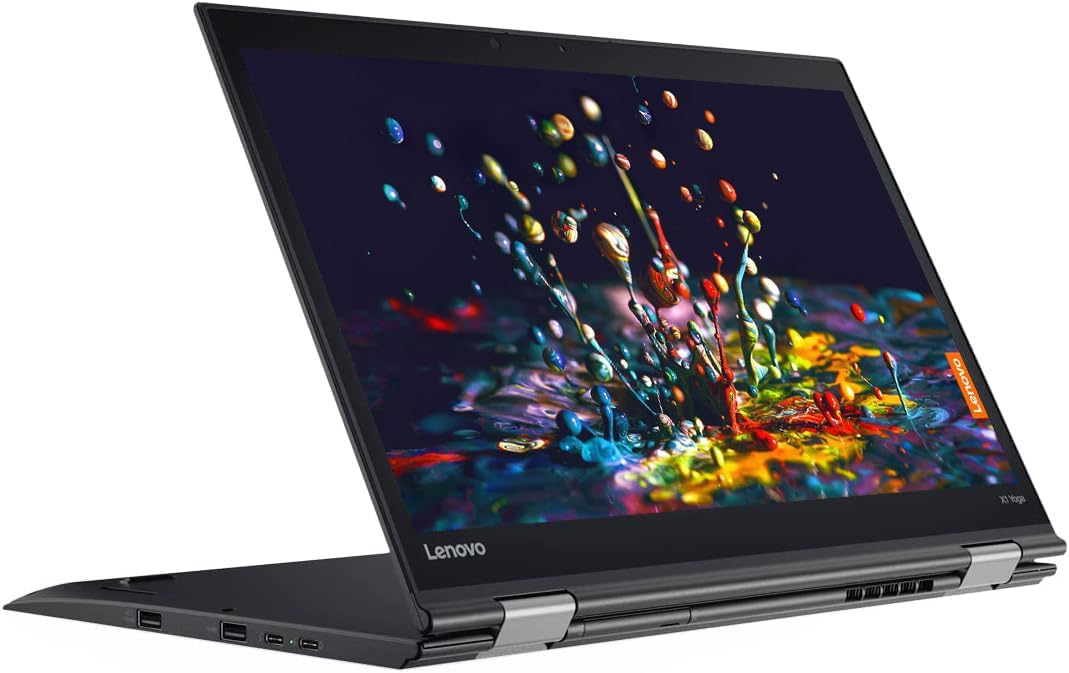
Image: The Lenovo ThinkPad X1 Yoga G2 in its standard laptop configuration.
2. ماذا يوجد في الصندوق
Upon unboxing your Lenovo ThinkPad X1 Yoga G2, please verify that all the following components are present:
- Lenovo ThinkPad X1 Yoga G2 Laptop
- AC adapter/power supply
- بطارية (متكاملة)
- التوثيق (دليل البدء السريع، معلومات السلامة)
3. الإعداد
3.1 التشغيل الأولي والشحن
- Connect the AC adapter to the power connector on your laptop and then to a power outlet.
- Open the laptop lid. The system may power on automatically, or you may need to press the power button located on the side.
- اتبع الإرشادات التي تظهر على الشاشة لإكمال إعداد Windows 10 Pro الأولي، بما في ذلك اللغة والمنطقة واتصال الشبكة وإنشاء حساب المستخدم.

Image: Left side of the laptop, illustrating port locations for power and peripherals.
3.2 توصيل الأجهزة الطرفية
Your ThinkPad X1 Yoga G2 offers various ports for connecting external devices:
- منافذ USB: قم بتوصيل أجهزة USB مثل محركات الأقراص الخارجية أو الفأرة أو لوحات المفاتيح.
- منفذ HDMI: قم بتوصيل شاشة خارجية أو جهاز عرض.
- مقبس الصوت: قم بتوصيل سماعات الرأس أو مكبرات الصوت الخارجية.

Image: Right side of the laptop, showing additional ports and the integrated stylus slot.
4. تعليمات التشغيل
4.1 إدارة الطاقة
- تشغيل الطاقة: اضغط على زر الطاقة.
- وضع السكون: أغلق الغطاء أو اضغط على زر الطاقة لفترة وجيزة.
- اغلق: Go to Start > Power > Shut down in Windows.
4.2 Using the Keyboard and TrackPoint/Touchpad

الصورة: مفصلة view of the keyboard, TrackPoint, and touchpad for navigation and input.
- The keyboard provides a comfortable typing experience.
- The TrackPoint (red dot in the center of the keyboard) allows for precise cursor control.
- The touchpad below the keyboard supports multi-touch gestures for navigation.
4.3 أوضاع قابلة للتحويل
The ThinkPad X1 Yoga G2 can be used in four primary modes:
- وضع الكمبيوتر المحمول: مواصفات قياسية لأجهزة الكمبيوتر المحمولة للكتابة والاستخدام التقليدي.
- وضع الوقوف: Fold the keyboard back to use the screen for presentations or media viewعمل.

Image: The laptop configured in stand mode, ideal for viewجي المحتوى.
- وضع الخيمة: Position the laptop like a tent for stable touch interaction or media consumption in confined spaces.

Image: The laptop in tent mode, providing a stable base for touch input.
- وضع الجهاز اللوحي: Fold the screen completely back against the base for a full tablet experience, ideal for touch and stylus input.

Image: The laptop fully converted to tablet mode, demonstrating stylus usage.
4.4 الاتصال اللاسلكي
- واي فاي: للاتصال بشبكة لاسلكية، انقر فوق أيقونة Wi-Fi في شريط المهام، وحدد شبكتك، وأدخل كلمة المرور إذا لزم الأمر.
- بلوتوث: Enable Bluetooth in Windows settings to pair with Bluetooth devices like headphones or mice.
5. الصيانة
5.1 تنظيف جهازك
- شاشة: استخدم قطعة قماش ناعمة وخالية من الوبر برفق دampيُنظف بالماء أو بمحلول تنظيف الشاشات. تجنب استخدام المواد الكيميائية القاسية.
- لوحة المفاتيح والهيكل: استخدم قطعة قماش ناعمة وجافة. بالنسبة للأوساخ العنيدة، امسحها برفق.amp يمكن استخدام قطعة قماش لضمان عدم دخول أي سائل إلى الفتحات.
5.2 العناية بالبطارية
- لإطالة عمر البطارية، تجنب درجات الحرارة القصوى.
- Periodically allow the battery to discharge partially before recharging.
5.3 تحديثات البرامج
قم بالتحقق من تحديثات Windows وتحديثات برامج تشغيل Lenovo وتثبيتها بانتظام لضمان الأداء والأمان الأمثل.
6. استكشاف الأخطاء وإصلاحها
If you encounter issues with your ThinkPad X1 Yoga G2, try the following basic troubleshooting steps:
- لا يوجد طاقة: تأكد من توصيل محول التيار المتردد بإحكام وأن مأخذ الطاقة يعمل. جرب مأخذاً آخر.
- مشاكل العرض: If the screen is blank, try connecting an external monitor to check if the display output is working. Adjust brightness settings.
- اتصال واي فاي: Restart your router and the laptop. Check network settings in Windows.
- الأداء البطيء: Close unnecessary applications. Check for malware. Ensure sufficient free storage space.
للحصول على مشكلات أكثر تعقيدًا، راجع دعم Lenovo webالموقع أو الاتصال بالدعم الفني.
7. المواصفات
Key technical specifications for the Lenovo ThinkPad X1 Yoga G2:
| ميزة | مواصفة |
|---|---|
| المعالج | إنتل كور i7-7600U (2.8 جيجاهرتز) |
| كبش | 8 جيجا بايت DDR4 |
| تخزين | 256 جيجا بايت SSD |
| عرض | 14 inch Full HD (1920 x 1080) Touchscreen LCD |
| نظام التشغيل | ويندوز 10 برو |
| الرسومات | إنتل الرسومات المتكاملة |
| الاتصال اللاسلكي | 802.11abg، بلوتوث |
| متوسط عمر البطارية | حتى ساعتين |
| الأبعاد (الطول × العرض × الارتفاع) | 13.1 × 9 × 0.7 بوصة |
| وزن العنصر | 3.13 رطل |
8. الضمان والدعم
يُعرض هذا المنتج كمنتج مُجدد من أمازون. تخضع منتجات أمازون المُجددة لفحص واختبار احترافيين لضمان عملها ومظهرها كأنها جديدة. وهي مؤهلة للاستبدال أو الاسترداد بموجب شروط وأحكام أمازون. ضمان أمازون المتجدد إذا لم تكن راضيًا عن عملية الشراء الخاصة بك.
For technical assistance or further support regarding your Lenovo ThinkPad X1 Yoga G2, please visit the official Lenovo support webالموقع أو الاتصال بخدمة العملاء الخاصة بهم.


