مقدمة
شكرا لك على الشراءasing the Blow BT460 Portable Bluetooth Speaker. This manual provides essential information for the safe and efficient operation of your device. Please read it thoroughly before use and retain it for future reference.
معلومات السلامة
- لا تعرض الجهاز لدرجات حرارة عالية، أو أشعة الشمس المباشرة، أو الرطوبة العالية.
- تجنب إسقاط السماعة أو تعريضها لصدمات قوية.
- لا تفكّ الجهاز أو تحاول إصلاحه بنفسك. أسند جميع أعمال الصيانة إلى فنيين مؤهلين.
- Keep the speaker away from water and other liquids. This device is not waterproof.
- استخدم فقط كابل الشحن ومصدر الطاقة المحددين.
المنتج انتهىview
The Blow BT460 is a versatile portable Bluetooth speaker designed for high-quality audio playback. It features a maximum output of 20W, Bluetooth connectivity, FM radio, MicroSD card slot, and an AUX input. Its compact dimensions make it suitable for both home use and travel.

الصورة: الجبهة view of the Blow BT460 Portable Bluetooth Speaker, showcasing its grey cylindrical design with a mesh grille and silver accents.
محتويات الحزمة
يرجى التحقق من الحزمة للعناصر التالية:
- Blow BT460 Portable Bluetooth Speaker
- كابل شحن USB
- كابل صوت AUX
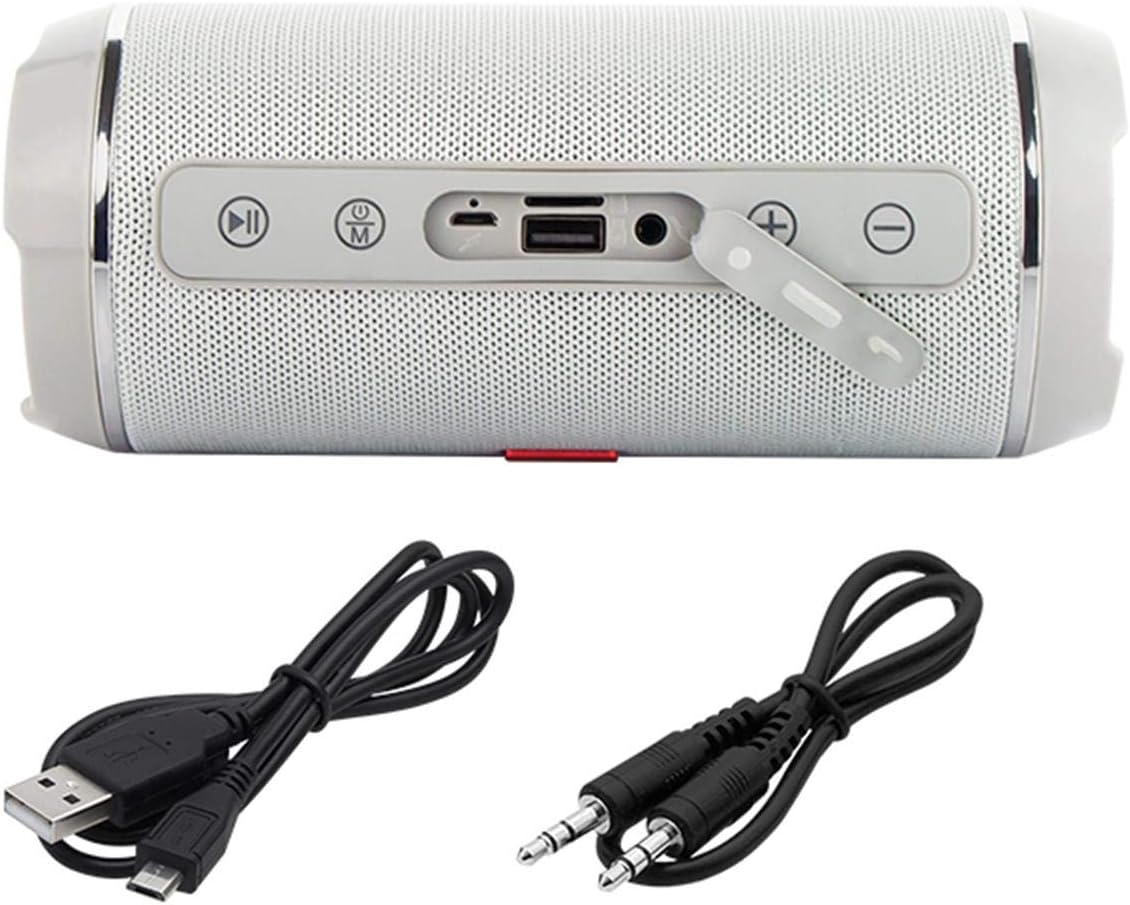
Image: The Blow BT460 speaker shown with its top panel revealing control buttons and ports, alongside the included USB charging cable and AUX audio cable.
الضوابط والمنافذ
تعرّف على عناصر التحكم في السماعة ومنافذ التوصيل الخاصة بها:
- زر الطاقة: اضغط مع الاستمرار لتشغيل مكبر الصوت أو إيقاف تشغيله.
- زر الوضع (M): Press to switch between Bluetooth, FM Radio, AUX, and MicroSD modes.
- زر التشغيل/الإيقاف المؤقت: تشغيل أو إيقاف تشغيل الصوت مؤقتًا.
- Previous Track / Volume Down (-): اضغط ضغطة قصيرة للانتقال إلى المقطع السابق، واضغط ضغطة طويلة لخفض مستوى الصوت.
- Next Track / Volume Up (+): اضغط ضغطة قصيرة للانتقال إلى المقطع التالي، واضغط ضغطة طويلة لزيادة مستوى الصوت.
- منفذ كارت الذاكرة الصغيرة: أدخل بطاقة MicroSD لتشغيل الصوت.
- منفذ USB: For USB drive playback or charging other devices (if supported).
- مدخلات AUX: قم بتوصيل أجهزة الصوت الخارجية باستخدام كابل AUX مقاس 3.5 ملم.
- منفذ شحن Micro USB: Connect the USB charging cable to power the speaker.
يثبت
1. شحن مكبر الصوت
- Connect the Micro USB end of the charging cable to the speaker's charging port.
- Connect the standard USB end to a USB power adapter (not included) or a computer's USB port.
- سيضيء مؤشر الشحن. سينطفئ أو يتغير لونه عند اكتمال الشحن.
- A full charge typically takes 3-4 hours and provides 3-4 hours of music playback.
2. تشغيل/إيقاف التشغيل
- To power on, press and hold the Power button until you hear an audible indication.
- لإيقاف التشغيل، اضغط مع الاستمرار على زر الطاقة مرة أخرى حتى يتم إيقاف تشغيل مكبر الصوت.
تعليمات التشغيل
1. اقتران بلوتوث
- Ensure the speaker is powered on and in Bluetooth mode (press the 'M' button if necessary). The speaker will enter pairing mode, indicated by a flashing LED.
- على جهازك المحمول (الهاتف الذكي، الجهاز اللوحي، وما إلى ذلك)، قم بتمكين البلوتوث وابحث عن الأجهزة المتاحة.
- حدد "BT460" من قائمة الأجهزة.
- بمجرد الاقتران، سيصدر مكبر الصوت صوت تأكيد، وسيتوقف مؤشر LED عن الوميض.
- You can now play audio from your device through the speaker. The Bluetooth range is approximately 10 meters.
2. وضع AUX
- Connect one end of the 3.5mm AUX audio cable to the speaker's AUX input port.
- Connect the other end to the headphone jack or audio output of your external audio device (e.g., MP3 player, CD player).
- Press the 'M' button on the speaker to switch to AUX mode.
- التحكم في التشغيل ومستوى الصوت من جهازك الخارجي.
3. تشغيل بطاقة microSD
- Insert a MicroSD card (with audio files) into the MicroSD card slot on the speaker.
- The speaker will automatically switch to MicroSD mode and begin playing music. If not, press the 'M' button to select MicroSD mode.
- استخدم أزرار التشغيل/الإيقاف المؤقت، والمسار السابق، والمسار التالي للتحكم في التشغيل.
4. راديو FM
- Press the 'M' button to switch to FM Radio mode.
- لإجراء مسح تلقائي وحفظ المحطات المتاحة، اضغط مع الاستمرار على زر التشغيل/الإيقاف المؤقت. سيقوم مكبر الصوت بمسح المحطات وحفظها تلقائيًا.
- Use the Previous Track (-) and Next Track (+) buttons to navigate between saved FM stations.
5. التحكم في مستوى الصوت
- Long press the Next Track (+) button to increase the volume.
- Long press the Previous Track (-) button to decrease the volume.
صيانة
- تنظيف: استخدم قطعة قماش ناعمة وجافة لتنظيف سطح مكبر الصوت. لا تستخدم منظفات أو مذيبات كاشطة.
- تخزين: عند عدم الاستخدام لفترات طويلة، قم بتخزين السماعة في مكان بارد وجاف، بعيدًا عن أشعة الشمس المباشرة ودرجات الحرارة القصوى.
- العناية بالبطارية: لإطالة عمر البطارية، تجنب تفريغها بالكامل بشكل متكرر. اشحن السماعة بانتظام، حتى في حالة عدم استخدامها.
استكشاف الأخطاء وإصلاحها
| مشكلة | السبب المحتمل | حل |
|---|---|---|
| لا يتم تشغيل مكبر الصوت. | نفدت طاقة البطارية. | قم بشحن السماعة باستخدام كابل USB المرفق. |
| لا يوجد صوت. | مستوى الصوت منخفض جدًا؛ تم اختيار وضع غير صحيح؛ الجهاز غير مقترن. | Increase volume; press 'M' to select correct mode; re-pair Bluetooth device. |
| لا يمكن لجهاز البلوتوث الاتصال. | السماعة ليست في وضع الاقتران؛ الجهاز بعيد جدًا؛ تداخل. | Ensure speaker is in Bluetooth pairing mode; move device closer (within 10m); restart both devices. |
| استقبال الراديو FM ضعيف. | إشارة ضعيفة؛ تداخل بيئي. | قم بنقل مكبر الصوت إلى منطقة ذات استقبال أفضل. |
تحديد
| ماركة | ينفخ |
| اسم الموديل | بي تي 460 |
| تكنولوجيا الاتصالات اللاسلكية | بلوتوث |
| تكنولوجيا الاتصال | مساعد، بلوتوث، USB |
| طاقة خرج السماعة | 20 واط (RMS) |
| مصدر الطاقة | Battery Powered (2000 mAh integrated battery) |
| عمر البطارية | 3-4 hours (music playback) |
| مدى البلوتوث | 10 متر |
| طريقة التحكم | Remote Control (if applicable, otherwise on-device buttons) |
| الأبعاد (الطول × العرض × الارتفاع) | 2.79 × 24.64 × 16.51 سم |
| وزن العنصر | 679 جرام |
| الأجهزة المتوافقة | مشغل MP3 ، هاتف ذكي |
| لون | Grey (schwarz.) |
الضمان والدعم
This product comes with a limited warranty. Please refer to the warranty card included in your package for specific terms and conditions. For technical support or service inquiries, please contact your retailer or the manufacturer's customer service channels.


