1. المقدمة
This manual provides essential information for the safe and efficient use of your Lenovo ThinkPad T590 laptop. Please read this manual thoroughly before operating your device to ensure proper setup, operation, and maintenance. Keep this manual for future reference.
2. انتهى المنتجview
The Lenovo ThinkPad T590 is a high-performance laptop designed for productivity. It features a 15.6-inch Full HD IPS display, an Intel Core i5-8265U processor, 8GB of RAM, and a 256GB SSD, running on Windows 10 Pro.
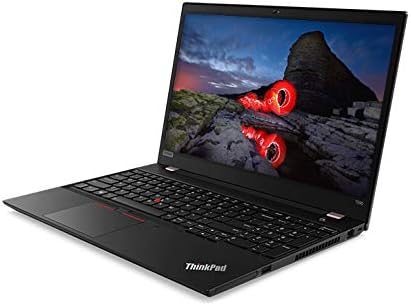
الشكل 2.1: بزاوية view of the Lenovo ThinkPad T590 laptop, showcasing its sleek design and full-size keyboard.
المكونات الرئيسية:
- عرض: 15.6-inch Full HD (1920x1080) IPS anti-glare screen.
- المعالج: Intel Core i5-8265U Quad-Core (1.60GHz).
- ذاكرة: ذاكرة وصول عشوائي DDR4 سعة 8 جيجابايت.
- تخزين: 256GB PCIe NVMe Solid State Drive (SSD).
- نظام التشغيل: Windows 10 Pro 64-bit.
- الرسومات: معالج رسومات Intel UHD Graphics 620 مدمج.
- الاتصال: Intel 9560ac Wi-Fi and Bluetooth 5.0.
- Webكام: Integrated 720p HD camera with microphone and ThinkShutter privacy cover.
- الموانئ: Includes USB 3.0 ports.
- بطارية: 3-cell Li-Polymer battery.
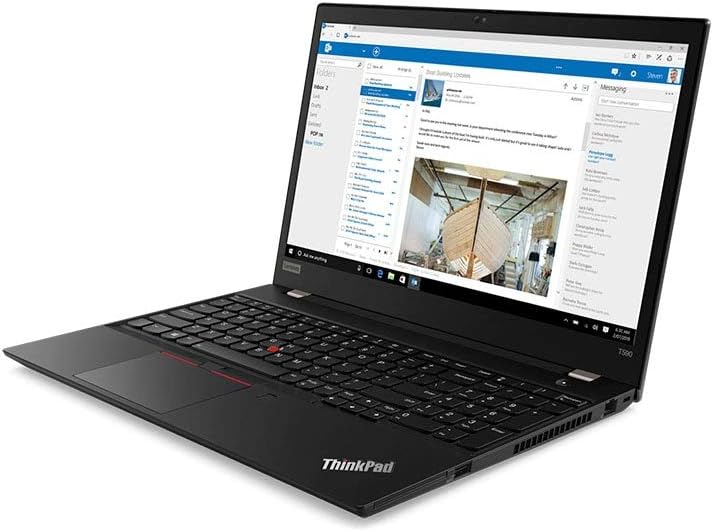
الشكل 2.2: The laptop screen displaying an email application, demonstrating its capability for professional use.

الشكل 2.3: The laptop screen displaying a video conference call, highlighting its integrated webcam and microphone for communication.

الشكل 2.4: مؤخرة view of the Lenovo ThinkPad T590 laptop, showing the hinge and ventilation design.
3. الإعداد
3.1 فك التعبئة
أخرج الكمبيوتر المحمول وجميع ملحقاته من العبوة بحرص. تأكد من وجود العناصر التالية:
- لابتوب لينوفو ثينك باد T590
- محول التيار المتردد
- سلك الطاقة
- الوثائق (بما في ذلك هذا الدليل)
3.2 توصيل محول الطاقة
- قم بتوصيل سلك الطاقة بمحول التيار المتردد.
- قم بتوصيل محول التيار المتردد بمأخذ كهربائي مناسب.
- Connect the AC adapter's output plug to the power input port on your ThinkPad T590.
- اسمح للبطارية بالشحن لمدة 30 دقيقة على الأقل قبل الاستخدام الأولي، أو حتى يشير مؤشر البطارية إلى وجود شحن كافٍ.
3.3 التشغيل المبدئي
Press the power button located on the laptop to turn it on. Follow the on-screen instructions to complete the initial setup of Windows 10 Pro, including language selection, network connection, and user account creation.
4. التشغيل
4.1 Using the Keyboard and TrackPoint/Touchpad
Your ThinkPad T590 features a full-size keyboard, a TrackPoint pointing device, and a multi-touch touchpad. Refer to the on-screen tutorials in Windows for detailed gestures and customization options.
4.2 الاتصال بالشبكة
للاتصال بشبكة Wi-Fi:
- انقر فوق رمز Wi-Fi في شريط النظام (الزاوية اليمنى السفلية من الشاشة).
- حدد الشبكة المطلوبة من القائمة.
- أدخل مفتاح أمان الشبكة (كلمة المرور) إذا طُلب منك ذلك.
- انقر فوق "اتصال".
For wired connections, connect an Ethernet cable to the laptop's Ethernet port (if available or via an adapter).
4.3 استخدام الأجهزة الخارجية
Connect USB devices such as external hard drives, mice, or keyboards to the available USB 3.0 ports. For display output, use the appropriate video output ports (e.g., HDMI, USB-C with display capabilities) to connect to external monitors or projectors.
5. الصيانة
5.1 تنظيف الكمبيوتر المحمول
- شاشة: استخدم قطعة قماش ناعمة وخالية من الوبر برفق دampاغسلها بالماء أو منظف الشاشة. لا ترش السائل مباشرة على الشاشة.
- لوحة المفاتيح و Casing: استخدم قطعة قماش ناعمة وجافة. بالنسبة للأوساخ العنيدة، امسحها برفق.amp يمكن استخدام قطعة قماش مبللة بمحلول صابون خفيف، مع التأكد من عدم دخول أي سائل إلى الفتحات.
- تهوية: Periodically check and clean the ventilation openings to prevent dust buildup, which can affect cooling performance. Use compressed air if necessary.
5.2 العناية بالبطارية
لزيادة عمر البطارية إلى أقصى حد:
- تجنب درجات الحرارة القصوى.
- لا تقم بتفريغ البطارية بالكامل بشكل متكرر.
- إذا كنت ستخزن الكمبيوتر المحمول لفترة طويلة، فتأكد من شحن البطارية إلى حوالي 50-60%.
5.3 تحديثات البرامج
Regularly update your Windows operating system and Lenovo drivers to ensure optimal performance, security, and compatibility. Windows updates can be managed through the Settings app, and Lenovo updates can be found on the official Lenovo support webموقع.
6. استكشاف الأخطاء وإصلاحها
يتناول هذا القسم المشكلات الشائعة التي قد تواجهها مع جهاز ThinkPad T590 الخاص بك.
6.1 الكمبيوتر المحمول لا يعمل
- تأكد من توصيل محول التيار المتردد بشكل آمن بالكمبيوتر المحمول ومأخذ الطاقة العامل.
- تأكد من أن منفذ الطاقة يعمل عن طريق توصيل جهاز آخر.
- إذا تم استنزاف البطارية بالكامل، فقد يستغرق الأمر بضع دقائق من الشحن قبل أن يتمكن الكمبيوتر المحمول من التشغيل.
6.2 Screen Remains Black or Goes to Sleep Mode Unexpectedly
- Press any key or move the mouse/TrackPoint to wake the system.
- Check power settings in Windows to ensure display sleep timers are set appropriately.
- If the issue persists, try connecting an external monitor to determine if the laptop's display is faulty.
- Perform a hard reset by holding the power button for 10-15 seconds until the laptop powers off, then restart.
6.3 مشاكل اتصال Wi-Fi
- تأكد من تمكين Wi-Fi في إعدادات Windows.
- أعد تشغيل جهاز التوجيه والمودم.
- انسَ الشبكة وأعد الاتصال، ثم أدخل كلمة المرور مرة أخرى.
- Update your wireless adapter drivers from the Lenovo support webموقع.
- If experiencing issues with 5GHz networks, try connecting to a 2.4GHz network if available, or ensure your router's 5GHz channel is not congested.
6.4 BIOS Password Set Out of the Box
If you encounter a BIOS password prompt upon initial setup, this indicates an unusual configuration. Contact Lenovo support immediately for assistance. Do not attempt to guess or bypass the password, as this may lead to data loss or system lockout.
7. المواصفات
| ميزة | مواصفة |
|---|---|
| اسم الموديل | ثينك باد T590 |
| رقم موديل العنصر | 20N4001NUS |
| المعالج | Intel Core i5-8265U (1.6 GHz, Quad-Core) |
| كبش | 8 جيجا بايت DDR4 |
| تخزين | قرص صلب SSD بسعة 256 جيجابايت (PCIe) |
| عرض | 15.6 Inches, Full HD (1920 x 1080) IPS |
| الرسومات | Intel UHD Graphics 620 (متكامل) |
| نظام التشغيل | ويندوز 10 برو |
| نوع لاسلكي | Bluetooth, Intel 9560ac Wi-Fi |
| منافذ USB | 2 منفذ USB 3.0 |
| وزن العنصر | 6.1 رطل (حوالي 2.77 كجم) |
| أبعاد المنتج (الطول × العرض × الارتفاع) | 20 × 12 × 3 بوصة (حوالي 50.8 × 30.5 × 7.6 سم) |
| بطارية | 1 Lithium Ion battery (3-cell Li-Polymer) |
| لون | أسود |
| ميزة خاصة | قارئ بصمات الأصابع |
8. الضمان والدعم
8.1 ضمان المنتج
Your Lenovo ThinkPad T590 laptop typically comes with a 3-Year Depot Warranty. This warranty covers manufacturing defects and hardware failures under normal use conditions. For specific terms and conditions, please refer to the warranty documentation included with your product or visit the official Lenovo support webموقع.
Extended protection plans may also be available for purchase separately, offering additional coverage beyond the standard warranty period.
8.2 الدعم الفني
للحصول على المساعدة الفنية أو تنزيلات برامج التشغيل أو طلبات الخدمة، يرجى زيارة موقع دعم Lenovo الرسمي website. You will need your product's serial number (usually found on a label on the bottom of the laptop or in the BIOS settings) to access specific support resources.
دعم Lenovo Webموقع: support.lenovo.com
When contacting support, be prepared to provide your model number (20N4001NUS) and a detailed description of the issue.


