1. انتهى المنتجview
The Orbit B-hyve Smart Hose Tap Timer with Wi-Fi Hub provides intelligent control over your outdoor watering. This system allows you to manage your irrigation from anywhere using the B-hyve app on your smartphone or computer. It features WeatherSense technology for smart watering adjustments based on local conditions and a built-in flow meter to monitor water consumption.

Image: The Orbit B-hyve Smart Hose Tap Timer (left) and its accompanying Wi-Fi Hub (right).

Image: Components of the Orbit B-hyve system, including the hose tap timer, Wi-Fi hub, and power adapter.
2. الميزات الرئيسية
- Full App Control: Manage your watering schedules from anywhere using the B-hyve app, available for Android, iOS, and web المتصفحات.
- WeatherSense Technology: Automatically adjusts watering based on real-time weather conditions, soil type, slope, and sun/shade exposure to optimize water usage.
- Built-in Flow Meter: Monitor your water consumption in gallons or by time, providing insights into your water usage.
- الإعداد السهل: Simple installation and programming process through the B-hyve app.
- نظام قابل للتوسيع: One Wi-Fi hub can control multiple B-hyve hose tap timers (additional timers sold separately), allowing for multiple watering zones.
- Manual Watering Option: Initiate watering directly from the timer unit without needing your smart device.
3. محتويات العبوة
تأكد من وجود جميع العناصر في الحزمة الخاصة بك:
- Orbit B-hyve Smart Hose Tap Timer (Model 94990)
- موزع واي فاي أوربت بي-هايف
- Power Adapter for Wi-Fi Hub
- دليل البدء السريع (غير مدرج في هذا الدليل)
Note: 2 AA batteries are required for the hose tap timer and are not included in the package.

Image: The Orbit B-hyve Smart Hose Tap Timer, Wi-Fi Hub, and power adapter as packaged.
4. تعليمات الإعداد
4.1. Install Batteries in the Timer
- Locate the battery compartment on the hose tap timer.
- Slide open the battery tray.
- Insert two (2) new AA alkaline batteries, ensuring correct polarity (+/-).
- أغلق درج البطارية بإحكام.

Image: A user inserting two AA batteries into the battery compartment of the B-hyve timer.
4.2. Connect Timer to Hose Tap
- Thread the hose tap timer onto any standard outdoor hose faucet.
- Hand-tighten the connection until secure. Do not overtighten.
- Connect your garden hose to the outlet of the timer.

Image: The Orbit B-hyve timer securely attached to an outdoor water spigot, with a garden hose connected to its outlet.
4.3. Set Up Wi-Fi Hub
- Plug the Wi-Fi Hub into an indoor electrical outlet within range of your Wi-Fi router and the hose tap timer.
- Ensure the hub's indicator light begins to flash, indicating it is ready for pairing.

Image: The Orbit B-hyve Wi-Fi Hub plugged into an electrical socket, ready for setup.
4.4. Download and Pair with B-hyve App
- Download the free B-hyve app from the Apple App Store or Google Play Store.
- افتح التطبيق وقم بإنشاء حساب أو قم بتسجيل الدخول إذا كان لديك حساب بالفعل.
- Follow the in-app instructions to add your new B-hyve device. The app will guide you through connecting the Wi-Fi Hub to your home network and then pairing it with the hose tap timer.

Image: A screenshot showing the B-hyve app interface on a mobile device, illustrating its design and functionality.

Image: The B-hyve app displaying the device pairing screen, prompting the user to select a device to connect.
5. تعليمات التشغيل
5.1. الري اليدوي
To manually water directly from the timer without using the app:
- Press the 'On/Off' button on the front of the hose tap timer.
- The timer will begin watering for a default duration (e.g., 10 minutes).
- Press the 'On/Off' button again to stop watering manually.
5.2. Smart Watering via B-hyve App
The B-hyve app offers comprehensive control and smart watering features:
- الجدولة: Create custom watering schedules based on specific days, times, and durations.
- الري الذكي: Enable WeatherSense to allow the timer to automatically adjust schedules based on local weather forecasts (rain delays, temperature adjustments) and site conditions.
- ترشيد استهلاك المياه: Adjust watering durations by percentage to conserve water or provide more during dry periods.
- مراقبة التدفق: View historical water usage data collected by the built-in flow meter.

Image: The B-hyve app displaying options for setting watering schedules, including start times, zones, and days of irrigation.
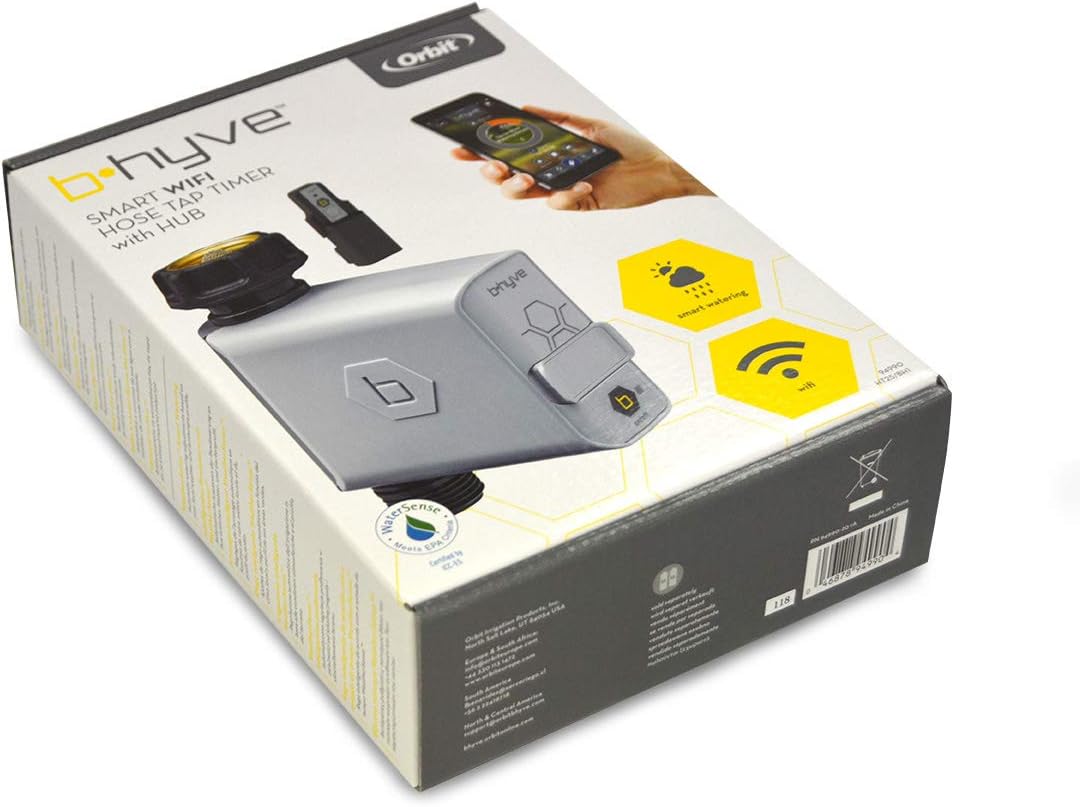
Image: The main screen of the B-hyve app, showing current watering status and controls.
6. الصيانة
- استبدال البطارية: The B-hyve app will notify you when the timer's batteries are low. Replace them promptly with two new AA alkaline batteries to ensure continuous operation.
- تنظيف: Periodically inspect the timer's inlet screen for debris and clean it if necessary to maintain proper water flow. Use a soft brush and water.
- فصل الشتاء: Before the first frost, disconnect the timer from the hose tap. Remove the batteries and store the timer indoors in a dry, protected area to prevent freezing and damage.
7. استكشاف الأخطاء وإصلاحها
| مشكلة | السبب المحتمل | حل |
|---|---|---|
| المؤقت لا يسقي. | Low batteries, water turned off, timer not paired, or schedule not set. | Check battery level in app, ensure hose tap is fully open, verify timer is paired, and check watering schedule in the B-hyve app. |
| App cannot connect to timer/hub. | Hub out of range, Wi-Fi issues, or hub unplugged. | Ensure hub is plugged in and within range of both router and timer. Check home Wi-Fi connection. Restart hub by unplugging and re-plugging. |
| Inaccurate water usage readings. | Debris in flow meter or incorrect setup. | Clean the inlet screen. Ensure the timer is installed correctly and water flow is unobstructed. |
| تسريبات المؤقت. | وصلة مفكوكة أو حلقة مانعة للتسرب تالفة. | Ensure connections are hand-tight. Check and replace rubber washers if damaged. |
8. المواصفات
| ميزة | التفاصيل |
|---|---|
| رقم الموديل | 94990 |
| أبعاد المنتج | 7.37 × 16.26 × 22.1 سم |
| وزن العنصر | 310 جرام |
| نوع المادة | بلاستيك |
| Power Source (Timer) | 2 بطاريات AA (غير مدرجة) |
| Power Source (Hub) | AC (via power adapter) |
| الاتصال | Wi-Fi (via Hub), Bluetooth (for initial pairing) |
| الشركة المصنعة | Orbit Irrigation Products Inc. |
9. معلومات الضمان
Orbit products are manufactured to high quality standards. For specific warranty details, please refer to the warranty card included with your product or visit the official Orbit B-hyve webالموقع. احتفظ بإيصال الشراء الخاص بك كإثبات للشراء في حالة وجود أي مطالبات بالضمان.
10. الدعم
For further assistance, technical support, or to access additional resources, please contact Orbit customer support:
- Webموقع: support.orbitbhyve.com
- Email (Europe & South Africa): معلومات@orbiteurope.com
- Phone (Europe & South Africa): +44 330 113 1472
- Email (North & Central America): support@orbitbhyve.com
- Email (South America): fbenavides@sercoriego.cl
- Phone (South America): +56 2 22419718
You can also find helpful tutorials and FAQs on the B-hyve app and the Orbit B-hyve webموقع.


