1. المقدمة
The Samson AirLine 99m AH9 Headset Wireless System is a compact and versatile wireless microphone solution designed for active performers, presenters, and educators. This system provides high-definition audio transmission without the need for cables or belt packs, offering freedom of movement and ease of use. It operates on a frequency-agile UHF band, ensuring reliable performance across 100 selectable channels.
The system comprises three main components:
- AH9 Micro Transmitter: A lightweight, rechargeable transmitter integrated into the headset.
- AR99m Micro Receiver: A compact receiver with multiple output options for versatile connectivity.
- DE10x Headset Microphone: منخفض المحترفينfile, comfortable headset microphone designed for clear vocal reproduction.
2. مكونات النظامview

الشكل 2.1: The complete Samson AirLine 99m AH9 Headset Wireless System, showing the AR99m receiver, AH9 micro transmitter, and DE10x headset microphone.

الشكل 2.2: عن قرب view of the AH9 micro transmitter integrated with the DE10x headset microphone. The green light indicates power status.

الشكل 2.3: قمة view of the AR99m micro receiver, showing the volume knob, SET button, channel display, and status indicators (READY, IR, PEAK).
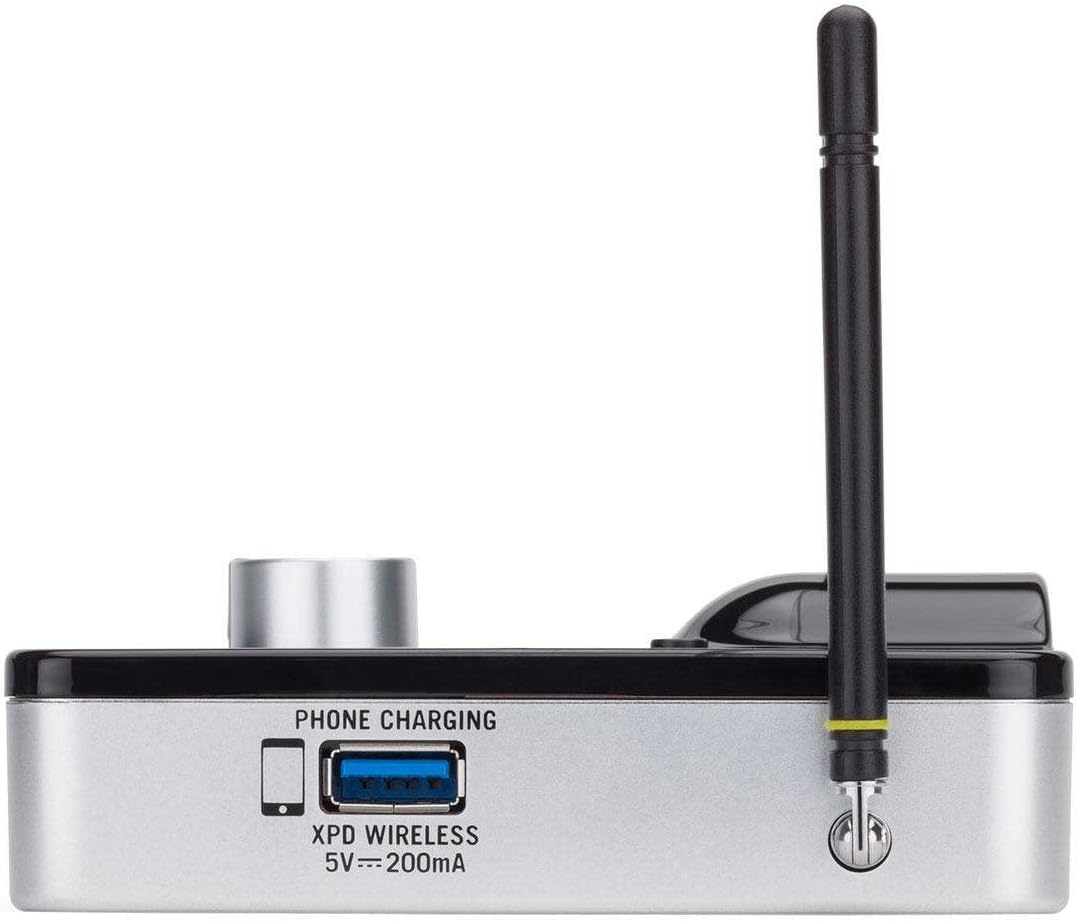
الشكل 2.4: جانب view of the AR99m micro receiver, highlighting the 'PHONE CHARGING' USB port (5V --- 200mA) and antenna connection.

الشكل 2.5: بزاوية view of the AR99m micro receiver, showing the DC IN port, 1/8" unbalanced output, and XLR balanced output.

الشكل 2.6: مؤخرة view of the AH9 micro transmitter, showing the charging contacts and the integrated headset cable connection.

الشكل 2.7: مؤخرة view of the AR99m micro receiver, detailing the DC IN (15V === 600mA), 1/4" unbalanced output, and XLR balanced output ports.

الشكل 2.8: The DE10x headset microphone, showing its lightweight design and adjustable ear hooks.
3. تعليمات الإعداد
3.1. Charging the AH9 Micro Transmitter
- Connect the supplied USB charging cable to the AH9 micro transmitter.
- قم بتوصيل الطرف الآخر من كابل USB بمحول طاقة USB قياسي (غير مرفق) أو بمنفذ USB مزود بالطاقة.
- The LED indicator on the AH9 will show charging status. A full charge provides up to 8 hours of operation.
3.2. Connecting the AR99m Micro Receiver
- Connect the included power adapter to the DC IN port (15V === 600mA) on the AR99m receiver.
- قم بتوصيل محول الطاقة بمأخذ التيار المتردد.
- Connect the AR99m receiver to your audio mixer, PA system, or recording device using one of the following outputs:
- إخراج XLR متوازن: For professional audio equipment.
- Unbalanced 1/4" Output: For standard instrument inputs or line-level inputs.
- Unbalanced 1/8" Output: For consumer-grade audio devices or computer inputs.
- Extend the antennas on the AR99m receiver for optimal signal reception.
3.3. Wearing the DE10x Headset Microphone
- Carefully place the headset over your ears, ensuring a comfortable and secure fit.
- Position the microphone element approximately 1-2 inches from the corner of your mouth for best sound quality.
- Use the included windscreens to reduce plosives and wind noise, if necessary.
4. تعليمات التشغيل
4.1. تشغيل / إيقاف التشغيل
- AH9 Micro Transmitter: Press and hold the power button on the transmitter until the LED illuminates. Press and hold again to power off.
- AR99m Micro Receiver: Turn the VOLUME knob clockwise to power on. Turn counter-clockwise until it clicks to power off.
4.2. اختيار القناة وربطها
The AirLine 99m system features 100 operating channels across a 24MHz bandwidth.
- Turn on the AR99m receiver. The channel display will show the current channel.
- اضغط على تعيين button on the AR99m receiver to cycle through available channels. Select a clear channel with no interference.
- Once a channel is selected on the receiver, turn on the AH9 transmitter.
- The AH9 transmitter will automatically scan and pair with the receiver on the selected channel. The 'READY' indicator on the receiver will illuminate when a successful connection is established.
4.3. ضبط الحجم
استخدم مقدار knob on the AR99m receiver to adjust the output level of the wireless system. Start with a low volume and gradually increase it to avoid sudden loud audio.
4.4. Monitoring Signal Status
- مؤشر الجاهزية: Illuminates when the transmitter and receiver are successfully paired and receiving a signal.
- مؤشر الذروة: Illuminates when the audio input from the transmitter is too high, indicating potential clipping. Reduce the input gain on your mixer or adjust the microphone position if this occurs.
- مؤشر الأشعة تحت الحمراء: Used during initial setup for infrared pairing (if applicable, though this model typically auto-pairs).
5. الصيانة
- تنظيف: Use a soft, dry cloth to clean the surfaces of the transmitter and receiver. Avoid using abrasive cleaners or solvents.
- العناية بالبطارية: Recharge the AH9 transmitter regularly. For long-term storage, ensure the battery is partially charged (around 50%) to prolong its lifespan.
- تخزين: قم بتخزين النظام في مكان بارد وجاف بعيدًا عن أشعة الشمس المباشرة ودرجات الحرارة القصوى.
- الزجاج الأمامي: Replace windscreens on the DE10x headset microphone as needed to maintain hygiene and acoustic performance.
6. استكشاف الأخطاء وإصلاحها
| مشكلة | السبب المحتمل | حل |
|---|---|---|
| لا يصدر صوت من جهاز الاستقبال |
|
|
| التداخل أو انقطاع الاتصال |
|
|
| صوت مشوه |
|
|
| عمر البطارية قصير |
|
|
7. المواصفات
| ميزة | التفاصيل |
|---|---|
| رقم الموديل | SW9A9SDE10-K |
| قنوات التشغيل | 100 (across 24MHz bandwidth) |
| نطاق التشغيل | ما يصل إلى 300 قدم (خط البصر) |
| AH9 Transmitter Battery Life | Up to 8 hours (Lithium-Ion, rechargeable) |
| AR99m Receiver Outputs | Balanced XLR, Unbalanced 1/4", Unbalanced 1/8" |
| نوع الميكروفون | DE10x Headset Microphone |
| الملحقات المتضمنة | 4 Windscreens, USB charging cable, Power adapter |
| وزن العنصر | 1 جنيه |
| أبعاد المنتج | 3 × 3 × 3 بوصة |
| نوع المادة | بلاستيك |
| مصدر الطاقة | تعمل بالبطارية |
| الأجهزة المتوافقة | Mixers, Audio Interfaces, PA Systems, Computers, Recording Devices |
8. الضمان والدعم
For warranty information and technical support, please refer to the official Samson Technologies webالموقع أو تواصل مع خدمة العملاء مباشرةً. احتفظ بإيصال الشراء كإثبات للشراء في حال وجود أي مطالبات بالضمان.
الموارد المتاحة على الإنترنت: قم بزيارة Samson Brand Store on Amazon لمزيد من المعلومات والدعم حول المنتج.


