1. المقدمة
شكرا لك على الشراءasing the Marathon CL030050P Digital Desk Clock. This compact and versatile clock is designed for convenience, offering a clear digital display with a soft blue backlight, an alarm with snooze function, temperature display, and multi-language day of the week display. This manual provides detailed instructions for setup, operation, and maintenance to ensure optimal performance.
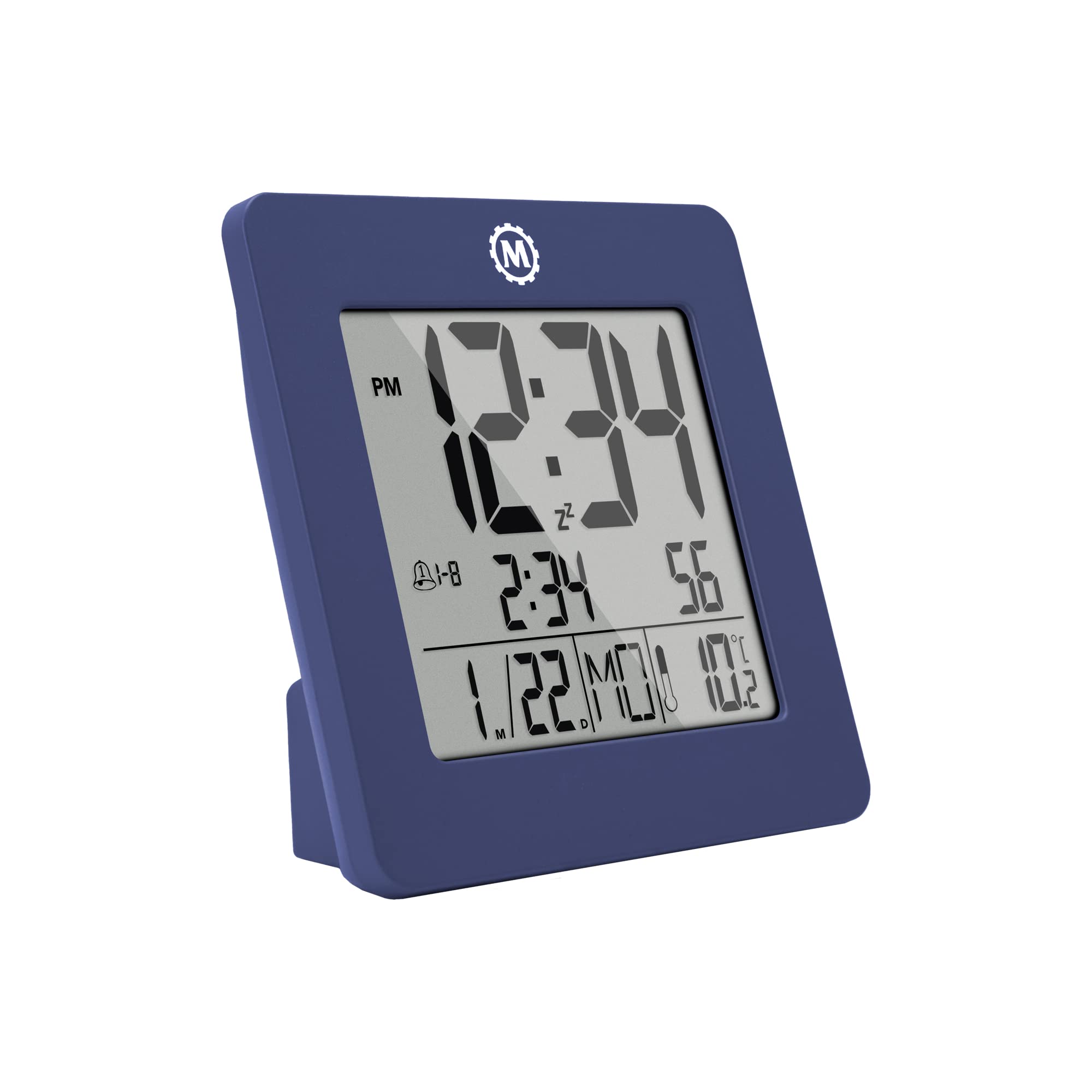
الشكل 1: الجبهة view of the Marathon CL030050P Digital Desk Clock.
2. محتويات العبوة
- Marathon CL030050P Digital Desk Clock
- دليل المستخدم (هذا المستند)
- البطاريات (مثبتة مسبقًا أو مرفقة بشكل منفصل)
3. الإعداد
3.1 تركيب البطارية
The clock operates on batteries. If batteries are not pre-installed, open the battery compartment cover on the back of the clock and insert the required batteries, ensuring correct polarity (+/-). Close the cover securely.
3.2 Initial Settings (Time, Date, Language, Temperature Unit)
The back of the clock features several buttons for configuration:
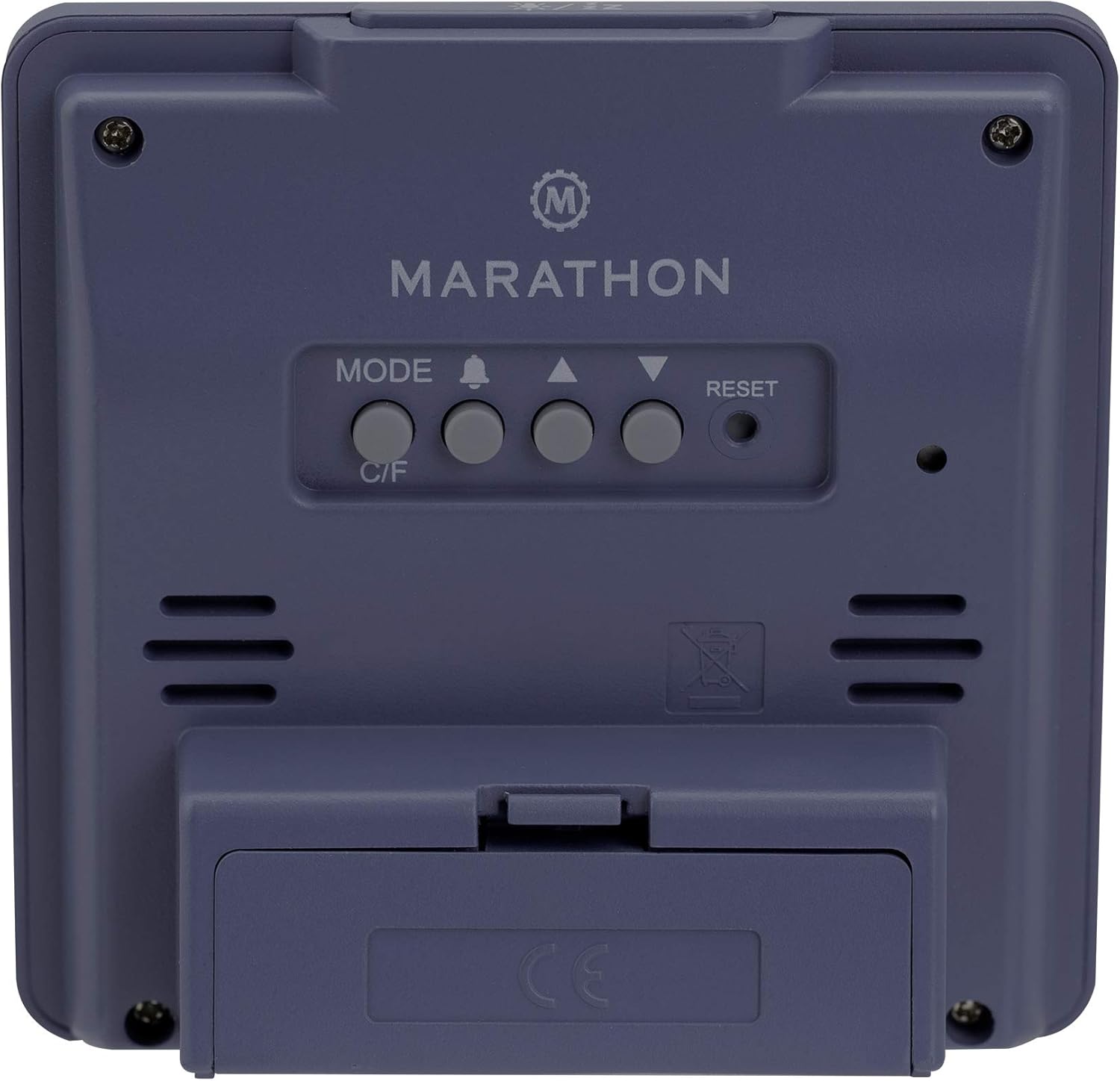
الشكل 2: خلفي view ساعة مزودة بأزرار تحكم.
- ضبط الوقت والتاريخ: اضغط مع الاستمرار على وضع استخدم الزر للدخول إلى وضع ضبط الوقت. أعلى (▲) و لأسفل (▼) buttons to adjust the flashing value (e.g., hour, minute, year, month, day). Press وضع مرة أخرى للتأكيد والانتقال إلى الإعداد التالي.
- تنسيق 12/24 ساعة: While in time setting mode, press the أعلى (▲) زر للتبديل بين تنسيق 12 ساعة (مع مؤشر صباحًا/مساءً) وتنسيق 24 ساعة.
- Day of Week Language: The day of the week can be displayed in 7 languages (English, Dutch, French, Spanish, Italian, Danish, German). This setting is typically adjusted within the date setting sequence. Use أعلى (▲) or لأسفل (▼) to select your preferred language when the day of the week is flashing.
- Temperature Unit (C/F): اضغط على C / F button on the back of the clock to switch between Celsius (℃) and Fahrenheit (℉) temperature display.
4. تعليمات التشغيل
4.1 طرق العرض
The clock continuously displays time, date, and temperature. The large, high-contrast display ensures readability.
4.2 تفعيل الإضاءة الخلفية
The clock features a soft blue Nightglow Super Glow backlight. To activate the backlight, press any button on the clock. The backlight will illuminate for a few seconds, providing temporary visibility in low-light conditions.
4.3 ضبط المنبه
- اضغط على ALARM (🔔) زر مرة واحدة ل view وقت التنبيه الحالي.
- اضغط مع الاستمرار على ALARM (🔔) button to enter alarm setting mode. The hour digit will flash.
- استخدم أعلى (▲) و لأسفل (▼) الأزرار لضبط الساعة. اضغط ALARM (🔔) to confirm and move to the minute setting.
- Adjust the minute using the أعلى (▲) و لأسفل (▼) أزرار. صحافة ALARM (🔔) للتأكيد والخروج من وضع ضبط المنبه.
- لتنشيط/إلغاء تنشيط التنبيه، اضغط على ALARM (🔔) button briefly outside of setting mode. An alarm icon will appear/disappear on the display.
4.4 وظيفة الغفوة
عند سماع صوت الإنذار، اضغط على أي زر (باستثناء إعادة ضبط) to activate the snooze function. The alarm will temporarily stop and sound again after a few minutes (snooze duration is typically fixed and cannot be adjusted). To turn off the alarm completely, press the إعادة ضبط button or let it ring for its full duration.

Figure 3: The clock is compact and fits comfortably in hand.
5. الصيانة
5.1 التنظيف
امسح الساعة بقطعة قماش ناعمة وجافة. لا تستخدم المنظفات الكاشطة أو المذيبات، لأنها قد تتلف الشاشة أو...asing.
5.2 استبدال البطارية
When the display becomes dim or the clock functions erratically, it is time to replace the batteries. Open the battery compartment on the back, remove the old batteries, and insert new ones, observing correct polarity. Dispose of old batteries responsibly.
6. استكشاف الأخطاء وإصلاحها
- العرض فارغ أو باهت: تحقق من تركيب البطارية. استبدل البطاريات إذا لزم الأمر.
- الوقت/التاريخ غير صحيح: Re-enter time and date settings as described in Section 3.2.
- إنذار لا يصدر صوتا: Ensure the alarm is activated (alarm icon visible on display). Check alarm volume if adjustable (this model may not have adjustable volume).
- Clock unresponsive: اضغط على إعادة ضبط button on the back of the clock using a pointed object (e.g., a paperclip). This will reset the clock to factory defaults, and you will need to set the time and date again.
7. المواصفات
| نموذج | CL030050P |
| ماركة | ماراثون |
| لون | French Blue |
| مقاس | صغير |
| مادة | بلاستيك |
| نوع العرض | رقمي |
| سمات | Alarm, Temperature Display |
| مصدر الطاقة | تعمل بالبطارية |
| أبعاد المنتج | 9.4 x 3.81 x 9.4 cm (3.7 x 1.5 x 3.7 inches) |
| وزن العنصر | 0.1 كيلوغرام (100 غرام) |
| الاستخدام الداخلي والخارجي | داخلي |

Figure 4: Product dimensions for the Marathon CL030050P Digital Desk Clock.
8. الضمان والدعم
For warranty information or technical support, please refer to the warranty card included with your product or visit the official Marathon webالموقع. إذا واجهت أي مشاكل غير مذكورة في هذا الدليل، يرجى الاتصال بخدمة العملاء للحصول على المساعدة.


