1. المقدمة
This manual provides detailed instructions for the installation, operation, and maintenance of the LG EAT63435703 WiFi Module. This module is a genuine Original Equipment Manufacturer (OEM) part designed for specific LG appliances. Please read this manual thoroughly before proceeding with any installation or operation.
2. معلومات السلامة
WARNING: Disconnect power before servicing. Failure to do so may result in electrical shock or personal injury.
Always follow local electrical codes and safety regulations. Installation should only be performed by qualified personnel. Do not attempt to modify the module or its components.
- Ensure the appliance is unplugged or the circuit breaker is off before installation.
- ارتدِ معدات الحماية الشخصية المناسبة، مثل القفازات ونظارات السلامة.
- Handle the module with care to avoid damage to sensitive electronic components.
3. انتهى المنتجview
The LG EAT63435703 is a WiFi communication module designed to enable network connectivity for compatible LG appliances. This module facilitates smart features and remote control capabilities, depending on the host appliance's design.
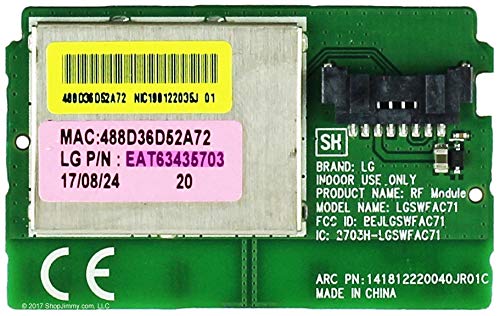
الصورة 1: الأعلى view of the LG EAT63435703 WiFi Module circuit board. The green circuit board features various electronic components, integrated circuits, and connection points. Text visible on the board includes "HSB J", "94V-0", "1730", "MV-6", and "F89382".
4. الإعداد والتثبيت
This section outlines the general steps for installing the LG EAT63435703 WiFi Module. Specific installation procedures may vary depending on the appliance model. Refer to your appliance's service manual for detailed instructions.
- انقطاع التيار الكهربائي: Ensure the appliance is completely disconnected from its power source. Unplug it from the wall outlet or turn off the corresponding circuit breaker.
- إزالة لوحة الوصول: Locate and carefully remove the access panel on your appliance that provides access to the main control board or the designated module slot.
- وحدة الإدراج: Gently align the EAT63435703 WiFi Module with its designated connector slot on the appliance's main board. Apply even pressure to firmly seat the module into place. Avoid forcing the module.
- الوحدة الآمنة (إن وجدت): If there are screws or clips designed to secure the module, fasten them appropriately.
- إعادة التجميع: Replace the access panel, ensuring all screws and fasteners are securely tightened.
- استعادة الطاقة: أعد توصيل الجهاز بمصدر الطاقة الخاص به.
5. تعليمات التشغيل
Once the WiFi module is installed, the appliance's smart features can be configured. Refer to your appliance's user manual for specific instructions on connecting to a WiFi network and utilizing smart functions.
- Appliance Power On: Turn on your LG appliance.
- إعداد الشبكة: Access the network settings menu on your appliance's display or through the associated LG smart application.
- الاتصال بشبكة WiFi: Select your home WiFi network (SSID) and enter the password.
- اقتران التطبيق: Follow the instructions in the LG ThinQ app (or similar application) to pair your appliance with your smartphone or other smart devices.
6. الصيانة
The LG EAT63435703 WiFi Module is a sealed electronic component and generally requires no routine maintenance. If the module appears to be malfunctioning, troubleshooting steps should be followed before considering replacement.
- Keep the appliance and its components clean and free from dust and debris.
- Avoid exposing the module or appliance to extreme temperatures or humidity.
7. استكشاف الأخطاء وإصلاحها
If you experience issues with the WiFi connectivity of your LG appliance after installing the EAT63435703 module, consider the following troubleshooting steps:
- التحقق من الطاقة: Ensure the appliance is powered on and receiving electricity.
- Router Connectivity: Verify that your home WiFi router is functioning correctly and broadcasting a signal. Try restarting your router.
- مقاعد الوحدة: Power off the appliance, disconnect it from power, and re-check that the WiFi module is securely seated in its slot.
- إعادة ضبط الجهاز: Perform a soft reset of your appliance (refer to your appliance's manual for instructions).
- إعدادات الشبكة: Re-enter your WiFi network credentials on the appliance to ensure they are correct.
- تدخل: Move the appliance closer to the WiFi router or eliminate potential sources of interference (e.g., other electronic devices).
If the issue persists after these steps, contact LG customer support or a qualified service technician.
8. المواصفات
| ميزة | التفاصيل |
|---|---|
| رقم الموديل | إيت63435703 |
| ماركة | LG |
| نوع القطعة | WiFi Module (Genuine OEM) |
| وزن العنصر | 1.6 أونصات |
| أبعاد الحزمة | 1 × 0.7 × 0.4 بوصة |
| المميزات الخاصة | Programmable (functionality depends on host appliance) |
9. الضمان والدعم
For warranty information regarding your LG EAT63435703 WiFi Module, please refer to the warranty documentation provided with your original LG appliance or contact LG customer service directly. As an OEM part, its warranty coverage is typically tied to the appliance it is installed in.
For technical support or service inquiries, please visit the official LG support website or contact their customer service hotline. You may need to provide your appliance's model and serial number.
دعم ال جي Webموقع: www.lg.com/us/support