1. المقدمة
Thank you for choosing the KWANWA Digital Alarm Clock, Model KW616-3N. This manual provides detailed instructions for setting up, operating, and maintaining your new clock. Designed for clear visibility and convenience, this battery-operated clock features an 8-inch extra-large LED display with 3-inch digits, adjustable brightness, and versatile placement options.

Figure 1: KWANWA Digital Alarm Clock (Model KW616-3N) with large red LED display.
2. مواصفات المنتج
- شاشة عرض سهلة القراءة: 3-inch huge LED time display against a large black backlit screen for excellent visibility.
- يعمل بالبطارية: Operates on 2 D-cell batteries (not included), eliminating messy cords and allowing flexible placement.
- التنسيب متعدد الاستخدامات: Features two unfoldable stand legs for table-top use and three wall-mounting hang holes for wall installation.
- سطوع قابل للتعديل: Offers 3-level manual brightness adjustment and an automatic night mode (8 PM - 6 AM) to dim the display.
- دقة عالية: Maintains time accuracy within ±30 seconds per month.
- المنبه اليومي: Includes a daily alarm with a gradually increasing volume for up to 2 minutes.
3. محتويات العبوة
- KWANWA Digital Alarm Clock (Model KW616-3N)
- دليل المستخدم
4. الإعداد
4.1. تركيب البطارية
- حدد مكان حجرة البطارية على الجزء الخلفي من الساعة.
- افتح غطاء حجرة البطارية.
- Insert two (2) D-cell alkaline batteries (not included), ensuring correct polarity (+/-).
- أغلق غطاء حجرة البطارية جيدًا.
4.2. تحديد مستوى
The clock offers two convenient placement options:
- Table-top: Unfold the two stand legs located on the back of the clock to place it on a desk, table, bedside, or nightstand.
- مثبت على الحائط: Use the three wall-mounting hang holes on the back of the clock to securely hang it on a wall.
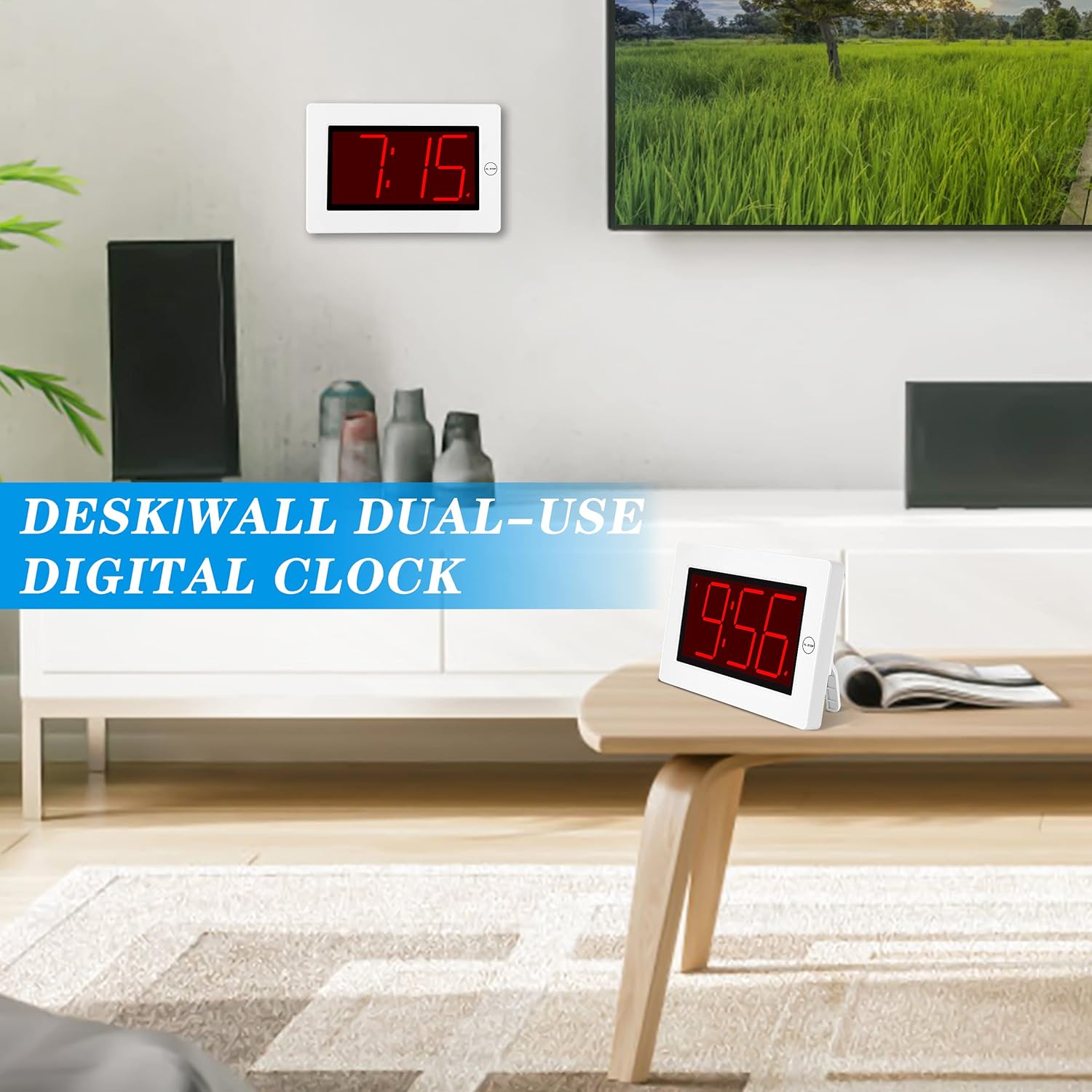
Figure 2: The clock can be used as a table-top or wall-mounted device.
5. تعليمات التشغيل
All control buttons are located on the back of the clock for easy access.

الشكل 3: خلفي view of the clock with labeled control buttons.
5.1 ضبط الوقت
- اضغط مع الاستمرار على الوقت المحدد اضغط على الزر لمدة 2 ثوانٍ للدخول إلى وضع ضبط الوقت. ستومض أرقام الساعة.
- اضغط على ساعة زر لضبط الساعة.
- اضغط على مين زر لضبط الدقائق.
- يضعط الوقت المحدد مرة أخرى للتأكيد والخروج.
5.2. إعداد التنبيه
- اضغط مع الاستمرار على مجموعة التنبيه اضغط على الزر لمدة 2 ثوانٍ للدخول إلى وضع ضبط المنبه. ستومض أرقام ساعة المنبه.
- اضغط على ساعة زر لضبط ساعة المنبه.
- اضغط على مين زر لضبط دقائق التنبيه.
- يضعط مجموعة التنبيه مرة أخرى للتأكيد والخروج.
5.3. Alarm On/Off & Snooze
- تشغيل / إيقاف التنبيه: اضغط على تشغيل / إيقاف الإنذار button on the back to activate or deactivate the alarm. An alarm icon will appear/disappear on the display.
- غفوة: عندما يصدر صوت التنبيه، اضغط على الزر الكبير AL STOP button on the top of the clock to activate snooze. The alarm will pause for a short period and sound again later.
- وقف التنبيه: To stop the alarm for the day, press any button on the back of the clock.

Figure 4: Interacting with the alarm and snooze button.
5.4. تعديل السطوع
The clock offers both manual and automatic brightness control:
- Manual Dimmer: اضغط على MANUAL DIMMER button on the back to cycle through 3 brightness levels (High, Medium, Low) or turn the display OFF.
- Auto Dimmer: The clock automatically dims the LED display between 8 PM and 6 AM to protect your eyes and save energy. This feature can be toggled ON/OFF using the AUTO DIMMER ON/OFF زر في الخلف.

Figure 5: Visual representation of the three brightness levels.
5.5. التوقيت الصيفي (DST)
اضغط على التوقيت الصيفي button on the back to adjust the time for Daylight Saving Time. This will advance or set back the time by one hour.
5.6. ضبط مستوى الصوت
استخدم مقدار button on the back to adjust the alarm volume to your preference.
6. الصيانة
- Clean the clock's exterior with a soft, dry cloth. Avoid using abrasive cleaners or solvents.
- إذا لم يتم استخدام الساعة لفترة طويلة، فقم بإزالة البطاريات لمنع التسرب.
7. استكشاف الأخطاء وإصلاحها
- Display is dim or off: Check battery levels and replace if necessary. Ensure the manual dimmer is not set to 'OFF' or the lowest setting.
- إنذار لا يصدر صوتا: Verify that the alarm is activated (alarm icon visible on display). Check the alarm volume setting.
- الوقت غير صحيح: Re-set the time following the instructions in section 5.1. Ensure DST setting is correct for your region.
8. المواصفات
| ميزة | التفاصيل |
|---|---|
| ماركة | كوانوا |
| رقم الموديل | KW616-3N |
| نوع العرض | الصمام الرقمي |
| حجم العرض | 8 inches (3-inch digits) |
| أبعاد المنتج | 8.7 بوصة عرض × 5.6 بوصة ارتفاع |
| مصدر الطاقة | Battery Powered (2 D batteries required) |
| نوع التركيب | Table-top/Wall-mounted |
| مادة | بلاستيك |
| وزن العنصر | 11.7 أونصات |
| ميزة خاصة | Cordless, Adjustable Brightness, Alarm |
9. الضمان والدعم
This product comes with a limited warranty. For warranty claims, technical support, or any inquiries regarding your KWANWA Digital Alarm Clock, please contact KWANWA customer service at sales@us-myhome.com.


