مقدمة
This manual provides detailed instructions for the setup, operation, and maintenance of your PROMETHEAN PRM-35 Short-Throw DLP Home Theater Projector. Please read this manual thoroughly before using the projector to ensure proper operation and to extend the life of your device. Keep this manual for future reference.
معلومات السلامة
اتبع احتياطات السلامة التالية لمنع الحرائق أو الصدمات الكهربائية أو الإصابات:
- لا تسد فتحات التهوية. تأكد من وجود مساحة كافية حول جهاز العرض لضمان تدفق الهواء بشكل صحيح.
- لا تعرض جهاز العرض للمطر أو الرطوبة.
- لا تفتح جهاز العرضasinز. إحالة جميع أعمال الصيانة إلى فنيي صيانة مؤهلين.
- تجنب النظر مباشرة إلى عدسة جهاز العرض عندما يكون lamp يجب تشغيله، لأن الضوء الساطع قد يضر عينيك.
- استخدم فقط سلك الطاقة المرفق مع جهاز العرض أو سلك بديل مناسب.
- Unplug the projector from the power outlet before cleaning or when not in use for extended periods.
محتويات الحزمة
تأكد من وجود جميع العناصر في الحزمة الخاصة بك:
- PROMETHEAN PRM-35 Projector
- سلك الطاقة
- جهاز التحكم عن بعد
- HDMI Cable (may vary by region/bundle)
- دليل المستخدم (هذا المستند)

Image: The PROMETHEAN PRM-35 projector shown alongside its remote control, power cord, and an HDMI cable, illustrating the typical package contents.
المنتج انتهىview
أمام View

الصورة: الجبهة view of the PROMETHEAN PRM-35 projector, highlighting the lens, brand logo, and various certifications.
The front of the projector features the main projection lens, which includes manual focus and digital zoom capabilities. The PROMETHEAN logo and other product identifiers are also visible.
مؤخرة View (Connectivity Ports)
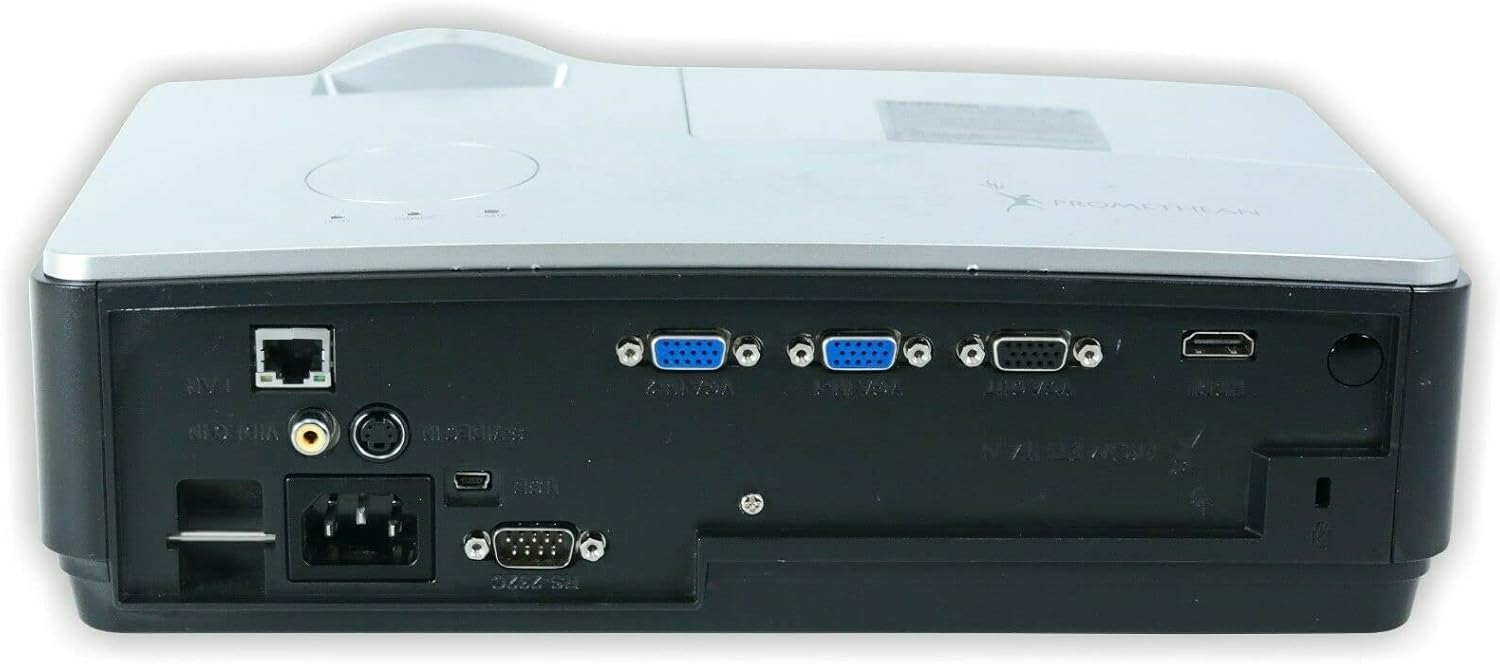
الصورة: الخلفية view of the PROMETHEAN PRM-35 projector, displaying a variety of input and output ports including HDMI, VGA, USB, S-Video, and network connections.
The rear panel provides all the necessary input and output ports for connecting to various devices. These include HDMI, VGA, S-Video, USB Mini Type-A, RS232, RJ-45 (LAN), and audio jacks.
جانب Views (Ventilation)

الصورة: الجانب view of the PROMETHEAN PRM-35 projector, showing the ventilation grilles for heat dissipation.

الصورة: جانب آخر view of the PROMETHEAN PRM-35 projector, also featuring ventilation grilles.
Both sides of the projector feature ventilation grilles to ensure proper airflow and prevent overheating. It is crucial to keep these vents unobstructed during operation.
قمة View
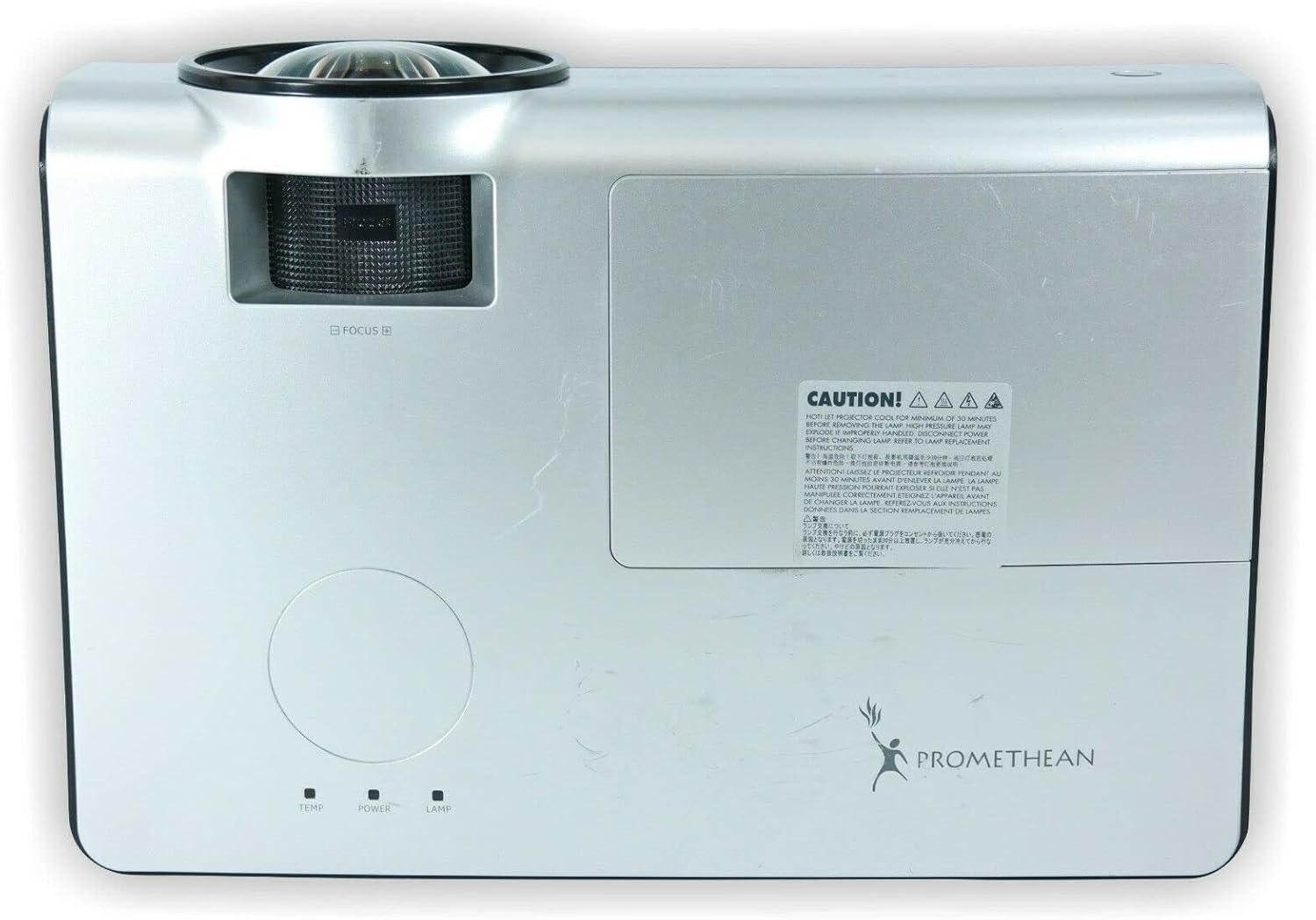
الصورة: أعلى view of the PROMETHEAN PRM-35 projector, showing the control panel area and lamp غطاء الوصول.
The top panel includes indicator lights for temperature, power, and lamp status, along with a caution label regarding lamp حرارة.
قاع View

الصورة: أسفل view of the PROMETHEAN PRM-35 projector, showing mounting points and regulatory labels.
The bottom of the projector features mounting points for ceiling or table top projection, along with product information and regulatory compliance labels.
يثبت
1. تحديد مستوى
Position the projector on a stable, flat surface or mount it securely. For short-throw projection, place the projector close to the screen. Ensure there is adequate space around the projector for ventilation.
- Table Top Projection: ضع جهاز العرض على الطاولة أمام الشاشة.
- إسقاط السقف: Use a compatible ceiling mount (sold separately) and ensure the projector is securely fastened.
- العرض الخلفي: If your screen supports it, the projector can be placed behind the screen. Adjust settings in the projector menu for rear projection.
2 التوصيل بالطاقة
- Connect the power cord to the projector's power input port on the rear panel.
- قم بتوصيل الطرف الآخر من سلك الطاقة بمأخذ كهربائي مؤرض.
- The power indicator light on the projector should illuminate.
3. توصيل مصادر الإدخال
The PRM-35 offers multiple connectivity options:
- HDMI: For high-definition digital video and audio. Connect an HDMI cable from your source device (e.g., Blu-ray player, game console, PC) to the HDMI port on the projector.
- VGA: For analog video connection from computers. Connect a VGA cable from your PC to one of the VGA/SVGA D-Sub ports.
- S- فيديو: للفيديو ذي الدقة القياسية.
- USB Mini Type-A: For certain data or control functions.
- RS232 (DB-9pin): للتحكم التسلسلي بجهاز العرض.
- RJ-45 (LAN): For network connectivity and control (e.g., Crestron RoomView).
- صوتي: Use the headphone jack for audio output or connect external speakers if desired.
4. Focus and Digital Zoom Adjustment
Once the projector is powered on and displaying an image:
- ركز: Rotate the focus ring around the projector lens until the image appears sharp and clear on the screen.
- التكبير الرقمي: Use the remote control or projector's on-screen display (OSD) menu to adjust the digital zoom. This feature allows you to enlarge or reduce the image size without moving the projector.
تشغيل جهاز العرض
تشغيل/إيقاف التشغيل
- تشغيل الطاقة: اضغط على قوة button on the projector's control panel or the remote control. The power indicator light will change to solid green.
- إيقاف التشغيل: اضغط على قوة اضغط على الزر مرة أخرى. قد تظهر رسالة تأكيد. اضغط قوة a second time to confirm shutdown. The projector will enter a cooling cycle before fully powering off. Do not unplug the projector during the cooling cycle.
Menu Navigation (OSD)
Use the buttons on the projector's control panel or the remote control to navigate the On-Screen Display (OSD) menu:
- استخدم قائمة طعام button to open or close the OSD.
- استخدم سهم أزرار (فوق تحت يسار يمين) to navigate through menu options.
- اضغط على يدخل or OK زر لاختيار خيار أو تأكيد إعداد.
- استخدم مخرج or خلف زر للعودة إلى القائمة السابقة أو للخروج من شاشة العرض على الشاشة.
اختيار مصدر الإدخال
للتبديل بين الأجهزة المتصلة:
- اضغط على مصدر or مدخل زر على جهاز التحكم عن بعد أو جهاز العرض.
- A list of available input sources will appear on the screen.
- استخدم سهم buttons to highlight the desired source and press يدخل or OK.
تعديلات الصورة
Access the Picture menu in the OSD to fine-tune image quality:
- سطوع: يضبط درجة سطوع أو قتامة الصورة بشكل عام.
- مقابلة: يتحكم في الفرق بين المناطق الأفتح والأغمق.
- لون: ضبط شدة الألوان.
- لون: Fine-tunes the color balance (primarily for NTSC video sources).
- حدة: Enhances or softens the edges of objects in the image.
- نسبة العرض إلى الارتفاع: Selects the display format (e.g., 16:10, 16:9, 4:3). The native aspect ratio is 16:10.
إعدادات الصوت
The PRM-35 has built-in speakers. Adjust audio settings via the OSD:
- مقدار: Controls the output level of the built-in speakers.
- صامت: يقوم بكتم الصوت مؤقتًا.
3D Modes (PC 3D Ready)
The projector supports PC 3D Ready functionality. To experience 3D content:
- Ensure your PC's graphics card and software support 3D output.
- Use compatible 3D glasses (sold separately).
- Refer to your PC's 3D software instructions for specific setup.
صيانة
تضمن الصيانة الدورية الأداء الأمثل وطول عمر جهاز العرض الخاص بك.
تنظيف جهاز العرض
- الخارج: استخدم قطعة قماش ناعمة وخالية من الوبر دampened with a mild, non-abrasive cleaner. Do not spray cleaner directly onto the projector.
- عدسة: Use a professional lens cleaning kit or a soft, dry microfiber cloth specifically designed for optical lenses. Avoid touching the lens with your fingers.
- فتحات التهوية: Periodically check and gently clean the ventilation grilles to prevent dust buildup, which can impede airflow. Use a soft brush or compressed air (held upright to prevent propellant discharge).
Lamp الحياة والاستبدال
The PRM-35 projector lamp has a long lifespan, up to 6000 hours. When the lamp يصل إلى نهاية حياته، لamp indicator light on the projector will illuminate or flash, and a message may appear on the screen.
Note: This projector features a filter-free design, eliminating the need for filter replacement or cleaning, which reduces maintenance time and cost.
بالنسبة ليamp replacement, it is recommended to contact qualified service personnel or refer to the detailed lamp replacement guide available from Promethean support.
تخزين
If storing the projector for an extended period:
- Power off the projector correctly and allow it to cool down completely.
- افصل جميع الكابلات.
- قم بتخزين جهاز العرض في مكان بارد وجاف، بعيدًا عن أشعة الشمس المباشرة ودرجات الحرارة القصوى.
- استخدم العبوة الأصلية أو علبة واقية لمنع الغبار والتلف.
استكشاف الأخطاء وإصلاحها
This section addresses common issues you might encounter with your PRM-35 projector.
| مشكلة | السبب المحتمل | حل |
|---|---|---|
| لا توجد صورة على الشاشة |
|
|
| الصورة ضبابية |
|
|
| يسخن جهاز العرض بشكل مفرط أو يتوقف عن العمل |
|
|
| جهاز التحكم عن بعد لا يعمل |
|
|
تحديد
| ميزة | التفاصيل |
|---|---|
| ماركة | بروميثيان |
| نموذج | بي ار ام-35 |
| نوع العرض | دي إل بي |
| الدقة الأصلية | 1280×800 |
| سطوع الصورة | شموم شمعة أنسي |
| نسبة التباين | 2000:1 |
| نسبة العرض إلى الارتفاع | 16: 10 (أصلية) |
| Video Modes Supported | 720 بكسل، 1080i، 1080 بكسل |
| أوضاع 3D | PC 3D Ready |
| مسافة الرمي | رمي قصيرة |
| الاتصال | HDMI, VGA, USB Mini Type-A, RS232, S-Video, RJ-45 (LAN), Headphone Jack |
| المميزات الخاصة | Portable, Short Throw, 3D-Ready, Closed Captioning, Crestron RoomView, Built-in Speakers, Filter-free design |
| وزن العنصر | 6 رطل (تقريبًا) |
| أبعاد المنتج | 11 × 12 × 4 بوصة (تقريبًا) |
| Lamp حياة | تصل إلى 6000 ساعة |
| التوافق | PC and MAC computers |
الضمان والدعم
For information regarding the warranty coverage for your PROMETHEAN PRM-35 projector, please refer to the warranty card included with your purchase or visit the official PROMETHEAN webقد تختلف شروط الضمان حسب المنطقة والتاجر.
For technical support, service, or to purchase replacement parts, please contact PROMETHEAN customer support through their official channels. You may need your product model number (PRM-35) and serial number when contacting support.
Official PROMETHEAN Webموقع: www.prometheanworld.com (This is a placeholder link, please refer to actual manufacturer web(موقع للدعم.)


