مقدمة
This manual provides essential instructions for the safe and efficient use of your Smart Kingfisher Rechargeable Lithium Battery and USB Charger. Please read this manual thoroughly before use and retain it for future reference.
معلومات السلامة
- تحذير: لا تحاول شحن البطاريات غير القابلة لإعادة الشحن.
- تحذير: Do not charge batteries from other suppliers unless explicitly stated as compatible.
- احفظ الشاحن والبطاريات بعيداً عن الماء والرطوبة.
- Do not disassemble, crush, or puncture the batteries or charger.
- تجنب تعريض البطاريات لدرجات حرارة عالية أو لأشعة الشمس المباشرة.
- تخلص من البطاريات بطريقة مسؤولة وفقًا للوائح المحلية.
محتويات الحزمة
تأكد من وجود جميع العناصر في الحزمة الخاصة بك:
- 2 x 425 Rechargeable Lithium Batteries
- 1 x Dual-Port USB Charger
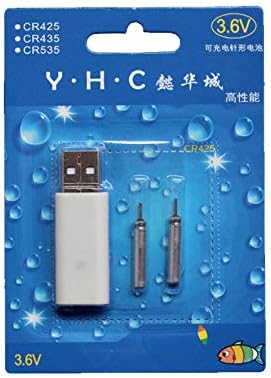
Image: Retail packaging showing the USB charger and two 425 rechargeable batteries.

Image: A pair of Smart Kingfisher 425 rechargeable lithium batteries.
يثبت
The Smart Kingfisher USB charger is designed for ease of use. No complex setup is required.
- Identify the USB charger and the 425 rechargeable batteries.
- Connect the USB charger to a compatible power source (see "Operating Instructions" for options).

Image: The USB charger unit with its two charging pins visible.
تعليمات التشغيل
شحن البطاريات
The charger features two ports, allowing for simultaneous charging of two batteries.
- Insert the 425 rechargeable batteries into the charging ports of the USB charger. Ensure a secure connection.
- Connect the USB charger to a power source. Compatible power sources include:
- USB power adapter (wall charger)
- بنك الطاقة
- شاحن السيارة
- Laptop or PC USB port
- Observe the LED indicator on the charger:
- A الصمام الثنائي الباعث للضوء الأخضر indicates that the batteries are currently charging.
- A الصمام الثنائي الباعث للضوء الأحمر indicates that the batteries are fully charged.
- تستغرق عملية الشحن عادةً حوالي ساعتين لإتمام الشحن بالكامل.
- Once fully charged, disconnect the charger from the power source and remove the batteries.
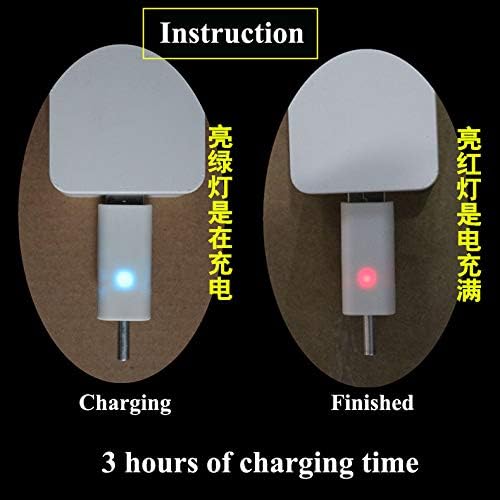
Image: Visual guide for charging status: green light for charging, red light for fully charged. Indicates a 3-hour charging time.

Image: Diagram illustrating multiple methods for charging the device, including car chargers, wall adapters, power banks, and laptops.
صيانة
- Clean the charger and batteries with a dry, soft cloth. Do not use liquids or abrasive cleaners.
- Store the batteries and charger in a cool, dry place when not in use.
- Avoid storing fully discharged batteries for extended periods to prolong their lifespan.
استكشاف الأخطاء وإصلاحها
| مشكلة | السبب المحتمل | حل |
|---|---|---|
| Batteries not charging (no LED indication) |
|
|
| Charging takes longer than 3 hours |
|
|
| Red LED does not turn on after extended charging |
|
|
تحديد
- مادة: بلاستيك
- وزن المنتج: 20 g (total for charger and batteries)
- نوع البطارية: 425 Rechargeable Lithium Battery (compatible with CR425, CR435, CR535)
- نوع الشاحن: شاحن USB ثنائي المنافذ
- مدخل: USB (compatible with various USB power sources)
- مؤشر الشحن: Green LED (charging), Red LED (fully charged)
- مدة الشحن التقريبية: 3 ساعات
الضمان والدعم
For warranty information or technical support, please refer to the retailer's return policy or contact the manufacturer directly. Keep your purchase receipt as proof of purchase.
للحصول على مساعدة إضافية، يمكنك زيارة product page on Amazon.com.mx.


