1. المقدمة
This user manual provides comprehensive instructions for the setup, operation, and maintenance of your SHARP LC-32HI5012E HD Ready Smart LED TV. Please read this manual thoroughly before using your television to ensure proper functionality and safety.
The SHARP LC-32HI5012E is an 81 cm (32-inch) HD Ready Smart LED TV featuring Active Motion 200 technology for enhanced picture quality and a Triple Tuner for versatile reception options. It includes integrated Wi-Fi and a Harman/Kardon sound system for a complete entertainment experience.
2. محتويات العبوة
عند فتح العبوة، يرجى التأكد من تضمين جميع العناصر التالية:
- SHARP LC-32HI5012E Main Unit
- جهاز التحكم عن بعد (بالبطاريات)
- دليل المستخدم (هذا المستند)

الصورة: الجبهة view of the SHARP LC-32HI5012E television, displaying a vibrant city skyline on its screen. This image shows the slim bezel design and the central SHARP logo.
3. الإعداد
3.1 تجميع الحامل
Carefully place the TV screen-down on a soft, flat surface to prevent damage. Attach the two stand feet to the designated slots at the bottom of the TV, securing them with the provided screws. Ensure the stand is firmly attached before proceeding.
3.2 توصيل الأجهزة الطرفية
Your TV offers various connection options for external devices:
- منافذ HDMI (x3): قم بتوصيل مشغلات بلو راي، أو أجهزة ألعاب الفيديو، أو أجهزة الاستقبال الرقمية.
- منافذ USB (x2): لتشغيل الوسائط من محركات أقراص USB.
- Antenna In (RF): Connect your terrestrial antenna for DVB-T/T2HD reception.
- Sat In: Connect your satellite dish for DVB-S/S2 reception.
- منفذ RJ45 (شبكة محلية): للاتصال بالإنترنت السلكي.
- CI+ Port: For conditional access modules (CAM) to view القنوات المشفرة .
- Mini Component/YPbPr, Mini AV Composite: للأجهزة التناظرية القديمة.
- إخراج الصوت البصري الرقمي: للاتصال بأنظمة الصوت الخارجية.
- Audio out / Headphone: لسماعات الرأس أو مكبرات الصوت الخارجية.

الصورة: الخلفية view of the SHARP LC-32HI5012E television, highlighting the arrangement of various input and output ports for connecting external devices.
3.3 التشغيل الأولي والإعداد لأول مرة
After connecting all necessary cables, plug the power cord into an electrical outlet. Press the power button on the remote control or the TV. The first-time setup wizard will guide you through:
- اختيار اللغة.
- اتصال الشبكة (Wi-Fi أو شبكة LAN سلكية).
- Channel scanning for DVB-C, DVB-S/S2, or DVB-T/T2HD.
- المنطقة الزمنية والإعدادات الأساسية الأخرى.
4. تعليمات التشغيل
4.1 وظائف التلفزيون الأساسية
- تشغيل/إيقاف التشغيل: استخدم زر الطاقة الموجود في جهاز التحكم عن بعد أو التلفزيون.
- التحكم في مستوى الصوت: استخدم أزرار VOL +/-.
- اختيار القناة: Use CH +/- or number buttons.
- مصدر الإدخال: Press the SOURCE button to switch between HDMI, AV, TV, etc.
- التنقل في القائمة: Use arrow keys and OK button to navigate menus.
4.2 ميزات التلفزيون الذكي
Your SHARP LC-32HI5012E is equipped with integrated Wi-Fi and offers access to various smart features:
- التطبيقات المثبتة مسبقًا: Access popular streaming services like Netflix and YouTube directly.
- Web المتصفح: تصفح الإنترنت مباشرة من جهاز التلفزيون الخاص بك.
- Aquos Net+: Access additional online content and services provided by Sharp.
تأكد من توصيل جهاز التلفزيون الخاص بك بالإنترنت للاستفادة الكاملة من وظائف التلفزيون الذكي.
4.3 نظام الصوت
The integrated Harman/Kardon sound system provides a high-quality audio experience with excellent dynamics and clarity. Adjust audio settings in the TV menu to customize your sound preferences.
5. الصيانة
5.1 تنظيف الشاشة
لتنظيف الشاشة، امسحها برفق بقطعة قماش ناعمة وخالية من الوبر. أما بالنسبة للبقع الصعبة، فامسحها برفق بقطعة قماش ناعمة وخالية من الوبر.ampامسح القماش بالماء أو بمنظف الشاشة المتخصص. لا رش السائل مباشرة على الشاشة.
5.2 العناية العامة
- احتفظ بالتلفزيون بعيدًا عن أشعة الشمس المباشرة ومصادر الحرارة.
- تأكد من وجود تهوية كافية حول التلفزيون.
- افصل التلفاز عن مأخذ الطاقة أثناء العواصف الرعدية أو عند تركه دون مراقبة لفترات طويلة.
6. استكشاف الأخطاء وإصلاحها
If you encounter any issues with your TV, please refer to the following common problems and solutions before contacting support.
| مشكلة | السبب المحتمل | حل |
|---|---|---|
| لا يوجد طاقة | Power cord unplugged, power outlet issue. | تأكد من توصيل سلك الطاقة. جرب منفذًا كهربائيًا آخر. |
| لا توجد صورة، ولكن الصوت موجود | مصدر إدخال غير صحيح، كابل معيب. | Verify correct input source. Check HDMI/AV cable connections. |
| لا يوجد صوت | صوت منخفض أو مكتوم، مشكلة في نظام الصوت الخارجي. | Unmute volume, increase volume. Check external audio connections. |
| لا يمكن الاتصال بشبكة Wi-Fi | Incorrect password, router issue, TV too far from router. | Re-enter password. Restart router. Move TV closer or use wired connection. |
7. المواصفات
| ميزة | التفاصيل |
|---|---|
| ماركة | حاد |
| رقم الموديل | LC-32HI5012E |
| تكنولوجيا الشاشة | قاد |
| دقة | جاهز للدقة العالية (1366 × 768 بكسل) |
| شاشة قطرية | 81.3 سم (32 بوصة) |
| معدل التحديث | 60 هرتز |
| ميزة خاصة | الإنترنت (التلفزيون الذكي) |
| خدمات الإنترنت المدعومة | Netflix, YouTube, Browser |
| تكنولوجيا الاتصال | USB, HDMI, LAN, Wi-Fi |
| الموالفات | DVB-C, DVB-S/S2, DVB-T/T2HD |
| نظام الصوت | هارمان/كاردون |
| أبعاد المنتج (العرض × الارتفاع × العمق) | 74 × 49.1 × 18 سم (مع الحامل) |
| وزن | 4.8 كيلوغرام |
| نوع التركيب | حامل الطاولة |
7.1 كفاءة الطاقة
The SHARP LC-32HI5012E has an energy efficiency rating of F. For detailed energy consumption information, please refer to the energy label and product information sheet.

Image: Energy efficiency label for the SHARP LC-32HI5012E television, showing its energy class F and power consumption details.
للمزيد من التفاصيل، تفضل بزيارة قاعدة بيانات EPREL الرسمية: https://eprel.ec.europa.eu/qr/402565
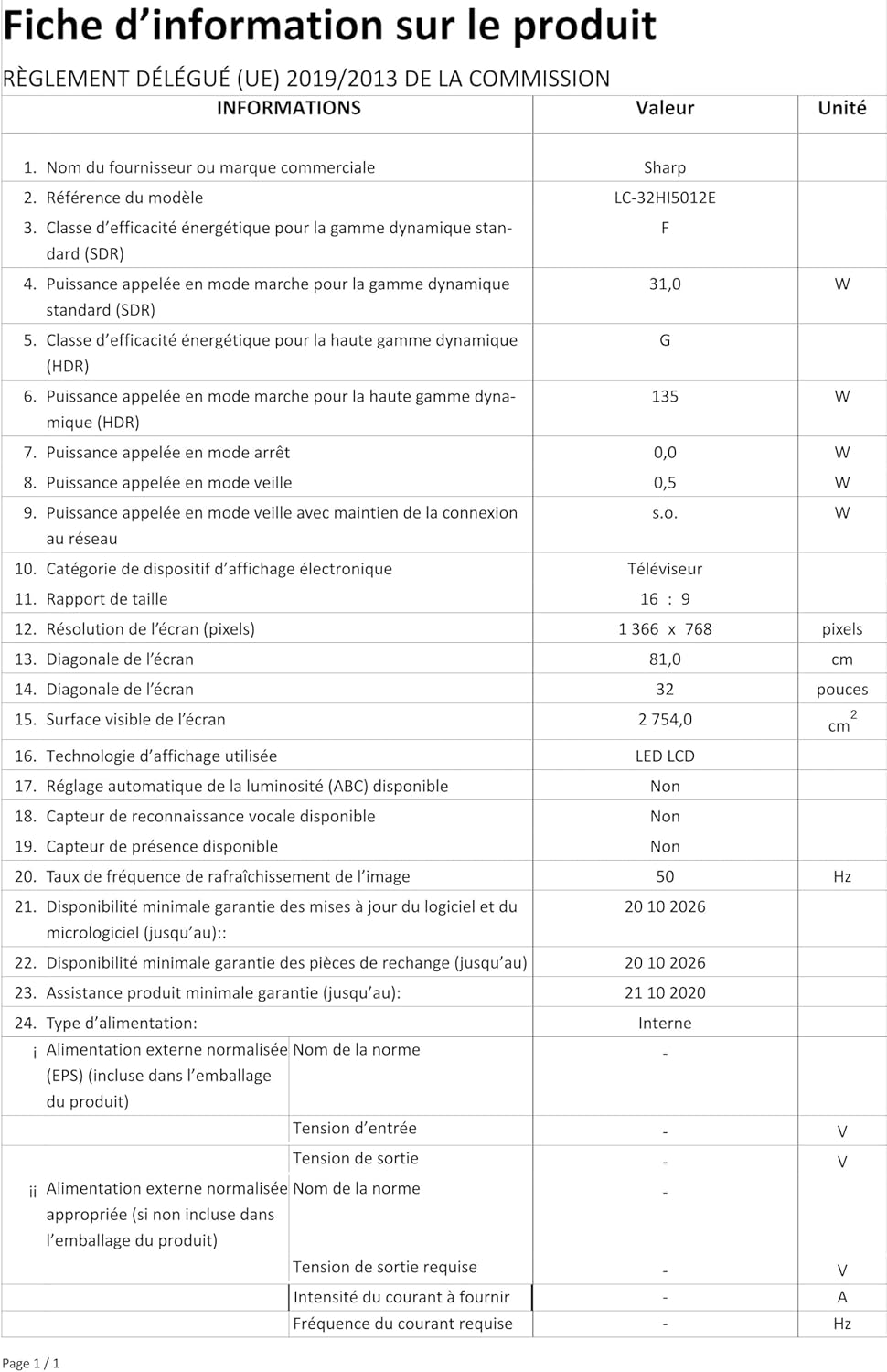
Image: Product information sheet detailing technical specifications and compliance information for the SHARP LC-32HI5012E television.
8. الضمان والدعم
For warranty information, please refer to the warranty card included with your product or visit the official SHARP webالموقع. احتفظ بإيصال الشراء الخاص بك كإثبات للشراء في حالة وجود أي مطالبات بالضمان.
For technical support or service inquiries, please contact SHARP customer service. Contact details can typically be found on the SHARP official webالموقع أو في عبوة المنتج.


