1. انتهى المنتجview
The SilverStone Strider Gold S Series SST-ST75F-GS-V3 is a 750W fully modular ATX power supply designed for desktop computers. It features 80 PLUS Gold certification for high efficiency, a compact 140mm depth for easy integration, and a class-leading single +12V rail for stable power delivery. This power supply is built to provide reliable and continuous power output under various operating conditions.
- 750 Watt Maximum DC Output: يوفر ample power for high-performance systems.
- تصميم مضغوط: With a depth of 140mm, it allows for easy installation in various PC cases.
- 100% Modular Cables: Enhances cable management and airflow within the system.
- 80 PLUS Gold Certification: Ensures high power efficiency, reducing heat and operating costs.
- Class-Leading Single +12V Rail: Delivers stable and consistent power to critical components.
- Strict 3% Voltage Regulation and Low Ripple & Noise: Guarantees clean and reliable power.
- 24/7 Continuous Power Output: Operates reliably with 40℃ operating temperature.
- Silent Running 120mm Fan: Features an 18dBA minimum noise level for quiet operation.

Image: The SilverStone Strider Gold S 750W power supply shown alongside its retail packaging.
2. معلومات السلامة
يرجى قراءة جميع تعليمات السلامة وفهمها جيداً قبل تركيب أو تشغيل وحدة التغذية هذه. قد يؤدي عدم اتباع هذه التعليمات إلى حدوث صدمة كهربائية أو حريق أو تلف المنتج والمكونات المتصلة به.
- Hazardous Area: This device is not designed to be user serviceable and contains high voltage inside that can be dangerous when opened. In the event of malfunction, please notify your dealer or local distributor for service.
- التثبيت الاحترافي: Installation should be performed by qualified personnel to prevent damage or injury.
- تهوية: تأكد من وجود تهوية كافية حول مصدر الطاقة. لا تسد أي فتحات تهوية.
- رُطُوبَة: لا تعرض مصدر الطاقة للماء أو الرطوبة الزائدة.
- مصدر الطاقة: Connect the power supply only to a grounded power outlet.
- التحميل الزائد: Do not overload the power supply beyond its specified wattage.
- إدارة الكابلات: Ensure all cables are properly routed and secured to prevent damage or interference.

الصورة: أعلى view of the power supply showing the product label, including electrical specifications and safety warnings in multiple languages.
3. محتويات العبوة
تأكد من تضمين جميع العناصر المدرجة أدناه في عبوة المنتج الخاصة بك:
- SilverStone Strider Gold S 750W Power Supply (SST-ST75F-GS-V3)
- مجموعة كابلات معيارية (أنواع مختلفة للوحة الأم، ووحدة المعالجة المركزية، وPCIe، وSATA، والأجهزة الطرفية)
- سلك الطاقة المتردد
- مسامير التثبيت
- User Manual / Warranty Information Booklet
- Cable Ties / Velcro Straps (for cable management)

Image: A complete set of modular cables, mounting screws, cable ties, and documentation included with the power supply.
4. الإعداد والتثبيت
Follow these steps to properly install your SilverStone Strider Gold S 750W power supply into your computer system.
4.1 قائمة التحقق من التثبيت المسبق
- تأكد من إيقاف تشغيل جهاز الكمبيوتر الخاص بك تمامًا وفصله عن مقبس الحائط.
- افتح علبة الكمبيوتر لديك للوصول إلى منطقة تركيب مصدر الطاقة.
- If replacing an existing power supply, carefully disconnect all cables and remove it.
4.2 التثبيت المادي
- Position the SilverStone SST-ST75F-GS-V3 power supply into the designated PSU bay in your computer case. Ensure the fan is oriented correctly for optimal airflow (typically facing downwards if there's a bottom vent, or upwards if not).
- قم بتثبيت وحدة التزويد بالطاقة في الهيكل باستخدام براغي التثبيت المرفقة.
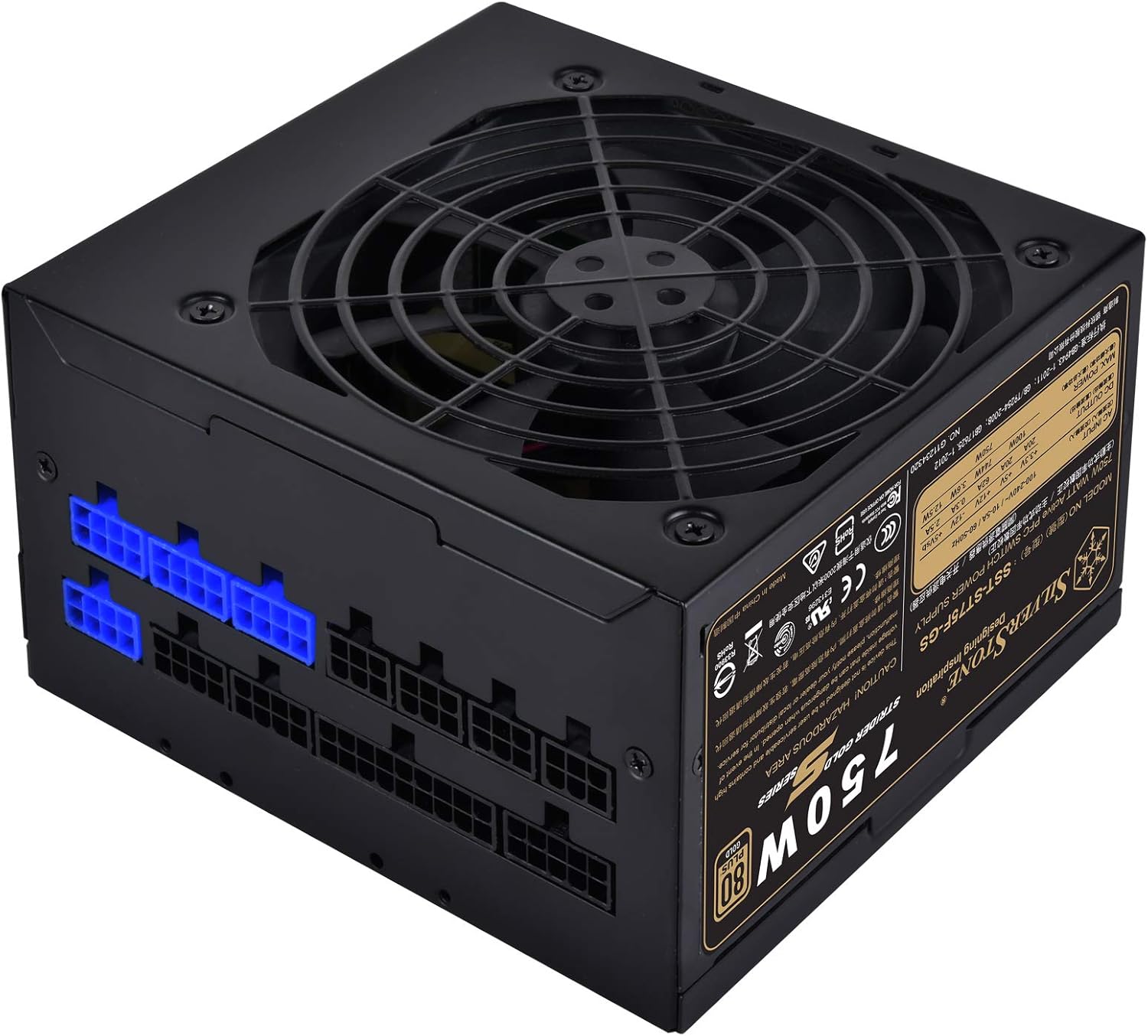
الصورة: زاوية view of the power supply, highlighting the modular cable connection ports on one side.
4.3 Cable Connection Guide
As a fully modular power supply, you only need to connect the cables required for your system components. This improves cable management and airflow.
- كابل اللوحة الأم ATX ذو 24 سنًا: Connect the large 24-pin cable from the PSU to the corresponding port on your motherboard.
- 8-pin (4+4) EPS/ATX 12V CPU Cable: Connect the 8-pin or split 4+4-pin cable to the CPU power connector on your motherboard. Some motherboards may require two such connectors.
- PCI-E Cables: For graphics cards, connect the appropriate 6-pin or 8-pin (6+2) PCI-E power cables from the PSU to your graphics card(s). Use separate cables for each connector on the GPU if possible for better power delivery.
- كابلات طاقة SATA: قم بتوصيل كابلات الطاقة SATA بمحركات الأقراص SSD ومحركات الأقراص الصلبة ومحركات الأقراص الضوئية.
- الكابلات الطرفية (Molex): Connect Molex cables for any other components requiring this type of power, such as case fans or older peripherals.

الصورة: تفصيلية view of the modular cable connection panel, showing various types of ports for different cables.
Ensure all connections are firm and secure. After connecting all necessary cables, organize them using the provided cable ties or Velcro straps to improve airflow and aesthetics.
5. التشغيل
بمجرد تركيب مصدر الطاقة وتوصيل جميع المكونات، يمكنك تشغيل النظام الخاص بك.
- قم بتوصيل سلك الطاقة المتردد بمدخل مصدر الطاقة ثم بمأخذ حائط مؤرض.
- Flip the power switch on the back of the power supply to the 'ON' (I) position.
- اضغط على زر الطاقة الموجود على علبة الكمبيوتر لبدء تشغيل النظام.
5.1 تشغيل المروحة
The 120mm fan in the SST-ST75F-GS-V3 is designed for silent operation, with a minimum noise level of 18dBA. The fan speed will adjust automatically based on the power supply's load and temperature to maintain optimal cooling while minimizing noise.

الصورة: لقطة مقربة view of the 120mm cooling fan integrated into the power supply unit.
6. الصيانة
Proper maintenance can extend the lifespan of your power supply and ensure stable operation.
- تنظيف: Periodically clean the exterior of the power supply and its fan grille to prevent dust buildup. Use compressed air to gently clear dust from the fan blades and vents. Ensure the system is powered off and unplugged before cleaning.
- بيئة: Operate the power supply in a clean, dry, and well-ventilventilated environment. Avoid extreme temperatures.
- Cable Checks: قم بفحص جميع توصيلات الكابلات المعيارية من حين لآخر للتأكد من أنها تظل آمنة.
7. استكشاف الأخطاء وإصلاحها
If you encounter issues with your power supply, try the following basic troubleshooting steps:
- لا يوجد طاقة:
- تأكد من توصيل سلك الطاقة المترددة بإحكام بكل من مصدر الطاقة ومقبس الحائط.
- تأكد من أن مفتاح الطاقة الموجود في الجزء الخلفي من وحدة تزويد الطاقة في وضع التشغيل (I).
- تأكد من أن منفذ الحائط يعمل عن طريق توصيل جهاز آخر.
- Ensure all modular cables are correctly and firmly seated in both the PSU and the components.
- عدم استقرار النظام/الإغلاق العشوائي:
- تحقق من وصلات الكابلات المفكوكة.
- Ensure adequate ventilation within the PC case to prevent overheating.
- Confirm that your system's power requirements do not exceed the 750W capacity of the PSU.
- ضجيج المروحة العالي:
- Clean any dust buildup from the fan and vents.
- Ensure the PSU is not operating under excessive load for prolonged periods.
If issues persist after performing these steps, please refer to the warranty information or contact SilverStone customer support.
8. المواصفات
Detailed technical specifications for the SilverStone Strider Gold S 750W Power Supply (SST-ST75F-GS-V3).
| ميزة | مواصفة |
|---|---|
| رقم الموديل | SST-ST75F-GS-V3 |
| Maximum DC Output | 750 واط |
| 80 PLUS شهادة | ذهب |
| عامل الشكل | ايه تي اكس |
| تصميم مزود الطاقة | وحدات كاملة |
| الأبعاد (الطول × العرض × الارتفاع) | 140 ملم × 150 ملم × 86 ملم (5.51 × 5.91 × 3.39 بوصات) |
| وزن | 1.31 كجم (2.89 رطل) |
| طريقة التبريد | هواء (مروحة 120 مم) |
| Minimum Fan Noise | 18dBA |
| درجة حرارة التشغيل | 0 درجة مئوية ~ 40 درجة مئوية |
| المجلدtagاللائحة | ±3% |
| التموج والضوضاء | ±3% |
8.1 Electrical Output Specifications
| السكك الحديدية | +3.3 فولت | +5 فولت | +12 فولت | -12 فولت | +5 فولت |
|---|---|---|---|---|---|
| ماكس. التيار الخارج | 20 أمبير | 20 أمبير | 62 أمبير | 0.3 أمبير | 2.5 أمبير |
| الأعلى. القدرة المجمعة | 100 واط | 744 واط | 3.6 واط | 12.5 واط | |
| إجمالي ماكس. قوة | 750 واط | ||||
9. الضمان والدعم
SilverStone Technology provides a limited warranty for its products. The specific terms and duration of the warranty may vary by region and product. Please refer to the warranty information booklet included with your product for detailed terms and conditions.
For technical support, warranty claims, or further assistance, please visit the official SilverStone Technology website or contact your local dealer or distributor. You can find contact information and support resources on their webموقع.
الموارد المتاحة على الإنترنت: www.silverstonetek.com


