1. المقدمة
The Optex ORT 8930-HD is a digital terrestrial receiver designed to receive free-to-air digital programs broadcast in MPEG2/MPEG4 format, compatible with DVB-T2 and HEVC/H.265 standards. This device connects to your television via HDMI or SCART. It features a USB input for future software updates, multimedia file playback (photos, music, videos), and direct recording to an external USB storage device (not included).
This manual provides detailed instructions for the proper installation, operation, and maintenance of your Optex ORT 8930-HD receiver. Please read it thoroughly before use to ensure optimal performance and to prevent damage.
2. معلومات السلامة
- تأكد من التهوية المناسبة حول الجهاز لمنع ارتفاع درجة الحرارة.
- لا تعرض جهاز الاستقبال للمطر أو الرطوبة أو درجات الحرارة القصوى.
- تجنب وضع الجهاز بالقرب من مصادر الحرارة مثل المشعاعات أو المواقد.
- استخدم فقط محول الطاقة المرفق مع الوحدة.
- لا تفتح الصندوقasinج؛ إحالة جميع الخدمات إلى الموظفين المؤهلين.
- افصل قابس الطاقة من مأخذ الحائط أثناء العواصف الرعدية أو عند عدم استخدامه لفترات طويلة.
3. محتويات العبوة
تأكد من وجود جميع العناصر في العبوة:
- 1 x Optex ORT 8930-HD Digital Receiver
- 1 × جهاز التحكم عن بعد
- 1 × دليل المستخدم
4. انتهى المنتجview
4.1 اللوحة الأمامية

الصورة 1: أمام view of the Optex ORT 8930-HD receiver, showing the display, USB port, and control buttons.
The front panel includes a digital display for channel numbers, a USB 2.0 port for external storage, and basic control buttons (CH+, CH-, Power).
4.2 اللوحة الخلفية
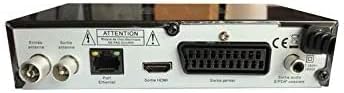
الصورة 2: مؤخرة view of the Optex ORT 8930-HD receiver, displaying various connectivity ports.
توفر اللوحة الخلفية التوصيلات التالية:
- Antenna In/Out: IEC 9.52 mm connectors for terrestrial antenna.
- مخرج HDMI: For connecting to an HD television.
- SCART Connector: For connecting to older televisions.
- S/PDIF Coaxial Audio: إخراج الصوت الرقمي.
- مدخلات الطاقة: For the external power adapter.
4.3 التحكم عن بعد

الصورة 3: The remote control unit for the Optex ORT 8930-HD receiver.
The remote control allows full operation of the receiver, including power, channel selection, volume, menu navigation, recording functions, and multimedia playback controls.
5. الإعداد
5.1 توصيل الهوائي
- Connect your terrestrial antenna cable to the "Antenna In" port on the rear panel of the receiver.
- If you wish to loop the antenna signal to another device, connect a coaxial cable from the "Antenna Out" port to the input of the next device.
5.2 توصيل جهازك بالتلفزيون
اختر إحدى طرق الاتصال التالية:
- HDMI (Recommended for HD): Connect an HDMI cable from the "HDMI Output" port on the receiver to an available HDMI input on your television.
- سكارت: Connect a SCART cable from the "SCART Connector" on the receiver to the SCART input on your television.
5.3 توصيل الطاقة
- Connect the power adapter to the power input port on the receiver.
- قم بتوصيل محول الطاقة بمأخذ الحائط المناسب.
5.4 المسح الأولي للقناة
- Turn on your television and select the correct input source (HDMI or SCART) corresponding to your connection.
- Power on the Optex ORT 8930-HD receiver.
- The first-time setup wizard should appear. Follow the on-screen instructions to perform an automatic channel search. This will scan for all available digital terrestrial channels in your area.
- If the wizard does not appear, navigate to the "Menu" > "Installation" > "Automatic Search" using the remote control.
6. تعليمات التشغيل
6.1 التشغيل الأساسي
- تشغيل/إيقاف التشغيل: اضغط على قوة زر على جهاز التحكم عن بعد أو اللوحة الأمامية.
- اختيار القناة: استخدم CH+ / CH- buttons or enter the channel number directly using the numeric keypad.
- التحكم في مستوى الصوت: استخدم المجلد+ / المجلد- أزرار.
- صامت: اضغط على كتم الصوت زر لإيقاف الصوت مؤقتًا.
6.2 إدارة القناة
- البحث التلقائي/اليدوي: الوصول من خلال قائمة طعام > تثبيت to rescan for channels.
- وظيفة LCN: The Logical Channel Numbering (LCN) function automatically sorts channels into a logical order. This can usually be enabled/disabled in the installation menu.
- Favorite List: Create personalized lists of your preferred channels for quick access. Refer to the on-screen menu for instructions on adding and managing favorite channels.
6.3 التسجيل والتشغيل
To use recording and multimedia playback features, connect a USB storage device (e.g., USB flash drive or external hard drive) to the USB port on the front panel.
- تسجيل يو اس بي: اضغط على ريك button on the remote control to start recording the current program. Press قف لإنهاء التسجيل.
- Timeshift Function: This allows you to pause live TV and resume watching later. Activate Timeshift via the remote control (usually a dedicated button or through the menu).
- تشغيل الوسائط المتعددة: Access the multimedia player via the قائمة طعام. You can browse and play music, photo, and video files stored on your connected USB device.
6.4 دليل البرامج الإلكتروني (EPG)
اضغط على دليل البرامج الإلكتروني زر على جهاز التحكم عن بعد ل view the Electronic Program Guide, which displays program schedules for upcoming broadcasts.
6.5 قفل الوالدين
Set up a parental lock to restrict access to certain channels or programs. This feature is typically found in the قائمة طعام > إعدادات النظام > الرقابة الأبوية قسم.
6.6 وظيفة المؤقت
The timer function allows you to schedule the receiver to turn on/off or record a specific program at a set time. Access this feature through the قائمة طعام.
6.7 Software Update via USB
التحقق بشكل دوري من الشركة المصنعة website for available software updates. Download the update file to a USB drive and follow the instructions in the قائمة طعام > إعدادات النظام > تحديث البرنامج section to install it.
7. الصيانة
- تنظيف: Use a soft, dry cloth to clean the exterior of the receiver. Do not use liquid or aerosol cleaners.
- تهوية: Ensure that the ventilation slots on the device are not blocked to prevent overheating.
- برمجة: Keep the receiver's software updated to ensure optimal performance and access to the latest features.
8. استكشاف الأخطاء وإصلاحها
| مشكلة | السبب المحتمل | حل |
|---|---|---|
| لا يوجد طاقة | كابل الطاقة مفصول؛ مأخذ الطاقة معطل. | تحقق من توصيل كابل الطاقة؛ جرب منفذًا كهربائيًا مختلفًا. |
| No signal / No channels | Antenna not connected; incorrect input source on TV; no channel scan performed. | Check antenna connection; select correct TV input; perform an automatic channel scan. |
| جهاز التحكم عن بعد لا يعمل | نفدت البطاريات؛ يوجد عائق بين جهاز التحكم عن بعد وجهاز الاستقبال. | Replace batteries; ensure clear line of sight to the receiver's IR sensor. |
| التسجيل عبر منفذ USB لا يعمل | USB device not connected or formatted incorrectly; insufficient storage space. | Ensure USB device is properly connected; format USB device (FAT32/NTFS); check available space. |
| يتجمد الجهاز أو يصبح غير مستجيب | خلل مؤقت في البرنامج. | Disconnect power for a few seconds, then reconnect. If problem persists, check for software updates. |
9. المواصفات
| ميزة | التفاصيل |
|---|---|
| نموذج | ORT 8930-HD |
| ماركة | أوبتكس |
| نوع الموالف | الأرضي (DVB-T2) |
| فك تشفير الفيديو | HEVC/H.265, MPEG-2.5 |
| الاتصال | 1x HDMI, 1x SCART, 1x USB 2.0, 1x S/PDIF Coaxial Audio, Antenna In/Out |
| سعة القناة | Over 1000 channels |
| تسجيل | External USB media (PVR function) |
| تشغيل الوسائط المتعددة | Music, Photos, Videos |
| المميزات الخاصة | Timeshift, EPG, Parental Lock, Favorite List, Multi-language Menu, LCN, 5V Antenna Power, Timer Function, Dolby Digital+ compatible |
| وضع إخراج الصوت | [SOM] |
| تكوين الصوت المحيطي للسماعات | 5.1 |
| انتاج الطاقة | 5 واط |
| وزن المنتج | 600 جرام |
10. الضمان والدعم
Specific warranty information is not provided within this manual. Please refer to the warranty card included with your purchase, contact your retailer, or visit the official Optex webالموقع للحصول على شروط وأحكام الضمان التفصيلية.
For technical support or service inquiries, please contact your local Optex distributor or the customer service department as indicated on the product packaging or manufacturer's webموقع.


