1. المقدمة
The Denver MRD-51 is a versatile multi-function music system designed to play various audio formats. It integrates a record player, DAB+ and FM/AM radio tuner, CD player, and cassette deck into a single unit. Additionally, it features a USB port for digitizing audio from CDs, records, or cassettes, and an AUX input for connecting external devices. The system includes two integrated stereo speakers for a complete audio experience.
2. تعليمات السلامة
- اقرأ كافة التعليمات بعناية قبل تشغيل الجهاز.
- احتفظ بهذا الدليل للرجوع إليه في المستقبل.
- لا تعرض الجهاز للمطر أو الرطوبة لتجنب نشوب حريق أو التعرض لصدمة كهربائية.
- تأكد من التهوية المناسبة؛ ولا تسد أي فتحات تهوية.
- ضع الوحدة على سطح ثابت ومستو.
- Disconnect the power plug from the wall outlet if the unit is not in use for a long period.
- لا تحاول صيانة الجهاز بنفسك. قم بإحالة جميع أعمال الصيانة إلى فنيين مؤهلين.
3. محتويات العبوة
تأكد من وجود جميع العناصر عند فك العبوة:
- Denver MRD-51 Multi-Function Music System
- كابل الطاقة
- جهاز التحكم عن بعد
- دليل المستخدم
4. انتهى المنتجview

الشكل 4.1: Denver MRD-51 Multi-Function Music System with turntable open. This image displays the Denver MRD-51 music system from a front-top perspective, with the turntable lid open and a vinyl record placed on the platter. The control panel, including the LCD display, knobs, and buttons, is visible below the turntable.

الشكل 4.2: Denver MRD-51 Multi-Function Music System, front view. A front view of the Denver MRD-51 music system with the turntable lid closed. This image highlights the integrated stereo speakers on the sides and the central control panel, emphasizing its classic design.
4.1 ضوابط اللوحة الأمامية
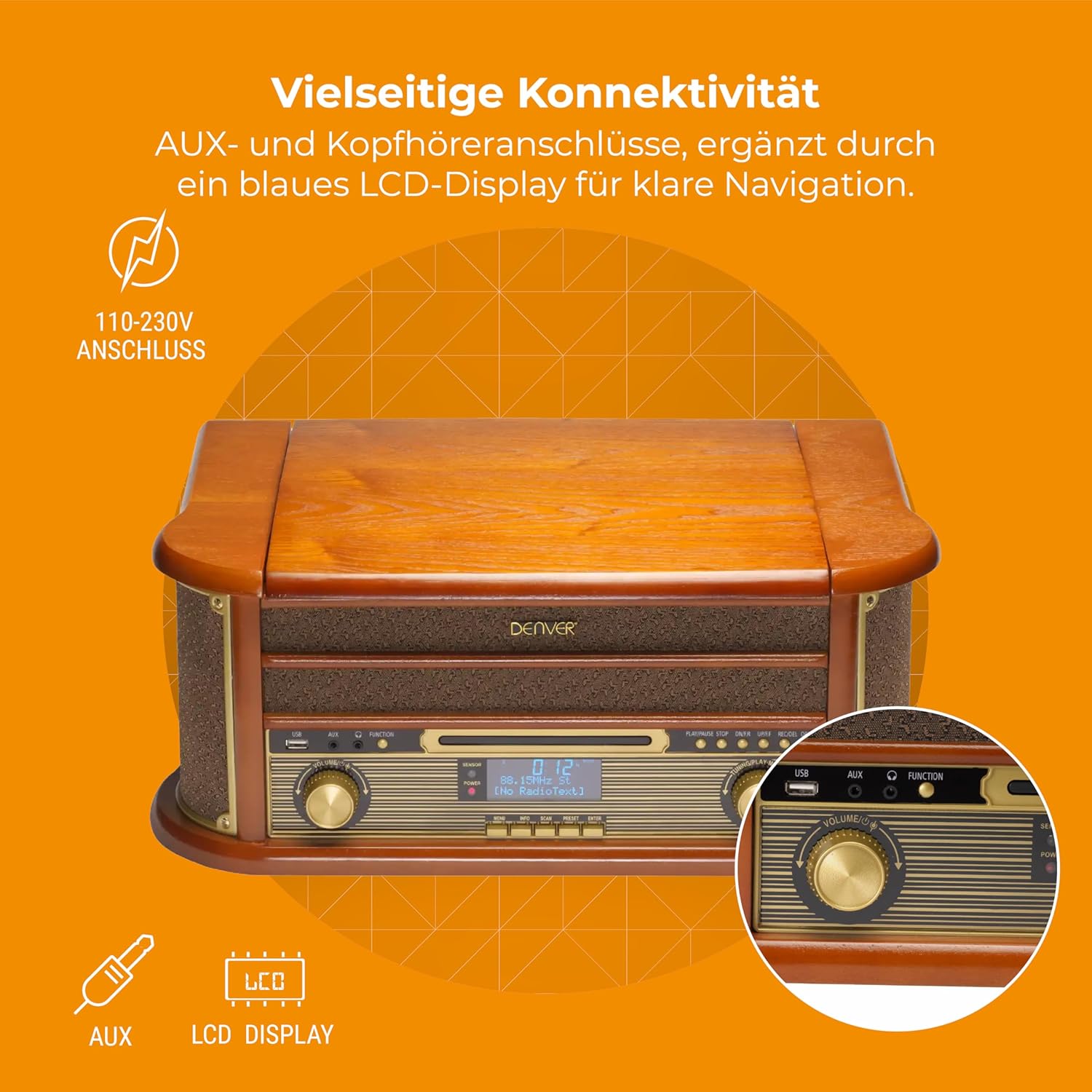
الشكل 4.3: Denver MRD-51 front panel with USB, AUX, and LCD display. A close-up of the Denver MRD-51's front control panel, showcasing the USB port, AUX input, and the blue LCD display for clear navigation. This view details the various connectivity options available.
- زر الطاقة: يقوم بتشغيل الوحدة أو إيقاف تشغيلها.
- زر الوظيفة: Selects between Turntable, CD, Cassette, DAB+, FM, AM, AUX, and USB modes.
- منفذ USB: For connecting USB storage devices for playback or recording.
- مدخلات AUX: مقبس 3.5 ملم لتوصيل مصادر الصوت الخارجية.
- شاشة LCD: Shows current mode, track information, radio frequency, and other system status.
- زر التشغيل / الإيقاف المؤقت: Starts or pauses playback for CD, Cassette, or USB.
- زر التوقف: يوقف التشغيل.
- SKIP Buttons (◀◀ / ▶▶): Skips tracks or fast forwards/rewinds.
- زر التسجيل: Initiates recording to USB.
- مقبض الصوت: ضبط مستوى الصوت الإجمالي للإخراج.
- موجة الضبط: Adjusts radio frequency in FM/AM mode or navigates menus in DAB+ mode.
4.2 Turntable and Cassette Deck

الشكل 4.4: Denver MRD-51 showing open turntable and cassette deck. This image illustrates the versatility of the Denver MRD-51, featuring the open turntable with a record and an arrow pointing to the cassette deck slot on the side, indicating its multi-format playback capabilities.
- طبق القرص الدوار: For playing vinyl records.
- Tone Arm with Stylus: Reads the grooves of vinyl records.
- محدد السرعة: Allows selection of 33, 45, or 78 RPM.
- Cassette Deck Slot: For inserting audio cassettes.
4.3 مشغل الأقراص المضغوطة

الشكل 4.5: Denver MRD-51 with CD tray open and remote control. This image shows the Denver MRD-51 with its CD tray open, ready for disc insertion. A remote control is also pictured, indicating convenient operation of the system's functions.
- درج الأقراص المضغوطة: For inserting compact discs.
- زر الفتح/الإغلاق: يفتح ويغلق درج الأقراص المدمجة.
5. الإعداد
5.1 التفريغ والتنسيب
- أخرج الوحدة بعناية من عبوتها.
- Place the unit on a flat, stable surface away from direct sunlight, heat sources, and excessive dust or moisture.
- تأكد من وجود مساحة كافية حول الوحدة للتهوية.
5.2 توصيل الطاقة
- Connect the power cable to the AC IN socket on the rear of the unit.
- Plug the other end of the power cable into a standard wall outlet (110-230V).
5.3 اتصال الهوائي
For optimal radio reception, extend the telescopic antenna fully for FM/DAB+ or adjust its position for AM.
6. تعليمات التشغيل
6.1 التشغيل العام
- اضغط على قوة الزر لتشغيل الوحدة.
- اضغط على وظيفة button repeatedly to cycle through available modes: Turntable, CD, Cassette, DAB+, FM, AM, AUX, USB.
- ضبط مقدار اضبط المقبض على مستوى الاستماع الذي ترغب فيه.
6.2 تشغيل القرص الدوار
- Select the 'Turntable' function.
- افتح غطاء القرص الدوار.
- ضع سجل الفينيل على الطبق.
- Set the speed selector to match the record's speed (33, 45, or 78 RPM). For 45 RPM records, use the included adapter if necessary.
- Gently lift the tone arm and position the stylus over the desired track on the record.
- Lower the tone arm slowly onto the record. Playback will begin.
- At the end of the record, the tone arm may automatically return to its rest, or you may need to manually lift and return it.
تشغيل مشغل الأقراص المضغوطة 6.3
- Select the 'CD' function.
- اضغط على فتح/إغلاق زر لفتح علبة الأقراص المضغوطة.
- Place a CD (CD/CD-R/CD-RW compatible) with the label side facing up into the tray.
- اضغط على فتح/إغلاق اضغط على الزر مرة أخرى لإغلاق الدرج. سيقوم الجهاز بقراءة القرص.
- يضعط تشغيل/إيقاف مؤقت لبدء التشغيل.
- استخدم يتخطى buttons (◀◀ / ▶▶) to navigate between tracks.
- يضعط قف لإنهاء التشغيل.
6.4 تشغيل مشغل الكاسيت
- Select the 'Cassette' function.
- Insert an audio cassette into the cassette deck slot until it clicks into place.
- اضغط على يلعب button (often integrated with the cassette mechanism) to start playback.
- استخدم قف button to end playback. Fast forward and rewind functions are typically available via dedicated buttons on the cassette deck.
6.5 تشغيل الراديو (DAB+/FM/AM)
- Select the desired radio function (DAB+, FM, or AM).
- لراديو DAB+: The unit will typically perform an automatic scan for available stations upon first use. Use the ضبط مقبض أو يتخطى buttons to navigate through the list of stations.
- For FM/AM Radio: استخدم ضبط knob to manually tune to a station. The frequency will be displayed on the LCD.
6.6 تسجيل USB
The MRD-51 allows you to digitize audio from your records, CDs, or cassettes directly to a USB storage device.
- أدخل محرك أقراص فلاش USB في منفذ يو اس بي.
- Select the source function you wish to record from (Turntable, CD, or Cassette).
- Start playback of the audio source (e.g., play a record, CD, or cassette).
- اضغط على سِجِلّ button. The recording indicator on the display will illuminate, and recording will begin.
- اضغط على سِجِلّ زر مرة أخرى أو قف زر لإنهاء التسجيل. التسجيل file سيتم حفظها على محرك أقراص USB.
6.7 مدخل ايه يو اكس
- قم بتوصيل جهاز صوت خارجي (مثل الهاتف الذكي أو مشغل MP3) بالكمبيوتر. مدخلات AUX using a 3.5mm audio cable.
- Select the 'AUX' function.
- Start playback on your external device. The audio will be played through the MRD-51's speakers.
7. الصيانة
7.1 تنظيف الوحدة
- افصل الوحدة دائمًا عن مأخذ التيار الكهربائي قبل التنظيف.
- استخدم قطعة قماش ناعمة وجافة لمسح الأسطح الخارجية.
- لا تستخدم المنظفات الكاشطة أو الشمع أو المذيبات.
7.2 Turntable Stylus Care
- Gently clean the stylus regularly with a soft brush, brushing from back to front.
- تجنب لمس القلم بأصابعك.
- Replace the stylus when sound quality deteriorates or if it is visibly damaged.
7.3 CD/Cassette Player Care
- Handle CDs and cassettes by their edges to avoid fingerprints and scratches.
- Keep the CD tray and cassette deck free of dust and debris.
8. استكشاف الأخطاء وإصلاحها
| مشكلة | السبب المحتمل | حل |
|---|---|---|
| لا يوجد طاقة | Power cable not connected; Wall outlet not active | Ensure power cable is securely connected; Try a different outlet |
| لا يوجد صوت | Volume too low; Incorrect function selected; External device not playing | Increase volume; Select correct function; Ensure external device is playing and connected properly |
| Turntable not spinning or poor sound | Speed setting incorrect; Stylus dirty or damaged; Record dirty | Adjust speed selector; Clean or replace stylus; Clean record |
| القرص المضغوط لا يعمل | CD inserted incorrectly; CD scratched or dirty; CD format not supported | Reinsert CD correctly; Clean or replace CD; Ensure CD is CD/CD-R/CD-RW format |
| استقبال الراديو ضعيف | الهوائي غير ممتد/غير مثبت بشكل صحيح؛ إشارة ضعيفة | Extend and adjust antenna; Try repositioning the unit |
| USB recording not working | USB drive full or incompatible; Source not playing | Use a different USB drive or clear space; Ensure audio source is playing during recording |
9. المواصفات
| ميزة | مواصفة |
|---|---|
| أبعاد المنتج | 20.08 × 13.39 × 8.46 بوصة |
| وزن العنصر | 15.18 جنيه (6.9 كيلوجرام) |
| رقم الموديل | MRD-51 (Internal: 111201210000) |
| ماركة | دنفر |
| سرعة الدوران القصوى | 78 دورة في الدقيقة (يدعم 33 و 45 و 78 دورة في الدقيقة) |
| المكونات المضمنة | MRD-51 unit |
| المميزات الخاصة | Adjustable Speed, Digital Recorder, Integrated Speakers |
| مادة | Aluminum (internal components), Wood (housing) |
| لون | خشب |
| الأجهزة المتوافقة | Personal Computer (for USB transfer) |
| موالف الراديو | DAB+, FM, AM |
| مشغل أقراص ليزرية | Supports CD/CD-R/CD-RW |
| مخرج الصوت | 2 × 2.5 واط مكبرات صوت ستيريو |
10. الضمان والدعم
For warranty information and technical support, please refer to the documentation provided with your purchase or contact Denver customer service through their official webالموقع. احتفظ بإثبات الشراء الخاص بك لاستخدامه في أي مطالبات بالضمان.


