1. المقدمة
The Cisco SG500-28MPP-K9 is a 28-port Gigabit Max PoE+ stackable managed switch designed to provide high availability, scalability, and performance for small to medium-sized businesses. This manual provides essential information for the proper installation, configuration, and maintenance of your device, ensuring optimal network performance and reliability.
2. تعليمات الإعداد
2.1. محتويات العبوة
تأكد من أن الحزمة الخاصة بك تحتوي على العناصر التالية:
- Cisco SG500-28MPP-K9 28-Port Gigabit Max PoE+ Managed Switch
- سلك الطاقة
- مجموعة التثبيت على الرف
- كابل وحدة التحكم (RJ-45 إلى DB-9)
- Documentation CD (or link to online resources)
2.2. التثبيت المادي
يمكن تركيب المحول على سطح المكتب أو تثبيته في رف معدات قياسي مقاس 19 بوصة.
- تثبيت سطح المكتب: ضع المفتاح على سطح مستوٍ وثابت. تأكد من وجود تهوية كافية حول الجهاز.
- التثبيت على الرف: ثبّت حوامل التثبيت المرفقة على جانبي المفتاح باستخدام البراغي المرفقة. ثبّت المفتاح في رفّ الجهاز.
2.3. توصيل المفتاح
Follow these steps to connect your switch:
- Connect the power cord to the switch's power inlet and then to a grounded electrical outlet.
- Connect your network devices (computers, IP phones, wireless access points) to the switch's Gigabit Ethernet ports using standard Ethernet cables. The switch supports Power over Ethernet Plus (PoE+) on its ports.
- For initial configuration, connect a computer to the switch's console port using the provided console cable, or connect a computer to any Ethernet port and configure its IP address to be in the same subnet as the switch's default IP address (typically 192.168.1.254).
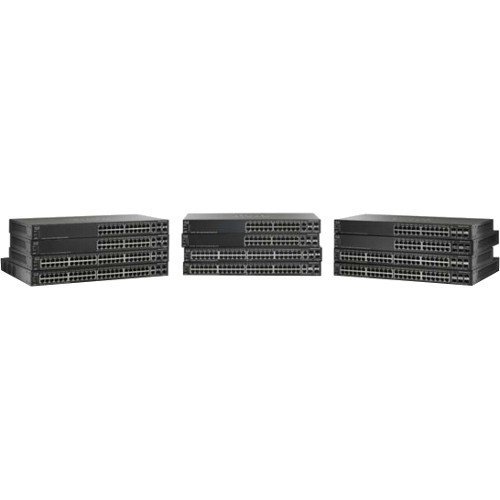
صورة توضح الواجهة view of the Cisco SG500-28MPP-K9 28-Port Gigabit Max PoE+ Managed Switch, highlighting its 28 ports and status indicators.
3. تشغيل المفتاح
3.1. التشغيل الأولي
Once connected to power, the switch will automatically power on. Observe the system LED indicators. The 'System' LED should turn green, indicating normal operation. Port LEDs will illuminate when a device is connected and active.
3.2. التكوين الأساسي
The Cisco SG500-28MPP-K9 is a managed switch, offering extensive configuration options via a web- واجهة المستخدم الرسومية (GUI) أو واجهة سطر الأوامر (CLI).
- Web الوصول إلى واجهة المستخدم الرسومية: افتح web browser and enter the switch's default IP address (e.g., http://192.168.1.254). Log in using the default credentials (refer to the documentation for specific defaults, often 'cisco' for both username and password).
- الوصول إلى واجهة سطر الأوامر: Use a terminal emulation program (e.g., PuTTY) to connect via the console port. Configure the serial connection settings (e.g., 115200 baud, 8 data bits, no parity, 1 stop bit, no flow control).
It is highly recommended to change default passwords immediately after initial access for security purposes.
3.3. الميزات الرئيسيةview
- منافذ جيجابت إيثرنت: يوفر اتصالاً عالي السرعة لأجهزة الشبكة.
- Max PoE+: Delivers Power over Ethernet Plus to connected devices, simplifying deployment of IP phones, wireless access points, and IP cameras.
- سهل التخزين: Allows multiple switches to be managed as a single unit, increasing network scalability and simplifying management.
- Managed Features: Supports advanced features such as VLANs, QoS, security, and IPv6 routing for robust network control.
4. الصيانة
4.1. تحديثات البرامج الثابتة
تحقق بانتظام من دعم سيسكو website for the latest firmware updates. Keeping your switch's firmware up-to-date ensures access to new features, performance improvements, and critical security patches. Follow the instructions provided with the firmware update package carefully.
4.2. التنظيف
To maintain proper airflow and prevent overheating, periodically clean the switch. Use a soft, dry cloth to wipe the exterior. For dust accumulation in ventilation openings, use compressed air. Ensure the switch is powered off and disconnected from the power source before cleaning.
4.3. الاعتبارات البيئية
Operate the switch within its specified environmental ranges for temperature and humidity to ensure longevity and stable performance. Avoid placing the switch in direct sunlight, near heat sources, or in areas with excessive dust or moisture.
5. استكشاف الأخطاء وإصلاحها
5.1. المشكلات الشائعة والحلول
- لا يوجد طاقة:
علامة مرض: مؤشر LED للطاقة مطفأ.
حل: Check the power cord connection to the switch and the electrical outlet. Ensure the outlet is functional. - لا يوجد اتصال بالشبكة:
علامة مرض: Devices connected to the switch cannot access the network.
حل: Verify that Ethernet cables are securely connected to both the switch and the devices. Check port status LEDs; a solid green or blinking green indicates a link. Ensure the switch has a valid IP configuration and is connected to your router/gateway. - جهاز PoE لا يعمل:
علامة مرض: PoE-powered device (e.g., IP phone) does not receive power.
حل: Ensure the device is PoE-compatible. Check the switch's PoE status LEDs for the specific port. Verify PoE settings in the switch's management interface. Ensure the total PoE budget of the switch is not exceeded. - لا يمكن الوصول Web واجهة المستخدم الرسومية:
علامة مرض: Browser cannot reach the switch's IP address.
حل: Verify your computer's IP address is in the same subnet as the switch. Ping the switch's IP address to confirm network reachability. Clear browser cache or try a different browser.
If issues persist after attempting these solutions, refer to the comprehensive troubleshooting guide on the Cisco support webالموقع أو الاتصال بالدعم الفني.
6. المواصفات الفنية
| ميزة | مواصفة |
|---|---|
| نموذج | SG500-28MPP-K9 |
| عدد المنافذ | 28 جيجابت إيثرنت |
| نوع الواجهة | بو إي آر+ |
| أبعاد المنتج | 21.5 × 18.7 × 4.3 بوصة |
| وزن العنصر | 15.31 رطل |
| ماركة | سيسكو |
| رمز المنتج الموحد | 748926547055 |
7. معلومات الضمان
This Cisco product is typically covered by a limited hardware warranty. For detailed information regarding the terms, conditions, and duration of your specific warranty, please refer to the warranty documentation included with your purchase or visit the official Cisco website. Warranty coverage may vary based on region and reseller.
8. الدعم
For further assistance, technical support, or to download the latest drivers and firmware, please visit the official Cisco support website. You can also find extensive documentation, FAQs, and community forums there.
دعم سيسكو Webموقع: https://www.cisco.com/go/support


