1. المقدمة
The NETGEAR GS116PP Unmanaged Power over Ethernet (PoE) Switch is designed for desktop or rackmount installations. It features 16 Gigabit Ethernet ports, including 16 PoE+ ports with a total power budget of 183 watts. This switch offers simple plug-and-play functionality without requiring software installation or complex configuration, making it suitable for various networking environments.
2. محتويات العبوة
تأكد من أن الحزمة الخاصة بك تحتوي على العناصر التالية:
- 16-port Gigabit Ethernet PoE+ Unmanaged Switch (GS116PP)
- محول طاقة (خارجي 200 واط)
- دليل التثبيت السريع
- طقم تركيب الرف
- طقم التثبيت على الحائط
3. جسديا أكثرview
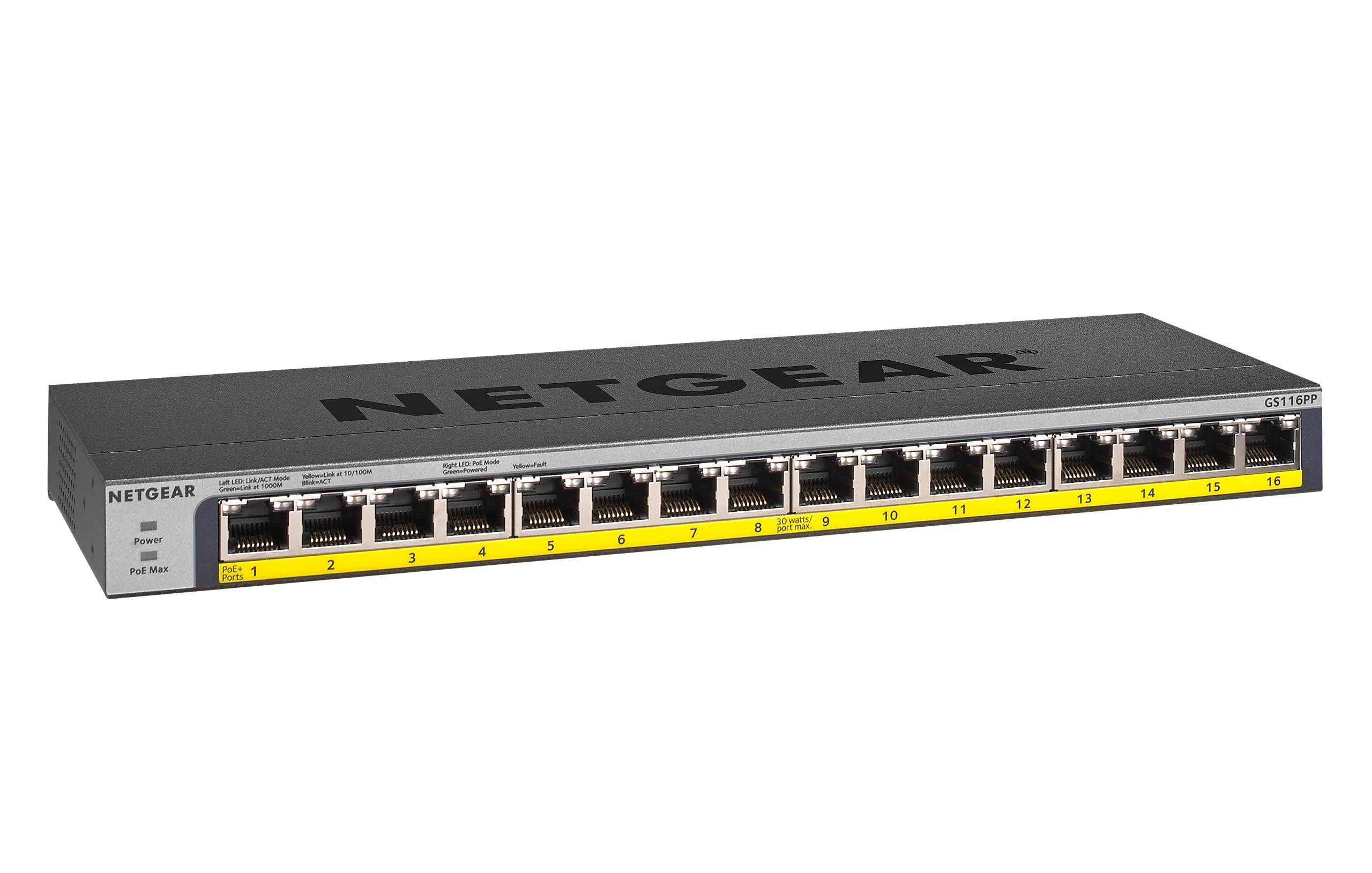
الشكل 1: أمام view of the NETGEAR GS116PP Switch.

الشكل 2: Close-up of the front panel with 16 Gigabit Ethernet PoE+ ports.

الشكل 3: مؤخرة view of the NETGEAR GS116PP Switch, showing the power input and ventilation.

الشكل 4: Dimensions of the NETGEAR GS116PP Switch (11.3"L x 4"W x 1.1"H).
4. الإعداد
4.1 التفريغ والتنسيب
Carefully remove the switch and all accessories from the packaging. The GS116PP supports desktop, wall-mount, or rack-mount placement. Ensure adequate ventilation around the device and avoid placing it near heat sources or in enclosed spaces.
4.2 توصيل الطاقة
- Connect the provided external 200W power adapter to the power input port on the rear of the switch.
- Plug the power adapter into a standard electrical outlet. The power LED on the front panel will illuminate, indicating the switch is powered on.
4.3 اتصال الشبكة
The GS116PP is an unmanaged switch, offering simple plug-and-play connectivity. No software installation or configuration is required.
- Connect your network router or main network device to any of the 16 Gigabit Ethernet ports on the switch using a standard Ethernet cable.
- Connect your network devices (computers, IP cameras, VoIP phones, wireless access points, etc.) to the remaining ports.
- For PoE-powered devices, simply connect them to any of the 16 PoE+ ports. The switch will automatically detect and provide power to compatible devices.
فيديو 1: انتهىview of Power over Ethernet (PoE) switching concepts and applications.
5. تشغيل المفتاح
5.1 التشغيل الأساسي
The NETGEAR GS116PP operates as a standard unmanaged network switch. It automatically detects the speed and duplex mode of connected devices and adjusts accordingly. Data is forwarded efficiently between connected devices at Gigabit speeds.
5.2 وظيفة التغذية عبر الإيثرنت (PoE+)
All 16 ports on the GS116PP support PoE+ (802.3at) and standard PoE (802.3af). This allows you to power compatible devices directly through the Ethernet cable, eliminating the need for separate power adapters and simplifying cable management.
- إجمالي ميزانية الطاقة: The switch provides a total power budget of 183W across all 16 PoE+ ports.
- Per-Port Power: Each PoE+ port can deliver up to 30W of power to a connected device.
- الكشف التلقائي: The switch automatically detects if a connected device is PoE-compatible and supplies the necessary power. Non-PoE devices can also be connected safely, as the switch will not supply power to them.
فيديو 2: A brief demonstration of the NETGEAR 16-Port Gigabit Ethernet Unmanaged PoE Switch (GS116PP) and its PoE capabilities.
6. المميزات
- 16 منافذ جيجابت إيثرنت: Provides high-speed wired connections for all your network devices.
- 16 PoE+ Ports with 183W Budget: Powers compatible devices like IP cameras, VoIP phones, and wireless access points directly through the Ethernet cable.
- إعداد التوصيل والتشغيل: No software to install or configuration needed for immediate use.
- خيارات التركيب المرنة: Supports desktop, wall-mount, or rack-mount placement with included hardware.
- تصميم موفر للطاقة: متوافق مع معيار IEEE802.3az لتقليل استهلاك الطاقة.
- عملية صامتة: Fanless design makes it ideal for noise-sensitive environments.
- التوافق الإقليمي: Made for use in U.S. & CA only.
7. المواصفات
| ميزة | مواصفة |
|---|---|
| رقم الموديل | GS116PP-100NAS |
| عدد المنافذ | 16 منفذ إيثرنت جيجابت |
| منافذ بو + | 16 (IEEE 802.3at/af) |
| إجمالي ميزانية الطاقة PoE | 183 واط |
| معدل نقل البيانات | 1 جيجابت في الثانية |
| أبعاد المنتج (الطول × العرض × الارتفاع) | 11.3 بوصة × 4 بوصة × 1.1 بوصة (28.7 سم × 10.16 سم × 2.79 سم) |
| وزن العنصر | 1.94 رطل (0.88 كجم) |
| مادة العلبة | معدن |
| المجلدtage | 240 فولت |
| درجة حرارة التشغيل | Up to 130 Degrees Fahrenheit (54.4°C) |
8. الصيانة
To ensure optimal performance and longevity of your NETGEAR GS116PP switch, follow these maintenance guidelines:
- حافظ على نظافة: Regularly clean the exterior of the switch with a soft, dry cloth. Avoid using liquid or aerosol cleaners.
- ضمان التهوية: Do not block the ventilation openings on the switch. Proper airflow prevents overheating.
- إدارة الكابلات: حافظ على تنظيم كابلات الشبكة وخلوها من الانحناءات أو التواءات مفرطة لمنع تدهور الإشارة.
- إعادة تشغيل الطاقة (إذا لزم الأمر): If the switch or connected devices are experiencing issues, a simple power cycle (unplugging and replugging the power adapter) can often resolve minor problems.
9. استكشاف الأخطاء وإصلاحها
If you encounter issues with your GS116PP switch, consider the following troubleshooting steps:
- لا يوجد طاقة:
- تأكد من توصيل محول الطاقة بشكل آمن بالمفتاح والمأخذ الكهربائي العامل.
- Check the power LED on the front panel; it should be illuminated.
- لا يوجد اتصال بالشبكة:
- Verify that Ethernet cables are securely plugged into both the switch and the connected devices.
- Check the link/activity LEDs on the switch ports; they should be lit or blinking for active connections.
- Ensure your router or upstream network device is functioning correctly.
- جهاز PoE لا يعمل:
- Confirm that the connected device is PoE-compatible (IEEE 802.3af or 802.3at).
- Check the PoE status LED for the specific port; it should indicate power delivery.
- Ensure the total power consumption of all connected PoE devices does not exceed the 183W budget. If the budget is exceeded, the switch may prioritize power to certain ports or disable power to others.
- حاول توصيل جهاز PoE بمنفذ مختلف.
- سرعة الشبكة بطيئة:
- Ensure all connected devices and cables support Gigabit Ethernet for optimal performance.
- Check for faulty cables by testing with known good cables.
- Avoid network loops by ensuring cables are not connected in a way that creates a circular path.
10. الضمان والدعم
The NETGEAR GS116PP Switch comes with a Lifetime Limited Hardware Warranty. This includes Next Business Day Replacement for eligible hardware failures.
For technical assistance and support, NETGEAR offers 24/7 chat support with a NETGEAR expert. Please refer to the official NETGEAR website or the quick install guide for detailed support contact information and warranty terms.


