1. المقدمة
Thank you for choosing the TechniSat VIOLA 2 Portable DAB/FM Radio. This compact and versatile radio allows you to enjoy high-quality digital DAB+ and traditional FM radio broadcasts wherever you are. This manual provides essential information for setting up, operating, and maintaining your device to ensure optimal performance and longevity.

Image 1.1: The TechniSat VIOLA 2 radio positioned on a wooden table in an outdoor setting, highlighting its portability.
2. معلومات السلامة
Please read these safety instructions carefully before using the device and keep them for future reference.
- مزود الطاقة: استخدم محول الطاقة المرفق فقط. تأكد من أن مستوى الصوتtage يطابق متطلبات منطقتك.
- البطاريات: Use 4 x AA-LR6 batteries. Do not mix old and new batteries, or different types of batteries. Remove batteries if the device will not be used for an extended period.
- الماء والرطوبة: لا تُعرِّض الجهاز للمطر أو الرطوبة أو السوائل المتساقطة. لا تضع عليه أي أغراض مملوءة بالسوائل، مثل المزهريات.
- حرارة: احتفظ بالجهاز بعيدًا عن مصادر الحرارة مثل المشعات أو فتحات التدفئة أو المواقد أو الأجهزة الأخرى (بما في ذلك ampالمُضخِّمات) التي تنتج الحرارة.
- تهوية: تأكد من التهوية الكافية. لا تسد أي فتحات تهوية.
- تنظيف: افصل التيار الكهربائي قبل التنظيف. استخدم قطعة قماش ناعمة وجافة. لا تستخدم المنظفات السائلة أو المنظفات البخاخة.
- الخدمة: لا تحاول خدمة هذا المنتج بنفسك. قم بإحالة جميع أعمال الصيانة إلى أفراد الخدمة المؤهلين.
3. محتويات العبوة
قم بفتح الصندوق بعناية وتأكد من وجود جميع العناصر وأنها في حالة جيدة:
- TechniSat VIOLA 2 Portable DAB/FM Radio
- محول الطاقة (6 فولت تيار مستمر)
- دليل المستخدم (هذا المستند)
Note: 4 x AA-LR6 batteries are required for portable use and are not included in the package.
4. انتهى المنتجview
Familiarize yourself with the various parts and controls of your VIOLA 2 radio.

الصورة 4.1: الجبهة view of the TechniSat VIOLA 2, displaying the speaker grille, LCD screen, and control buttons.
4.1 ضوابط اللوحة الأمامية
- المتحدث: مكبر صوت مدمج لإخراج الصوت.
- شاشة LCD: Two-line display showing station information, time, and menu options.
- زر التشغيل/الإيقاف: يقوم بتشغيل الجهاز أو إيقاف تشغيله.
- Volume/Enter Knob: Rotate to adjust volume, press to confirm selections.
- Tune +/- Buttons: Used for manual tuning or navigating menus.
- DAB/FM Button: يُبدّل بين وضعَي راديو DAB+ وراديو FM.
- زر المعلومات / القائمة: Displays additional information or accesses the menu settings.

الصورة 4.2: تفصيلية view of the control buttons and rotary knob on the TechniSat VIOLA 2, illustrating its simple operation.
4.2 اتصالات اللوحة الخلفية

Image 4.3: The rear panel of the radio, showing the headphone output and the DC 6V power input.
- مقبس سماعة الرأس (3.5،XNUMX ملم): للاستماع الخاص.
- مدخلات DC 6V: قم بتوصيل محول الطاقة المرفق هنا.
- حجرة البطارية: Located on the rear, for 4 x AA batteries.
- هوائي تلسكوبي: قم بتمديده للحصول على أفضل استقبال للراديو.
5. الإعداد
5.1 تشغيل الجهاز
The VIOLA 2 can be powered by the included mains adapter or by batteries for portable use.
5.1.1 الطاقة الرئيسية
- Insert the small plug of the power adapter into the DC 6V input on the rear of the radio.
- قم بتوصيل محول الطاقة بمأخذ حائط قياسي.
5.1.2 طاقة البطارية
- Open the battery compartment cover on the rear of the radio.
- Insert 4 x AA-LR6 batteries, ensuring correct polarity (+/-).
- أغلق غطاء حجرة البطارية جيدًا.
5.2 ضبط الهوائي
For optimal reception, fully extend the telescopic antenna. Adjust its position and angle to achieve the best signal quality, especially in FM mode or areas with weaker DAB+ signals.
6. تعليمات التشغيل
6.1 تشغيل / إيقاف
اضغط على تشغيل/إيقاف زر لتشغيل الراديو أو إيقافه.
6.2 Mode Selection (DAB/FM)
اضغط على DAB / FM button to switch between DAB+ digital radio mode and FM analog radio mode.
6.3 البحث عن المحطات
6.3.1 DAB+ Auto Scan
When you first turn on the radio in DAB+ mode, it will automatically perform a full scan for available stations. If you move to a new location or wish to refresh the station list:
- تأكد من أن الراديو في وضع DAB+.
- اضغط مع الاستمرار على معلومات / قائمة زر للدخول إلى القائمة.
- تدوير Volume/Enter knob to select "Full Scan" and press the knob to confirm.
- The radio will scan and update the station list.
6.3.2 FM Auto Scan
في وضع FM:
- Ensure the radio is in FM mode.
- اضغط مع الاستمرار على لحن +/- buttons. The radio will scan for the next available station.
6.4 التحكم في مستوى الصوت
تدوير Volume/Enter مقبض لضبط مستوى الاستماع.
6.5 استخدام سماعات الرأس
Connect standard 3.5mm headphones to the headphone jack on the rear of the radio for private listening. The internal speaker will automatically mute when headphones are connected.
6.6 عرض المعلومات

Image 6.1: A close-up of the radio's two-line LCD display, showing current station and program information.
The two-line LCD display provides various information depending on the mode:
- DAB+ Mode: Station name, program type, scrolling text (DLS), signal strength, time, date.
- وضع FM: Frequency, station name (if RDS available), program type (if RDS available), time, date.
اضغط على معلومات / قائمة button repeatedly to cycle through available display information.
7. الصيانة
7.1 التنظيف
Wipe the radio with a soft, dry, lint-free cloth. Do not use abrasive cleaners, waxes, or solvents as they may damage the finish.
7.2 استبدال البطارية
When the battery indicator on the display shows low power, replace all four AA batteries with new ones. Ensure the radio is turned off or connected to mains power before replacing batteries.
8. استكشاف الأخطاء وإصلاحها
| مشكلة | السبب المحتمل | حل |
|---|---|---|
| لا يوجد طاقة | محول الطاقة غير موصول؛ البطاريات فارغة أو تم إدخالها بشكل غير صحيح. | تحقق من توصيل محول الطاقة؛ استبدل البطاريات أو تأكد من صحة القطبية. |
| لا يوجد صوت | مستوى الصوت منخفض جدًا؛ سماعات الرأس موصولة؛ تم تفعيل خاصية كتم الصوت. | Increase volume; Disconnect headphones; Check for mute function (if applicable). |
| Poor reception (DAB+/FM) | الهوائي غير ممتد أو في وضع سيئ؛ منطقة إشارة ضعيفة. | Fully extend and adjust the telescopic antenna; Try moving the radio to a different location. Perform a full scan in DAB+ mode. |
| DAB+ stations missing | Not all stations scanned; Moved to a new area. | Perform a full scan (see Section 6.3.1). |
| العرض لا يعمل | Device off; Faulty unit. | Ensure device is on; If problem persists, contact customer support. |
9. المواصفات
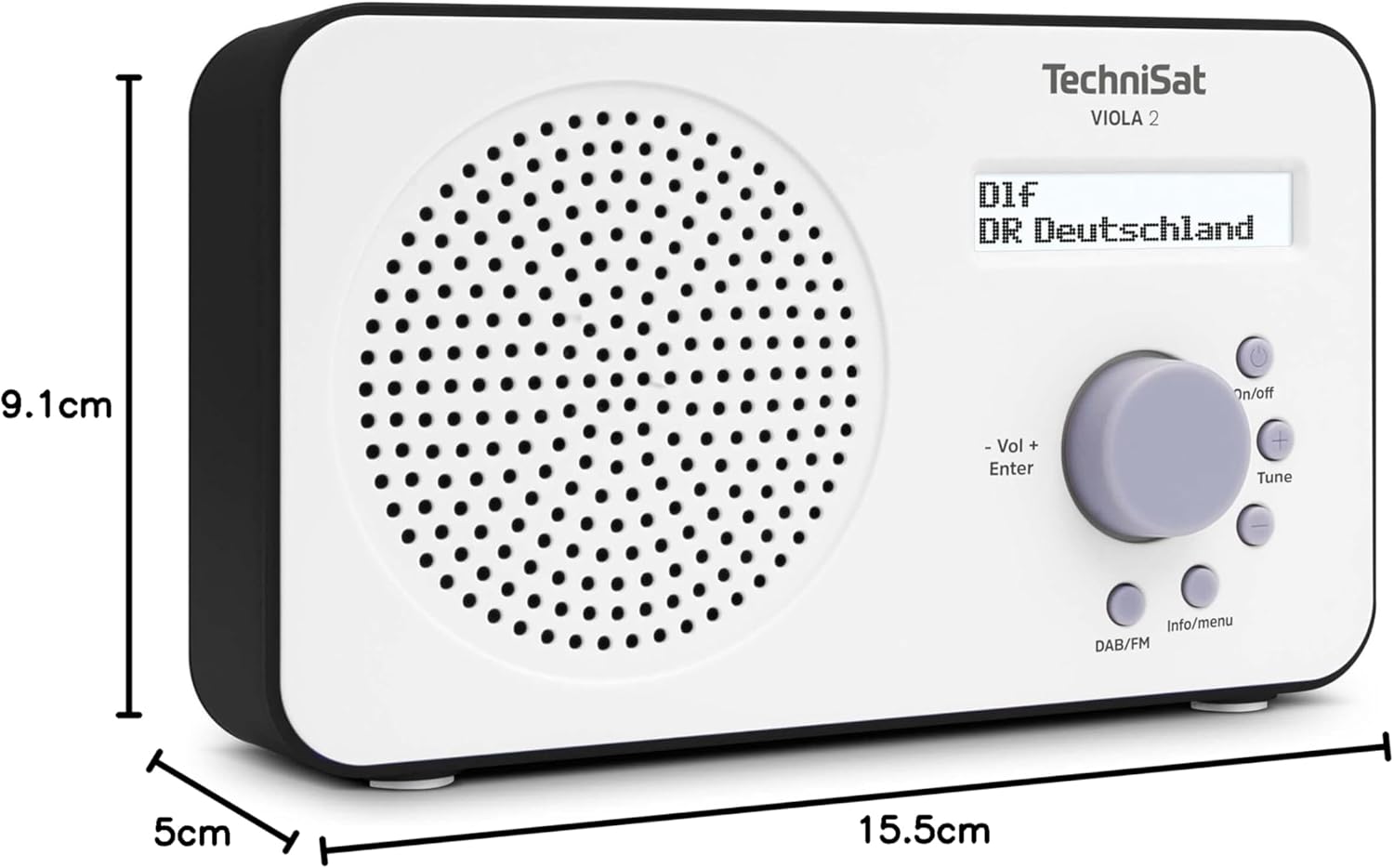
Image 9.1: The TechniSat VIOLA 2 radio with its physical dimensions indicated.
- نموذج: فيولا 2
- الشركة المصنعة: تكني سات
- رقم الموديل: 0000/3906
- أبعاد المنتج (العرض × العمق × الارتفاع): 15.5 × 5 × 9.1 سم
- وزن: 338 جرام
- نطاقات الراديو المدعومة: DAB+, FM (with RDS and PLL)
- تقنية الموالف: DAB / FM
- مخرج السماعات: 1 واط
- عرض: Two-line LCD with backlight
- الاتصال: 3.5mm Headphone Jack (AUX)
- مصدر الطاقة: Corded Electric (6V DC adapter) and Battery Powered
- البطاريات: 4 x AA-LR6 (not included)
- المميزات الخاصة: Automatic station search, electronic volume control
- بلد المنشأ: الصين
10. الضمان والدعم
TechniSat products are designed for reliability and performance. For warranty information, please refer to the warranty card included with your purchase or visit the official TechniSat website. If you encounter any issues not covered in this manual, please contact TechniSat customer support for assistance.
You can find contact details and further support resources on the official TechniSat webموقع: www.technisat.com


