مقدمة
The Mitel 6920W is a powerful, feature-rich IP phone designed for business communication. Equipped with Wi-Fi connectivity, it offers flexibility in deployment and ensures reliable voice communication. This manual provides comprehensive instructions for setting up, operating, maintaining, and troubleshooting your Mitel 6920W IP Phone.
محتويات الحزمة
قبل أن تبدأ، يرجى التأكد من أن الحزمة الخاصة بك تحتوي على العناصر التالية:
- Mitel 6920W IP Phone Unit
- سماعة الهاتف
- سماعة الهاتف
- حامل الهاتف
- كابل إيثرنت
- محول الطاقة (إذا لم تكن تستخدم الطاقة عبر الإيثرنت - PoE)
- دليل البدء السريع (إذا كان متضمنًا)
يثبت
1. Attaching the Phone Stand
The phone stand allows you to position your phone at an optimal viewing angle. Align the tabs on the stand with the slots on the back of the phone and push firmly until it clicks into place.
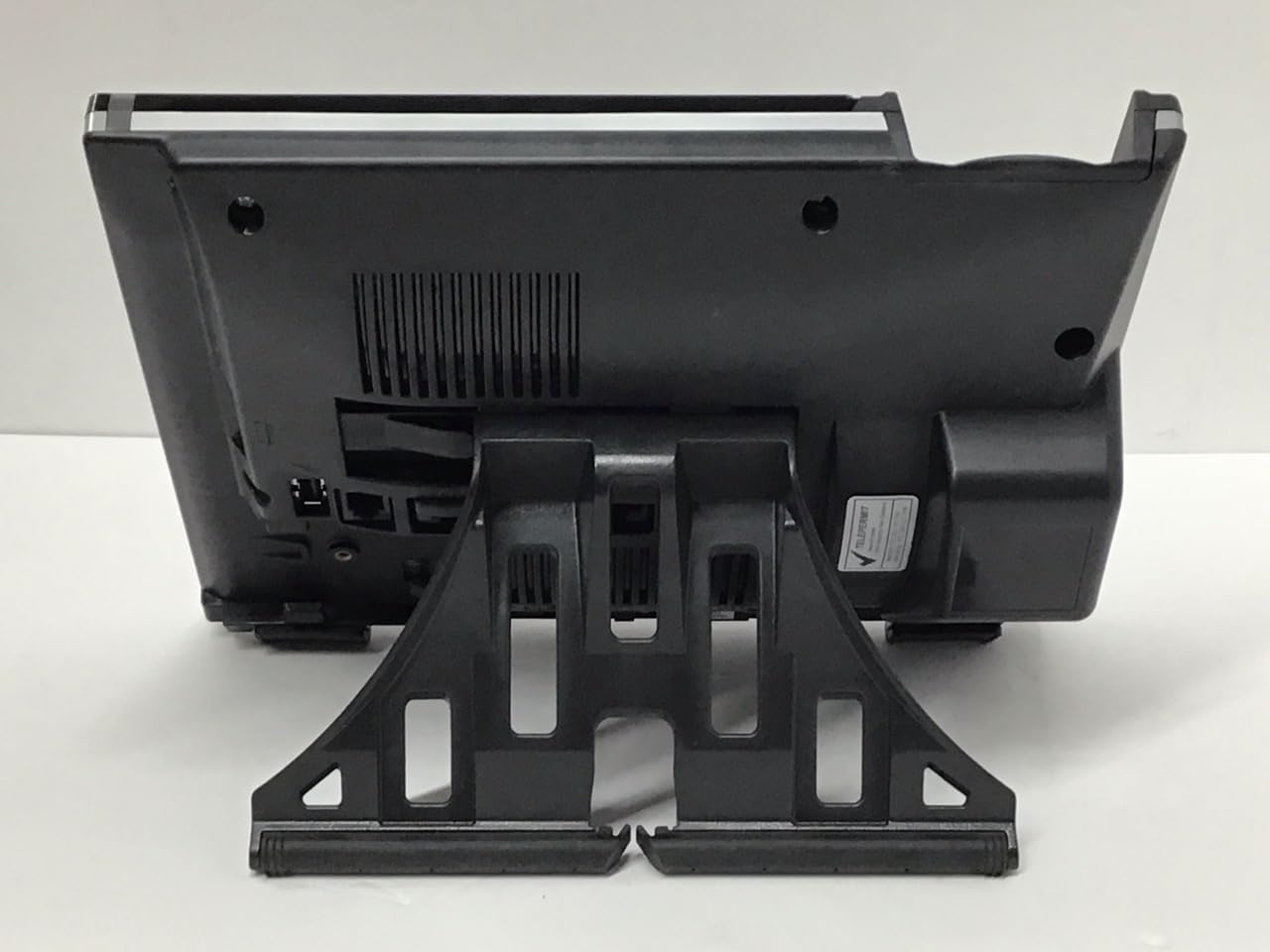
صورة: خلف view of the Mitel 6920W IP Phone with its stand attached, showing the connection points and the angled support.
2. Connecting the Handset and Headset
- Connect one end of the coiled handset cord to the handset and the other end to the handset port on the back of the phone (usually marked with a handset icon).
- If using a headset, connect it to the dedicated headset port (usually marked with a headset icon).
3. الاتصال بالشبكة والطاقة
- اتصال إيثرنت: Connect one end of the Ethernet cable to the LAN port on the back of the phone and the other end to your network switch or router. If your network provides Power over Ethernet (PoE), the phone will power on automatically.
- محول الطاقة (إذا لم يكن هناك PoE): If PoE is not available, connect the power adapter to the power port on the back of the phone and then plug it into a wall outlet.

صورة: أمام view of the Mitel 6920W IP Phone, displaying its screen, physical keypad, and programmable soft keys.
4. التشغيل الأولي والتكوين
Once powered on, the phone will boot up and attempt to connect to your network. It may automatically download configuration settings from your VoIP system. Follow any on-screen prompts for initial setup, such as language selection or time zone.
5. إعداد اتصال Wi-Fi
To connect your 6920W to a Wi-Fi network:
- اضغط على إعدادات button (gear icon) on the phone.
- انتقل إلى إعدادات الشبكة or إعدادات الواي فاي.
- Enable Wi-Fi and select your desired network from the list of available networks.
- Enter the Wi-Fi password (if required) using the keypad and on-screen prompts.
- Confirm the connection. The phone should display a Wi-Fi icon indicating a successful connection.
Operating Your Mitel 6920W IP Phone
وظائف الاتصال الأساسية
- إجراء مكالمة: ارفع السماعة أو اضغط على مكبر الصوت button. Dial the number and press the الاتصال الهاتفي or يرسل مفتاح مرن.
- الرد على مكالمة: ارفع سماعة الهاتف واضغط على مكبر الصوت أو اضغط على إجابة مفتاح مرن.
- إنهاء المكالمة: أغلق السماعة أو اضغط على إنهاء المكالمة مفتاح مرن.
لوحة المفاتيح ونظام الملاحة
The phone features a standard 12-button dial pad. Use the navigation cluster (up, down, left, right arrows, and select button) to move through menus and options on the display.
الشاشة والمفاتيح اللينة
The phone's display shows call information, menus, and status indicators. The soft keys located directly below the display change their function based on the current context (e.g., during a call, in a menu). Their current function is indicated on the display above each key.
الوصول إلى البريد الصوتي
للوصول إلى بريدك الصوتي، اضغط على البريد الصوتي button (envelope icon) and follow the audio prompts.
ميزات الاتصال المتقدمة
- يمسك: أثناء المكالمة النشطة ، اضغط على يمسك مفتاح ناعم. اضغط عليه مرة أخرى لاستئناف المكالمة.
- نقل: أثناء المكالمة النشطة ، اضغط على تحويل soft key. Dial the number to transfer to, and once connected, press تحويل again (consultative transfer) or hang up (blind transfer).
- مؤتمر: أثناء المكالمة النشطة ، اضغط على مؤتمر soft key. Dial the number of the third party, and once connected, press مؤتمر مرة أخرى للانضمام إلى جميع الأطراف.
- مكبر صوت: اضغط على مكبر الصوت زر لتشغيل وضع مكبر الصوت أو إيقاف تشغيله.
- صامت: اضغط على صامت لكتم صوت الميكروفون أثناء المكالمة. اضغط عليه مرة أخرى لإلغاء كتم الصوت.
صيانة
تنظيف الهاتف
To keep your phone clean, gently wipe the surfaces with a soft, damp, lint-free cloth. Avoid using abrasive cleaners, solvents, or aerosol sprays, as these can damage the phone's finish and internal components.
تحديثات البرامج
Your Mitel 6920W IP Phone may receive software updates periodically to improve performance and add new features. These updates are typically managed by your system administrator. Do not attempt to manually update the firmware unless instructed by your IT department or Mitel support.
استكشاف الأخطاء وإصلاحها
المشاكل الشائعة والحلول
| مشكلة | الحل المحتمل |
|---|---|
| لا يوجد نغمة اتصال | Check all cable connections (Ethernet, power, handset). Ensure the phone is powered on. Contact your system administrator if the issue persists. |
| لا يمكن الاتصال بشبكة Wi-Fi | Verify Wi-Fi password. Ensure the phone is within range of the Wi-Fi access point. Restart the phone and try again. Check network settings. |
| العرض لا يعمل | Check power connection. Restart the phone. If the display remains blank or faulty, contact support. |
| جودة الاتصال رديئة | Check network connection stability (wired or Wi-Fi signal strength). Ensure no other devices are heavily using network bandwidth. |
إعادة ضبط المصنع
A factory reset will erase all custom settings and return the phone to its default state. This should only be performed as a last resort and typically under the guidance of your system administrator or Mitel support. Consult your system administrator for the specific procedure for your deployment.
تحديد
| ميزة | التفاصيل |
|---|---|
| ماركة | ميتيل |
| نموذج | 6920 واط |
| ASIN | B07DD9BW2Z |
| لون | أسود |
| نوع الهاتف | حبالي |
| مادة | بلاستيك |
| مصدر الطاقة | كهرباء سلكية |
| نوع المسجل | لوحة مفاتيح واحدة |
| نوع نظام الرد | رقمي |
| الأجهزة المتوافقة | Computer Systems, VoIP Services, Telephone Networks |
| عملية متعددة الخطوط | تشغيل متعدد الخطوط |
| تحديد هوية المتصل | نعم |
| أبعاد الحزمة | 10.71 × 7.91 × 3.66 بوصة |
| وزن العنصر | 2.38 رطل |
| الشركة المصنعة | ميتيل |
| تاريخ أول توفر | 20 ديسمبر 2022 |
الضمان والدعم
The Mitel 6920W IP Phone comes with a standard manufacturer's warranty. For specific warranty terms and conditions, please refer to the documentation provided with your purchase or visit the official Mitel webموقع.
For technical support, troubleshooting assistance, or warranty claims, please contact your system administrator or authorized Mitel reseller. You can also find additional resources and contact information on the official Mitel support webموقع: www.mitel.com/support