مقدمة
The DigiTech Multi-Function LCD Wall Clock (Model XC0225) is a versatile device designed to provide convenient time display along with additional environmental information. This clock features a large LCD screen displaying time, date, day of the week, indoor temperature, and humidity. It also includes alarm and snooze functions, making it suitable for various settings, whether mounted on a wall or placed on a desktop.
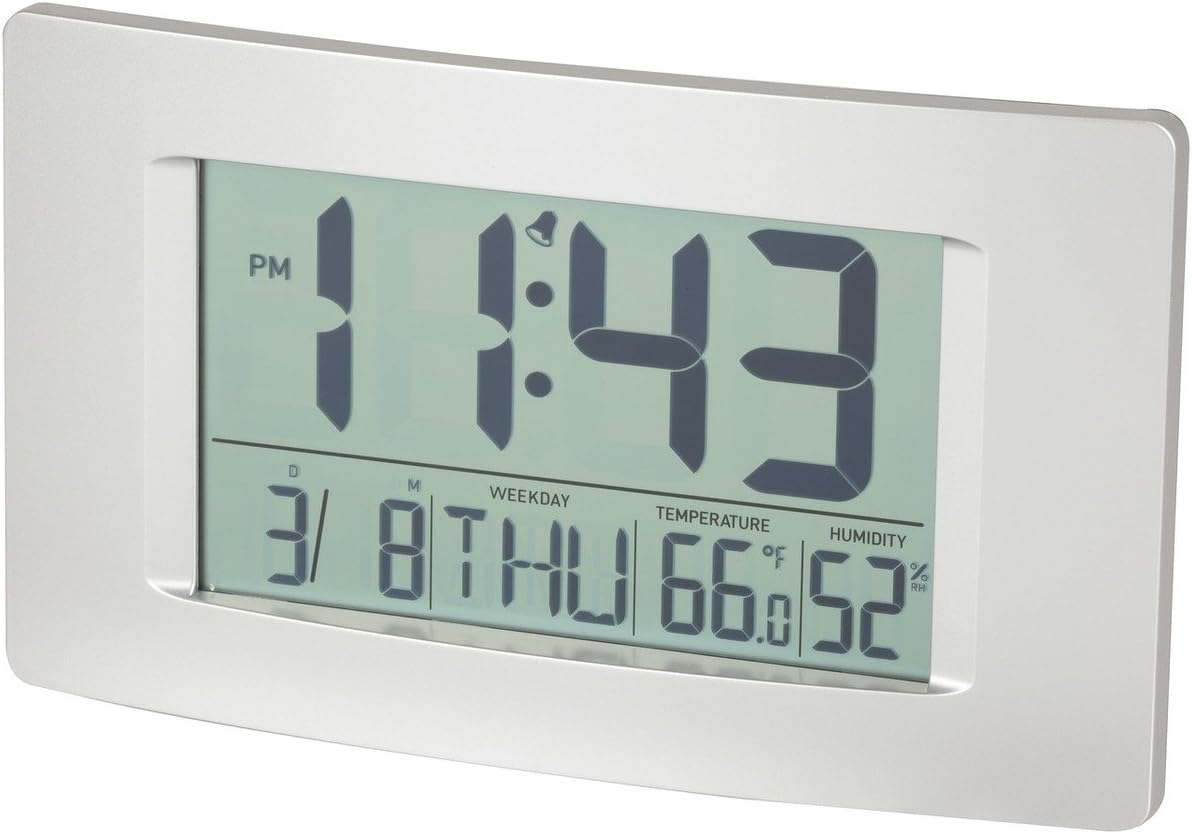
الشكل 1: الجبهة view of the Multi-Function LCD Wall Clock.
محتويات الحزمة
- DigiTech Multi-Function LCD Wall Clock (Model XC0225)
- دليل المستخدم (هذا المستند)
ملحوظة: 3 x AA batteries are required for operation and are not included in the package.

Figure 2: Product packaging illustrating the clock and its features.
يثبت
1. تركيب البطارية
- حدد مكان حجرة البطارية على الجزء الخلفي من الساعة.
- افتح غطاء حجرة البطارية.
- Insert 3 x AA batteries, ensuring correct polarity (+ and -) as indicated inside the compartment.
- أغلق غطاء حجرة البطارية جيدًا.
2. التشغيل الأولي
Upon battery installation, the clock will power on automatically and display default settings. You may need to adjust the time, date, and other settings as described in the "Operating Instructions" section.
3. خيارات التركيب
- التنسيب على سطح المكتب: Utilize the integrated stand on the back of the clock to place it on any flat surface.
- التثبيت على الحائط: Use the integrated hang-hole on the back of the clock to mount it securely on a wall using a suitable screw or hook (not included).
تعليمات التشغيل
The clock features several buttons on the back for setting and adjusting functions. Refer to the labels next to each button for their specific functions (e.g., MODE, UP, DOWN, ALARM, SNOOZE/LIGHT).
1. ضبط الوقت والتاريخ
- اضغط على وضع اضغط على الزر بشكل متكرر حتى يبدأ عرض الوقت بالوميض.
- استخدم UP or تحت أزرار لضبط الساعة.
- يضعط وضع ثم انتقل إلى الدقائق، ثم استخدم UP or تحت للتعديل.
- تواصل الضغط وضع للتنقل بين إعدادات السنة والشهر واليوم، وضبط كل منها باستخدام UP or تحت.
- يضعط وضع للمرة الأخيرة للخروج من وضع الإعدادات.
2. ضبط المنبه
- اضغط على إنذار اضغط على الزر مرة واحدة لعرض وقت التنبيه الحالي.
- اضغط مع الاستمرار على إنذار اضغط على الزر حتى يبدأ مؤشر ساعة المنبه بالوميض.
- استخدم UP or تحت أزرار لضبط ساعة التنبيه.
- يضعط إنذار again to move to alarm minutes, then use UP or تحت للتعديل.
- يضعط إنذار one last time to confirm and exit alarm setting mode.
- لتنشيط/إلغاء تنشيط التنبيه، اضغط على إنذار اضغط على الزر لفترة وجيزة عندما لا تكون في وضع الإعداد. سيظهر رمز التنبيه/يختفي على الشاشة.
3. وظيفة الغفوة
عندما يصدر صوت التنبيه ، اضغط على غفوة / ضوء button to activate the snooze function. The alarm will temporarily stop and sound again after the set snooze interval (1-60 minutes, adjustable in settings).
4. Temperature Unit Selection (°C/°F)
اضغط لفترة وجيزة على UP button (or a dedicated °C/°F button if present) to toggle between Celsius (°C) and Fahrenheit (°F) temperature display.
5. تنسيق 12/24 ساعة
اضغط لفترة وجيزة على تحت button (or a dedicated 12/24H button if present) to switch between 12-hour and 24-hour time formats.
صيانة
1. التنظيف
- امسح سطح الساعة بقطعة قماش ناعمة وجافة.
- لا تستخدم المنظفات الكاشطة أو المذيبات أو البخاخات الكيميائية، لأنها قد تتلف الشاشة أوasing.
2. استبدال البطارية
When the display becomes dim or functions become erratic, it is time to replace the batteries. Follow the "Battery Installation" steps in the Setup section to replace the 3 x AA batteries. Always replace all batteries at the same time with new ones.
استكشاف الأخطاء وإصلاحها
| مشكلة | السبب المحتمل | حل |
|---|---|---|
| العرض فارغ أو خافت. | البطاريات فارغة أو تم تركيبها بشكل غير صحيح. | استبدل البطاريات ببطاريات جديدة من نوع AA عدد 3، مع التأكد من صحة القطبية. |
| الوقت/التاريخ غير صحيح. | Not set correctly after battery installation or power interruption. | اتبع تعليمات "ضبط الوقت والتاريخ" لإعادة الضبط. |
| لا يصدر صوت الإنذار. | Alarm is not activated or alarm time is incorrect. | Ensure the alarm icon is displayed. Verify the alarm time setting. |
| يبدو أن قراءات درجة الحرارة/الرطوبة غير دقيقة. | Clock placed near heat sources, vents, or in direct sunlight. | Relocate the clock to an area with stable ambient temperature and humidity. Allow time for readings to stabilize. |
تحديد
| ميزة | التفاصيل |
|---|---|
| نموذج | إكس سي0225 |
| نوع العرض | شاشات الكريستال السائل الرقمية |
| حجم شاشة LCD | 194 مم (عرض) × 110 مم (ارتفاع) |
| الوظائف | Time, Date, Day of Week, Alarm, Snooze, Indoor Temperature, Indoor Humidity |
| تنسيق الوقت | 12 Hour / 24 Hour selectable |
| مدى درجة الحرارة | -9.9 درجة مئوية إلى + 50 درجة مئوية (14.1 درجة فهرنهايت إلى 122.0 درجة فهرنهايت) |
| نطاق الرطوبة | 20٪ إلى 95٪ الرطوبة النسبية (RH) |
| مدة الغفوة | 1 - 60 minutes (adjustable) |
| مصدر الطاقة | 3 بطاريات AA (غير متضمنة) |
| Dimensions (Overall, W x H x D) | 306 مم × 176 مم × 36 مم (تقريبًا) |
| وزن | 540g (without batteries) / 660g (shipping weight) |
| خيارات التركيب | Integrated Stand, Wall Hang-hole |

Figure 3: Main display area dimensions of the clock for reference.
الضمان والدعم
This DigiTech product comes with a ضمان لمدة سنتين من تاريخ الشراء. يغطي هذا الضمان عيوب المواد والصناعة في ظل الاستخدام العادي.
For technical support, warranty claims, or further assistance, please contact your retailer or the DigiTech customer service department. Please have your model number (XC0225) and proof of purchase ready when contacting support.


