1. المقدمة
The POWERTECH MP3752 is an intelligent and lightweight solar charge controller designed to manage the power flow from your solar panels to your battery bank. Utilizing Pulse Width Modulation (PWM) technology, it ensures efficient and safe battery charging. This controller offers a set-and-forget operation, providing maximum charge into your batteries without constant monitoring. It integrates essential safety features such as overload, short-circuit, over-discharge, and reverse-polarity protection. Additionally, a convenient USB port on the front panel allows for up to 1.2A charging, useful for mobile devices during power outages. The unit supports various battery types including sealed lead-acid, Gel, and flooded cells, and automatically selects the optimal charging mode (bulk, equalise, float).
2. معلومات السلامة
Please read all instructions carefully before installation and operation. Failure to follow these instructions may result in damage to the unit, battery, or personal injury.
- تأكد من صحة جميع التوصيلات وتأمينها قبل تشغيل الطاقة.
- Do not connect the solar controller to an AC power source.
- قم بتثبيت وحدة التحكم في منطقة جيدة التهوية، بعيدًا عن المواد القابلة للاشتعال وأشعة الشمس المباشرة.
- تجنب حدوث ماس كهربائي في أطراف البطارية أو أطراف الألواح الشمسية.
- قم دائمًا بتوصيل البطارية أولاً، ثم اللوحة الشمسية، وأخيرًا الحمل. افصلها بترتيب عكسي.
- This device is not waterproof; protect it from moisture and water.
- يجب ألا يقوم بالتركيب والصيانة إلا الموظفين المؤهلين.
3. مواصفات المنتج
- Automatic charge mode selection (Bulk, Equalise, Float).
- Suitable for both 12V and 24V battery banks.
- Integrated USB charging port (5V, 1.2A max) on the front panel.
- Supports sealed lead-acid, Gel, and flooded battery types.
- Comprehensive protection features: overload, short-circuit, over-discharge, reverse-polarity.
- Pulse Width Modulation (PWM) charging technology.
4. محتويات العبوة
يرجى التحقق من محتويات الحزمة عند الاستلام:
- 1 x POWERTECH MP3752 Solar Controller
- 1 × دليل المستخدم (هذه الوثيقة)
5. انتهى المنتجview والتوصيلات
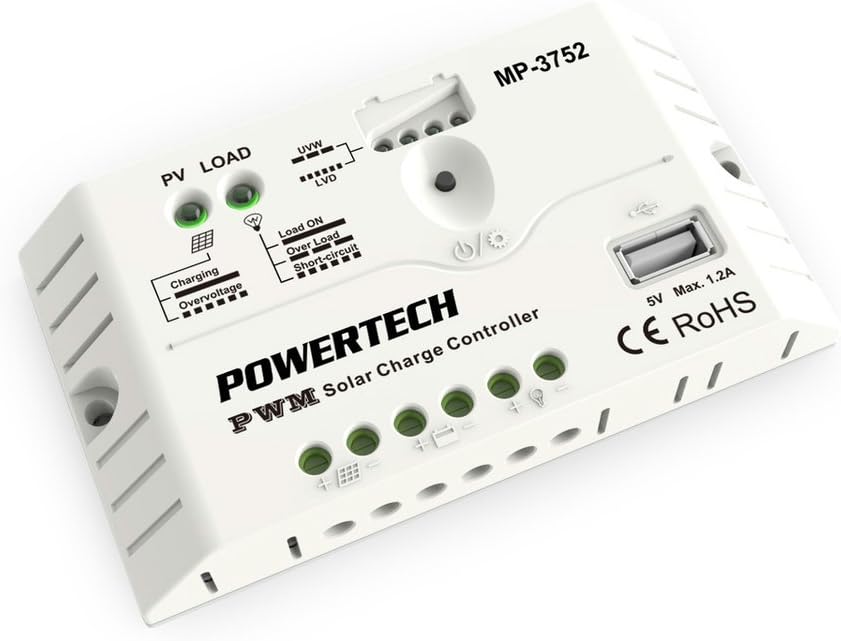
الشكل 1: الجبهة view of the POWERTECH MP3752 Solar Controller. This image displays the PV LOAD, UVW, LVD, Load ON, Over Load, Short-Circuit indicators, the USB port, and the connection terminals for solar panels, battery, and load.
The MP3752 controller features clearly marked terminals for easy connection. Refer to Figure 1 for a visual guide to the controller's layout and indicators.
محطات الاتصال:
- Solar Panel Input (PV): Connect your solar panel array here. Ensure correct polarity (+ and -).
- توصيل البطارية: Connect your 12V or 24V battery bank here. Observe correct polarity (+ and -).
- تحميل الإخراج: Connect your DC loads (e.g., lights, fans) here. Observe correct polarity (+ and -).
- منفذ USB: 5V, 1.2A max output for charging small electronic devices.
6. الإعداد والتثبيت
اتبع هذه الخطوات لتثبيت جهاز التحكم في شحن الطاقة الشمسية بشكل صحيح:
- التركيب: Choose a dry, well-ventilated indoor location, away from direct sunlight, high temperatures, and moisture. Ensure sufficient air circulation around the controller.
- توصيل البطارية:
- Connect the positive (+) terminal of the battery to the battery positive (+) terminal on the controller.
- Connect the negative (-) terminal of the battery to the battery negative (-) terminal on the controller.
- The controller will automatically detect if it's a 12V or 24V system.
- اتصال الألواح الشمسية:
- Connect the positive (+) terminal of the solar panel to the solar panel positive (+) terminal on the controller.
- Connect the negative (-) terminal of the solar panel to the solar panel negative (-) terminal on the controller.
- Ensure the open-circuit voltage of the solar panel does not exceed the maximum input voltage of the controller (typically 50V for 12/24V systems).
- اتصال التحميل:
- Connect the positive (+) terminal of your DC load to the load positive (+) terminal on the controller.
- Connect the negative (-) terminal of your DC load to the load negative (-) terminal on the controller.
- Do not exceed the maximum rated current for the load output (20A).
- التحقق من الاتصالات: Double-check all connections for correct polarity and tightness before proceeding.

Figure 2: The POWERTECH MP3752 Solar Controller shown in its packaging, illustrating its application with solar panels. This image provides a contextual view of the product's intended use.
7. تعليمات التشغيل
7.1. Automatic System Voltagه الاعتراف
The controller automatically detects whether the connected battery bank is 12V or 24V upon initial connection. Ensure the battery is connected first for proper voltagالكشف الإلكتروني.
7.2. طرق الشحن
The MP3752 employs intelligent PWM charging, automatically cycling through different stages to optimize battery health and lifespan:
- الشحن بالجملة: Delivers maximum current to rapidly bring the battery to approximately 80% charge.
- Equalise Charge: يطبق بشكل دوري حجمًا أعلىtage to equalize the charge among battery cells, preventing sulfation and extending battery life (for flooded batteries).
- تعويم المسؤول: يحافظ على شحن البطارية بالكامل من خلال توفير جهد صغير وثابتtagهـ، تعويضاً عن التسريح الذاتي.
7.3. Load Control
The load output is controlled by the controller to prevent over-discharge of the battery. When the battery voltagه يسقط أقل من Low Voltage Disconnect (LVD) threshold, the load output will be automatically disconnected. It will reconnect once the battery has recharged to the Low Voltage Reconnect (LVR) threshold.
Press the power button on the controller to manually turn the load output ON or OFF.
7.4. منفذ شحن USB
The 5V, 1.2A USB port can be used to charge small electronic devices like smartphones or tablets. This port is active as long as the battery has sufficient charge.
8. المؤشرات
The POWERTECH MP3752 features several LED indicators to provide real-time status information:
- PV LOAD (Solar Panel Indicator):
- أخضر: Solar panel is connected and generating power.
- عن: No solar input or insufficient light.
- مؤشر الشحن:
- أخضر: جاري شحن البطارية.
- عن: Battery is fully charged or not charging.
- أوفرفولtagالمؤشر الإلكتروني:
- أحمر: حجم الإدخالtage from solar panel is too high, or battery voltage is overcharge protection level.
- UVW (Battery Voltage Indicator): Multiple LEDs indicating battery charge level.
- LVD (حجم منخفضtage Disconnect Indicator):
- أحمر: حجم البطاريةtage is low, load output has been disconnected.
- مؤشر تشغيل الحمل:
- أخضر: Load output is active.
- Over Load Indicator:
- أحمر: Load current exceeds the maximum rated current. Load output may be temporarily disconnected.
- Short-Circuit Indicator:
- أحمر: Short-circuit detected on the load output. Load output will be disconnected.
9. الصيانة
To ensure optimal performance and longevity of your solar charge controller, regular maintenance is recommended:
- تنظيف: Periodically clean the exterior of the controller with a dry, soft cloth. Do not use solvents or abrasive cleaners.
- الاتصالات: Annually check all wiring connections for tightness and corrosion. Loose connections can cause overheating and poor performance.
- تهوية: تأكد من عدم انسداد فتحات التهوية ووجود تدفق هواء كافٍ حول الوحدة.
- تقتيش: افحص وحدة التحكم بحثًا عن أي علامات تلف مادي أو تغير في اللون أو روائح غير عادية.
10. استكشاف الأخطاء وإصلاحها
| مشكلة | السبب المحتمل | حل |
|---|---|---|
| No charging from solar panel. |
|
|
| لا يعمل تحميل المخرجات. |
|
|
| أوفرفولtagالمؤشر الإلكتروني قيد التشغيل. |
|
|
11. المواصفات
| المعلمة | قيمة |
|---|---|
| رقم الموديل | MP3752 (03617080) |
| حجم النظامtage | 12V/24V Auto-sensing |
| الحد الأقصى لتيار الشحن | 20 أمبير |
| الأعلى. الحمل الحالي | 20 أمبير |
| مخرج يو اس بي | 5 فولت ، 1.2 أمبير كحد أقصى |
| نوع الشحن | PWM (Bulk, Equalise, Float) |
| أنواع البطارية المدعومة | Sealed Lead-Acid, Gel, Flooded |
| أبعاد المنتج | 5.83 × 3.39 × 1.38 بوصة |
| وزن العنصر | 5.6 أونصات |
| الشركة المصنعة | باور تيك |
| ماركة | جايكار |
12. الضمان والدعم
This product is covered by a standard manufacturer's warranty against defects in materials and workmanship. Please refer to your purchase documentation for specific warranty terms and duration. For technical support, troubleshooting assistance, or warranty claims, please contact your retailer or the manufacturer directly.
ملاحظة: سيؤدي تفكيك المنتج أو تعديله دون إذن إلى إبطال الضمان.


