1. المقدمة
This manual provides essential information for the installation, configuration, operation, and maintenance of the MOXA AWK-1137C-US-T 802.11n Wireless AP Client. This device is designed for industrial wireless applications, offering reliable 802.11n connectivity in challenging environments with a wide operating temperature range.
2. معلومات السلامة
- افصل الطاقة دائمًا قبل تنظيف الجهاز أو صيانته.
- تأكد من التأريض المناسب لمنع المخاطر الكهربائية.
- قم بتشغيل الجهاز ضمن نطاقات درجة الحرارة والرطوبة المحددة.
- لا تعرض الجهاز للرطوبة أو درجات الحرارة القصوى.
- يجب ألا يقوم بالتركيب والصيانة إلا الموظفين المؤهلين.
3. محتويات العبوة
تأكد من أن الحزمة الخاصة بك تحتوي على العناصر التالية:
- MOXA AWK-1137C-US-T Wireless AP Client unit
- دليل التثبيت السريع
- Documentation CD (or link to online resources)
- Mounting kit (if applicable)
- Power adapter or terminal block (if applicable)
في حال وجود أي عناصر مفقودة أو تالفة، يرجى الاتصال بالبائع على الفور.
4. انتهت الأجهزةview
The AWK-1137C-US-T features robust industrial design. Key components typically include:
- منافذ إيثرنت: لاتصالات الشبكة السلكية.
- موصلات الهوائي: For external antennas to optimize wireless signal.
- مدخلات الطاقة: Terminal block for DC power input.
- مؤشرات LED: Provide status information for power, WLAN, and Ethernet activity.
- زر إعادة الضبط: لاستعادة إعدادات المصنع الافتراضية.
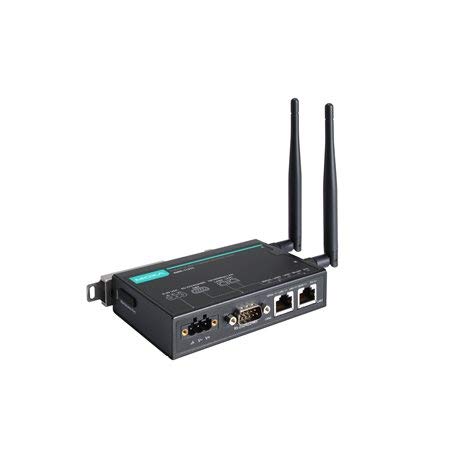
Figure 1: MOXA AWK-1137C-US-T Wireless AP Client. This image shows the compact industrial design of the device, typically featuring antenna ports, Ethernet connections, and power input.
5. الإعداد
5.1 التركيب
The AWK-1137C-US-T supports DIN-rail mounting. Attach the DIN-rail kit to the device and snap it onto a standard DIN-rail. Ensure the device is securely fastened to prevent vibration or accidental dislodgement.
5.2 توصيل الطاقة
- Connect a suitable DC power source (e.g., 12-48 VDC) to the device's power input terminal block.
- Ensure correct polarity (+ and -) as indicated on the device.
- Tighten the screws on the terminal block to secure the power wires.
5.3 اتصال الشبكة
- Connect an Ethernet cable from your network switch or router to the Ethernet port on the AWK-1137C-US-T.
- Attach appropriate antennas to the antenna connectors. Ensure they are securely tightened.
5.4 التكوين الأولي
To access the device's webواجهة إدارة قائمة على:
- Connect a computer directly to the device's Ethernet port or ensure it is on the same network segment.
- Configure your computer's IP address to be in the same subnet as the device's default IP address (refer to the Quick Installation Guide for the default IP).
- افتح web browser and enter the device's default IP address.
- قم بتسجيل الدخول باستخدام اسم المستخدم وكلمة المرور الافتراضيين (راجع دليل التثبيت السريع).
- Change the default password immediately for security.
6. التشغيل
أوضاع التشغيل 6.1
The AWK-1137C-US-T can operate in various modes, including Access Point (AP) and Client mode. Select the appropriate mode based on your network requirements.
- وضع نقطة الوصول (AP): The device acts as a central hub for wireless clients to connect.
- وضع العميل: The device connects to an existing Access Point, extending wired network connectivity wirelessly.
6.2 الإعدادات اللاسلكية
Configure the following wireless parameters via the web الواجهة:
- معرف مجموعة الخدمات: The name of your wireless network.
- قناة: Select an appropriate wireless channel to avoid interference.
- فرقة: Configure for 2.4 GHz or 5 GHz operation, depending on the model and environment.
- نقل الطاقة: Adjust the output power for optimal coverage and compliance.
6.3 إعدادات الأمان
Implement strong wireless security to protect your network:
- التشفير: Use WPA2/WPA3-PSK or Enterprise for robust security.
- Password/Passphrase: Choose a strong, unique password.
- تصفية عنوان MAC: Optionally restrict access to specific devices.
7. الصيانة
7.1 تحديثات البرامج الثابتة
افحص الموكسا بانتظام website for the latest firmware updates. Firmware updates can provide new features, performance improvements, and security patches. Follow the instructions provided with the firmware package for a safe update process.
7.2 التنظيف
Clean the device periodically with a soft, dry cloth. Do not use liquid or aerosol cleaners. Ensure the device is powered off before cleaning.
7.3 الاعتبارات البيئية
Ensure the operating environment remains within the specified temperature and humidity limits (-40 to 75°C). Avoid placing the device near heat sources or in direct sunlight.
8. استكشاف الأخطاء وإصلاحها
8.1 لا يوجد طاقة
- Check the power cable connection and ensure the power source is active.
- التحقق من مستوى الطاقةtage is within the device's specified range.
- Inspect the power input terminal block for loose connections.
8.2 لا يوجد اتصال بالشبكة
- Check Ethernet cable connections and ensure they are properly seated.
- Verify that the network switch or router is functioning correctly.
- For wireless connections, ensure the SSID, security settings, and channel match the connected AP/client.
- Check the LED indicators for network activity.
8.3 سرعة لاسلكية بطيئة
- Ensure antennas are properly connected and positioned for optimal signal.
- Check for sources of interference (e.g., other wireless devices, microwave ovens).
- Adjust the wireless channel to a less congested one.
- Verify that the device is operating in 802.11n mode and not a slower standard.
8.4 إعادة الضبط إلى إعدادات المصنع الافتراضية
If configuration issues persist, you may need to reset the device to its factory default settings. Locate the reset button (often recessed) and press and hold it for approximately 5-10 seconds while the device is powered on. The device will reboot with default settings.
9. المواصفات
| ميزة | مواصفة |
|---|---|
| رقم الموديل | AWK-1137C-US-T |
| المعيار اللاسلكي | 802.11ن |
| فرقة التشغيل | US Band |
| درجة حرارة التشغيل | -40 إلى 75 درجة مئوية |
| أبعاد الحزمة | 7.87 × 6.57 × 1.97 بوصة |
| وزن العنصر | 1.15 رطل |
| الشركة المصنعة | موكسا |
| تاريخ أول توفر | 30 أبريل 2018 |
10. الضمان والدعم
10.1 معلومات الضمان
MOXA products typically come with a standard warranty. For detailed warranty terms and conditions, please refer to the official MOXA webالموقع أو بطاقة الضمان المرفقة مع المنتج. احتفظ بإيصال الشراء للمطالبة بالضمان.
10.2 الدعم الفني
For technical assistance, product documentation, or driver downloads, please visit the official MOXA support website. You can also contact MOXA's customer support team directly through the contact information provided on their webموقع.


