1. المقدمة
Thank you for choosing the TecTake Corner Computer Desk, Model 402405. This L-shaped workstation is designed to provide a practical and spacious area for your computer and work essentials. Its modern design, featuring a refined tabletop and stable steel construction, ensures durability and a timeless aesthetic. This manual provides essential information for the safe assembly, operation, and maintenance of your new desk.
يرجى قراءة هذا الدليل جيداً قبل التجميع والاستخدام، والاحتفاظ به للرجوع إليه مستقبلاً.
2. تعليمات السلامة
لضمان الاستخدام الآمن ومنع التلف، يرجى مراعاة إرشادات السلامة التالية:
- حَشد: Assemble the desk on a soft, clean surface to prevent scratches. Ensure all components are correctly aligned and securely fastened according to the provided assembly instructions.
- استقرار: Do not overload the desk. The maximum load capacity is 100 kg (220 lbs). Distribute weight evenly across the surface.
- الموقع: Place the desk on a level and stable floor. Avoid placing it near heat sources, direct sunlight, or in excessively humid environments.
- أطفال: احتفظ بالأجزاء الصغيرة ومواد التغليف بعيدًا عن متناول الأطفال لتجنب مخاطر الاختناق.
- صيانة: Regularly check all screws and connections to ensure they remain tight. Tighten if necessary.
- متحرك: When moving the desk, lift it rather than dragging it to prevent damage to the legs and floor.
3. محتويات العبوة
Before beginning assembly, please verify that all parts are present and undamaged. The package should contain:
- 1x Corner Desk (comprising main tabletop sections and frame components)
- 1x Computer Tower Holder
- 1x Illustrated Assembly Instructions
- All necessary screws, fittings, and tools for assembly (as specified in the assembly instructions)

Figure 1: Assembled TecTake Corner Computer Desk (Dark Wood Finish). This image shows the overall L-shaped design, the spacious work surface, and the integrated keyboard tray.
4. الإعداد والتجميع
The TecTake Corner Computer Desk requires assembly. Please follow the detailed, illustrated instructions provided in your package. It is recommended to have two people for assembly to ensure ease and safety.
- أفرغ: Carefully unpack all components and lay them out on a clean, soft surface to prevent damage.
- تحديد الأجزاء: راجع قائمة الأجزاء في دليل التجميع لتحديد كل مكون.
- اتبع الخطوات: Proceed step-by-step according to the illustrated assembly guide. Ensure all screws and connectors are tightened securely but do not overtighten.
- صينية لوحة المفاتيح: Install the sliding keyboard tray as indicated in the instructions. Ensure it slides smoothly.
- Computer Tower Holder: Position the included computer tower holder as desired.
- التحقق النهائي: Once assembled, gently test the desk's stability and ensure all parts are firmly connected.

الشكل 2: من أعلى إلى أسفل view of the TecTake Corner Computer Desk (White Finish). This perspective highlights the L-shape and the ample surface area for multiple monitors or work items.
5. تعليمات التشغيل
Your TecTake Corner Computer Desk is designed for efficient and comfortable use. Here are some operational aspects:
- سطح العمل: Utilize the large L-shaped surface for your monitor(s), laptop, documents, and other office supplies. The design provides ample space for multitasking.
- صينية لوحة المفاتيح: The integrated sliding keyboard tray allows you to store your keyboard and mouse neatly under the desk when not in use, freeing up valuable desktop space. Gently pull it out for use and push it back in for storage.
- Computer Tower Holder: The included holder is designed to keep your computer tower off the floor, protecting it from dust and allowing for better airflow. It accommodates towers with a maximum width of 25 cm.
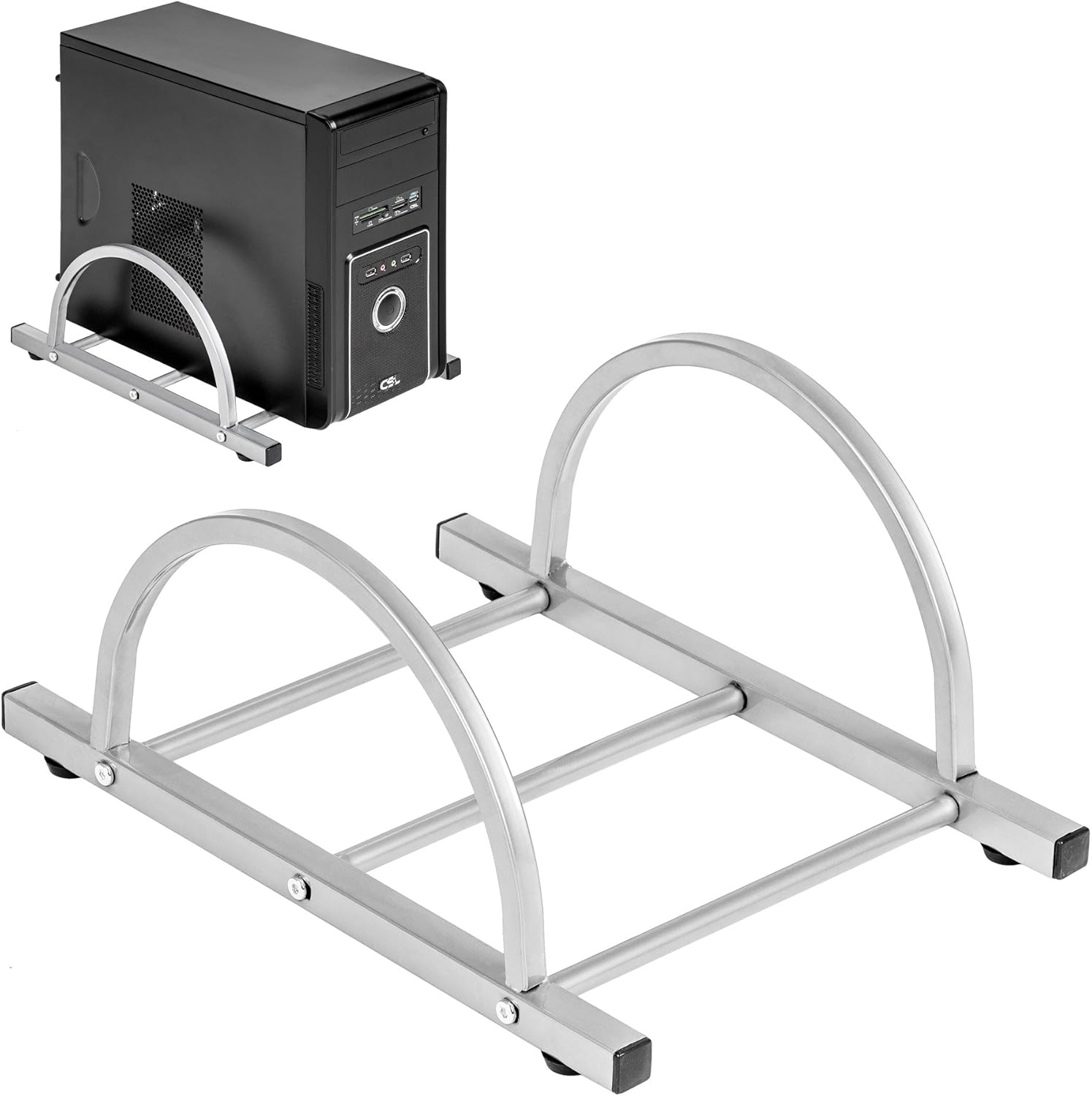
Figure 3: TecTake Computer Tower Holder. This image displays the separate holder designed to keep your PC tower elevated and secure.
6. الصيانة
العناية المناسبة ستطيل عمر مكتبك وتحافظ على مظهره:
- تنظيف: مسح الأسطح بمادة ناعمة، دamp cloth. For stubborn marks, use a mild soap solution and immediately dry with a clean cloth. Avoid abrasive cleaners or harsh chemicals.
- الانسكابات: Clean up spills immediately to prevent staining or damage to the MDF surface.
- الأجهزة: Periodically check all screws and fittings for tightness. Re-tighten as necessary to maintain stability.
- حماية: Use coasters for drinks and protective pads under hot items to prevent damage to the tabletop.
7. استكشاف الأخطاء وإصلاحها
إذا واجهت مشاكل مع مكتبك، فضع في اعتبارك الحلول الشائعة التالية:
- المكتب متذبذب:
- تأكد من أن المكتب موجود على سطح مستو.
- افحص جميع براغي ومسامير التجميع. أحكم ربط أي وصلات مفكوكة.
- Verify that all leg caps are properly installed and making full contact with the floor.
- درج لوحة المفاتيح لا ينزلق بسلاسة:
- Check for any obstructions in the sliding mechanism.
- Ensure the rails are correctly installed and aligned.
- Clean the rails if dust or debris is present.
- اجزاء مفقودة: If you find any parts missing upon unpacking, please refer to the "Warranty and Support" section to contact customer service.
8. المواصفات
| ميزة | التفاصيل |
|---|---|
| ماركة | TecTake |
| رقم الموديل | 402405 |
| الأبعاد الكلية (الطول × العرض × الارتفاع) | 170 x 135 x 75 cm (66.9 x 53.1 x 29.5 inches) |
| ارتفاع سطح العمل | 75 سم (29.5 بوصة) |
| Large Tabletop Section (L x W) | 115 × 55 سم (45.3 × 21.7 بوصة) |
| Small Tabletop Section (L x W) | 80 × 55 سم (31.5 × 21.7 بوصة) |
| Rounded Corner Section (L x W) | 55 × 55 سم (21.7 × 21.7 بوصة) |
| سمك سطح الطاولة | 1.5 سم (0.6 بوصة) |
| Sliding Keyboard Tray (L x W) | 56.5 × 35 سم (22.2 × 13.8 بوصة) |
| Steel Tube Dimensions | 3x2 cm; 2x2 cm; 1.5x1.5 cm |
| Computer Tower Holder Width (Max) | 25 سم (9.8 بوصة) |
| الحد الأقصى لسعة التحميل | 100 كجم (220 رطل) |
| مادة | Veneered MDF surface, powder-coated steel tube frame, plastic feet and end caps |
| Color (as per model) | أبيض |
9. الضمان والدعم
TecTake products are manufactured with quality and durability in mind. For information regarding warranty coverage, please refer to the warranty card included with your product or visit the official TecTake webموقع.
If you have any questions, require assistance with assembly, or need to report missing/damaged parts, please contact TecTake customer service. Contact details can typically be found on the product packaging, the included assembly instructions, or the official TecTake webموقع.
الدعم عبر الإنترنت: www.tectake.de (يرجى مراجعة منطقتك) web(للحصول على معلومات الاتصال المحددة، يرجى زيارة الموقع).


