مقدمة
The Akuvox SP-R50 is a business IP phone designed to provide high-quality, cost-effective communication solutions. It features HD Voice, a 2.3-inch 132x64 graphical LCD with backlight, and supports 3-way conferencing. This manual provides essential information for setting up, operating, maintaining, and troubleshooting your SP-R50 IP phone.
محتويات الحزمة
قبل البدء، يرجى التأكد من وجود جميع العناصر في العبوة:
- IP Phone (Akuvox SP-R50) x 1
- حامل × 1
- Handset with Cord x 1
- كابل إيثرنت × 1
- محول الطاقة × 1
يثبت
Follow these steps to set up your Akuvox SP-R50 IP Phone:
- إرفاق الحامل: Securely attach the stand to the back of the IP phone.
- توصيل سماعة الهاتف: قم بتوصيل أحد طرفي سلك سماعة الهاتف الملفوف بسماعة الهاتف والطرف الآخر بمنفذ سماعة الهاتف الموجود على قاعدة الهاتف.
- الاتصال بالشبكة:
- إذا كنت تستخدم Power over Ethernet (PoE)، فقم بتوصيل أحد طرفي كبل Ethernet بمنفذ LAN على الهاتف والطرف الآخر بمفتاح أو جهاز توجيه شبكة يدعم PoE.
- If not using PoE, connect one end of the Ethernet cable to the LAN port on the phone and the other end to your network switch or router. Then, connect the power adapter to the phone's power port and plug it into a power outlet.
- التمهيد الأولي: The phone will power on automatically. The LCD screen will display the boot-up sequence. Once complete, it will attempt to obtain an IP address and register with your SIP server.
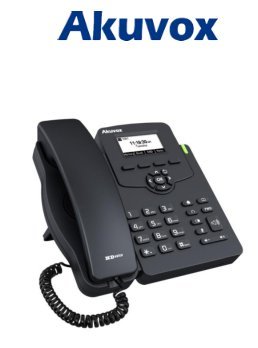
Image: Akuvox SP-R50 Business IP Phone, showing the main unit with the handset resting on its cradle and the stand attached, ready for setup.
تعليمات التشغيل
This section covers the basic operation of your Akuvox SP-R50 IP Phone.
إجراء واستقبال المكالمات
- لإجراء أتصال: Pick up the handset or press the Speaker button. Dial the desired number and press the الاتصال الهاتفي or # مفتاح.
- لتلقي مكالمة: ارفع السماعة أو اضغط على المتحدث الزر عندما يرن الهاتف.
- لإنهاء المكالمة: أغلق السماعة أو اضغط على المتحدث زر.
ميزات الاتصال
- خدمة انتظار المكالمات: Allows you to answer a second incoming call while on an active call.
- إعادة توجيه المكالمة: Redirects incoming calls to another number.
- تحويل المكالمة: Transfers an active call to another party.
- Call on Hold: Puts an active call on hold.
- صامت: يكتم صوت الميكروفون أثناء المكالمة.
- رد ألي: Configures the phone to automatically answer incoming calls.
- معاودة الاتصال: يقوم بالاتصال بآخر رقم تم الاتصال به.
- لا تزعج (DND): Blocks all incoming calls.
- Local 3-Way Conference: Allows you to conduct a three-way conference call.
Phonebook and Settings
- دليل الهاتف: The phone supports a phonebook of up to 500 groups and 5 remote phone book URLs. Access and manage contacts through the menu.
- ضبط مستوى الصوت: Use the volume keys on the phone to adjust the handset, speaker, or ringer volume.
- نغمات الرنين: Select from various ring tones through the phone's settings menu.
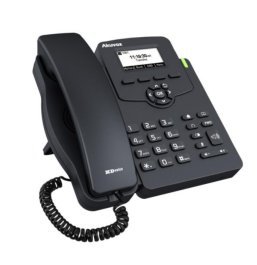
Image: Akuvox SP-R50 Business IP Phone, showcasing its ergonomic design and key layout from a slightly elevated angle, highlighting the display and navigation buttons.
صيانة
Proper maintenance ensures the longevity and optimal performance of your IP phone.
- تنظيف: استخدم قطعة قماش ناعمة وجافة لتنظيف سطح الهاتف. لإزالة البقع الصعبة، افركه برفق.ampاغسل قطعة القماش بالماء. لا تستخدم مواد كيميائية قاسية، أو منظفات كاشطة، أو مذيبات.
- بيئة: Keep the phone away from direct sunlight, excessive heat sources, and moisture. Ensure it is placed on a stable surface to prevent accidental falls.
- الكابلات: Periodically check all connected cables (handset, Ethernet, power) for any signs of wear or damage. Replace damaged cables immediately.
استكشاف الأخطاء وإصلاحها
If you encounter issues with your Akuvox SP-R50, refer to the following common problems and solutions:
| مشكلة | السبب المحتمل | حل |
|---|---|---|
| الهاتف لا يعمل. | لا يوجد اتصال طاقة أو محول طاقة/PoE معيب. | Check if the power adapter is securely plugged in or if the Ethernet cable is connected to a PoE-enabled port. Try a different power outlet or PoE port. |
| لا طنين. | مشكلة في اتصال الشبكة أو فشل تسجيل SIP. | Verify the Ethernet cable is properly connected. Check the network status on the phone's display. Contact your network administrator or SIP service provider if the issue persists. |
| لا يمكن إجراء أو استقبال المكالمات. | SIP registration failed, DND enabled, or network problem. | Ensure the phone is registered (check display). Disable DND if active. Confirm network connectivity. |
| جودة المكالمة رديئة (صدى، ثابت). | ازدحام الشبكة أو التداخل معها. | Ensure your network has sufficient bandwidth. Avoid placing the phone near other electronic devices that may cause interference. |
تحديد
Key technical specifications for the Akuvox SP-R50 Business IP Phone:
| ميزة | وصف |
|---|---|
| ماركة | أكوفوكس |
| نموذج | Akuvox SP-R50 |
| عرض | 2.3'' 132*64 Graphical LCD with Backlight |
| حسابات SIP | خط واحد (يدعم حساب SIP واحد) |
| الميزات الصوتية | HD Voice, 3-Way Conference |
| سعة دليل الهاتف | 500 groups, 5 Remote Phone Book URL مدعوم |
| سجلات المكالمات | 100 إدخالات |
| قوة | PoE Support, Power Adapter (included) |
| المميزات الخاصة | Call Waiting, Call Forward, Call Transfer, Call on Hold, Mute, Auto-answer, Redial, DND, Speed Dial, Hotline, Direct IP call, Music on hold, Intercom, Call Pickup, Group Call Pickup, Anonymous Call, Anonymous Call Rejection |
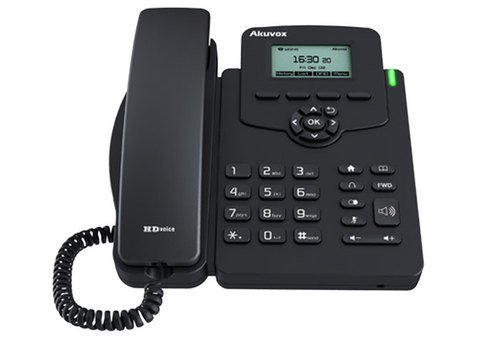
الصورة: الجبهة view of the Akuvox SP-R50 Business IP Phone, clearly showing the display, navigation keys, and numeric keypad.
معلومات الضمان
The Akuvox SP-R50 Business IP Phone comes with a ضمان لمدة سنة واحدة from the date of purchase. This warranty covers manufacturing defects and malfunctions under normal use. Please retain your proof of purchase for warranty claims. For detailed terms and conditions, refer to the warranty card included with your product or contact Akuvox customer support.
يدعم
If you require further assistance or have questions not covered in this manual, please contact your vendor or Akuvox customer support. You may also visit the official Akuvox website for additional resources and frequently asked questions.


