1. المقدمة
This document provides comprehensive instructions for the setup, operation, and maintenance of your Raspberry Pi 3 Model B+ Motherboard. The Raspberry Pi 3 Model B+ is a versatile single-board computer designed for a wide range of applications, from educational projects to home automation and server tasks.
يرجى قراءة هذا الدليل جيداً قبل استخدام جهازك لضمان الأداء الأمثل وطول العمر.
2. انتهى المنتجview
The Raspberry Pi 3 Model B+ features enhanced processing power and connectivity options compared to previous models. Key features include:
- المعالج: 1.4GHz 64-bit quad-core ARMv8 CPU (Broadcom BCM2837B0)
- كبش: 1 GB LPDDR2 SDRAM
- الربط اللاسلكي: Dual-band 2.4GHz and 5GHz IEEE 802.11.b/g/n/ac Wireless LAN, Bluetooth 4.2/BLE
- إيثرنت: Faster Gigabit Ethernet (via USB 2.0 bridge, max 300 Mbps)
- الطاقة عبر إيثرنت (PoE): Capability via a separate PoE HAT (Power over Ethernet Hardware Attached on Top)
- GPIO: 40-pin GPIO header for interfacing with external hardware
- فيديو سمعي: Full-size HDMI port, DSI display port, 3.5mm audio/video jack, CSI camera port
- USB: 4 منفذ USB 2.0
- تخزين: Micro SD card slot for operating system and data storage
- مدخلات الطاقة: Micro USB power input (5.1V / 2.5A recommended)
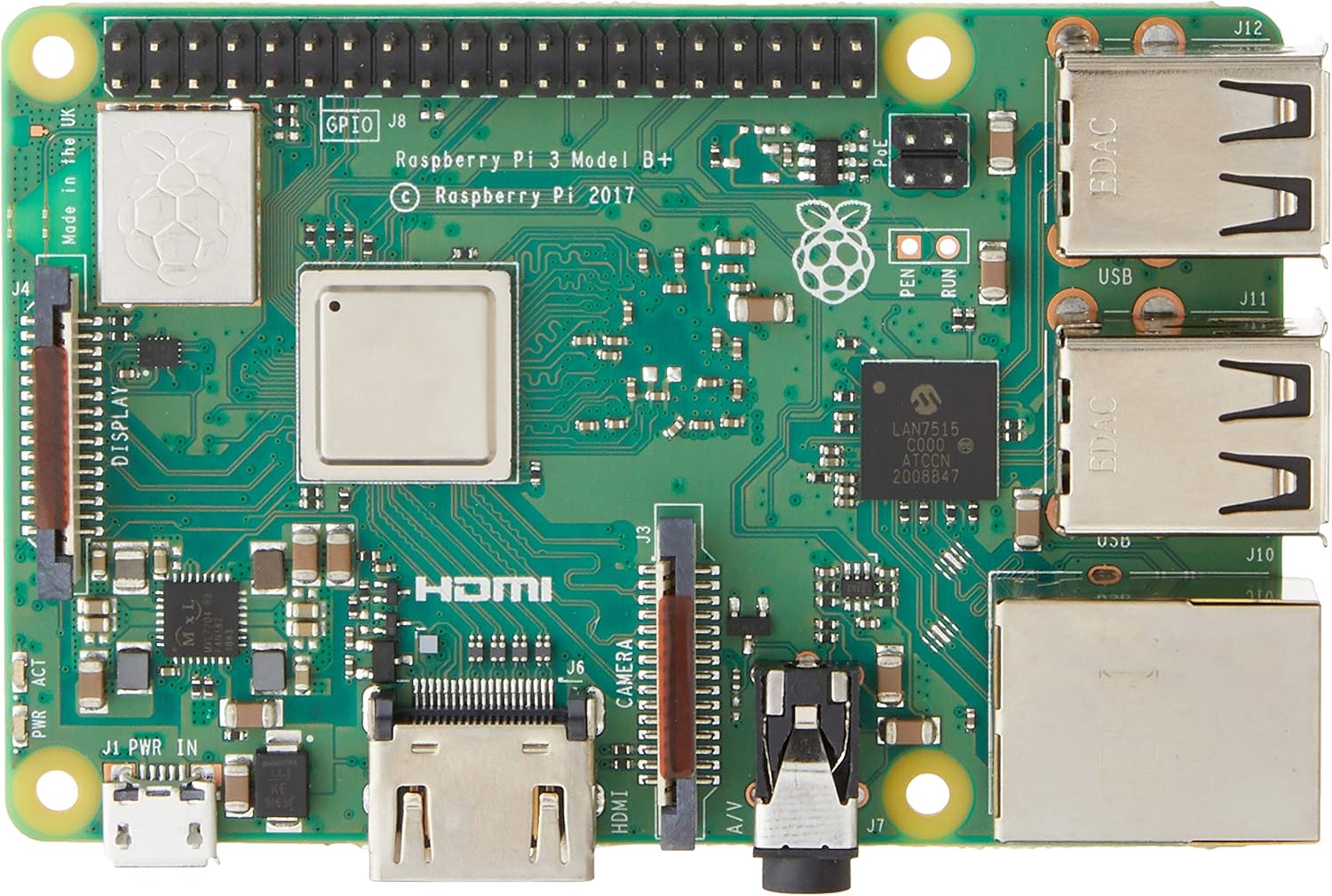
الشكل 2.1: الجزء العلوي view of the Raspberry Pi 3 Model B+ Motherboard, showing the processor, RAM, GPIO pins, HDMI, USB ports, and Ethernet port.

الشكل 2.2: القاع view of the Raspberry Pi 3 Model B+ Motherboard, highlighting the Micro SD card slot and various components.

الشكل 2.3: الجانب view of the Raspberry Pi 3 Model B+ Motherboard, detailing the Ethernet port and four USB ports.

الشكل 2.4: بزاوية view of the Raspberry Pi 3 Model B+ Motherboard, showcasing the various input/output ports including HDMI, Micro USB, and audio jack.
3. الإعداد
3.1 Required Components (Not Included)
- مزود الطاقة: 2.5A Micro USB Power Supply (recommended for stable operation).
- تخزين: Class 10 Micro SD Card (minimum 8GB, pre-loaded with Pi 3 B+ compatible software).
- أجهزة الإدخال (اختياري): USB or Bluetooth keyboard/mouse.
- العرض (اختياري): HDMI or DSI compatible display.
3.2 خطوات الإعداد الأولية
- قم بإعداد بطاقة الذاكرة الصغيرة (Micro SD): Download a compatible operating system image (e.g., Raspberry Pi OS) from the official Raspberry Pi website. Use an imaging tool (like Raspberry Pi Imager) to write the OS image to your Class 10 Micro SD card.
- أدخل بطاقة SD الصغيرة: Gently insert the prepared Micro SD card into the card slot on the underside of the Raspberry Pi board.
- توصيل الأجهزة الطرفية:
- Connect your HDMI display to the HDMI port on the Raspberry Pi.
- Connect your USB keyboard and mouse to the available USB ports.
- (Optional) Connect an Ethernet cable to the Ethernet port for wired network access.
- تطبيق القوة: Connect the 2.5A Micro USB power supply to the Micro USB power port on the Raspberry Pi. The device will automatically power on and begin booting.
- التمهيد الأول: Follow the on-screen instructions to complete the initial setup of the operating system, including setting up Wi-Fi, language, and user accounts.
4. التشغيل
4.1 التشغيل الأساسي
Once the operating system is installed and configured, your Raspberry Pi is ready for use. You can interact with it via the connected keyboard, mouse, and display, similar to a traditional desktop computer. The Raspberry Pi OS provides a graphical user interface (GUI) for ease of use.
4.2 تثبيت البرامج وتحديثاتها
Software can be installed via the graphical "Add/Remove Software" utility or through the command line using `apt` commands (e.g., `sudo apt update`, `sudo apt install [package_name]`). Regular updates are recommended to ensure system stability and security.
4.3 GPIO Usage
The 40-pin GPIO header allows for advanced projects involving physical computing. You can connect various sensors, actuators, and other electronic components to control them programmatically using languages like Python.
Refer to the official Raspberry Pi documentation for detailed guides on GPIO programming and hardware interfacing.
5. الصيانة
- تحديثات البرامج: Regularly update your operating system and installed software packages to receive the latest features, bug fixes, and security patches. This can typically be done via the terminal using `sudo apt update` followed by `sudo apt upgrade`.
- إدارة الطاقة: Always use a stable and sufficient power supply (5.1V / 2.5A) to prevent unexpected shutdowns or data corruption. Avoid disconnecting power without properly shutting down the operating system first.
- العناية ببطاقة SD: Micro SD cards can wear out over time. Regularly back up your data and consider using high-quality, durable cards. Avoid frequent power cuts to minimize the risk of SD card corruption.
- البيئة المادية: Keep the Raspberry Pi in a cool, dry, and well-ventilated area. Avoid exposing it to extreme temperatures, humidity, or dust. Consider using a protective case.
6. استكشاف الأخطاء وإصلاحها
- لا يوجد طاقة/تشغيل:
- Ensure the power supply is correctly connected and meets the 5.1V / 2.5A specification.
- Check the Micro SD card for proper insertion and ensure it has a valid operating system image.
- Look for the red power LED (PWR) to be steadily lit and the green activity LED (ACT) to flash during boot.
- مشاكل العرض:
- Verify the HDMI cable is securely connected to both the Raspberry Pi and the display.
- تأكد من ضبط شاشتك على مصدر الإدخال الصحيح.
- مشاكل الاتصال بالشبكة:
- For wired Ethernet, check the cable connection and router status.
- For Wi-Fi, ensure the correct network name (SSID) and password are entered in the OS settings.
- Restart your router and the Raspberry Pi.
- الجهاز الطرفي لا يستجيب:
- Try connecting USB devices to different USB ports.
- For Bluetooth devices, ensure they are in pairing mode and correctly configured in the OS.
7. المواصفات
| ميزة | مواصفة |
|---|---|
| المعالج | 1.4 GHz Broadcom BCM2837B0, Cortex-A53 (ARMv8) 64-bit SoC |
| كبش | 1GB LPDDR2 SDRAM |
| شبكة محلية لاسلكية | Dual-band 2.4GHz and 5GHz IEEE 802.11.b/g/n/ac |
| بلوتوث | بلوتوث 4.2، بلوتوث منخفض الطاقة (BLE) |
| إيثرنت | Gigabit Ethernet (via USB 2.0, max 300 Mbps) |
| منافذ USB | 4 منافذ USB 2.0 |
| منفذ الإدخال والإخراج العام (GPIO) | 40-pin GPIO header |
| مخرج الفيديو | Full-size HDMI, DSI display port |
| واجهة الكاميرا | CSI camera port |
| مخرج الصوت | 3.5mm 4-pole stereo audio and composite video port |
| تخزين | Micro SD port for loading your operating system and data storage |
| مدخلات الطاقة | 5.1V / 2.5A DC via Micro USB connector |
| أبعاد | 4.33 × 2.76 × 1.18 بوصة |
| وزن | 2.82 أونصات |
| نظام التشغيل | Linux (e.g., Raspberry Pi OS) |
8. الضمان والدعم
For warranty information and technical support, please refer to the official Raspberry Pi webالموقع أو تواصل مع بائع التجزئة. احتفظ بإيصال الشراء لأي مطالبات بالضمان.
راسبيري باي الرسمي Webموقع: www.raspberrypi.org


