1. انتهى المنتجview
The Sharp EL-531TG-GY is a scientific calculator designed for students and professionals requiring advanced mathematical functions. It features a 2-line display and Multi-Line Playback, facilitating the input and review of complex equations. This model is suitable for general math, algebra, geometry, trigonometry, statistics, biology, chemistry, and general science applications.
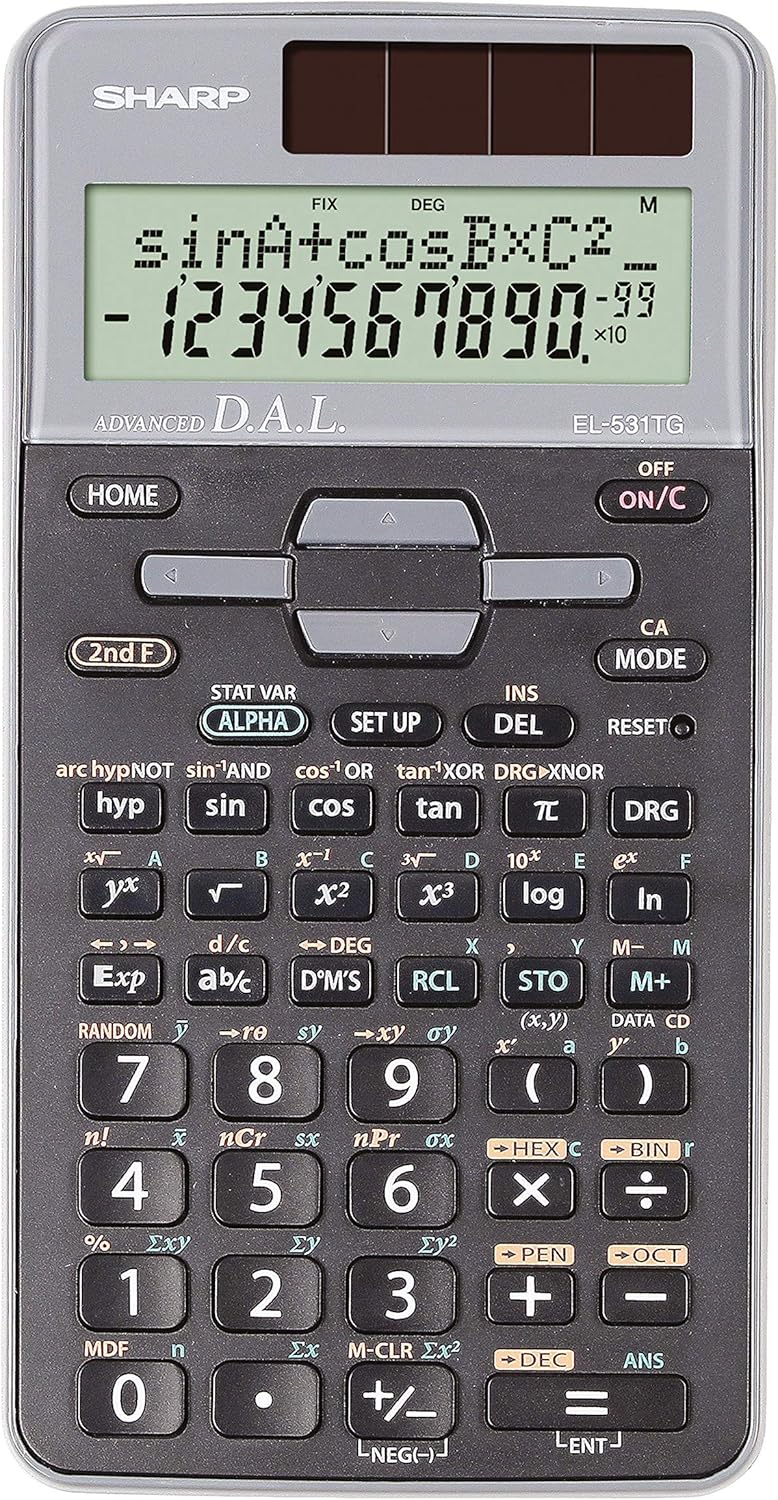
الشكل 1: الجبهة view of the Sharp EL-531TG-GY Scientific Calculator, showing the display, keypad, and solar panel.
2. الإعداد والاستخدام الأولي
2.1 مصدر الطاقة
The EL-531TG-GY calculator operates using both solar power and a single LR44 button cell battery. The solar panel provides power in well-lit environments, while the battery ensures operation in low-light conditions or when solar power is insufficient. An LR44 battery is included with the calculator.
2.2 تشغيل / إيقاف
- To turn the calculator ONاضغط على ON / C مفتاح.
- To turn the calculator عناضغط على الطابق الثاني F المفتاح متبوعًا بالملحق عن key (which is typically the same as ON / C).
2.3 Initial Display Settings
Upon first use or after a reset, the calculator will typically default to certain settings (e.g., DEG for angle units). Refer to Section 3.3 for details on changing mode settings.
3. تعليمات التشغيل
3.1 العمليات الحسابية الأساسية
أدخل الأرقام باستخدام لوحة المفاتيح الرقمية. استخدم +, -, ×، و ÷ keys for addition, subtraction, multiplication, and division, respectively. Press = to obtain the result.
3.2 الوظائف العلمية
The calculator performs over 273 advanced scientific functions. Many functions are accessed by pressing the الطابق الثاني F key before the desired function key.
- الدوال المثلثية: يستخدم خطيئة, كوس, تان. Inverse functions (sin⁻¹, cos⁻¹, tan⁻¹) are accessed via الطابق الثاني F.
- الدوال اللوغاريتمية: يستخدم سجل (الأساس 10) و ln (اللوغاريتم الطبيعي).
- القوى والجذور: يستخدم x², √, x³, ³√.
- الكسور: استخدم d/c key for fraction input and conversion.
3.3 Mode Settings (DEG/RAD/GRAD)
To change the angle unit mode (Degrees, Radians, Gradians):
- اضغط على DRG مفتاح.
- اضغط بشكل متكرر DRG to cycle through DEG (Degrees), RAD (Radians), and GRAD (Gradians). The current mode is indicated on the display.
3.4 وظائف الذاكرة
The calculator includes memory functions for storing and recalling values.
- STO (Store): يضعط شركة ستو followed by a variable key (e.g., A, B) to store the displayed value.
- RCL (Recall): يضعط ار سي ال followed by the variable key to recall the stored value.
- M+ (الذاكرة الإضافية): Adds the displayed value to the independent memory.
- م- (الذاكرة ناقص): Subtracts the displayed value from the independent memory.
3.5 Multi-Line Playback
The 2-line display allows for Multi-Line Playback, enabling users to review previous calculations and expressions. Use the directional arrow keys (up/down) to scroll through past entries and results. This feature is useful for checking work or re-using parts of previous calculations.
4. الصيانة
4.1 التنظيف
To clean the calculator, wipe the surface gently with a soft, dry cloth. Do not use abrasive cleaners, solvents, or excessive moisture, as these can damage the display or internal components.
4.2 استبدال البطارية
The calculator uses one LR44 button cell battery. If the display becomes dim or erratic in low-light conditions, the battery may need replacement. To replace the battery:
- تأكد من إيقاف تشغيل الآلة الحاسبة.
- حدد مكان حجرة البطارية في الجزء الخلفي من الآلة الحاسبة.
- افتح غطاء الحجرة بعناية.
- قم بإزالة بطارية LR44 القديمة وأدخل بطارية جديدة، مع التأكد من صحة القطبية (+/-).
- أغلق غطاء حجرة البطارية جيدًا.
4.3 التخزين
When not in use, store the calculator in a cool, dry place away from direct sunlight and extreme temperatures. The hard cover included with the calculator provides protection from scratches and minor impacts.
5. استكشاف الأخطاء وإصلاحها
5.1 مشاكل العرض
- Blank or Dim Display: Ensure sufficient light for the solar panel. If the issue persists, replace the LR44 battery.
- Erratic Display: This may indicate a low battery. Replace the LR44 battery.
5.2 Incorrect Results
- Check Mode Settings: Verify that the angle unit (DEG, RAD, GRAD) is set correctly for trigonometric calculations.
- Input Error: Review your input using the Multi-Line Playback feature to ensure the expression was entered correctly.
- Memory Contents: If using memory functions, ensure the stored values are correct.
5.3 Calculator Not Responding
If the calculator becomes unresponsive, try performing a reset. Locate the إعادة ضبط button (often a small recessed button requiring a thin object like a paperclip to press). Pressing this button will clear all memory and return the calculator to its factory default settings.
6. المواصفات

الشكل 2: الجبهة view of the Sharp EL-531TG-GY Scientific Calculator, illustrating its dimensions.
| ميزة | وصف |
|---|---|
| رقم الموديل | SH-EL531TGGY |
| نوع العرض | 2-line LCD with Multi-Line Playback |
| الوظائف | أكثر من 273 وظيفة علمية متقدمة |
| مصدر الطاقة | Solar and 1 x LR44 battery (included) |
| مادة | بلاستيك |
| الأبعاد (الطول × العرض × الارتفاع) | 16.1 × 8 × 1.5 سم (تقريبًا) |
| وزن | 100 جم (تقريبًا) |

الشكل 3: الجانب view of the Sharp EL-531TG-GY Scientific Calculator, showing its slim profile.
7. الضمان والدعم
7.1 معلومات الضمان
This product is covered by a manufacturer's warranty. Please refer to the warranty card included with your purchase or visit the official Sharp webالموقع للحصول على شروط وأحكام الضمان التفصيلية الخاصة بمنطقتك.
7.2 دعم العملاء
For technical assistance, troubleshooting not covered in this manual, or service inquiries, please contact Sharp customer support. Contact information can typically be found on the Sharp official webالموقع أو على عبوة المنتج.


