مقدمة
This manual provides instructions for the operation and maintenance of your Timex Expedition Digital Chrono Alarm Timer 33mm Watch, Model TW4B13100. This digital outdoor watch features a chronograph, alarm, and timer, designed for everyday use.

الشكل 1: أمام view of the Timex Expedition Digital Watch. The watch features a black case, a clear digital display showing the time and date, and a durable gray and blue striped fabric strap. Buttons for 'SET', 'MODE', 'START/SPLIT', and 'STOP/RESET' are visible on the sides of the watch case.
يثبت
Initial Activation and Time Setting
Upon first use, or after a battery replacement, you may need to activate the watch and set the time and date.
- If a plastic guard is present under the SET button, remove it.
- اضغط مع الاستمرار على تعيين button until the display flashes, indicating time setting mode.
- استخدم START / SPLIT button to adjust the flashing segment (e.g., hours, minutes).
- اضغط على وضع button to advance to the next segment (e.g., minutes, AM/PM, month, day, year).
- كرر الخطوتين 3 و 4 حتى يتم ضبط جميع الإعدادات المطلوبة.
- اضغط على تعيين button again to exit time setting mode.
معلومات البطارية
Your watch comes with one product-specific battery included. When the display dims or functions become erratic, it may be time to replace the battery. Timex recommends having battery replacement performed by a qualified service center to maintain water resistance.
أوضاع التشغيل
The watch features multiple modes accessible via the وضع زر.

الشكل 2: جانب view of the Timex Expedition Digital Watch. This image highlights the textured buttons on the right side of the watch case, labeled 'START/SPLIT' and 'STOP/RESET', which are used for various functions across different modes.
وضع الوقت
This is the default display mode, showing the current time, day of the week, and date.
كرونوغراف (ساعة توقيت)
The chronograph measures elapsed time.
- من وضع الوقت، اضغط وضع until "CHRONO" or a similar indicator appears.
- يضعط START / SPLIT لبدء التوقيت.
- يضعط START / SPLIT again to record a split time (the display will freeze, but timing continues in the background). Press START / SPLIT again to return to current elapsed time.
- يضعط توقف / إعادة تعيين لإيقاف الكرونوغراف مؤقتًا.
- With the chronograph paused, press توقف / إعادة تعيين again to reset it to zero.
مؤقت (عد تنازلي)
The countdown timer allows you to set a specific duration, after which an alarm will sound.
- من وضع الوقت، اضغط وضع until "TIMER" or a similar indicator appears.
- اضغط مع الاستمرار تعيين حتى يومض العرض.
- يستخدم START / SPLIT to adjust the hours, minutes, or seconds.
- يضعط وضع للتنقل بين الساعات والدقائق والثواني.
- يضعط تعيين لتأكيد إعداد المؤقت.
- يضعط START / SPLIT لبدء العد التنازلي.
- يضعط توقف / إعادة تعيين to pause or resume the timer.
- عندما يصل المؤقت إلى الصفر، سيصدر صوت تنبيه. اضغط على أي زر لإسكاته.
إنذار
The watch features an alarm function to alert you at a set time.
- من وضع الوقت، اضغط وضع until "ALARM" or a similar indicator appears.
- اضغط مع الاستمرار تعيين حتى يومض وقت التنبيه.
- يستخدم START / SPLIT to adjust the hours and minutes.
- يضعط وضع to move between hours, minutes, and AM/PM.
- يضعط تعيين للتأكد من وقت التنبيه.
- لتفعيل/إلغاء تفعيل المنبه، اضغط START / SPLIT أثناء وضع التنبيه (عادةً ما يشير رمز الجرس إلى التفعيل).
- عندما يصدر صوت الإنذار، اضغط على أي زر لإسكاته.
INDIGLO Night-Light
The INDIGLO night-light illuminates the watch display for visibility in low-light conditions.
- اضغط على نيلي button (typically located on the front of the watch, below the display) to activate the backlight.
- سيظل الضوء مضاءً لبضع ثوانٍ.
صيانة
مقاومة الماء
This watch is water resistant to 100 meters (330 feet). This means it is suitable for showering, swimming, and snorkeling. It is not suitable for scuba diving.
- Do not press any buttons while the watch is wet or submerged.
- Avoid exposing the watch to extreme temperature changes (e.g., hot shower then cold water).
- بعد تعرض الساعة للماء المالح، اشطفها بالماء العذب وجففها جيداً.
تنظيف
Clean your watch regularly to remove dirt and debris.
- For the case and crystal, use a soft, damp قطعة قماش.
- For the fabric strap, it can be gently hand-washed with mild soap and water. Ensure it is completely dry before wearing.
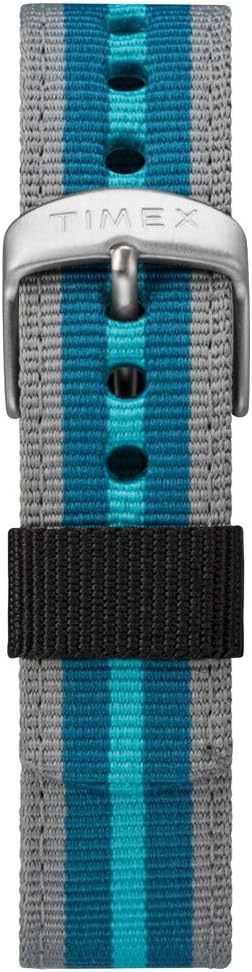
الشكل 3: عن قرب view of the Timex Expedition watch's fabric strap. The strap features alternating stripes of gray and two shades of blue, secured by a silver-colored buckle with the Timex logo.
استكشاف الأخطاء وإصلاحها
| مشكلة | السبب المحتمل | حل |
|---|---|---|
| العرض فارغ أو خافت. | بطارية منخفضة أو ميتة. | استبدال البطارية. |
| الأزرار لا تستجيب. | Watch may be in a locked mode or internal error. | Try pressing all buttons simultaneously for a few seconds to reset (if applicable). If problem persists, consult service. |
| الوقت غير صحيح. | لم يتم ضبط الوقت بشكل صحيح أو أن البطارية منخفضة. | Re-set the time and date. If issue recurs, replace battery. |
تحديد
- ماركة: تايمكس
- رقم الموديل: TW4B13100
- نوع العرض: رقمي
- قطر العلبة: 33 ملم
- مقاومة الماء: 100 أمتار (330 قدم)
- سمات: Chronograph, Alarm, Timer, INDIGLO Night-Light
- مادة الحزام: قماش
- بطارية: 1 بطارية خاصة بالمنتج (مضمنة)
- قسم: للجنسين-بالغين
المنتج انتهىview فيديو
For a visual guide on the Timex Expedition Digital watch, please refer to the video below.
فيديو 1: انتهىview of the Timex Expedition Digital 33mm Nylon Strap watch. This video demonstrates the watch's design and features, providing a visual understanding of its appearance and basic functionalities.
الضمان والدعم
Timex watches are manufactured to high standards and are backed by a limited warranty. For specific warranty details, registration, or support inquiries, please refer to the official Timex website or contact Timex customer service.
يمكنك زيارة متجر تايمكس الرسمي لمزيد من المعلومات: متجر تايمكس على أمازون


