1. المقدمة
شكرا لك على الشراءasing the Capello Play it All Bluetooth Wireless Home Stereo Speaker CI302. This device offers versatile audio playback options including Bluetooth wireless streaming, CD player functionality, and FM digital radio. This manual provides detailed instructions for setup, operation, maintenance, and troubleshooting to ensure optimal performance and longevity of your speaker system.
2. معلومات هامة حول السلامة
- اقرأ جميع التعليمات قبل تشغيل الجهاز.
- احتفظ بهذا الدليل للرجوع إليه في المستقبل.
- لا تعرض الوحدة للمطر أو الرطوبة لمنع حدوث حريق أو مخاطر الصدمات.
- تأكد من التهوية المناسبة؛ ولا تسد أي فتحات تهوية.
- ضع الوحدة على سطح ثابت ومستو.
- استخدم فقط المرفقات/الملحقات المحددة من قبل الشركة المصنعة.
- افصل الوحدة أثناء العواصف الرعدية أو عند عدم استخدامها لفترات طويلة.
- قم بإحالة جميع أعمال الصيانة إلى موظفي الخدمة المؤهلين.
3. محتويات العبوة
يرجى التأكد من وجود جميع العناصر:
- Capello Play it All Bluetooth Wireless Home Stereo Speaker CI302
- جهاز التحكم عن بعد
- محول التيار المتردد
- دليل المستخدم (هذا المستند)
4. انتهى المنتجview
Familiarize yourself with the main components and controls of your Capello Play it All speaker.
أمام View

الشكل 4.1: أمام view of the Capello Play it All speaker, showing the speaker grille, digital clock display, and subtle branding.
ضوابط اللوحة العلوية

الشكل 4.2: Top panel of the Capello Play it All speaker, illustrating the CD compartment, 'capello' logo, and various control buttons including PRESET, MODE, PAIRING, PROGRAM/CLOCK SET, SKIP, PLAY/PAUSE, STOP, REPEAT, and VOLUME.
- PRESET +/-: Navigate through saved FM radio stations.
- اتجاهات: Switch between Bluetooth, CD, FM Radio, and Line-In modes.
- الاقتران: قم بتفعيل وضع الاقتران عبر البلوتوث.
- PROGRAM/CLOCK SET: Program CD tracks or set the clock.
- SKIP ◀◀ / ▶▶: Skip tracks on CD or adjust FM frequency.
- PLAY/PAUSE ▶▶: Play or pause CD playback.
- STOP ■: Stop CD playback.
- يكرر: Repeat current track or all tracks on CD.
- المجلد +/-: ضبط مستوى الصوت.
- فتح / إغلاق: افتح أو أغلق حجرة الأقراص المدمجة.
- تعليق: تشغيل/إيقاف تشغيل الجهاز.
Rear Panel (Typical)
The rear panel typically includes the AC power input, FM antenna connection, and Line-In jack.
5. الإعداد
5.1 توصيل الطاقة
- Connect the AC power adapter to the DC IN jack on the rear of the speaker.
- قم بتوصيل الطرف الآخر من المحول بمنفذ حائط قياسي.
- The unit will enter standby mode, and the digital clock display will illuminate.
إعداد هوائي FM 5.2
For optimal FM radio reception, extend the FM wire antenna fully and position it for the best signal. Avoid placing it near other electronic devices that may cause interference.
5.3 ضبط الساعة
- في وضع الاستعداد ، اضغط مع الاستمرار على PROGRAM/CLOCK SET زر.
- The hour digits will begin to flash. Use the SKIP ◀◀ / ▶▶ أزرار لضبط الساعة.
- يضعط PROGRAM/CLOCK SET مرة أخرى للتأكد من الساعة.
- ستومض أرقام الدقائق. استخدم SKIP ◀◀ / ▶▶ أزرار لضبط الدقائق.
- يضعط PROGRAM/CLOCK SET one last time to save the setting.
6. تعليمات التشغيل
6.1 تشغيل/إيقاف التشغيل واختيار الوضع
- اضغط على تعليق button on the unit or the remote control to turn the speaker on or off.
- اضغط على وضع button repeatedly to cycle through available modes: Bluetooth, CD, FM Radio, and Line-In.
6.2 البث اللاسلكي بتقنية البلوتوث
- Turn on the speaker and select Bluetooth mode using the وضع button. The display will show 'BT' and flash, indicating it's in pairing mode.
- On your Bluetooth-enabled device (smartphone, tablet, computer), enable Bluetooth and search for available devices.
- Select 'Capello CI302' (or similar) from the list of devices.
- Once paired, the speaker will emit a confirmation tone, and 'BT' on the display will stop flashing.
- You can now play audio from your device through the speaker. Use your device or the speaker's controls for volume and track navigation.
تشغيل أقراص مضغوطة 6.3
- اضغط على فتح/إغلاق button to open the CD compartment.
- Carefully place an audio CD (CD, CD-R/-RW) with the label side facing up into the compartment.
- Close the CD compartment. The unit will read the disc.
- If not already in CD mode, press the وضع زر لتحديد وضع القرص المضغوط.
- اضغط على تشغيل/إيقاف مؤقت زر لبدء التشغيل.
- يستخدم SKIP ◀◀ / ▶▶ to skip tracks, توقف ■ to stop, and يكرر to cycle through repeat options.
6.4 FM Digital Radio
- اضغط على وضع button to select FM radio mode. The current frequency will be displayed.
- التأكد الذاتي: اضغط مع الاستمرار على تشغيل/إيقاف مؤقت button to automatically scan and save available FM stations as presets.
- ضبط يدوي: يضعط SKIP ◀◀ / ▶▶ briefly to fine-tune the frequency. Press and hold to scan for the next strong station.
- Accessing Presets: استخدم الإعداد المسبق +/- أزرار للتنقل بين المحطات المحفوظة.
6.5 Line-In Operation
- Connect an audio cable (not included) from the headphone jack or line-out of an external audio device to the في الخط jack on the speaker.
- اضغط على وضع button to select Line-In mode.
- Play audio from your connected device. Volume can be controlled via the speaker or the external device.
6.6 شحن USB
The speaker features a USB port for charging compatible devices (e.g., smartphones, tablets). Connect your device's USB charging cable (not included) to the USB port on the speaker. The speaker does not need to be in a specific mode for USB charging to function.
6.7 استخدام جهاز التحكم عن بعد
The included remote control provides convenient access to all functions. Ensure the remote has working batteries and is pointed towards the front of the speaker.
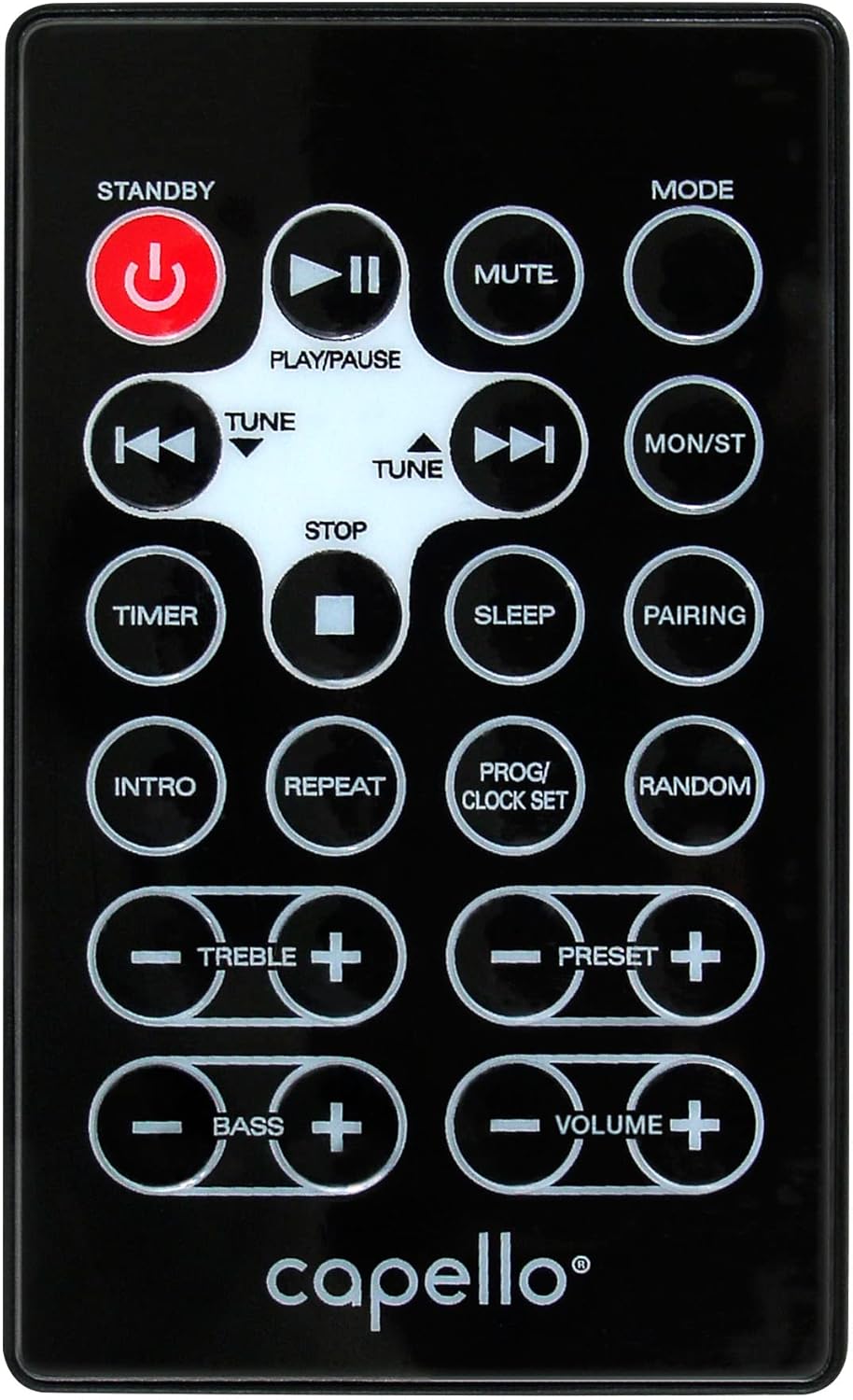
الشكل 6.1: Layout of the remote control for the Capello Play it All speaker, showing buttons for Standby, Play/Pause, Mute, Mode, Skip/Tune, Stop, Timer, Sleep, Pairing, Intro, Repeat, Program/Clock Set, Random, Treble, Bass, and Volume controls.
- تعليق: السلطة / قبالة.
- تشغيل/إيقاف مؤقت: تشغيل الصوت أو إيقافه مؤقتًا.
- كتم الصوت: كتم الصوت أو إلغاء كتمه.
- اتجاهات: Cycle through input modes.
- SKIP/TUNE ◀◀ / ▶▶: Skip tracks or tune radio frequency.
- قف: أوقف التشغيل.
- المُؤقت: ضبط مؤقت النوم.
- ينام: Activate sleep function.
- الاقتران: ابدأ عملية الاقتران عبر البلوتوث.
- المقدمة: Play the first few seconds of each CD track.
- يكرر: Repeat current track or all tracks.
- PROG/CLOCK SET: Program CD tracks or set clock.
- عشوائي: Play CD tracks in random order.
- الثلاثي +/-: Adjust treble levels.
- صوت جهير +/-: Adjust bass levels.
- الحجم +/-: ضبط مستوى الصوت الإجمالي.
7. الصيانة
7.1 التنظيف
- افصل الوحدة دائمًا عن مأخذ التيار الكهربائي قبل التنظيف.
- استخدم قطعة قماش ناعمة وجافة لمسح الأسطح الخارجية.
- لا تستخدم المنظفات الكاشطة أو الشمع أو المذيبات لأنها قد تؤدي إلى إتلاف الطبقة النهائية.
- بالنسبة لعدسة الأقراص المضغوطة، استخدم قرص تنظيف عدسة الأقراص المضغوطة المتخصص.
7.2 التخزين
If storing the unit for an extended period, unplug it from the power source and store it in a cool, dry place away from direct sunlight and extreme temperatures.
8. استكشاف الأخطاء وإصلاحها
| مشكلة | السبب المحتمل | حل |
|---|---|---|
| لا يوجد طاقة | سلك الطاقة غير موصول؛ المقبس غير نشط. | Ensure power cord is securely plugged in; try a different outlet. |
| لا يوجد صوت | Volume too low; incorrect mode selected; external device muted. | Increase volume; select correct input mode; check external device volume/mute. |
| يتخطى القرص المضغوط أو لا يتم تشغيله | Dirty or scratched CD; CD inserted incorrectly; dirty CD lens. | Clean or replace CD; insert CD label-side up; use a CD lens cleaner. |
| فشل اقتران البلوتوث | Device too far; Bluetooth not enabled on device; speaker not in pairing mode. | Move device closer; enable Bluetooth; ensure speaker is in BT pairing mode. |
| استقبال FM ضعيف | الهوائي غير ممتد؛ تداخل. | Fully extend and reposition FM antenna; move away from other electronics. |
| جهاز التحكم عن بعد لا يعمل | Batteries depleted; obstruction; not pointed at sensor. | Replace batteries; remove obstructions; point remote directly at the unit. |
9. المواصفات
| ميزة | مواصفة |
|---|---|
| ماركة | كابيلو |
| رقم الموديل | CI302 |
| تكنولوجيا الاتصال | بلوتوث |
| نوع السماعة | ستيريو |
| وضع إخراج الصوت | ستيريو |
| تنسيقات الصوت المدعومة | قرص مضغوط ، MP3 |
| Speakers Nominal Output Power | 10 واط |
| مكبرات الصوت الحد الأقصى لطاقة الإخراج | 10 واط |
| تكوين قناة الصوت المحيطي للسماعات | 2.0 |
| نوع مصدر الطاقة | كهرباء سلكية |
| الأجهزة المتوافقة | كمبيوتر محمول، هاتف ذكي، جهاز لوحي |
| المميزات الخاصة | Digital Display, Portable, USB Port |
| نوع المادة | بلاستيك |
| نوع التركيب | سطح الطاولة |
| وزن العنصر | 2.57 كيلوغرام |
| أبعاد الحزمة | 38.3 × 24.2 × 18.5 سم |
| البطاريات المتضمنة | لا |
| البطاريات المطلوبة | لا |
10. الضمان والدعم
This product is covered by a limited warranty. Please refer to the warranty card included in your package for specific terms and conditions. For technical support or customer service inquiries, please contact Capello customer support through their official webالموقع أو معلومات الاتصال المقدمة مع وثائق الشراء الخاصة بك.


