1. المقدمة
شكرا لك على الشراءasing the Lenco DIR-150 Internet Radio. This manual provides essential information for setting up, operating, and maintaining your device. Please read it thoroughly before use and retain it for future reference.
2. معلومات السلامة
- لا تعرض الجهاز للمطر أو الرطوبة لتجنب الحريق أو الصدمة الكهربائية.
- لا تفتح الصندوقasinز. إحالة جميع أعمال الصيانة إلى موظفين مؤهلين.
- تأكد من التهوية الجيدة حول الوحدة. لا تسد فتحات التهوية.
- استخدم فقط محول الطاقة المرفق مع الجهاز.
- احتفظ بالجهاز بعيدًا عن أشعة الشمس المباشرة ومصادر الحرارة والمجالات المغناطيسية القوية.
- قم بتنظيف الجهاز باستخدام قطعة قماش ناعمة وجافة فقط.
3. محتويات العبوة
تأكد من وجود جميع العناصر في العبوة:
- Lenco DIR-150 Internet Radio
- جهاز التحكم عن بعد
- محول الطاقة
- دليل المستخدم (هذا المستند)
4. انتهى المنتجview
4.1 اللوحة الأمامية
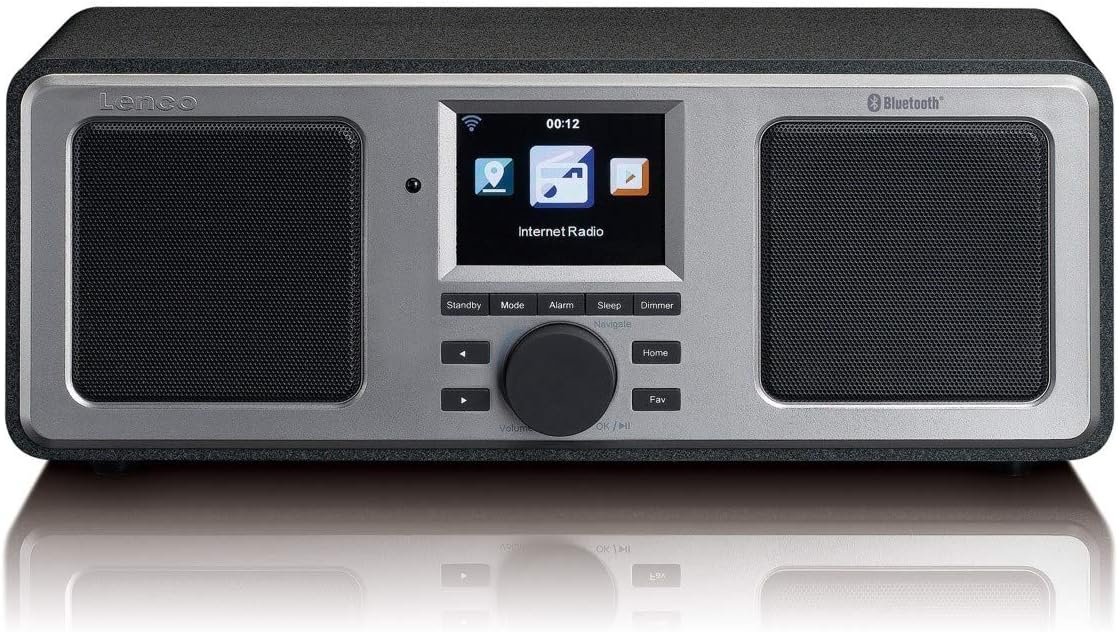
The front panel features a central color display, two integrated speakers, and control buttons. The display shows current mode, station information, time, and menu options. Control buttons include Standby, Mode, Alarm, Sleep, Dimmer, navigation arrows, a rotary knob for volume and selection, Home, and Fav (Favorites).
4.2 اللوحة الخلفية

The rear panel includes the power switch, DC IN port, Line Out, AUX In, and a USB port. An extendable telescopic antenna for FM reception is also located on the rear.
5. الإعداد
5.1 توصيل الطاقة
- Connect the supplied power adapter to the DC IN port on the rear of the DIR-150.
- قم بتوصيل محول الطاقة بمأخذ الحائط.
- قم بتحريك مفتاح الطاقة الموجود على اللوحة الخلفية إلى وضع "التشغيل".
5.2 Antenna Placement
للحصول على أفضل استقبال لراديو FM، قم بتمديد الهوائي التلسكوبي الموجود في الجزء الخلفي من الجهاز بالكامل. اضبط موضعه للحصول على أفضل جودة للإشارة.
5.3 Initial Network Configuration (Wi-Fi)
Upon first power-on, the device will guide you through the initial setup wizard:
- Select your preferred language using the rotary knob and press to confirm.
- سيقوم الراديو بالبحث عن شبكات Wi-Fi المتوفرة.
- قم باختيار شبكة Wi-Fi المنزلية الخاصة بك من القائمة.
- Enter your Wi-Fi password using the rotary knob to select characters and navigation buttons to move. Press the knob to confirm each character and then the final password.
- بمجرد الاتصال، سيعرض الراديو رسالة تأكيد.
6. تعليمات التشغيل
6.1 التشغيل الأساسي
- تشغيل/إيقاف التشغيل: اضغط على تعليق button to switch the unit between standby and operational mode.
- التحكم في مستوى الصوت: قم بتدوير المقبض المركزي لضبط مستوى الصوت.
- ملاحة: Use the navigation arrows and the rotary knob to browse menus and select options. Press the rotary knob to confirm a selection.
- وضع: اضغط على وضع button to cycle through available modes (Internet Radio, FM, Bluetooth, USB, AUX).
- بيت: اضغط على بيت زر للعودة إلى القائمة الرئيسية.
- Fav (Favorites): اضغط على مفضل button to access your saved favorite stations.
6.2 راديو الإنترنت
Access thousands of internet radio stations worldwide.
- Select 'Internet Radio' from the main menu.
- تصفح المحطات حسب الموقع أو النوع أو ابحث بالاسم.
- Select a station using the rotary knob and press to start playback.
- To save a station as a favorite, navigate to the station and press the مفضل زر.
6.3 راديو FM
Listen to local FM broadcasts.
- اضغط على وضع button until 'FM Radio' is selected.
- The radio will automatically scan for available FM stations.
- Use the navigation arrows to manually tune or select a scanned station.
- The display will show RDS information (station name, program type) if available.
6.4 تشغيل البلوتوث
قم ببث الصوت لاسلكيًا من جهازك المزود بتقنية البلوتوث.
- اضغط على وضع button until 'Bluetooth' is selected. The radio will enter pairing mode.
- On your mobile device, enable Bluetooth and search for 'Lenco DIR-150'.
- Select 'Lenco DIR-150' to pair. Once connected, you can play audio from your device through the radio.
6.5 تشغيل USB
تشغيل الصوت files مباشرة من محرك أقراص فلاش USB.
- Insert a USB flash drive into the USB port on the rear panel.
- اضغط على وضع اضغط على الزر حتى يتم تحديد "USB".
- Browse your audio files (MP3, WAV, AAC formats supported) and select one to play.
6.6 مدخل ايه يو اكس
قم بتوصيل الأجهزة الصوتية الخارجية باستخدام كابل صوت مقاس 3.5 ملم.
- Connect one end of a 3.5mm audio cable to the AUX IN port on the rear of the DIR-150.
- قم بتوصيل الطرف الآخر بمقبس سماعة الرأس أو مخرج الصوت الخاص بجهازك الخارجي.
- اضغط على وضع button until 'AUX' is selected.
- التحكم في التشغيل ومستوى الصوت من جهازك الخارجي.
6.7 Media Streaming (UPnP)
Stream music from a PC or NAS (Network Attached Storage) device on your home network.
- Ensure your PC or NAS is configured as a UPnP media server and is on the same Wi-Fi network as the DIR-150.
- Navigate to the 'Media Player' or 'UPnP' option in the radio's menu.
- Select your media server from the list and browse your music library.
7. ميزات إضافية
7.1 منبه
Set up to two independent alarms.
- اضغط على إنذار زر.
- Select 'Alarm 1' or 'Alarm 2' and configure the time, alarm source (buzzer or radio), and frequency (daily, once, weekends, weekdays).
- Press the rotary knob to confirm settings.
- To snooze an active alarm, press the غفوة button (usually the rotary knob).
7.2 مؤقت النوم
Set the radio to automatically turn off after a specified period.
- اضغط على ينام زر.
- Select the desired sleep duration (e.g., 15, 30, 60 minutes).
- The radio will count down and enter standby mode when the timer expires.
7.3 توقعات الطقس
View local weather forecasts for the next 5 days.
- Navigate to the 'Weather' option in the main menu.
- Select your location to view التوقعات.
8. الصيانة
- تنظيف: Disconnect the power before cleaning. Use a soft, dry, lint-free cloth to wipe the exterior. Do not use abrasive cleaners or solvents.
- تخزين: If not used for an extended period, unplug the device and store it in a cool, dry place.
9. استكشاف الأخطاء وإصلاحها
| مشكلة | السبب المحتمل | حل |
|---|---|---|
| لا يوجد طاقة | محول الطاقة غير موصول؛ مفتاح الطاقة مطفأ | Ensure adapter is securely connected and power switch is ON. |
| لا يوجد اتصال بالإنترنت | Incorrect Wi-Fi password; Router issue; Out of range | Re-enter Wi-Fi password; Restart router; Move radio closer to router. |
| استقبال FM ضعيف | Antenna not extended or positioned correctly | قم بتمديد الهوائي التلسكوبي بالكامل وضبطه. |
| فشل اقتران البلوتوث | Device not in pairing mode; Other device already connected | Ensure radio is in Bluetooth mode; Disconnect from other devices; Restart both devices. |
| تشغيل USB لا يعمل | غير مدعوم file format; USB drive not recognized | يضمن files are MP3, WAV, or AAC; Try a different USB drive. |
10. المواصفات
- نموذج: DIR-150
- طاقة الإخراج: 16 واط (RMS)
- عرض: شاشة ملونة مقاس 2.8 بوصة
- الاتصال: Wi-Fi, Bluetooth, USB, AUX (3.5mm), Line-Out
- نطاقات الراديو: Internet Radio, FM (PLL Tuner)
- تنسيقات الصوت المدعومة: MP3, WAV, AAC (for USB/Streaming)
- مزود الطاقة: محول التيار المتردد (مضمن)
- الأبعاد (العرض × العمق × الارتفاع): 310 × 126 × 116 ملم
- وزن: 1.52 كجم
- سمات: Alarm Clock (2 alarms), Snooze, Sleep Timer, Weather Forecast, UPnP Streaming
11. الضمان والدعم
Lenco products are manufactured to high quality standards. In the unlikely event of a defect, Lenco provides a warranty in accordance with the laws of the country of purchase. For specific warranty terms and conditions, please refer to the warranty card included with your product or visit the official Lenco website. For technical support or service inquiries, please contact your retailer or the Lenco customer service department.


