1. المقدمة
This manual provides essential information for the installation, operation, maintenance, and troubleshooting of your Juniper Networks EX3400-48P Ethernet Switch. The EX3400-48P is designed to deliver a high-performance, flexible, and cost-effective solution for demanding data, voice, and video enterprise access environments. It supports Juniper Networks Virtual Chassis technology for simplified network operations.
2. معلومات السلامة
Please read and understand all safety instructions before installing or operating the device. Failure to follow these guidelines may result in injury or damage to the equipment.
- تأكد من التأريض الصحيح للمعدات.
- Do not operate the switch in wet or damp شروط.
- Use only the power supply provided or approved by Juniper Networks.
- تجنب سد فتحات التهوية لمنع ارتفاع درجة الحرارة.
- Refer to qualified service personnel for any servicing not described in this manual.
3. انتهى المنتجview
The Juniper Networks EX3400-48P is a 48-port Power over Ethernet (PoE+) capable Ethernet switch. It features a compact design suitable for rack mounting and offers various connectivity options.
3.1. المكونات المادية
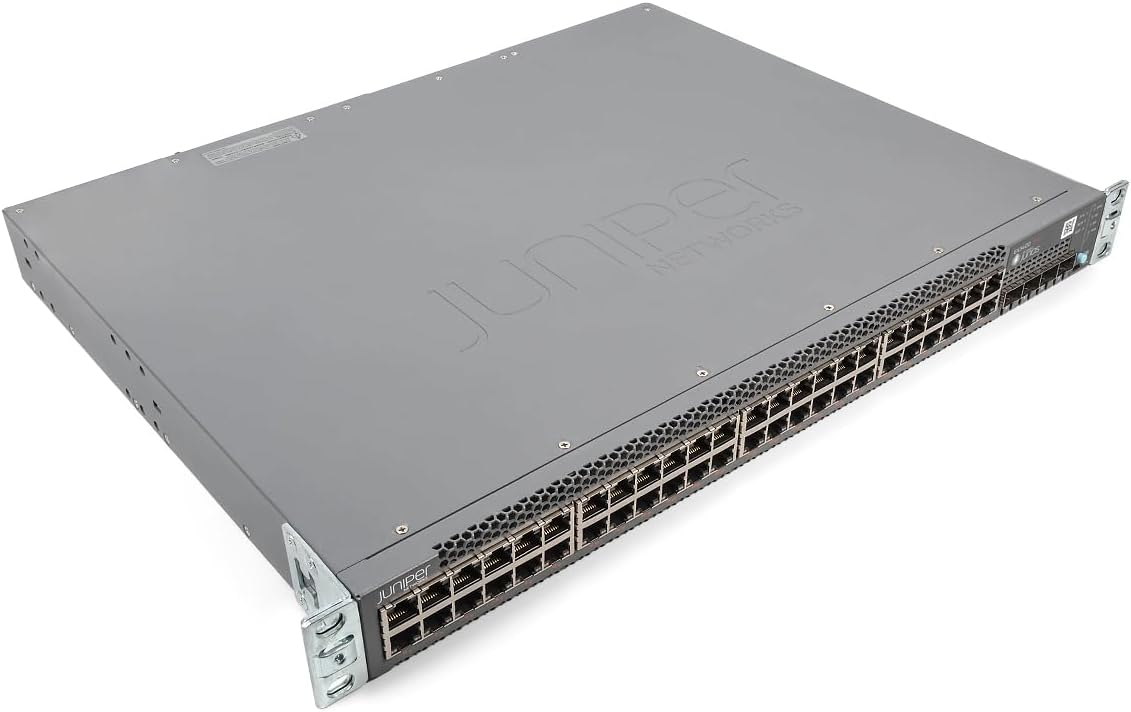
الشكل 1: بزاوية view of the Juniper EX3400-48P Ethernet Switch, showing the top and front panels with the Juniper Networks logo.

الشكل 2: أمام view of the EX3400-48P switch, highlighting the 48 Ethernet ports, uplink ports, and status LEDs.

الشكل 3: مؤخرة view of the EX3400-48P, displaying the modular power supply bay, fan modules, management (MGMT) port, and console (CON) port.

الشكل 4: خلفية بزاوية view of the EX3400-48P, showing the power supply unit partially extracted, illustrating its modular design.
3.2. ميزات اللوحة الأمامية
- 48 منفذ إيثرنت من نوع 10/100/1000BASE-T: For connecting network devices.
- منافذ الوصلة الصاعدة: SFP/SFP+ ports for high-speed connections to other switches or routers.
- مؤشرات الحالة: Indicators for system status, port activity, and PoE status.
3.3. ميزات اللوحة الخلفية
- Power Supply Bay: Houses the modular power supply unit.
- وحدات المروحة: Provide cooling for the system.
- Management (MGMT) Port: An out-of-band Ethernet port for device management.
- Console (CON) Port: For local serial console access.
4. الإعداد
4.1. التفريغ والتفتيش
Carefully remove the switch from its packaging. Inspect the device for any signs of physical damage. Report any damage to your supplier immediately.
4.2 تركيب الرف
The EX3400-48P is designed for standard 19-inch rack installation. Use the provided rack-mount brackets and screws to secure the switch in the rack. Ensure adequate space for airflow around the unit.
4.3. توصيل الطاقة
- تأكد من أن مفتاح الطاقة الموجود على اللوحة الخلفية في وضع إيقاف التشغيل.
- Connect the power cord to the power supply unit on the rear of the switch.
- قم بتوصيل الطرف الآخر من سلك الطاقة بمأخذ كهربائي مؤرض يعمل بالتيار المتردد.
- Flip the power switch to the ON position. The system status LED should illuminate.
4.4. التكوين الأولي
For initial configuration, connect a console cable from your computer to the console port on the rear of the switch. Use a terminal emulation program (e.g., PuTTY, Tera Term) with the following settings:
- معدل باود: 9600
- بتات البيانات: 8
- التكافؤ: لا يوجد
- بتات التوقف: 1
- التحكم في التدفق: لا يوجد
Follow the on-screen prompts to set up basic network parameters such as IP address, subnet mask, and default gateway.
5. التشغيل
5.1. تشغيل / إيقاف التشغيل
- تشغيل الطاقة: After connecting the power cord, press the power switch to the ON position. The switch will perform a power-on self-test (POST).
- إيقاف التشغيل: To power off, press the power switch to the OFF position. For a controlled shutdown, it is recommended to save the configuration and issue a shutdown command via the command-line interface (CLI) before physically powering off.
5.2. مؤشرات LED
توفر مصابيح LED الموجودة على اللوحة الأمامية معلومات مرئية عن حالة تشغيل المفتاح:
- مؤشر LED: Indicates overall system status (e.g., green for normal operation, amber for warning, red for critical error).
- ألم LED: يشير إلى حالة التنبيه.
- الصمام PoE: Indicates Power over Ethernet status.
- مصابيح LED للمنفذ: Indicate link status and activity for each Ethernet port.
5.3. تكوين الشبكة
The EX3400-48P can be configured via its command-line interface (CLI) or a web-based graphical user interface (GUI) if enabled. Common configurations include:
- VLAN creation and assignment.
- Port security settings.
- Routing protocols.
- Quality of Service (QoS) settings.
- Spanning Tree Protocol (STP) configuration.
Refer to the Juniper Networks documentation for detailed configuration guides specific to Junos OS.
6. الصيانة
6.1. تحديثات البرامج الثابتة
تحقق بانتظام من دعم جونيبر نتوركس website for the latest Junos OS firmware updates. Keeping the firmware up-to-date ensures optimal performance, security, and access to new features. Follow the instructions provided with the firmware package for the update procedure.
6.2. التنظيف
Keep the switch clean and free of dust. Use a soft, dry cloth to wipe the exterior. For ventilation openings, use compressed air to remove dust buildup. Ensure the switch is powered off before cleaning.
6.3. Modular Component Replacement
The EX3400-48P features modular power supplies and fan trays. If a component fails, it can be replaced without powering down the entire switch (hot-swappable). Refer to the Juniper Networks hardware guide for specific replacement procedures.
7. استكشاف الأخطاء وإصلاحها
يوفر هذا القسم حلولاً للمشكلات الشائعة التي قد تواجهها.
7.1. لا قوة
- تأكد من توصيل سلك الطاقة بشكل آمن بالمفتاح ومأخذ الطاقة.
- تحقق مما إذا كان مأخذ الطاقة يعمل أم لا.
- تأكد من أن مفتاح الطاقة الموجود على اللوحة الخلفية في وضع التشغيل.
- Inspect the power supply unit for any fault indicators.
7.2. No Link on Port
- Check the Ethernet cable connection at both ends.
- تأكد من تشغيل الجهاز المتصل وعمله بشكل صحيح.
- Try a different port on the switch.
- Verify the cable is not damaged and meets specifications (e.g., Cat5e or higher).
7.3. مشاكل الاتصال بالشبكة
- Verify IP address, subnet mask, and gateway settings on the switch and connected devices.
- تحقق من إعدادات الشبكة المحلية الظاهرية (VLAN) إن وجدت.
- Use diagnostic tools like
pingوtraceroutefrom the switch CLI. - Consult system logs for error messages.
8. المواصفات
The following table outlines the technical specifications for the Juniper Networks EX3400-48P Ethernet Switch:
| ميزة | مواصفة |
|---|---|
| رقم الموديل | EX3400-48P |
| عدد المنافذ | 48 |
| نوع الواجهة | SFP/SFP+ |
| معدل نقل البيانات | 336 جيجابت في الثانية |
| المجلدtage | 48 فولت (تيار مستمر) |
| مادة العلبة | معدن |
| تصنيف درجة الحرارة العليا | 50 درجة مئوية |
| أبعاد المنتج | 17.2 × 13.78 × 1.73 بوصة |
| وزن العنصر | 12.65 رطل |
| الشركة المصنعة | العرعر |
| رمز المنتج الموحد | 832938071001 |
9. الضمان والدعم
9.1. ضمان المنتج
This product is typically covered by a manufacturer's warranty. Please refer to the specific warranty terms provided at the time of purchase or on the official Juniper Networks website. A 30-day return policy may apply depending on the vendor.
9.2. الدعم الفني
For technical assistance, documentation, software downloads, and further support, please visit the official Juniper Networks support website. You may also contact your authorized Juniper Networks reseller for local support options.


