المنتج انتهىview
The Redmi Y2 is a feature-rich smartphone designed for everyday use. It combines a sleek design with robust performance, making it suitable for communication, entertainment, and productivity. This manual provides essential information for setting up, operating, maintaining, and troubleshooting your device.

الشكل 1: خلفي view of the Redmi Y2 smartphone, highlighting the dual camera module and fingerprint sensor.
1. الإعداد
Follow these steps to set up your new Redmi Y2 smartphone.
1.1 فك الصندوق والفحص الأولي
أزل جميع المكونات من العبوة بعناية. تأكد من وجود العناصر التالية:
- Redmi Y2 Smartphone
- شاحن
- SIM ejector Pin
- دليل المستخدم
- Clear soft case
- بطاقة الضمان
فيديو 1: أكثر منview of the Redmi Y2 smartphone, including its design, display, camera, and accessories found in the box.
1.2 إدخال بطاقات SIM وبطاقة MicroSD
The Redmi Y2 supports dual Nano-SIM cards and a dedicated MicroSD card for expandable storage. Locate the SIM tray on the left side of the device.
- Insert the SIM ejector pin into the small hole on the SIM tray to open it.
- اسحب درج بطاقة SIM بعناية.
- Place your Nano-SIM cards into the designated slots.
- If desired, insert a MicroSD card into its dedicated slot.
- ادفع الدرج برفق إلى داخل الجهاز حتى يستقر في مكانه.

Figure 2: Left side of the Redmi Y2, illustrating the SIM card tray location.
1.3 التشغيل والتكوين الأولي
To power on your device, press and hold the power button located on the right side until the Redmi logo appears. Follow the on-screen instructions to complete the initial setup, including language selection, Wi-Fi connection, and Google account setup.

Figure 3: Right side of the Redmi Y2, showing the power and volume buttons.
1.4 Device Ports and Buttons
Familiarize yourself with the physical layout of your Redmi Y2:
- قمة: 3.5mm headphone jack, secondary microphone, and IR blaster.
- قاع: Micro-USB charging port, primary microphone, and speaker grilles.

الشكل 4: الجزء العلوي view of the Redmi Y2, highlighting the headphone jack and IR blaster.

الشكل 5: القاع view of the Redmi Y2, showing the Micro-USB port and speaker grilles.
2. Operating Your Redmi Y2
2.1 العرض وواجهة المستخدم
The Redmi Y2 features a 5.99-inch HD+ display with an 18:9 aspect ratio, providing an immersive viewing experience for media and gaming. The device runs on Android 8.1 Oreo with MIUI 9.5 (or later) overlay, offering a customized and user-friendly interface.
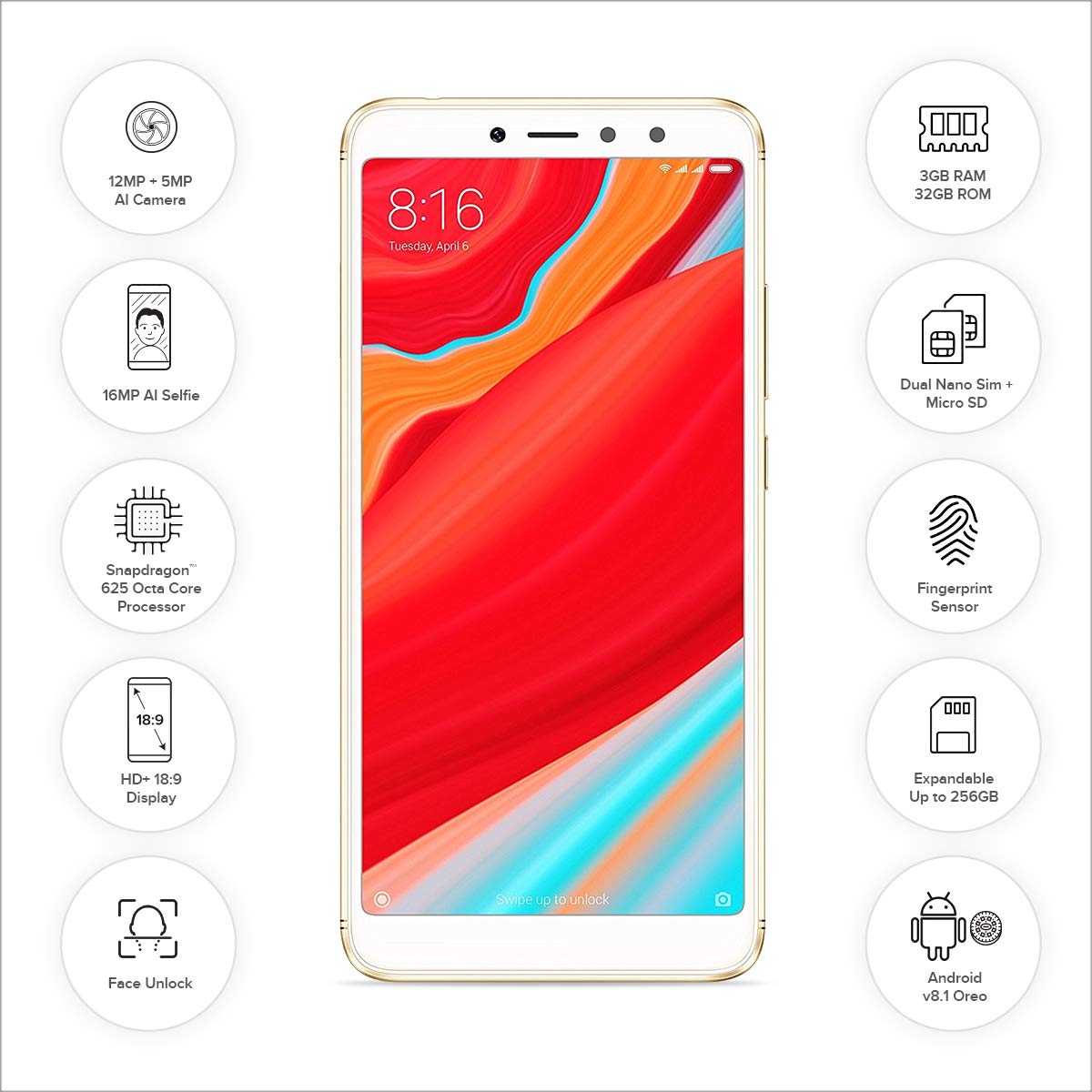
الشكل 6: الجبهة view of the Redmi Y2, showcasing its 5.99-inch display and key features.
2.2 ميزات الكاميرا
The Redmi Y2 is equipped with a dual rear camera setup (12MP + 5MP) for capturing photos with depth-of-field effects. The front-facing camera is a 16MP sensor, ideal for high-quality selfies, even in low-light conditions thanks to its soft-tone selfie light.
2.3 ميزات الأمان
For enhanced security, the Redmi Y2 includes a rear-mounted fingerprint sensor and face unlock functionality. These features allow for quick and secure access to your device.
2.4 Navigation Gestures
The device offers optional gesture navigation, allowing you to replace traditional navigation buttons with intuitive swipes. Swipe up from the bottom to go home, swipe up and pause for recent apps, and swipe from the left or right edge to go back.
3. الصيانة
3.1 العناية بالبطارية
The Redmi Y2 is powered by a 3080 mAh Lithium Polymer battery. To maximize battery life and ensure longevity:
- تجنب درجات الحرارة القصوى.
- استخدم الشاحن المرفق للحصول على أفضل النتائج في عملية الشحن.
- تجنب تفريغ البطارية بالكامل بشكل متكرر.
- Manage background app usage to conserve power.
3.2 إدارة التخزين
The device comes with 32GB or 64GB of internal storage, expandable up to 256GB via a MicroSD card. Regularly manage your storage by:
- حذف غير ضروري fileق والتطبيقات.
- Moving large media files إلى بطاقة MicroSD.
- Clearing cached data from apps.
4. استكشاف الأخطاء وإصلاحها
If you encounter issues with your Redmi Y2, refer to the following common solutions:
4.1 الجهاز لا يستجيب
- إعادة تشغيل: Press and hold the power button for about 10-15 seconds until the device restarts.
- تكلفة: Connect the device to its charger and wait a few minutes before attempting to power it on again.
4.2 استنزاف البطارية بسرعة
- Check Apps: تحديد وإغلاق التطبيقات التي تستهلك طاقة كبيرة والتي تعمل في الخلفية.
- سطوع الشاشة: قم بتقليل سطوع الشاشة أو تمكين السطوع التكيفي.
- استخدام الشبكة: قم بإيقاف تشغيل Wi-Fi أو Bluetooth أو GPS عند عدم الاستخدام.
- تحديث البرنامج: Ensure your device's software is up to date, as updates often include battery optimizations.
4.3 Camera Issues
- مسح ذاكرة التخزين المؤقت: Go to Settings > Apps > Camera > Storage and clear cache/data.
- إعادة تشغيل: أعد تشغيل الجهاز.
- Check Permissions: Ensure the camera app has all necessary permissions.
5. المواصفات
Below are the detailed specifications for the Redmi Y2 smartphone:
| نظام التشغيل | أندرويد 8.1 (أوريو) |
| كبش | 3 جيجا بايت |
| التخزين الداخلي | 32 GB (expandable up to 256 GB via MicroSD) |
| المعالج | Qualcomm Snapdragon 625 Octa-Core, 1.3 GHz |
| عرض | 5.99-inch IPS LCD, 1440 x 720 resolution (HD+) |
| الكاميرا الخلفية | 12 MP + 5 MP Dual AI Camera |
| الكاميرا الأمامية | 16 MP with Selfie Light |
| بطارية | 3080 مللي أمبير ليثيوم بوليمر |
| أبعاد | 16.1 × 0.8 × 7.7 سم |
| وزن | 168 جرام |
| الاتصال | Bluetooth, Wi-Fi, GLONASS GPS, Dual SIM (4G VoLTE) |
| المميزات الخاصة | Dual SIM, Fingerprint Sensor, Face Unlock, IR Blaster |
6. الضمان والدعم
Your Redmi Y2 smartphone comes with a 1-year manufacturer's warranty from the date of purchase. This warranty covers manufacturing defects and issues arising from normal use.
For technical support, service requests, or further assistance, please visit the official Redmi support webتفضل بزيارة الموقع الإلكتروني أو تواصل مع خدمة العملاء. راجع بطاقة الضمان المرفقة بعبوة المنتج للاطلاع على الشروط والأحكام المحددة.
الشركة المصنعة: شاومي


