1. المقدمة
This manual provides instructions for the installation, operation, and maintenance of the Nexxt Solutions Naxos800 8-Port Fast Ethernet Network Switch. The Naxos800 is an unmanaged compact desktop switch designed for small office/home office (SOHO) environments, student dormitories, and small enterprises, offering reliable network connectivity.
2. الميزات الرئيسية
- 8 منفذ إيثرنت سريع: Provides 8 UTP/STP 10/100Mbps ports with auto MDI/MDIX.
- التوصيل والتشغيل: Simple setup requiring no software configuration.
- مفتاح غير مُدار: Operates without requiring complex management interfaces.
- Store-and-Forward Technology: Ensures efficient packet transmission.
- تعلم عنوان MAC: Supports auto-learning and aging with a built-in 1000 MAC address table.
- تصميم مضغوط: Suitable for desktop or wall mounting.
- توفير الطاقة: تصميم منخفض استهلاك الطاقة.
- التحكم في التدفق: Full duplex and half duplex back pressure flow control.
- متانة: Integrated lightning protection and a sturdy metal case.
- التشغيل الهادئ: Fanless design for silent performance.
3. محتويات العبوة
تأكد من أن الحزمة الخاصة بك تحتوي على العناصر التالية:
- One (1) Nexxt Solutions Naxos800 8-Port Fast Ethernet Switch
- محول طاقة واحد (1)

Image: The Nexxt Solutions Naxos800 switch, its power adapter, and product packaging.
4. انتهى المنتجview

الصورة: الجبهة view of the Naxos800 switch, showing the Nexxt logo and eight green LED indicators for port activity.
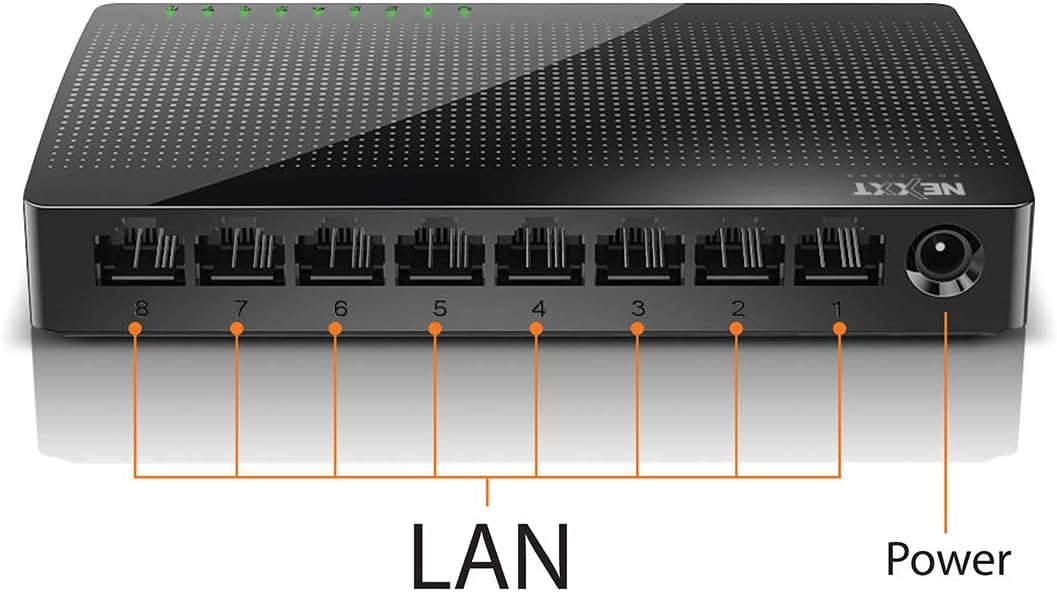
الصورة: الخلفية view of the Naxos800 switch, highlighting the eight LAN ports (numbered 1-8) and the power input port.
مؤشرات LED
The front panel features LED indicators for each port, providing visual status:
- الصمام الثنائي الباعث للضوء الأخضر (ثابت): Indicates a stable link connection.
- مؤشر LED باللون الأخضر (وامض): Indicates data activity on the corresponding port.
- انطلق: No link or connection detected.
5. الإعداد والتثبيت
The Naxos800 switch is designed for simple plug-and-play installation. No software or complex configuration is required.
- الموقع: Place the switch on a stable, flat surface or mount it on a wall using appropriate hardware (not included). Ensure adequate ventilation around the device.
- الاتصال بالطاقة: Connect the provided power adapter to the power input port on the switch and then plug the adapter into a standard electrical outlet. The power LED (if present, or the port LEDs will light up) should illuminate.
- الاتصال بالشبكة:
- Connect your router or modem to any of the 8 LAN ports on the Naxos800 switch using an Ethernet cable.
- Connect your network devices (e.g., computers, gaming consoles, IP cameras, Smart TVs, printers) to the remaining LAN ports on the Naxos800 switch using an Ethernet cable.
- تحقق من الاتصال: Once devices are connected, the corresponding LED indicators on the switch's front panel should light up green (solid for link, flashing for activity).

Image: Diagram illustrating a typical network setup. An ADSL or Cable Modem connects to a Router, which then connects to the Naxos800 switch. Various devices like laptops, media players, game consoles, IP cameras, Smart TVs, and IP phones are connected to the Naxos800 switch.
6. تشغيل المفتاح
The Naxos800 is an unmanaged switch, meaning it operates automatically without user intervention once connected. It functions as an internet splitter, expanding the number of wired network connections available from your router or modem.
- Automatic Speed Detection: Each port automatically detects the speed of the connected device (10Mbps or 100Mbps) and adjusts accordingly.
- MDI/MDIX التلقائي: Eliminates the need for crossover cables; the switch automatically detects and corrects for straight-through or crossover cable types.
- نقل البيانات: Data packets are forwarded between connected devices at Fast Ethernet speeds. The store-and-forward architecture ensures data integrity.
7. الصيانة
The Naxos800 switch requires minimal maintenance.
- تنظيف: استخدم قطعة قماش ناعمة وجافة لتنظيف الجزء الخارجي من المفتاح. لا تستخدم منظفات سائلة أو بخاخات.
- تهوية: تأكد من عدم انسداد فتحات التهوية لمنع ارتفاع درجة الحرارة.
- دورة الطاقة: If the device experiences issues, a simple power cycle (unplugging and replugging the power adapter) can often resolve minor problems.
8. استكشاف الأخطاء وإصلاحها
If you encounter issues with your Naxos800 switch, refer to the following common problems and solutions:
| مشكلة | السبب المحتمل | حل |
|---|---|---|
| لا يوجد طاقة / الجهاز لا يعمل. | محول الطاقة غير متصل أو معيب؛ منفذ الطاقة لا يعمل. | Ensure the power adapter is securely connected to the switch and a working electrical outlet. Try a different outlet. |
| لا يوجد ضوء مؤشر للوصلة لجهاز متصل. | Ethernet cable faulty or improperly connected; device not powered on or faulty; incorrect port. |
|
| Slow network speeds. | Network congestion; faulty cable; device limitations. |
|
9. المواصفات
| يصف | قيمة |
|---|---|
| رقم الموديل | ASIDT084U3 |
| الموانئ | 8 x 10/100Mbps Fast Ethernet (UTP/STP) |
| عرض نطاق اللوحة الخلفية | 1.6 جيجابت في الثانية |
| جدول عناوين MAC | 1000 إدخالات |
| التحكم في الوصول | سي دي ام ايه |
| التحكم في التدفق | Full duplex and half duplex back pressure |
| الأبعاد (الطول × العرض × الارتفاع) | 12.4 × 5.9 × 2.3 سم |
| وزن | 140 جرام |
| مدخلات الطاقة | محول طاقة خارجي (مضمّن) |
ملاحظة: المواصفات عرضة للتغيير دون إشعار مسبق.
10. الضمان والدعم
The Nexxt Solutions Naxos800 8-Port Fast Ethernet Network Switch comes with a ضمان محدود لمدة سنة واحدة. For warranty claims or technical support, please contact Nexxt Solutions customer service. Refer to the official Nexxt Solutions webللحصول على أحدث معلومات الدعم وتفاصيل الاتصال، تفضل بزيارة الموقع.
Nexxt Solutions is a US company committed to quality and customer service.


