مقدمة
The Pure Siesta S6 is a sophisticated DAB/DAB+ and FM alarm clock radio designed to enhance your bedside experience. It features a large, ultra-clear CrystalVue display, impressive audio quality via Bluetooth, and a convenient USB port for charging your devices. This manual provides comprehensive instructions for setting up, operating, and maintaining your Siesta S6.
الميزات الرئيسية
- دفق الصوت اللاسلكي: Use Siesta S6 as a wireless speaker to stream audio content from your smartphone, laptop, or tablet via Bluetooth.
- CrystalVue+ Display: Large, ultra-clear display for optimal readability, with adaptive brightness.
- Siesta Timer: Program a short nap with a single button press.
- Integrated USB Power Port: Keep your phone, tablet, or other devices fully charged by connecting them to the built-in USB port.
- راديو DAB/DAB+ وراديو FM: يمكنك الوصول إلى مجموعة واسعة من محطات الراديو الرقمية والتناظرية.
- إنذارات متعددة: Set up to three independent alarms with customizable days, sources (tone, last station, preset), and volume.
دليل الإعداد
Follow these steps to set up your Pure Siesta S6 for the first time.
- فك الجهاز: Carefully remove the Siesta S6 from its packaging.
- توصيل الطاقة: Insert the supplied mains adapter into the DC IN port on the back of the unit. Plug the adapter into a wall outlet.
- موقف الهوائي: Uncoil the wire antenna fully for optimal DAB/DAB+ and FM reception. Position it away from other electronic devices.
- الفحص الأولي: Upon first power-up, the Siesta S6 will automatically scan for available DAB/DAB+ radio stations and set the clock. This process may take a few minutes.
- Adjust Display Brightness (Optional): The display brightness adjusts automatically. If desired, you can manually adjust this setting via the "Menu" section.

الصورة: الخلفية view of the Siesta S6, highlighting the USB charging port and the power input.

الصورة: واجهة بزاوية view of the Pure Siesta S6, displaying the time and alarm indicators.
تعليمات التشغيل
This section details the various functions and controls of your Siesta S6.
ضوابط أكثرview
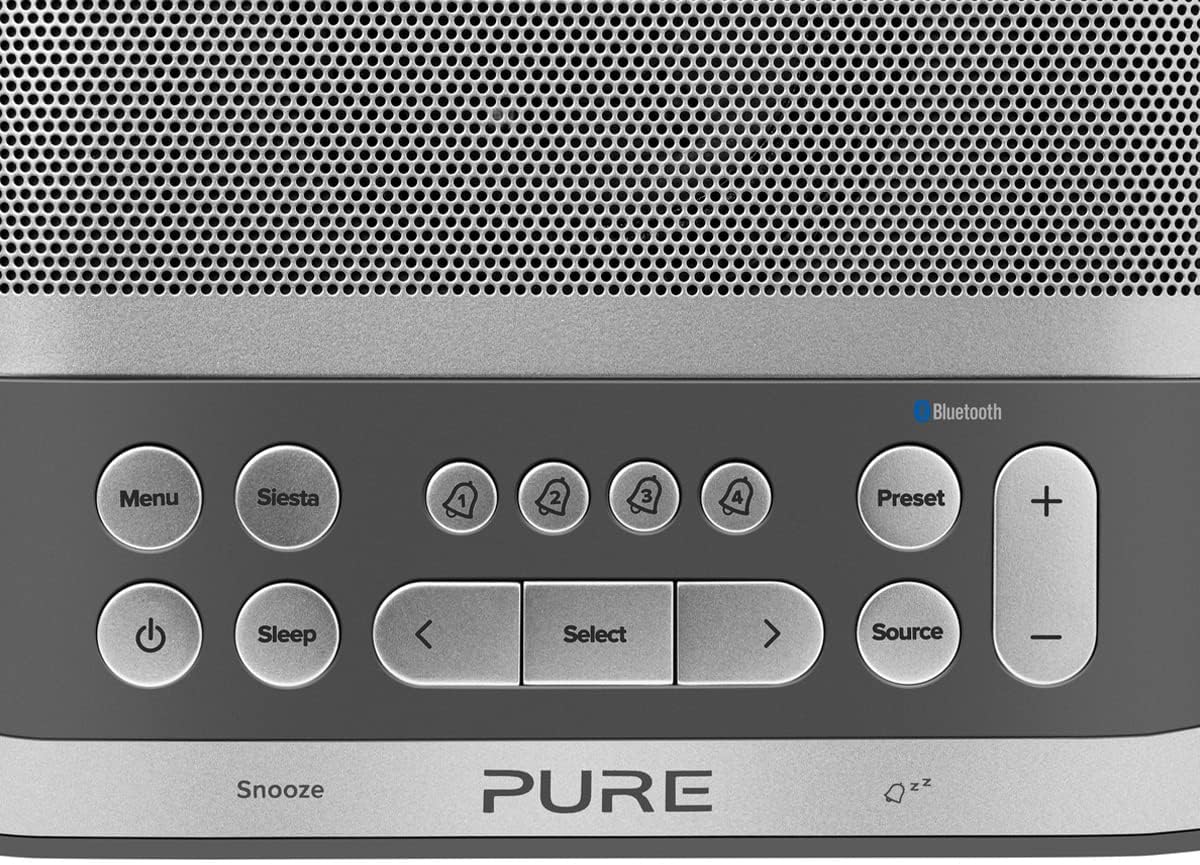
Image: Close-up of the top panel buttons, including Menu, Siesta, Alarm 1-4, Preset, Volume, Power, Sleep, Source, and Navigation buttons.
- زر الطاقة (●): اضغط لتشغيل الوحدة أو إيقاف تشغيلها.
- زر القائمة: الوصول إلى إعدادات النظام وخياراته.
- Siesta Button: Activates the Siesta timer for short naps.
- Alarm Buttons (1, 2, 3, 4): Press to activate/deactivate or configure individual alarms.
- زر الضبط المسبق: Save and recall your favorite radio stations.
- أزرار التحكم في مستوى الصوت (+/-): ضبط مستوى الصوت.
- زر النوم: Set a sleep timer for the radio to turn off automatically.
- زر المصدر: التبديل بين أوضاع DAB وFM وBluetooth.
- أزرار التنقل (< Select >): التنقل عبر القوائم وتحديد الخيارات.
- Snooze Bar: Press to temporarily silence an active alarm.
تشغيل الراديو (DAB/DAB+ و FM)
- حدد الوضع: اضغط على مصدر button to cycle between DAB and FM radio modes.
- اضبط المحطات:
- ربت: In DAB mode, use the < و > buttons to browse available stations. Press يختار لضبط المحطة.
- وزير الخارجية: في وضع FM ، اضغط على يختار to auto-scan for the next available station. Use < و > للضبط الدقيق.
- حفظ الإعدادات المسبقة: لحفظ محطة، اضغط مع الاستمرار على الإعداد المسبق زر. يستخدم < و > لاختيار رقم محدد مسبقًا، ثم اضغط يختار للتأكيد.
- استدعاء الإعدادات المسبقة: اضغط لفترة وجيزة على الإعداد المسبق زر. يستخدم < و > to select a preset, then press يختار.
Bluetooth Pairing and Streaming
- الدخول إلى وضع البلوتوث: اضغط على مصدر button until "Bluetooth" is displayed. The Siesta S6 will enter pairing mode, indicated by a flashing Bluetooth icon.
- إقران جهازك: On your smartphone, tablet, or computer, enable Bluetooth and search for "Pure Siesta S6" in the list of available devices. Select it to pair.
- ابدأ البث: Once paired, you can play audio from your device, and it will stream wirelessly to the Siesta S6.
ضبط المنبهات

Image: A hand interacting with the top controls of the Siesta S6, demonstrating alarm setting.
- اختر المنبه: اضغط على أحد ملفات Alarm (1, 2, 3, or 4) buttons to select an alarm to configure.
- تكوين الإعدادات: استخدم < و > buttons to adjust the time, alarm source (DAB, FM, Tone, Last Station), volume, and days of the week (Everyday, Weekdays, Weekends, Once). Press يختار لتأكيد كل إعداد.
- تفعيل/إلغاء التفعيل: اضغط لفترة وجيزة على الزر المقابل إنذار button to toggle the alarm on or off. An active alarm will show its indicator on the display.
- غفوة: عندما يصدر صوت التنبيه، اضغط على غفوة bar to temporarily silence it. The alarm will sound again after the snooze period.
- وقف التنبيه: To turn off a sounding alarm completely, press the قوة زر.
Using the Siesta Timer
The Siesta timer allows you to set a short nap timer.
- فعل: اضغط على قيلولة زر.
- ضبط المدة: استخدم < و > buttons to set the desired nap duration (e.g., 5, 10, 15 minutes).
- يتأكد: يضعط يختار to start the Siesta timer. The display will show the countdown.
الشحن عبر USB
The USB port on the back of the Siesta S6 can be used to charge your mobile devices.
- Connect your device's USB charging cable to the USB port on the Siesta S6.
- Ensure the Siesta S6 is powered on and connected to mains electricity.
- سيبدأ الشحن تلقائيًا.
صيانة
Proper care will ensure the longevity of your Siesta S6.
- تنظيف: امسح الجهاز بقطعة قماش ناعمة وجافة وخالية من الوبر. لا تستخدم المنظفات الكاشطة أو الشمع أو المذيبات.
- الموقع: Avoid placing the unit in direct sunlight, near heat sources, or in environments with high humidity or dust.
- تهوية: تأكد من وجود تهوية كافية حول الجهاز لتجنب ارتفاع درجة حرارته. لا تسد فتحات التهوية.
استكشاف الأخطاء وإصلاحها
If you encounter issues with your Siesta S6, refer to the following common problems and solutions.
| مشكلة | حل |
|---|---|
| لا يوجد طاقة | تأكد من توصيل محول الطاقة بشكل آمن بالوحدة ومأخذ الحائط العامل. |
| استقبال راديو ضعيف | Fully extend and reposition the wire antenna. Try moving the unit to a different location, away from other electronic devices that may cause interference. Perform a full scan for DAB stations. |
| بلوتوث لا يتصل | Ensure the Siesta S6 is in Bluetooth pairing mode (flashing icon). Make sure Bluetooth is enabled on your device and it is within range. Try unpairing and re-pairing the device. |
| لا يصدر صوت الإنذار | Verify that the alarm is activated (indicator on display). Check the alarm volume setting. Ensure the alarm time is correctly set. |
| Display Too Dim/Bright | Access the Menu settings to adjust the display brightness or toggle the automatic brightness feature. |
تحديد
| ميزة | التفاصيل |
|---|---|
| ماركة | نقي |
| رقم الموديل | ص149584 |
| لون | نوار (أسود) |
| نوع المنتج | راديو المنبه الرقمي |
| حجم العرض | 3.9 بوصة |
| الاتصال | بلوتوث |
| المميزات الخاصة | Alarm, Siesta Timer, USB Charging Port |
| الأجهزة المتوافقة | الهاتف المحمول، الجهاز اللوحي |
| مصدر الطاقة | التيار الكهربائي |
| أبعاد المنتج | 14.6L x 7H centimeters |
الضمان والدعم
Pure products are designed and manufactured to the highest standards. For warranty information and technical support, please refer to the warranty card included with your product or visit the official Pure webالموقع. احتفظ بإثبات الشراء الخاص بك لتقديم مطالبات الضمان.
For further assistance, you may also contact Pure customer service through their official channels.


