المنتج انتهىview
This manual provides instructions for the Delock USB 2.0 A-B Cable, model 83687. This cable is designed for connecting devices with a USB Type-A port to devices with a USB Type-B port, facilitating data transfer.
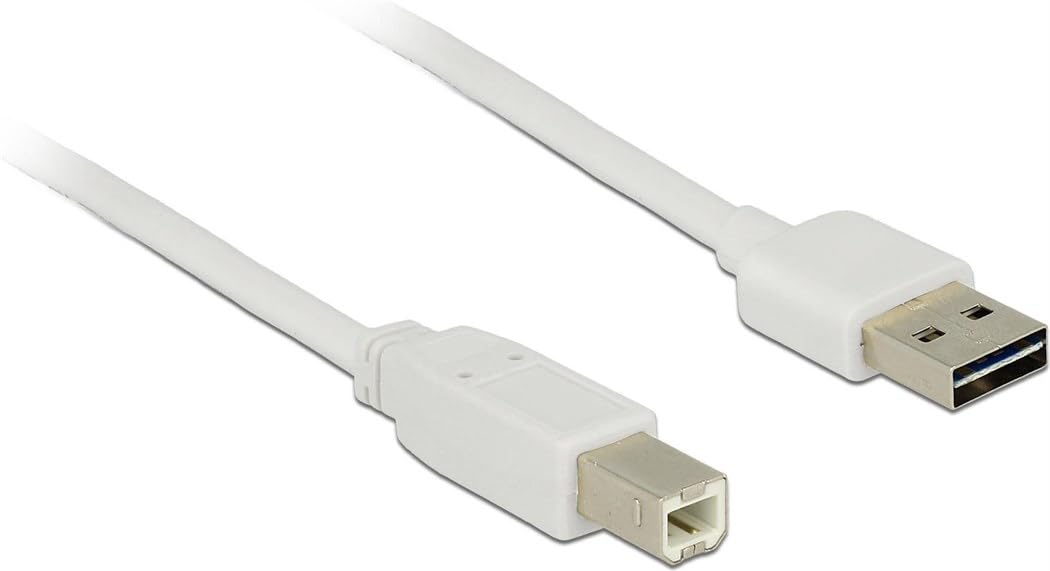
Image: The Delock USB 2.0 A-B Cable, featuring a white cable and gold-plated connectors. The USB Type-A connector is visible on the right, and the USB Type-B connector is on the left.
يثبت
The Delock USB 2.0 A-B Cable is designed for simple plug-and-play operation. Follow these steps to connect your devices:
- تحديد المنافذ: Locate the USB Type-A port on your host device (e.g., computer, laptop) and the USB Type-B port on your peripheral device (e.g., printer, scanner, external hard drive).
- Connect USB Type-A: Insert the USB Type-A connector of the cable into the corresponding USB Type-A port on your host device. Ensure it is fully seated.
- Connect USB Type-B: Insert the USB Type-B connector of the cable into the corresponding USB Type-B port on your peripheral device. Ensure it is fully seated.
- تحقق من الاتصال: Once both ends are connected, your operating system should automatically detect the peripheral device. If necessary, install any required drivers for your peripheral device as per its manufacturer's instructions.
This cable is compatible with devices such as laptops and personal computers.
تعليمات التشغيل
Once the cable is properly connected, it facilitates data transfer between the connected devices. The cable supports USB 2.0 specifications, allowing for data transfer rates of up to 480 Mbit/s.
- Ensure both connected devices are powered on for proper communication.
- Initiate data transfer operations (e.g., printing, scanning, file transfer) through the software or operating system interface of your host device.
- For optimal performance, avoid disconnecting the cable during active data transfer.
صيانة
To ensure the longevity and optimal performance of your Delock USB 2.0 A-B Cable, follow these maintenance guidelines:
- تخزين: خزّن الكابل في مكان بارد وجاف بعيدًا عن أشعة الشمس المباشرة ودرجات الحرارة العالية. تجنّب لفّ الكابل أو ثنيه بإحكام، خاصةً بالقرب من الموصلات، لتجنب تلفه الداخلي.
- تنظيف: If the cable or connectors become dirty, gently wipe them with a soft, dry, lint-free cloth. Do not use liquid cleaners or abrasive materials.
- التعامل: Always grasp the connector housing when plugging or unplugging the cable, rather than pulling on the cable itself. This prevents strain on the cable's internal wires and connections.
- حماية: Keep the cable away from sharp objects, heavy furniture, or areas where it might be stepped on or pinched, as this can damage the insulation and internal conductors.
استكشاف الأخطاء وإصلاحها
If you encounter issues with your Delock USB 2.0 A-B Cable, consider the following troubleshooting steps:
| مشكلة | السبب المحتمل / الحل |
|---|---|
| لم يتم التعرف على الجهاز |
|
| بطء نقل البيانات |
|
| اتصال متقطع |
|
تحديد
| ميزة | التفاصيل |
|---|---|
| ماركة | ديلوك |
| رقم الموديل | 83687 |
| نوع الكابل | كابل يو اس بي 2.0 ايه بي |
| طول الكابل | 2 أمتار (6.56 قدم) |
| الموصل 1 | USB من النوع A ذكر |
| الموصل 2 | USB Type-B Male |
| إصدار USB | 2.0 |
| معدل نقل البيانات (الحد الأقصى) | 480 ميجابت/ثانية |
| جهات الاتصال | مطلي بالذهب |
| لون | أبيض |
| الأجهزة المتوافقة | Laptop, Personal Computer, and other devices with USB A and B ports |
| ميزة خاصة | نقل البيانات |
الضمان والدعم
For information regarding warranty coverage and technical support for your Delock USB 2.0 A-B Cable, please refer to the official Delock webيمكنك زيارة الموقع الإلكتروني أو الاتصال بخدمة العملاء مباشرةً. قد تختلف شروط الضمان المحددة باختلاف المنطقة والبائع.
Manufacturer: DeLOCK
تاريخ أول توفر: 29 أغسطس 2017


