1. المقدمة
This manual provides essential information for the safe and effective use of your Vivibright GP90 UP Portable Video Projector. Please read it thoroughly before operating the device and retain it for future reference. The Vivibright GP90 UP is a portable video projector featuring an Android 4.42 operating system, 3200 lumens brightness, and 1280x800 native resolution, designed for multimedia entertainment and presentations.
2. تعليمات السلامة
- لا تسد فتحات التهوية. تأكد من وجود تدفق هواء كافٍ حول جهاز العرض لمنع ارتفاع درجة حرارته.
- لا تعرض جهاز العرض للمطر أو الرطوبة لتجنب الصدمة الكهربائية أو الحريق.
- تجنب النظر مباشرة إلى عدسة جهاز العرض عندما يكون lamp يتم تشغيله، لأن الضوء الساطع يمكن أن يسبب تلفًا للعين.
- ضع جهاز العرض على سطح مستوٍ وثابت لمنعه من السقوط.
- استخدم فقط محول الطاقة المرفق مع جهاز العرض.
- لا تحاول تفكيك أو إصلاح جهاز العرض بنفسك. أسند جميع أعمال الصيانة إلى فنيين مؤهلين.
- أبقِ جهاز العرض بعيدًا عن مصادر الحرارة وأشعة الشمس المباشرة.
3. محتويات العبوة
تأكد من وجود جميع العناصر في العبوة:
- Vivibright GP90 UP Projector
- كابل الطاقة
- Remote Control (may not be included with all models)
- دليل المستخدم (هذا المستند)
4. انتهى المنتجview
Familiarize yourself with the projector's components and connection ports.
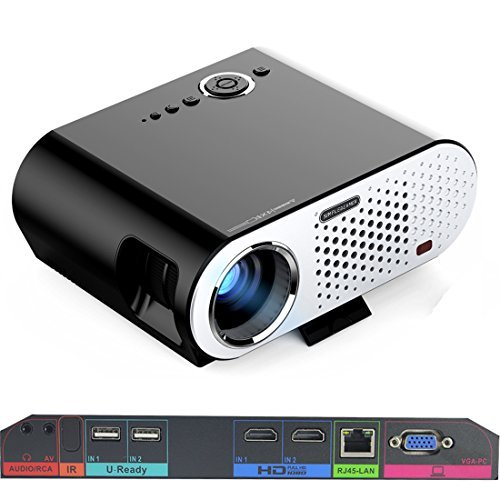
Image: The Vivibright GP90 UP projector showing its top controls, lens, and various input/output ports on the rear panel. The top features power and navigation buttons. The front has the projection lens. The rear panel includes Audio/RCA, IR receiver, two USB ports (U-Ready), two HDMI ports (HD), an RJ45-LAN port, and a VGA-PC port.
4.1 اللوحة الأمامية
- عدسة الإسقاط: يُصدر الصورة.
4.2 اللوحة العلوية
- أزرار التحكم: Power, navigation, and menu access.
4.3 Rear Panel (Input/Output Ports)
- AUDIO/RCA: Audio output and composite video input.
- إير: مستقبل الأشعة تحت الحمراء للتحكم عن بعد.
- IN 1 / IN 2 (USB): Two USB ports for connecting USB storage devices.
- IN 1 / IN 2 (HDMI): Two HDMI inputs for digital video and audio sources.
- RJ45-LAN: منفذ إيثرنت للاتصال بالشبكة السلكية.
- VGA-PC: VGA input for connecting to computers.
5. الإعداد
5.1 التنسيب
- Place the projector on a flat, stable surface or mount it on a ceiling or tripod.
- Ensure the projector is positioned directly in front of the screen or wall. Avoid angled placement as horizontal keystone correction is not available.
- The optimal projection distance ranges from 1.2m to 8.5m, producing screen sizes from 35 to 280 inches. For a 100-inch image, a distance of approximately 3 meters is recommended.
5.2 توصيل الطاقة
- قم بتوصيل كابل الطاقة بمدخل الطاقة الخاص بجهاز العرض.
- Plug the other end of the power cable into a suitable electrical outlet (90~240V/50~60Hz).
5.3 توصيل أجهزة الإدخال
- HDMI: Connect an HDMI cable from your source device (e.g., laptop, Blu-ray player, gaming console) to one of the projector's HDMI ports.
- USB: Insert a USB flash drive or external hard drive into a USB port to access media files.
- VGA: Connect a VGA cable from your computer to the projector's VGA-PC port.
- من: Use an RCA cable to connect older devices to the AV input.
- LAN: Connect an Ethernet cable to the RJ45-LAN port for a wired internet connection.
5.4 ضبط التركيز والانحراف
- ركز: Rotate the focus ring around the lens until the projected image is sharp and clear.
- تصحيح الانحراف: Use the manual vertical keystone correction feature (±15°) to adjust the image shape if the projector is not perfectly perpendicular to the screen. This corrects trapezoidal distortion.
6. تعليمات التشغيل
6.1 تشغيل/إيقاف التشغيل
- تشغيل الطاقة: اضغط على زر التشغيل في جهاز العرض أو جهاز التحكم عن بعد. سيتغير ضوء المؤشر، وسيبدأ جهاز العرض بالعمل.
- إيقاف التشغيل: اضغط زر التشغيل مرة أخرى. أكد إيقاف التشغيل إذا طُلب منك ذلك. اترك جهاز العرض ليبرد قبل فصله عن الكهرباء.
6.2 التنقل في نظام التشغيل أندرويد
- The projector runs on Android 4.42. Use the remote control or connect a wireless mouse (recommended for easier navigation) to interact with the interface.
- Access pre-installed apps or download compatible applications from the app store. Note that some newer applications may not be compatible with Android 4.42.
6.3 الإسقاط اللاسلكي
- واي فاي: Connect to a wireless network via the settings menu. Supports dual-band Wi-Fi 2.4G.
- بلوتوث: Supports Bluetooth 4.0 for connecting wireless devices such as speakers. Note that Bluetooth audio output may only be available when using USB or Android sources, not HDMI.
- Wireless Push (EZCast / Miracast / Airplay): Use compatible apps on your smartphone or tablet to mirror your device's screen to the projector. Ensure your device and the projector are on the same Wi-Fi network.
6.4 إعدادات الصوت
- The projector features built-in 4Ω, 5W stereo speakers with SRS sound technology.
- For enhanced audio, connect external speakers via the Audio Out port or wirelessly via Bluetooth (when using Android or USB sources).
7. الصيانة
7.1 التنظيف
- عدسة: استخدم قطعة قماش ناعمة وخالية من الوبر، مُخصصة للعدسات البصرية. لا تستخدم منظفات كاشطة.
- Casing: امسح الجزء الخارجي من جهاز العرض بقطعة قماش ناعمة وجافة. وللأوساخ المستعصية، استخدم قطعة قماش ناعمة قليلاً.amp القماش ثم تجفيفه جيدا.
- فتحات التهوية: Periodically clean the ventilation openings with a soft brush or compressed air to prevent dust buildup, which can affect performance and lifespan.
7.2 التخزين
- عند عدم استخدام جهاز العرض لفترات طويلة، قم بتخزينه في مكان بارد وجاف، بعيدًا عن أشعة الشمس المباشرة ودرجات الحرارة القصوى.
- Cover the lens with its cap to protect it from dust and scratches.
8. استكشاف الأخطاء وإصلاحها
| مشكلة | السبب المحتمل | حل |
|---|---|---|
| لم يتم عرض أي صورة | الطاقة غير موصولة؛ مصدر الإدخال غير محدد؛ غطاء العدسة مثبت | تحقق من توصيل الطاقة؛ حدد مصدر الإدخال الصحيح؛ أزل غطاء العدسة |
| الصورة ضبابية | لم يتم ضبط التركيز؛ جهاز العرض قريب جدًا/بعيد جدًا | اضبط حلقة التركيز؛ اضبط مسافة الإسقاط |
| الصورة شبه منحرفة | جهاز العرض غير عمودي على الشاشة | Adjust vertical keystone correction; Reposition projector to be centered |
| لا يوجد صوت | Volume too low; Muted; External speakers not connected/selected | Increase volume; Unmute; Check external speaker connections/settings |
| Wireless projection unstable | Weak Wi-Fi signal; Device incompatibility; Outdated Android OS | Ensure strong Wi-Fi signal; Check device compatibility with Miracast/Airplay; Consider wired connection if issues persist with older Android version. |
9. المواصفات
| ميزة | التفاصيل |
|---|---|
| ماركة | Vivibright |
| نموذج | GP90 UP |
| نظام التشغيل | أندرويد 4.42 |
| سطوع | 3200 Lumens (LED Luminous efficiency) |
| الدقة الأصلية | 1280 x 800 (supports up to 1080P) |
| نسبة التباين | 3000:1 (Dynamic up to 10,000:1) |
| حجم العرض | 35-280 بوصة |
| مسافة الإسقاط | 1.2 متر - 8.5 متر |
| نسبة الرمي | 1.45:1 |
| تصحيح الانحراف | دليل عمودي ± 15 درجة |
| مصدر الضوء الحياة | تصل إلى 30,000 ساعة |
| الاتصال | Wi-Fi (2.4G), Bluetooth 4.0, 2x HDMI, 2x USB, VGA, AV, RJ45-LAN |
| صوتي | Built-in 4Ω, 5W stereo speakers with SRS sound |
| مزود الطاقة | 90 ~ 240 فولت / 50 ~ 60 هرتز |
| أبعاد المنتج | 27 × 22 × 9 سم |
| وزن العنصر | 3.17 كجم |
10. الضمان والدعم
For warranty information and technical support, please refer to the documentation provided at the time of purchase or contact Vivibright customer service. Keep your purchase receipt as proof of purchase for warranty claims.


