مقدمة
Thank you for choosing the Uncaged Ergonomics Dual Motor Electric Standing Desk Frame. This premium adjustable desk frame is designed to enhance your workspace by allowing seamless transitions between sitting and standing positions, promoting a healthier and more productive work environment. This manual provides detailed instructions for assembly, operation, maintenance, and troubleshooting to ensure optimal performance and longevity of your desk frame.

Image: The Uncaged Ergonomics Dual Motor Electric Standing Desk Frame with its control panel, showcasing the robust design and intuitive interface.
معلومات السلامة
يرجى قراءة جميع تعليمات السلامة بعناية قبل التجميع والتشغيل لمنع الإصابة أو تلف المنتج.
- الوزن المحدد: Do not exceed the maximum weight capacity of 113 kg (250 lbs) on the desk frame. Overloading can cause damage and pose a safety risk.
- تكنولوجيا منع الاصطدام: The desk frame is equipped with anti-collision technology. This feature helps prevent the desk from lowering onto an object by stopping movement if an obstruction is detected. However, always ensure the path is clear during height adjustments.
- السلامة الكهربائية:
- تأكد من توصيل سلك الطاقة بشكل صحيح بمأخذ كهربائي مؤرض.
- Do not operate the desk with a damaged power cord or plug.
- احتفظ بالسوائل بعيدًا عن المكونات الكهربائية.
- افصل الطاقة قبل التنظيف أو الصيانة.
- الأطفال والحيوانات الأليفة: احتفظ بالأطفال والحيوانات الأليفة بعيدًا عن المكتب أثناء التشغيل لتجنب الحوادث.
- حَشد: تأكد من تثبيت جميع المكونات بإحكام وفقًا لتعليمات التجميع. قد تؤدي الأجزاء غير المثبتة بإحكام إلى عدم الاستقرار.
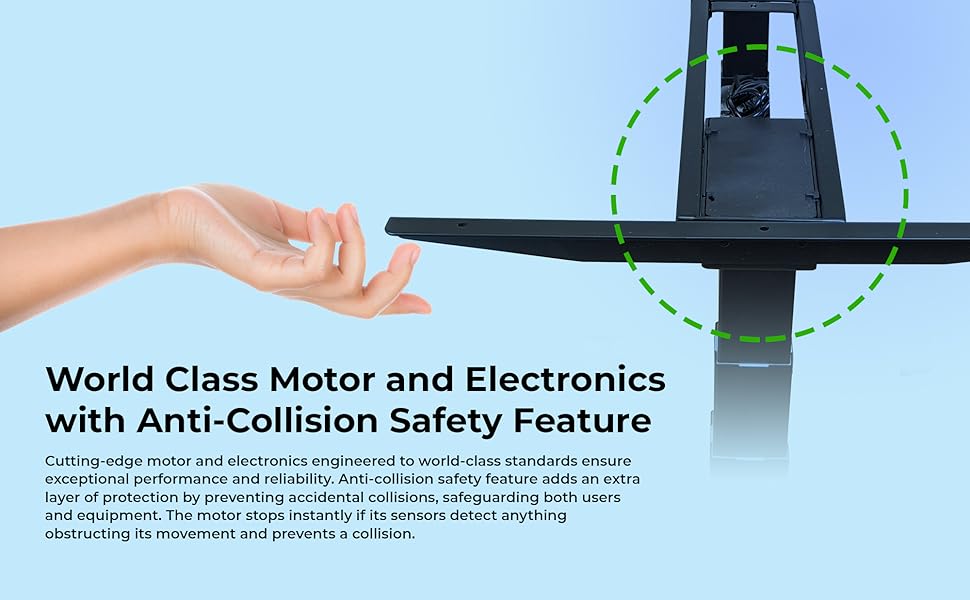
Image: Illustration of the anti-collision safety feature, showing how the desk stops if an obstruction is detected during movement.
محتويات الحزمة
قبل البدء بالتجميع، يرجى التأكد من وجود جميع المكونات وسلامتها. في حال وجود أي أجزاء مفقودة أو تالفة، يرجى التواصل مع خدمة العملاء.
- 1 x Electric Desk Frame (includes legs, crossbar, and feet)
- 1 x Control Panel with LED Display
- 1 x Power Adapter and Cable
- أدوات التجميع (براغي، مسامير، حلقات معدنية)
- مفتاح ألين (للتجميع)
- علاقات إدارة الكابلات
- Rubber Spacers (for tabletop mounting)
- دليل المستخدم (هذا المستند)
تعليمات التجميع (الإعداد)
Follow these steps to assemble your Uncaged Ergonomics Electric Standing Desk Frame. It is recommended to have a second person assist with assembly, especially when handling larger components or the tabletop.
- فك مكونات الحزمة: Carefully remove all parts from the packaging. The packaging is designed to protect the components during transit.
- قم بتوصيل القدمين بالساقين: Securely attach the feet to the bottom of each desk leg using the provided screws.
- وصل العارضة المتقاطعة: Connect the adjustable crossbar between the two desk legs. Ensure the crossbar is extended to the desired width for your tabletop.
- صندوق التحكم في التركيب: Attach the control box to the designated area on the frame, typically under the crossbar, using the provided hardware.
- توصيل المحركات ولوحة التحكم: Plug the motor cables from each leg into the control box. Connect the control panel cable to the control box.
- Prepare Tabletop: Place your chosen tabletop upside down on a soft, protected surface. Position the assembled desk frame onto the tabletop, ensuring it is centered and aligned.
- تركيب على سطح الطاولة: Use the provided screws and rubber spacers to securely attach the desk frame to the tabletop. Pre-drilling pilot holes in the tabletop may be necessary depending on its material.
- إدارة الكابلات: Use the included cable ties to neatly route and secure all cables, preventing them from dangling or getting caught during height adjustments.
- تشغيل الطاقة: Carefully flip the desk upright. Plug the power cable into the control box and then into a grounded electrical outlet.
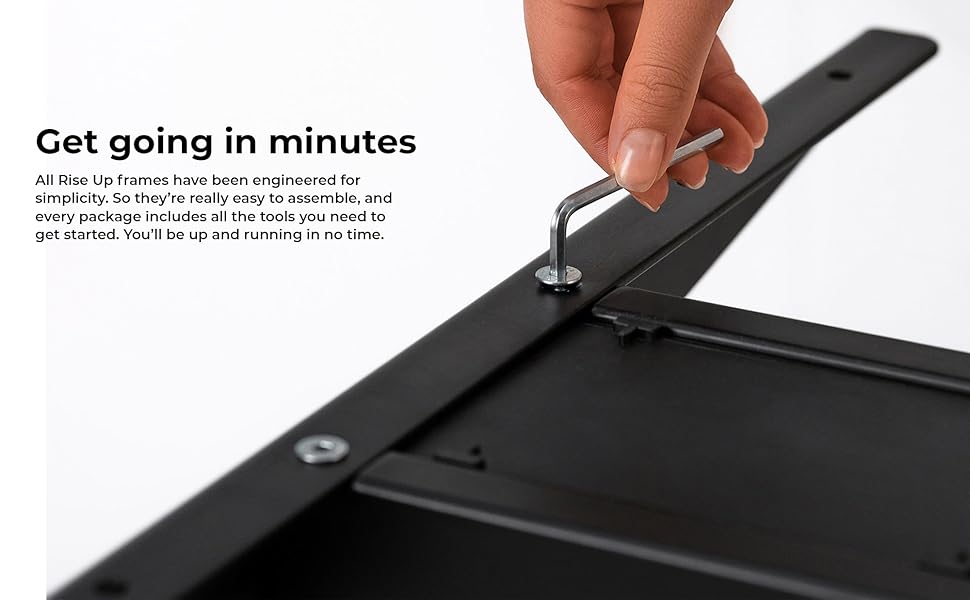
الصورة: لقطة مقربة view of an assembly step, showing the use of an Allen wrench to secure a component of the desk frame.
تعليمات التشغيل
The control panel allows for easy and precise height adjustments, along with convenient memory settings.
انتهت لوحة التحكمview
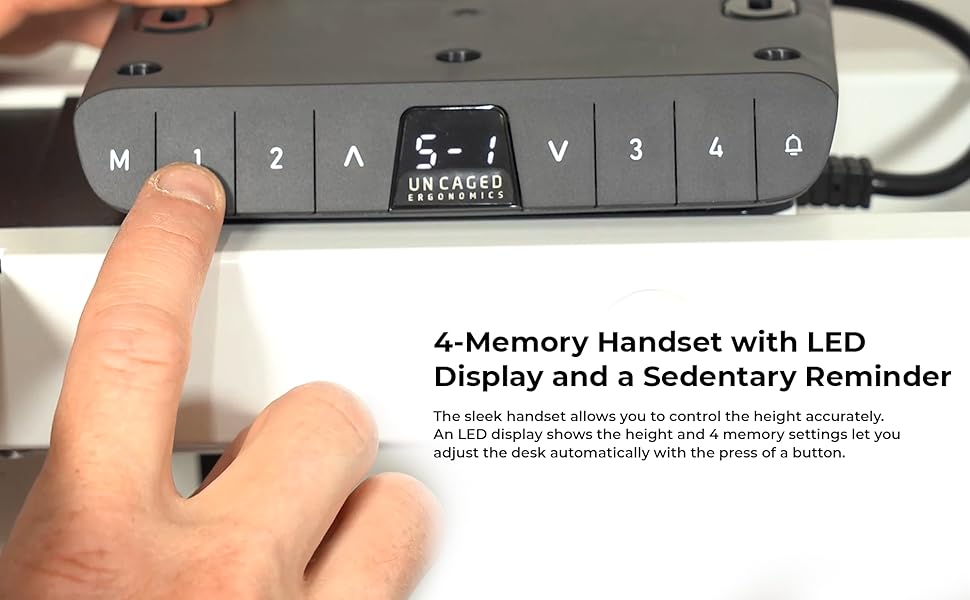
Image: The desk's control panel featuring an LED display for height readings and buttons for manual adjustment and memory presets.
- أزرار الأعلى/الأسفل (▲ / ▼): Press and hold the Up or Down arrow buttons to manually adjust the desk height. Release the button to stop at the desired height. The LED display will show the current height.
- إعدادات الذاكرة (1، 2، 3، 4): The desk frame features four programmable memory presets for quick height adjustments.
- قم بضبط المكتب على الارتفاع المطلوب باستخدام الأزرار لأعلى/لأسفل.
- اضغط على الزر "M". ستظهر على شاشة LED عبارة "S-".
- Within 3 seconds, press the desired memory button (1, 2, 3, or 4). The display will show "S-1", "S-2", etc., indicating the height has been saved.
- To recall a saved height, simply press the corresponding memory button (1, 2, 3, or 4). The desk will automatically move to the saved position.
- خاصية منع الاصطدام: During height adjustment, if the desk encounters an obstruction, it will automatically stop and reverse slightly to prevent damage.

Image: A user comfortably working at the desk in a standing position, demonstrating the ergonomic benefits of height adjustability.
سمات
The Uncaged Ergonomics Electric Standing Desk Frame is engineered with advanced features for superior performance and user experience.
- نظام المحرك المزدوج: Equipped with two powerful motors for fast, smooth, and quiet height adjustments. Each motor is located in a leg, ensuring synchronized movement and stability.
- Wide Height Adjustment Range: Seamlessly adjust the desk height from 66 cm (26.1 inches) to 131 cm (51.6 inches), accommodating a wide range of user heights and preferences.
- Adjustable Width Frame: The frame's width can be adjusted from 107 cm (42.3 inches) to 152 cm (71 inches), allowing compatibility with various tabletop sizes.
- 3-سtage Lifting Columns: الثلاثةtage leg design provides a greater height range and increased stability, even at maximum extension.
- تكنولوجيا منع الاصطدام: Advanced sensors detect obstructions during movement, automatically stopping and reversing the desk to prevent damage.
- 4 إعدادات مسبقة للذاكرة: Save your preferred sitting and standing heights for quick, one-touch adjustments.
- LED Height Display: The integrated LED display on the control panel shows the precise current height of the desk.
- بناء قوي: Made from high-strength, powder-coated steel for exceptional durability and a sleek finish.
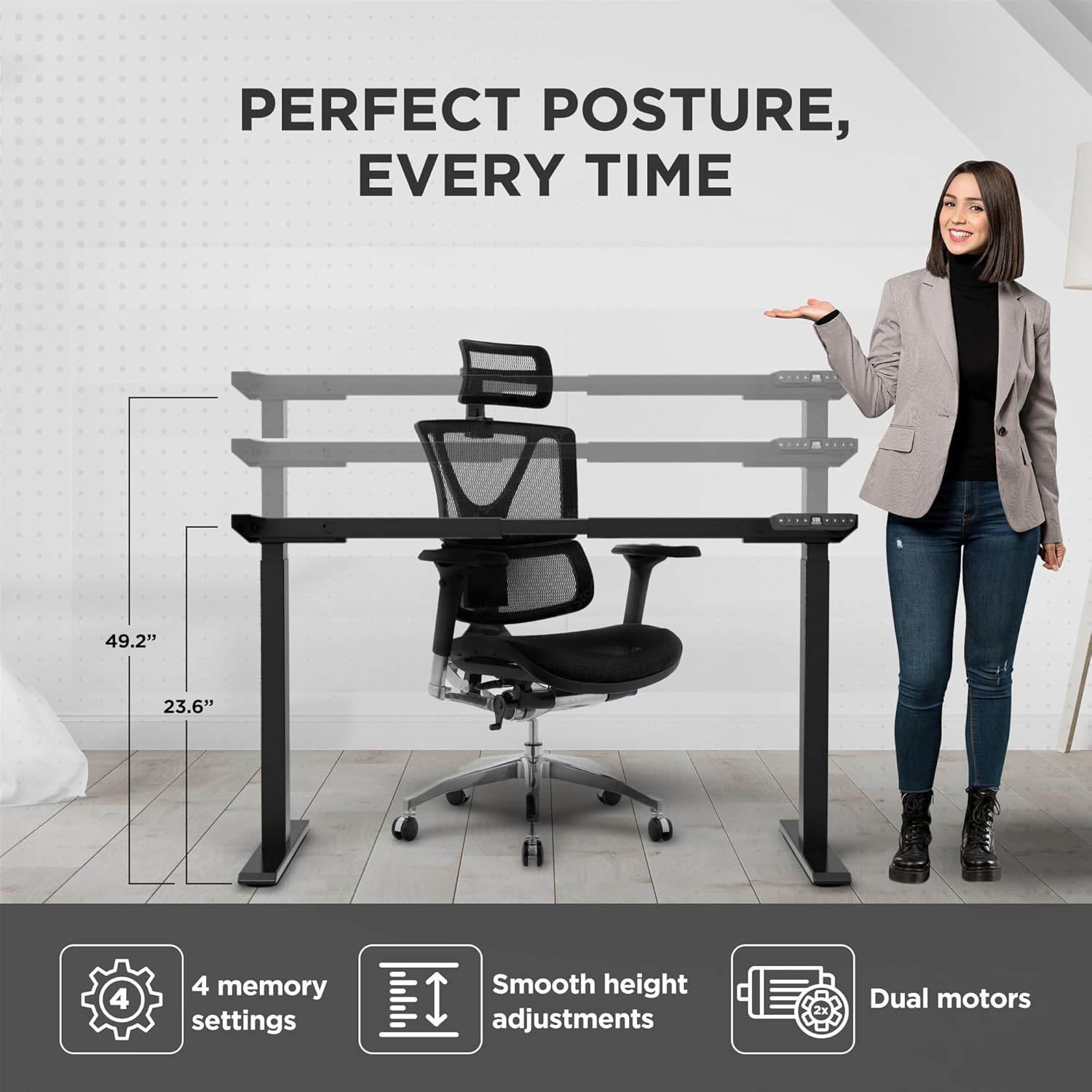
Image: Visual representation of the desk frame's adjustable height and key features, including 4 memory settings, smooth adjustments, and dual motors.

Image: Two individuals, one standing and one sitting, illustrating the wide range of height adjustability offered by the desk frame.
تحديد
| رقم الموديل | RUb |
| ماركة | بيئة العمل غير المقيدة |
| لون | أسود |
| نطاق تعديل الارتفاع | 66 - 131 سم (26.1 - 51.6 بوصة) |
| Width Adjustment Range | 107 - 152 سم (42.3 - 71 بوصة) |
| الحد الأقصى لوزن السعة | 113 كجم (250 رطل) |
| مادة | فولاذ عالي القوة |
| ينهي | مطلي بالمسحوق |
| المحركات | محركات مزدوجة |
| الساق Stages | 3-سtage |
| إعدادات الذاكرة المسبقة | 4 |
| المميزات الخاصة | Anti-collision technology, LED height display |
| أبعاد المنتج (مجمعة) | 69.85 x 152.4 x 131.06 cm (27.5 x 60 x 51.6 inches) |
| وزن العنصر | 22.68 كجم (50 رطل) |

Image: The desk frame illustrating its compatibility with various tabletop sizes, ranging from 42.3 to 71 inches in width.
صيانة
Regular maintenance will help ensure the long-term performance and appearance of your desk frame.
- تنظيف: امسح إطار المكتب بقطعة قماش ناعمة و...amp قطعة قماش. تجنب استخدام المواد الكيميائية القاسية أو المنظفات الكاشطة، لأنها قد تتلف الطبقة الخارجية.
- التحقق من الاتصالات: افحص جميع البراغي والصواميل دوريًا للتأكد من إحكام ربطها. أعد ربطها إذا لزم الأمر.
- إدارة الكابلات: Ensure cables remain neatly organized and are not pinched or tangled, which could affect movement or cause damage.
- العناية بالمحرك: The dual motors are designed for durability and require no special lubrication. Avoid exposing them to excessive dust or moisture.
استكشاف الأخطاء وإصلاحها
If you encounter any issues with your desk frame, refer to the common problems and solutions below. If the problem persists, please contact customer support.
| مشكلة | السبب المحتمل | حل |
|---|---|---|
| المكتب لا يتحرك ولا يستجيب للأوامر. | Power cable disconnected; control box not properly connected; system error. |
|
| يتحرك المكتب بشكل غير متساوٍ أو يصدر أصواتًا غير عادية. | حمل غير متساوٍ؛ وصلات مفكوكة؛ عائق. |
|
| Memory settings are not saving or recalling correctly. | Incorrect saving procedure; temporary system glitch. |
|
| Anti-collision feature triggers too often or not at all. | Sensitivity setting; physical obstruction. |
|
الضمان والدعم
Uncaged Ergonomics is committed to providing high-quality products built for durability and longevity. Our desk frames are designed to meet commercial-grade standards, reflecting over a decade of proven experience in manufacturing ergonomic solutions.
While specific warranty details may vary by region or purchase point, Uncaged Ergonomics stands behind the quality of its products. For any questions, technical assistance, or support needs, please contact Uncaged Ergonomics customer service. Our team is dedicated to ensuring your satisfaction and assisting with any issues you may encounter.
Please visit the official Uncaged Ergonomics website or refer to your purchase documentation for the most up-to-date warranty information and contact details.
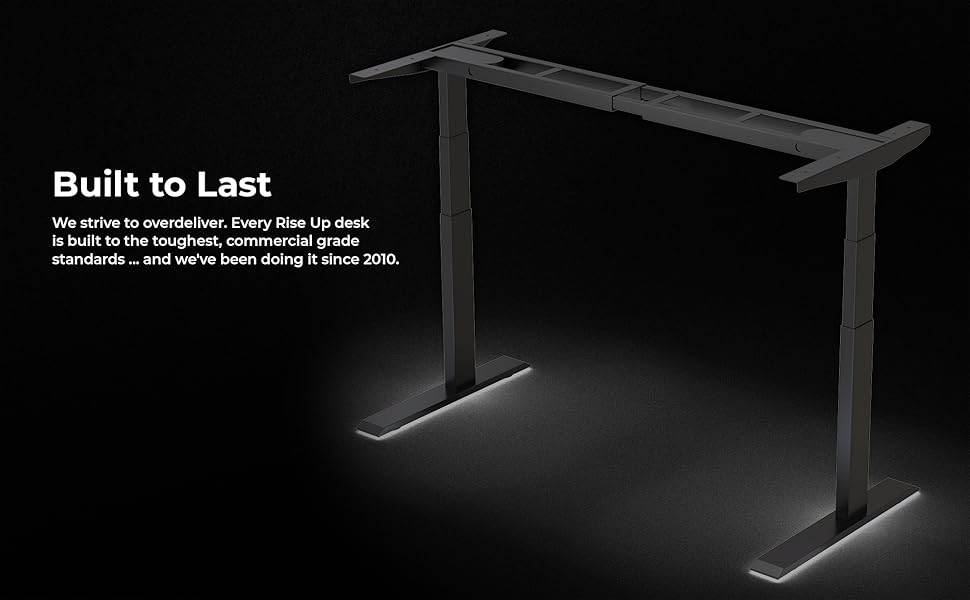
Image: The desk frame illuminated, emphasizing its robust construction and the brand's commitment to building products that are "Built to Last" since 2010.


