1. المقدمة
The COMPUTHERM Q7RF wireless room thermostat is designed for precise control of heating and air conditioning systems. This programmable device allows you to set individual temperature schedules for each day of the week, optimizing comfort and energy efficiency in your home or office. Its wireless design offers flexible placement of the thermostat unit, while the receiver unit connects directly to your boiler or air conditioning system, compatible with both 24V and 230V control circuits.
2. محتويات العبوة
تأكد من وجود جميع المكونات في الحزمة الخاصة بك:
- 4 x COMPUTHERM Q7RF Room Thermostat (Transmitter Unit)
- 4 x COMPUTHERM Q7RF Receiver Unit
- دليل المستخدم (هذا المستند)
- مسامير التثبيت ومقابس الحائط
3. انتهى المنتجview
The COMPUTHERM Q7RF system consists of two main components: the thermostat unit (transmitter) and the receiver unit. The thermostat unit measures the room temperature and allows you to set desired temperatures and programs. The receiver unit connects to your heating or cooling system and switches it on or off based on signals from the thermostat unit.

الشكل 1: انتهىview of the COMPUTHERM Q7RF 4-piece set, showing multiple thermostat and receiver units.
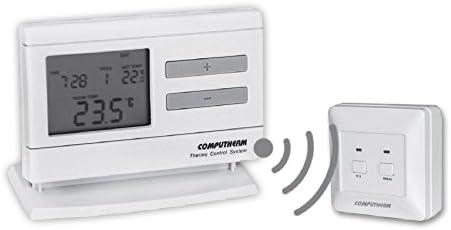
Figure 2: A single COMPUTHERM Q7RF thermostat unit communicating wirelessly with its receiver unit.
3.1 Thermostat Unit (Transmitter)
- شاشة LCD: Shows current temperature, set temperature, time, day, and program status.
- أزرار التحكم: For setting temperature, time, and programming schedules.
- حجرة البطارية: لامدادات الطاقة.
3.2 وحدة الاستقبال
- محطات الأسلاك: For connection to the heating/cooling system.
- مؤشرات الحالة: LEDs to show power and relay status.
- Manual Override Buttons: For temporary manual control.
4. المواصفات
| ميزة | مواصفة |
|---|---|
| ماركة | كمبيوثيرم |
| نموذج | Q7RF |
| تبديل حجمtage | 24V AC/DC, ... 250V AC, 50Hz |
| استهلاك الطاقة | 6W |
| نطاق قياس درجة الحرارة | 3 – 45°C (in 0.1°C increments) |
| نطاق درجة حرارة قابل للتعديل | 5 – 40°C (in 0.5°C increments) |
| دقة قياس درجة الحرارة | ±0.5 درجة مئوية |
| نوع وحدة التحكم | زر |
| تكنولوجيا الاتصال | لاسلكي (ترددات الراديو) |
| المميزات الخاصة | Programmable, Compatible with various system voltages |
5. الإعداد والتثبيت
5.1 Thermostat Unit Placement and Battery Installation
- اختر الموقع: Place the thermostat unit in a central area of the room where it can accurately measure the ambient temperature, away from direct sunlight, drafts, or heat sources.
- تركيب البطاريات: Open the battery compartment on the back of the thermostat unit. Insert the required batteries (typically AA or AAA, refer to the unit's markings) ensuring correct polarity. Close the compartment.
- تشغيل الطاقة: The display should light up, indicating the unit is powered.
5.2 Receiver Unit Wiring
WARNING: Electrical installation should only be performed by a qualified electrician. Disconnect power to the heating/cooling system before proceeding.
- قم بتركيب جهاز الاستقبال: Secure the receiver unit near your boiler or air conditioning system using the provided screws and wall plugs.
- أطراف توصيل الأسلاك: Open the cover of the receiver unit to expose the wiring terminals.
- الاتصال بالنظام: Connect the receiver unit to the two-wire room thermostat connection point of your boiler or AC system. Ensure connections are secure and follow the wiring diagram provided with your heating/cooling system and the receiver unit. The COMPUTHERM Q7RF is compatible with both 24V and 230V control circuits.
- اعادة الطاقة: Once wiring is complete and verified, close the receiver unit cover and restore power to your heating/cooling system.
5.3 Pairing the Units (If not pre-paired)
Refer to the specific instructions provided with your Q7RF set for pairing procedures. Typically, this involves pressing a pairing button on the receiver unit and then initiating a pairing sequence on the thermostat unit within a short timeframe. A successful pairing will usually be indicated by an LED on the receiver or a message on the thermostat display.
6. تعليمات التشغيل
6.1 فهم شاشة LCD
The LCD display provides all necessary information about the thermostat's current status and settings.

الشكل 3: مفصل view of the COMPUTHERM Q7RF LCD display, illustrating various indicators such as program number, manual modification symbol, weekdays, time, set temperature, actual room temperature, low battery symbol, boiler ON state, and timed control symbol.
- أيام الأسبوع: يشير إلى اليوم الحالي من الأسبوع.
- Exact Time / Time Left: Displays the current time or time remaining for a manual modification.
- رقم البرنامج: Shows the active program segment.
- ضبط درجة الحرارة: The desired temperature set by the user.
- Actual Room Temperature: The current temperature measured by the thermostat.
- Symbol for Manual Modification: Indicates that the thermostat is currently operating under a temporary manual override.
- Temp. Modified until next manual intervention: Shows the duration of a temporary temperature change.
- Symbol for Low Battery Voltage: Appears when batteries need replacement.
- Symbol for Boiler ON State: Indicates when the heating/cooling system is active.
- Symbol for Timed Control: Indicates that a programmed schedule is active.
6.2 ضبط الوقت واليوم الحاليين
- اضغط على وقت زر.
- استخدم + or - الأزرار لضبط الساعة، ثم اضغط وقت مرة أخرى للتأكيد.
- Repeat for minutes and day of the week.
6.3 ضبط درجة الحرارة يدويا
- في وضع التشغيل العادي، اضغط على + or - أزرار لضبط درجة الحرارة المطلوبة.
- The new temperature will be maintained until the next programmed time slot or until manually overridden again.
6.4 Programming Daily/Weekly Schedules
The Q7RF allows for independent programming for each day of the week. You can typically set multiple time periods with different temperatures for each day.
- اضغط على بروغ زر للدخول إلى وضع البرمجة.
- استخدم يوم button to select the day you wish to program (e.g., MON, TUE, etc.).
- استخدم وقت و +/- buttons to set the start time for the first program period.
- استخدم ضبط درجة الحرارة و +/- أزرار لضبط درجة الحرارة المطلوبة لهذه الفترة.
- يضعط بروغ again to move to the next program period for the same day, or use يوم للانتقال إلى اليوم التالي.
- Repeat until all desired periods and days are programmed.
- اضغط على يجري or EXIT button to save and exit programming mode.
7. الصيانة
7.1 استبدال البطارية
When the low battery symbol appears on the LCD display, replace the batteries immediately to ensure continuous operation. Use new, high-quality alkaline batteries of the specified type.
- افتح غطاء حجرة البطارية الموجود في الجزء الخلفي من وحدة منظم الحرارة.
- قم بإزالة البطاريات القديمة.
- Insert new batteries, observing correct polarity (+/-).
- أغلق غطاء حجرة البطارية.
7.2 التنظيف
Clean the thermostat and receiver units with a soft, dry cloth. Do not use abrasive cleaners, solvents, or spray directly onto the units, as this may damage the electronics or finish.
8. استكشاف الأخطاء وإصلاحها
| مشكلة | السبب المحتمل | حل |
|---|---|---|
| شاشة الترموستات فارغة | البطاريات الميتة | استبدال البطاريات بأخرى جديدة. |
| نظام التدفئة/التبريد لا يستجيب | 1. Receiver unit not powered 2. Units not paired 3. Wiring issue 4. خارج النطاق | 1. Check power supply to receiver. 2. Perform pairing procedure (Section 5.3). 3. Verify wiring connections (Section 5.2). 4. Move thermostat closer to receiver or check for obstructions. |
| قراءة غير صحيحة لدرجة الحرارة | Thermostat placed in unsuitable location (direct sun, draft) | Relocate thermostat to a more central and stable temperature area. |
| Programmed schedule not active | Thermostat in manual override mode | Exit manual override mode (e.g., press RUN/AUTO button) to resume programmed operation. |
9. الضمان والدعم
COMPUTHERM products are manufactured to high-quality standards. For warranty information, please refer to the warranty card included with your product or contact your retailer. For technical support, please reach out to the COMPUTHERM customer service or your local distributor. Keep your purchase receipt as proof of purchase.


