1. المقدمة
This user manual provides comprehensive instructions for the Comix CS-3302 12-Digit Desktop Calculator. Please read this manual thoroughly before using the calculator to ensure proper operation and to maximize its lifespan. This calculator is designed for general office and school use, featuring a large LCD display, dual power source, and various calculation functions.
2. معلومات السلامة
- Do not expose the calculator to extreme temperatures, direct sunlight, or high humidity.
- تجنب إسقاط الآلة الحاسبة أو تعريضها لصدمات قوية.
- Do not attempt to disassemble or modify the calculator. This will void the warranty.
- Use a soft, dry cloth for cleaning. Do not use liquid cleaners or abrasive materials.
- يحفظ بعيدًا عن متناول الأطفال الصغار.
3. انتهى المنتجview

الشكل 3.1: أمام view of the Comix CS-3302 Desktop Calculator, showing the large LCD display and full keypad.
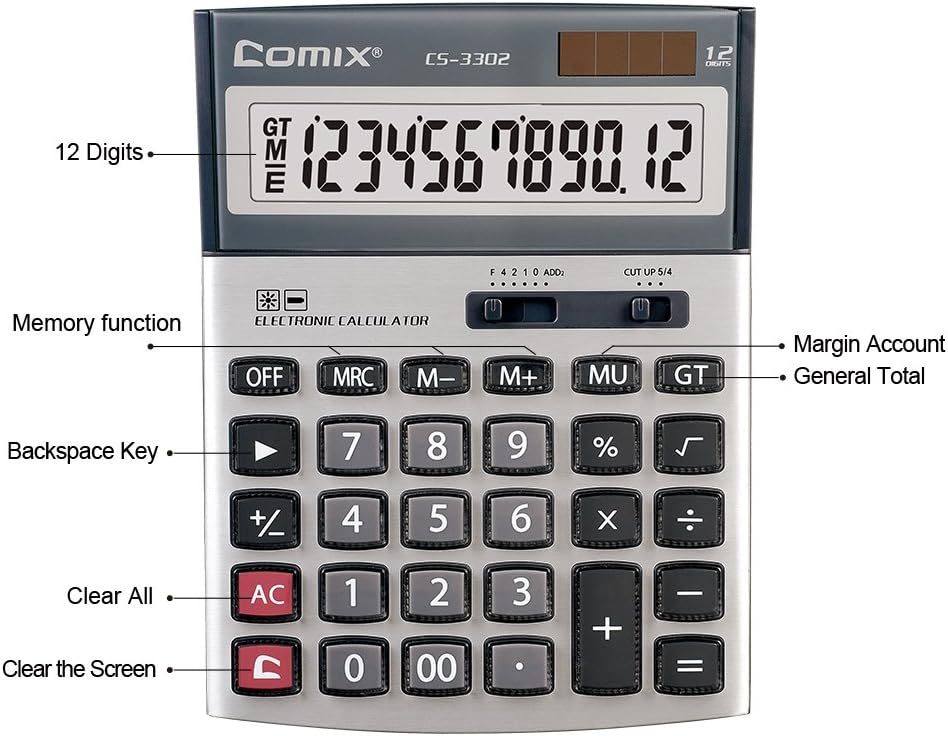
الشكل 3.2: Key functions and display features of the Comix CS-3302 Calculator, including 12 digits display, memory functions, and clear keys.

الشكل 3.3: Dimensions of the Comix CS-3302 Calculator, showing its compact and ergonomic design.

الشكل 3.4: بزاوية view of the Comix CS-3302 Calculator, highlighting its sleek profile وتخطيط المفاتيح.

الشكل 3.5: سايد بروfile of the Comix CS-3302 Calculator, showing its slim design.

الشكل 3.6: Retail packaging of the Comix CS-3302 Calculator, highlighting key features like 12 digits, dual power, and acrylic keys.
4. الإعداد
4.1 مصدر الطاقة
The Comix CS-3302 calculator operates on a dual power system: solar and battery. The solar panel provides power in well-lit environments, while a single AA battery (not included) serves as an auxiliary power source for low-light conditions or when solar power is insufficient.
- تركيب البطارية: Locate the battery compartment on the back of the calculator. Open the cover and insert one AA battery, ensuring correct polarity (+/-). Close the battery compartment cover securely.
- التشغيل الأولي: The calculator should power on automatically when sufficient light is available or with the battery installed. If not, press the تشغيل/تيار متردد زر.
5. تعليمات التشغيل
5.1 العمليات الأساسية
- إضافة (+): أدخل الرقم الأول، ثم اضغط +أدخل الرقم الثاني، ثم اضغط =.
- الطرح (-): أدخل الرقم الأول، ثم اضغط -أدخل الرقم الثاني، ثم اضغط =.
- الضرب (×): أدخل الرقم الأول، ثم اضغط ×أدخل الرقم الثاني، ثم اضغط =.
- القسمة (÷): أدخل الرقم الأول، ثم اضغط ÷أدخل الرقم الثاني، ثم اضغط =.
- بيرسنtagه (٪): Enter the number, press × (أو ÷), enter the percentagقيمة e، ثم اضغط %. على سبيل المثالample, to calculate 10% of 200, enter 200 × 10 %.
- الجذر التربيعي (√): Enter the number, then press √.
5.2 وظائف خاصة
- OFF: Powers off the calculator.
- مكيف الهواء (الكل واضح): يمسح جميع الإدخالات والذاكرة، ويعيد ضبط الآلة الحاسبة إلى حالتها الأولية.
- ج (إدخال واضح): Clears the last entered number or the current display value without affecting previous calculations or memory.
- Backspace (►): يحذف الرقم الأخير الذي تم إدخاله.
- M+ (الذاكرة الإضافية): يضيف القيمة المعروضة إلى الذاكرة.
- م- (الذاكرة ناقص): يطرح القيمة المعروضة من الذاكرة.
- MRC (استعادة الذاكرة/مسحها): اضغط مرة واحدة لاستدعاء قيمة الذاكرة. اضغط مرتين لمسح الذاكرة.
- MU (Mark Up / Margin Account): Used for profit margin calculations. Enter cost, press MU, enter selling price, then press = to get the profit margin.
- المجموع الكلي: Accumulates the results of all calculations. Pressing GT displays the grand total.
- +/- (تغيير الإشارة): يغير إشارة الرقم المعروض (من موجب إلى سالب، أو من سالب إلى موجب).
5.3 Decimal and Rounding Settings
The calculator features two slide switches at the top for controlling decimal places and rounding:
- Decimal Selector (F 4 2 1 0 ADD2):
- F (Floating Decimal): Displays all available decimal places.
- 4 ، 2 ، 1 ، 0: Sets the number of decimal places to 4, 2, 1, or 0 respectively.
- ADD2 (وضع الإضافة): Automatically adds two decimal places to all results, useful for currency calculations.
- Rounding Selector (CUT UP 5/4):
- CUT (Cut Off): Truncates the number, discarding all digits beyond the set decimal places.
- UP (Round Up): Rounds up the last digit if there are any non-zero digits beyond the set decimal places.
- 5/4 (Round Half Up): Rounds up if the first discarded digit is 5 or greater, otherwise rounds down.
6. الصيانة
- تنظيف: Wipe the calculator surface with a soft, dry cloth. For stubborn dirt, slightly dampen the cloth with water, but ensure no liquid enters the calculator. Do not use chemical cleaners.
- تخزين: When not in use for extended periods, store the calculator in a cool, dry place away from direct sunlight and extreme temperatures.
- استبدال البطارية: If the display becomes dim or unresponsive in low light, replace the AA battery. Ensure the calculator is off before replacing the battery.
7. استكشاف الأخطاء وإصلاحها
| مشكلة | السبب المحتمل | حل |
|---|---|---|
| العرض فارغ أو خافت. | عدم كفاية الضوء لتوليد الطاقة الشمسية، أو انخفاض مستوى البطارية. | Move to a brighter area or replace the AA battery. |
| نتائج حسابية غير صحيحة. | Incorrect input, incorrect decimal/rounding settings, or memory interference. | يضعط AC to clear all and restart. Check decimal and rounding switch positions. Ensure correct key presses. |
| المفاتيح لا تستجيب. | Calculator frozen or physical damage. | حاول الضغط عن ثم تشغيل/تيار متردد. If problem persists, remove and reinsert battery. If still unresponsive, contact support. |
8. المواصفات
| ماركة | كوميكس |
| رقم الموديل | CS-3302 (P/N: 11821063) |
| عرض | شاشة LCD مكونة من 12 أرقام |
| مصدر الطاقة | Dual Power (Solar & 1x AA Battery - not included) |
| مادة | أكريليك، معدن |
| الأبعاد (الطول × العرض × الارتفاع) | حوالي 23.6 × 15.7 × 4.3 سم (9.3 × 6.2 × 1.7 بوصة) |
| وزن | حوالي 322 جرام (0.71 رطل) |
| درجة حرارة التشغيل | -25 ℃ to +60 ℃ (-13 ℉ to +140 ℉) |
| رمز المنتج الموحد | 842064102524 |
9. الضمان والدعم
Comix products are designed for quality and durability. This product comes with a ضمان لمدة 3 سنوات من تاريخ الشراء، بما في ذلك تغطية عيوب المواد والصناعة في ظل الاستخدام العادي.
For warranty claims, technical support, or any inquiries regarding your Comix CS-3302 calculator, please contact Comix customer service through their official website or the retailer where the product was purchased. Please have your proof of purchase and the product model number ready when contacting support.
For more information, visit the official Comix webموقع: www.comix.com


