مقدمة
The HyperGear Marathon Sport Wireless Bluetooth Earphones are engineered to provide a high-fidelity audio experience for active individuals. Designed for comfort and durability, these earphones offer wireless connectivity, clear sound, and convenient hands-free calling, making them suitable for various activities from intense workouts to casual listening.
محتويات الحزمة
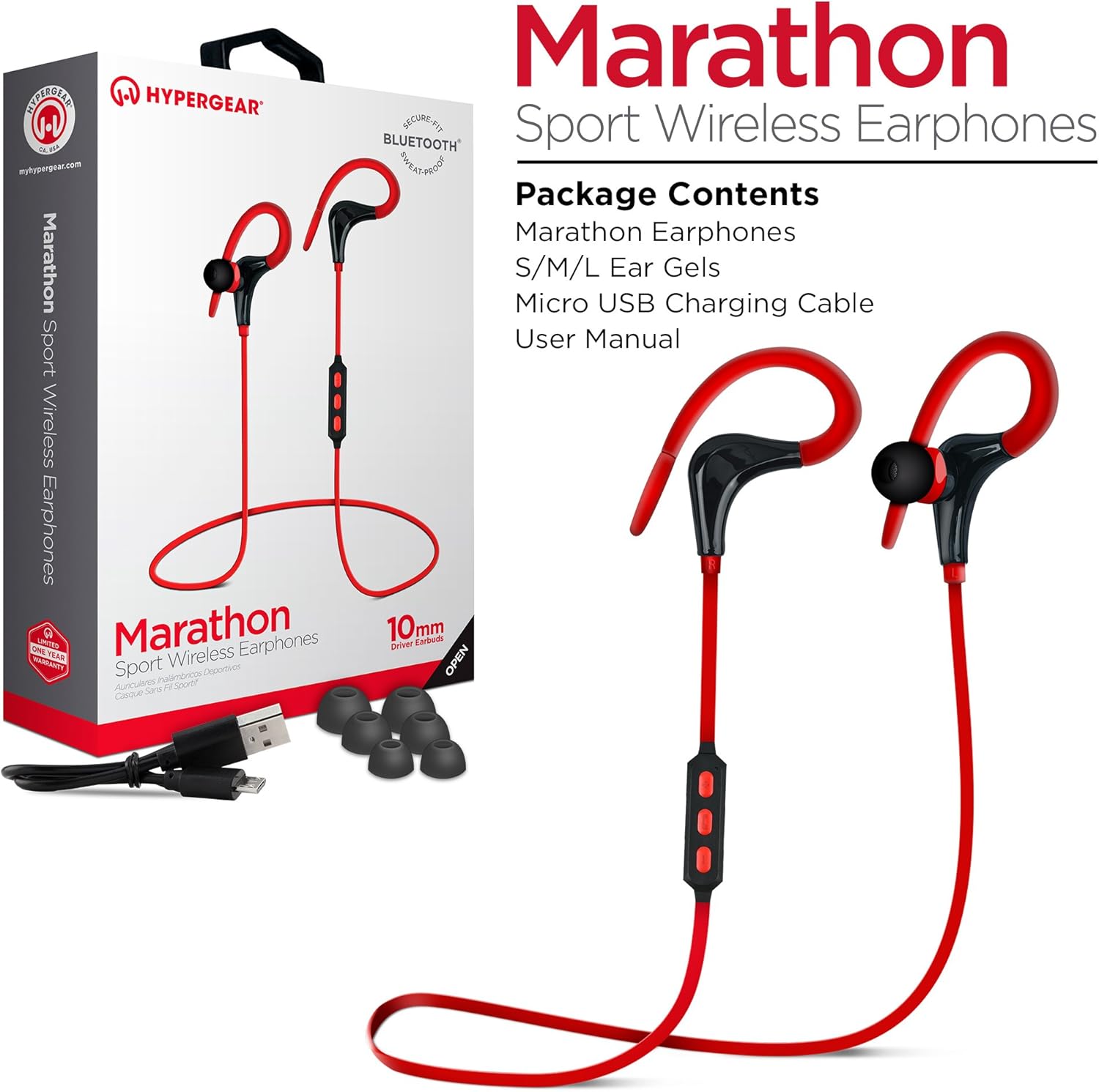
This image displays the retail packaging for the HyperGear Marathon Sport Wireless Earphones, showing the earphones themselves, a Micro USB charging cable, and various sizes of ear gels. The box highlights features such as 'Secure Fit' and 'Bluetooth'.
يرجى تحديد المربع للعناصر التالية:
- HyperGear Marathon Sport Wireless Earphones
- S/M/L Ear Gels (various sizes for optimal fit)
- كابل شحن ميكرو يو اس بي
- دليل المستخدم (هذا المستند)
يثبت
1. شحن سماعات الأذن
Before first use, fully charge your earphones. The battery provides up to 5 hours of average life on a single charge.
- Locate the Micro USB charging port on the earphones' in-line control module.
- قم بتوصيل كابل Micro USB المرفق بمنفذ الشحن.
- قم بتوصيل الطرف الآخر من كابل USB بمصدر طاقة USB متوافق (مثل منفذ USB في الكمبيوتر، أو محول USB جداري).
- The LED indicator will show charging status (refer to the LED indicator section for details). Once fully charged, the LED will change color or turn off.
2. الاقتران بجهاز بلوتوث

This image illustrates the wireless freedom of the HyperGear Marathon Sport Earphones, depicting them wirelessly connected via Bluetooth to a smartphone, tablet, and desktop computer, emphasizing their universal compatibility.
The earphones use Bluetooth 4.1 technology for reliable wireless transmission up to 33 feet (10 meters).
- Ensure the earphones are charged and turned off.
- Press and hold the Multi-function button (usually the center button on the in-line control) for approximately 5-7 seconds until the LED indicator flashes red and blue alternately, indicating pairing mode.
- On your Bluetooth-enabled device (smartphone, tablet, etc.), go to the Bluetooth settings and turn Bluetooth on.
- بحث عن available devices. You should see "HyperGear Marathon" or a similar name appear in the list.
- Select "HyperGear Marathon" to connect. Once successfully paired, the LED indicator on the earphones will typically flash blue slowly or turn solid blue.
- إذا طُلب منك إدخال رمز المرور، أدخل "0000".
ستحاول سماعات الأذن تلقائيًا إعادة الاتصال بالجهاز المقترن الأخير عند تشغيلها.
تعليمات التشغيل
ضوابط أكثرview

This image highlights the in-line control module of the HyperGear Marathon Sport Earphones, positioned next to a smartphone displaying a music player. It emphasizes the convenience of hands-free music and call management.
The in-line control module allows you to manage music playback and calls.
| الزر/الإجراء | وظيفة |
|---|---|
| زر متعدد الوظائف (مركز) |
|
| رفع الصوت (+) |
|
| اخفض الصوت (-) |
|
ارتداء سماعات الأذن

This image shows a person cycling outdoors while wearing the HyperGear Marathon Sport Earphones, demonstrating the secure behind-the-ear hook design that keeps the earphones in place during active movement.

This image depicts a person running, wearing the HyperGear Marathon Sport Earphones. It highlights the ergonomic ear gels and sweatproof design, emphasizing their suitability for active lifestyles and secure fit during exercise.
The Marathon earphones feature a behind-the-ear hook design and ergonomic ear gels for a secure and comfortable fit, even during strenuous activities.
- Select the ear gel size that provides the best seal and comfort for your ears. Three sizes (S/M/L) are included.
- ضع سماعة الأذن في قناة أذنك.
- Gently loop the ear hook over the top and behind your ear, adjusting it until it feels secure and comfortable.
جودة الصوت

This image showcases the High-Fidelity Stereo Sound feature of the HyperGear Marathon Sport Earphones, highlighting the 10mm Neodymium Drivers that deliver powerful bass and clear highs for an authentic listening experience.
Equipped with powerful 10mm Neodymium Drivers, these earphones deliver high-fidelity stereo sound with robust bass and clear high frequencies for an immersive audio experience.
صيانة
Proper care will extend the life of your HyperGear Marathon earphones.
- تنظيف: Use a soft, dry cloth to wipe the earphones. For ear gels, remove them and clean with a mild soap solution if necessary, then rinse and dry thoroughly before reattaching. Do not use harsh chemicals or abrasive materials.
- تخزين: عند عدم الاستخدام، قم بتخزين سماعات الأذن في مكان بارد وجاف، بعيدًا عن أشعة الشمس المباشرة ودرجات الحرارة القصوى.
- مقاومة الماء: The earphones are sweatproof and water-resistant, but they are not waterproof. Do not submerge them in water or expose them to heavy rain. Dry them thoroughly if they get wet from sweat or light splashes.
- الشحن: Avoid overcharging. Disconnect the charging cable once the earphones are fully charged.
استكشاف الأخطاء وإصلاحها
| مشكلة | السبب المحتمل | حل |
|---|---|---|
| سماعات الأذن لا تعمل | بطارية منخفضة | اشحن سماعات الأذن بالكامل. |
| لا يمكن الاقتران بالجهاز | سماعات الأذن ليست في وضع الاقتران؛ البلوتوث مُعطل على الجهاز؛ الجهاز بعيد جدًا | Ensure earphones are in pairing mode (flashing red/blue). Turn on Bluetooth on your device. Move device closer to earphones (within 33 ft/10m). Forget previous pairings on your device and try again. |
| لا يوجد صوت أو مستوى صوت منخفض | Volume too low; Earphones not connected; Incorrect audio output selected on device | Increase volume on both earphones and connected device. Reconnect earphones. Check audio output settings on your device. |
| قطع الصوت للداخل/الخارج | Interference; Device too far; Obstructions | Move closer to the connected device. Avoid strong electromagnetic interference. Ensure no physical obstructions between earphones and device. |
| الميكروفون لا يعمل | Incorrect settings on device; Earphones not properly connected | Check microphone input settings on your device. Ensure earphones are fully connected and selected as the audio input device. |
تحديد

This is a clear, full-view image of the HyperGear Marathon Sport Wireless Bluetooth Earphones in red, showcasing their design with ear hooks and the in-line control module.
| ميزة | التفاصيل |
|---|---|
| نموذج | HYG-14077 |
| الاتصال | بلوتوث 4.1 |
| لاسلكي المدى | حتى 33 قدمًا (10 مترًا) |
| حجم السائق | محركات 10 ملم نيوديميوم |
| عمر البطارية | مدة الاستخدام تصل إلى 5 ساعات (متوسط الاستخدام) |
| ميكروفون | Built-In, Noise Cancelling |
| مقاومة الماء | مقاوم للعرق / مقاوم للماء |
| وزن | 9 جرام |
| مادة | بلاستيك |
| أبعاد | 32 × 3.3 × 2.49 سم |
| التوافق | Universal (Apple, Android, tablets, wearables, gaming devices) |
الضمان والدعم
HyperGear products are designed with quality and reliability in mind. For warranty information and customer support, please refer to the official HyperGear webالموقع أو اتصل بخدمة العملاء الخاصة بهم مباشرة.
- رسمي Webموقع: www.hypergear.com (يرجى ملاحظة: هذا هو عنصر نائب URL. Refer to your product packaging or HyperGear's official documentation for the correct support webموقع.)
- خدمة العملاء: يمكن العثور على معلومات الاتصال عادةً على موقع الشركة المصنعة webتغليف الموقع أو المنتج.
يرجى الاحتفاظ بإثبات الشراء الخاص بك لمطالبات الضمان.


