1. المقدمة
This manual provides comprehensive instructions for the installation, operation, and maintenance of your UHPPOTE 4 Channel Color Quad System Video Splitter, Model UT-XYL-440. This device is designed to process and display video feeds from up to four CCTV cameras simultaneously on a single monitor, offering various display modes and control options for effective surveillance monitoring.
2. معلومات السلامة
- تأكد من وضع الجهاز على سطح مستوٍ وثابت لمنع السقوط العرضي.
- قم بتشغيل الجهاز ضمن المجلد المحددtage range (DC 12V) using the provided power adapter.
- Avoid exposing the unit to moisture, rain, or extreme temperatures. This device is intended for indoor use only.
- لا تفتح الصندوقasing or attempt to repair the unit yourself. Refer all servicing to qualified personnel.
- Maintain adequate ventilation around the unit to prevent overheating.
3. محتويات العبوة
يرجى التأكد من وجود جميع العناصر في الحزمة الخاصة بك:
- UHPPOTE 4 Channel Color Quad System Video Splitter (UT-XYL-440)
- الأشعة تحت الحمراء للتحكم عن بعد
- BNC Adapters (7 pieces)
- محول الطاقة (DC 12V)

Image 3.1: UHPPOTE 4 Channel Color Quad System Video Splitter, remote control, and BNC adapters.
4. انتهى المنتجview
Familiarize yourself with the components and controls of your video splitter.
4.1. اللوحة الأمامية
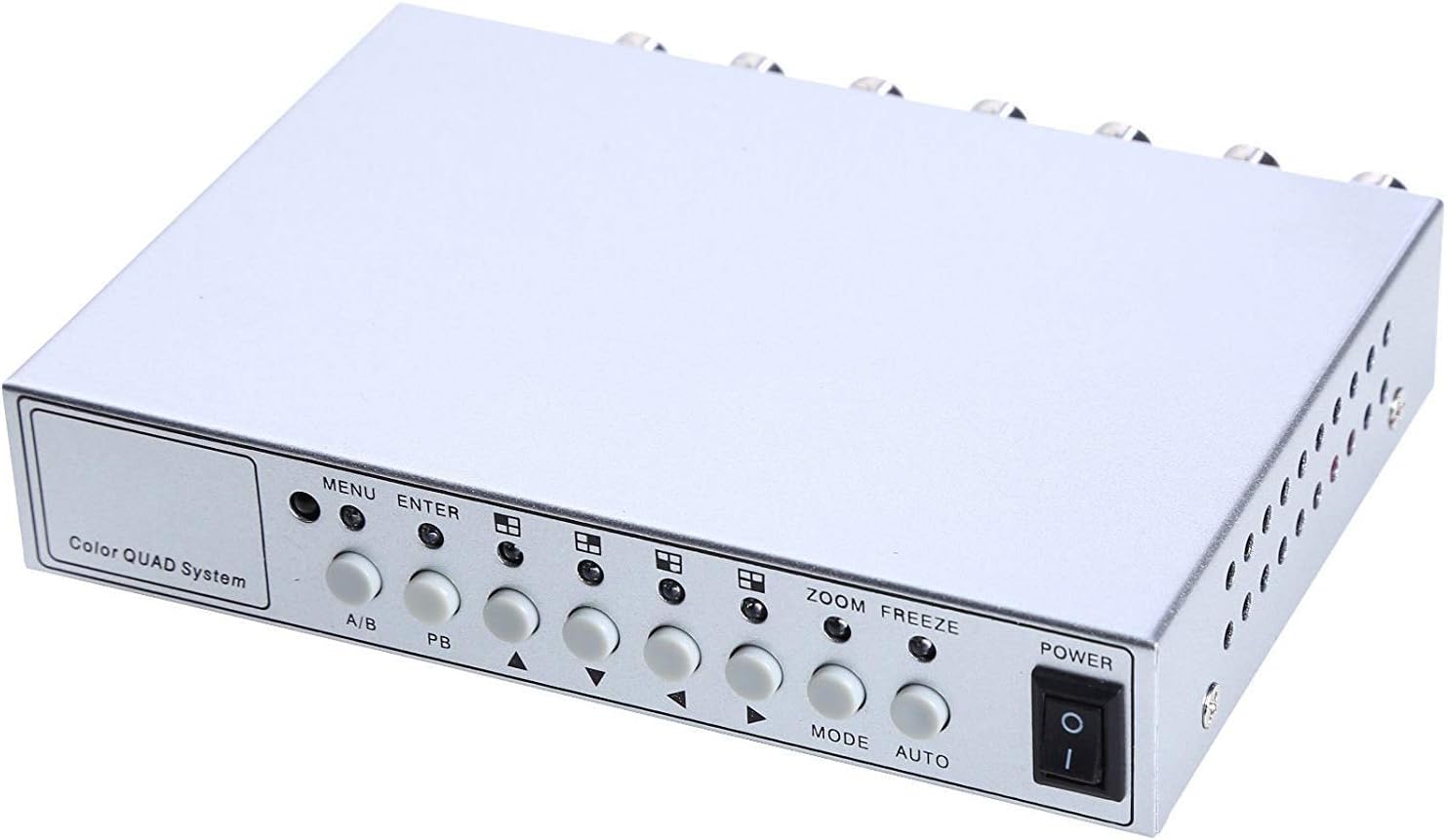
الصورة 4.1: عناصر التحكم والمؤشرات في اللوحة الأمامية.
- MENU: Accesses the on-screen display (OSD) menu for settings adjustment.
- أدخل: Confirms selections within the OSD menu.
- أ/ب: Switches between different display modes or channels.
- ب ب: Playback control (if connected to a VCR).
- أسهم الاتجاهات (أعلى/أسفل/يسار/يمين): تصفح خيارات القائمة وقم بتعديل القيم.
- تكبير: Activates the digital zoom function.
- تجميد: Freezes the current video frame.
- اتجاهات: Cycles through various display modes (Quad, Full Screen, PIP, Dual Split).
- تلقاءي: Activates the auto-sequence display mode.
- قوة: مفتاح تشغيل/إيقاف للجهاز.
4.2. اللوحة الخلفية

Image 4.2: Rear panel video input/output ports and power input.
- VIDEO 1-4: BNC inputs for connecting up to four CCTV cameras.
- VCR IN: BNC input for connecting a VCR or other recording device.
- VCR OUT: BNC output for connecting to a VCR or other recording device.
- شاشة: BNC output for connecting to a display monitor.
- تيار مستمر 12 فولت: Power input jack for the DC 12V power adapter.
4.3. جهاز التحكم عن بعد

Image 4.3: Infrared remote control for convenient operation.
The remote control provides convenient access to all functions, mirroring the front panel controls and offering direct channel selection.
5. الإعداد
Follow these steps to set up your UHPPOTE Video Splitter:
- ربط الكاميرات: Connect your CCTV cameras to the فيديو 1, فيديو 2, فيديو 3، و فيديو 4 BNC input ports on the rear panel. Ensure secure connections.
- توصيل الشاشة: Connect your display monitor to the MONITOR BNC output port on the rear panel.
- Connect VCR (Optional): If you wish to record video, connect the جهاز فيديو في و VCR OUT BNC ports to your VCR or recording device.
- توصيل الطاقة: أدخل محول الطاقة DC 12V في تيار مستمر 12 فولت input jack on the rear panel, then plug the adapter into a standard electrical outlet.
- تشغيل الطاقة: اضغط على قوة button on the front panel or remote control to turn on the unit.
6. تعليمات التشغيل
6.1. تشغيل/إيقاف التشغيل
اضغط على قوة button on the front panel or the remote control to switch the unit on or off.
6.2. أوضاع العرض
The unit supports various display configurations. Use the وضع button on the front panel or remote to cycle through them:
- QUAD Split Mode: Displays all four camera feeds simultaneously in a four-way split screen.
- وضع ملء الشاشة: Displays a single camera feed in full screen. Use the directional arrows or number buttons (1-4) on the remote to select the desired camera.
- وضع صورة داخل صورة (PIP): Displays one main camera feed with a smaller window of another camera feed. The position of the PIP window can often be adjusted via the menu.
- Dual Split Mode: Displays two camera feeds simultaneously (e.g., side-by-side or top-bottom).
- Auto Sequence Mode: Automatically cycles through full-screen views of each connected camera. Activate using the آلي زر على اللوحة الأمامية أو جهاز التحكم عن بعد.
6.3. التنقل في القائمة والإعدادات
To access and adjust system settings:
- اضغط على قائمة طعام button on the front panel or remote control. The On-Screen Display (OSD) menu will appear.
- استخدم أعلى/أسفل directional arrows to navigate between menu options.
- يضعط يدخل to select an option or enter a sub-menu.
- استخدم يسار/يمين directional arrows to adjust values (e.g., brightness, contrast) or change settings.
- يضعط قائمة طعام مرة أخرى للخروج من القائمة.
إعدادات المفتاح:
- تعديلات الفيديو: Adjust Brightness, Contrast, Saturation, Hue, and Sharpness for optimal image quality.
- تنسيق النظام: Select between NTSC (for North America, Japan, etc.) or PAL (for Europe, Asia, etc.) based on your region's video standard. Incorrect selection can lead to distorted or black and white images.
- Overlay Information: Configure display of Camera Title, Real Time and Date, and Alarm/Loss/Motion messages.
- Event Report: Review event logs and configure buzzer/relay output settings.
6.4. وظيفة التكبير
In full-screen mode, press the تكبير button on the front panel or remote to activate digital zoom. Use the directional arrows to select the area to zoom in on.
6.5. Freeze Function
اضغط على تجميد (FRZ) button on the front panel or remote to pause the current video frame. Press it again to resume live video.
7. الصيانة
- تنظيف: استخدم قطعة قماش ناعمة وجافة لتنظيف الجزء الخارجي من الجهاز. لا تستخدم المنظفات السائلة أو البخاخات.
- تهوية: Ensure the ventilation holes are not obstructed to prevent overheating.
- تخزين: في حالة تخزين الوحدة لفترة طويلة، افصلها عن مصدر الطاقة وخزنها في مكان بارد وجاف.
8. استكشاف الأخطاء وإصلاحها
| مشكلة | السبب المحتمل | حل |
|---|---|---|
| لا توجد إشارة فيديو على الشاشة |
|
|
| Distorted, black & white, or rolling image |
|
|
| جهاز التحكم عن بعد لا يعمل |
|
|
| Constant buzzing sound |
|
|
9. المواصفات
| ميزة | التفاصيل |
|---|---|
| رقم الموديل | UT-XYL-440 |
| مدخلات الفيديو | 4 BNC (for cameras), 1 BNC (VCR In) |
| مخرجات الفيديو | 1 BNC (Monitor), 1 BNC (VCR Out) |
| دقة الفيديو | 720x480 (NTSC 60Hz), 720x576 (PAL 50Hz) |
| أوضاع العرض | Quad Split, Full Screen, PIP, Dual Split, Auto Sequence |
| تعديلات الصورة | السطوع، التباين، التشبع، هوى، الحدة |
| وظائف خاصة | Freeze Function, Zoom Function, Video Loss Detection, Motion Detection |
| مزود الطاقة | تيار مستمر 12 فولت |
| وزن العنصر | 13.4 أونصة (حوالي 380 جرامًا) |
| أبعاد الحزمة | 8.54 × 6.06 × 2.4 بوصة (حوالي 21.7 × 15.4 × 6.1 سم) |
| البطارية عن بعد | 1 x CR2 battery (required) |
10. الضمان والدعم
UHPPOTE products are designed for reliability and performance. For warranty information, technical support, or service inquiries, please refer to the contact information provided with your purchase or visit the official UHPPOTE website. Please have your model number (UT-XYL-440) available when contacting support.


