مقدمة
شكرا لك على الشراءasing the ipega PG-9087S Wireless Game Controller. This device is designed to enhance your mobile gaming experience on Android and iOS smartphones and tablets. Please read this manual carefully before use to ensure proper operation and to maximize the lifespan of your controller.
معلومات السلامة
- لا تعرض جهاز التحكم لدرجات الحرارة العالية أو الرطوبة أو أشعة الشمس المباشرة.
- تجنب إسقاط وحدة التحكم أو تعريضها لصدمات قوية.
- لا تحاول تفكيك وحدة التحكم أو تعديلها. سيؤدي ذلك إلى إلغاء الضمان وقد يتسبب في تلفها.
- Keep the controller away from children and pets.
- استخدم فقط كابل الشحن المقدم أو الموصى به.
محتويات الحزمة
- ipega PG-9087S Wireless Game Controller
- كابل شحن USB
- دليل المستخدم (هذا المستند)
المنتج انتهىview

Figure 1: Controller Layout. This image displays the ipega PG-9087S controller with its various buttons and components labeled, including the Left 3D joystick, D-Pad, TURBO button, battery/mode indicators, Home Button, R1/R2, ABXY Action buttons, Right 3D joystick, START, and SELECT buttons.

الشكل 2: الميزات الرئيسية. This image highlights specific design elements: a textured rocker for improved grip, LED red button lights for visibility, scrub and non-slip trigger construction for precise control, and a classic cross key design for the D-Pad.
المميزات الرئيسية:
- اتصال بلوتوث 4.0: Ensures stable and high-speed transmission.
- ذراع قابلة للتمديد: Accommodates devices with a maximum extending size of 6.2 inches (70-158mm) and a thickness of up to 9mm.
- تصميم مريح: Provides comfort for extended gaming sessions.
- High Sensitivity Buttons: Designed for quick and accurate responses.
- Custom Function/Button Mapping: Allows users to customize button functions according to personal preferences for various games.
- دعم متعدد المنصات: Compatible with Android 6.0 and above, and iOS devices.
يثبت
1. شحن وحدة التحكم
Before first use, fully charge the controller. Connect the provided USB charging cable to the controller's charging port and to a USB power source (e.g., computer, USB wall adapter). The battery charging indicators (1, 2, 3, 4) will illuminate to show charging status and battery level.
2. تشغيل / إيقاف التشغيل

Figure 3: Power Switch and Connection Methods. This image shows the physical on/off switch located at the bottom of the controller and provides visual instructions for Android and iOS direct connection methods.
- لتشغيل: Locate the power switch (labeled 'switch:on/off' in Figure 3) on the bottom of the controller and slide it to the 'ON' position.
- لإيقاف التشغيل: Slide the power switch to the 'OFF' position.
3. اقتران بلوتوث
The PG-9087S supports direct connection without needing to download a separate application.
- لأجهزة iOS: مع إيقاف تشغيل وحدة التحكم، اضغط مع الاستمرار على Y button + HOME button simultaneously for 2 seconds until the indicator light flashes rapidly.
- لأجهزة الأندرويد: مع إيقاف تشغيل وحدة التحكم، اضغط مع الاستمرار على A button + HOME button simultaneously for 2 seconds until the indicator light flashes rapidly.
Once the indicator light flashes, enable Bluetooth on your mobile device and search for "PG-9087S". Select it to pair. The indicator light will become solid once successfully connected.
4. تركيب الجهاز
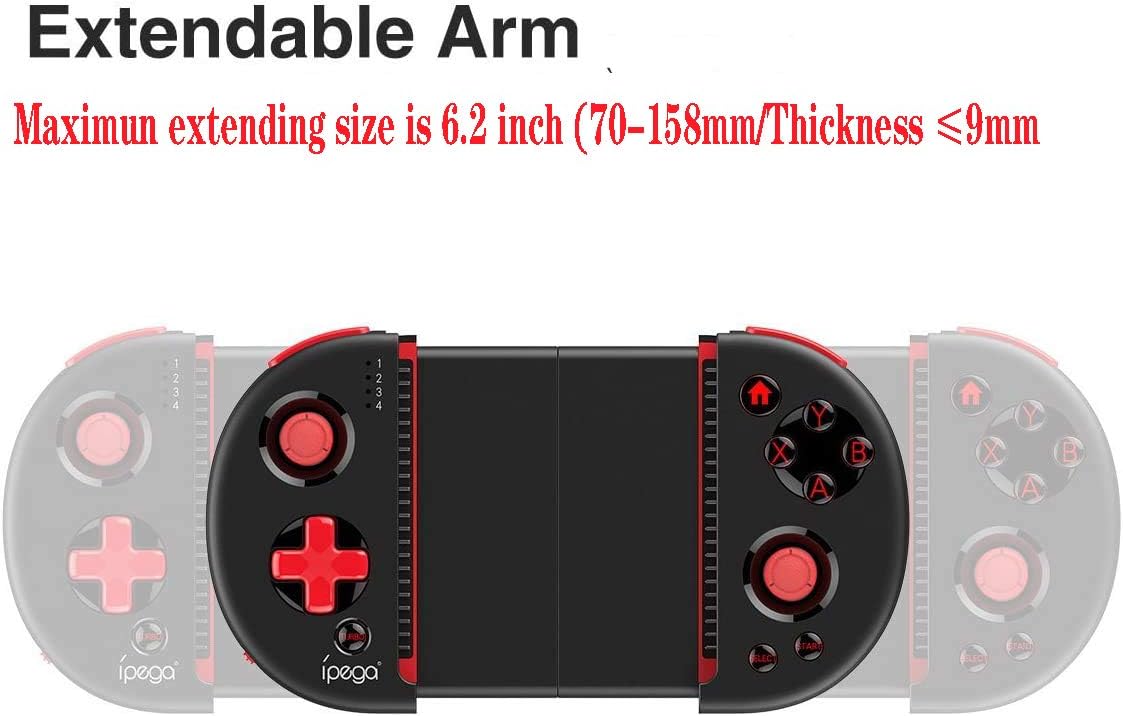
Figure 4: Extendable Arm. This image illustrates the extendable arm feature of the controller, showing its maximum extension size of 6.2 inches (70-158mm) and a maximum device thickness of 9mm.
Gently extend the arms of the controller to fit your smartphone or tablet. Ensure your device is securely seated within the extendable arm. The arm supports devices up to 6.2 inches (158mm) in length and 9mm in thickness.
تعليمات التشغيل
1. عناصر التحكم الأساسية
Refer to Figure 1 for the layout of the buttons and joysticks. The controller features:
- عصا التحكم ثلاثية الأبعاد لليسار/اليمين: للحصول على حركة دقيقة والتحكم في الكاميرا.
- لوحة الاتجاهات (D-Pad): للمدخلات الاتجاهية.
- أزرار التحكم ABXY: أزرار الإجراءات القياسية للألعاب.
- أزرار L1/L2/R1/R2: أزرار الكتف والمحفزات لتنفيذ مختلف الإجراءات داخل اللعبة.
- أزرار البدء/التحديد: For in-game menu navigation and selections.
- زر الصفحة الرئيسة: Returns to the device's home screen or controller menu.
- زر توربو: Activates rapid-fire functionality for assigned buttons.
2. Button Mapping and Customization
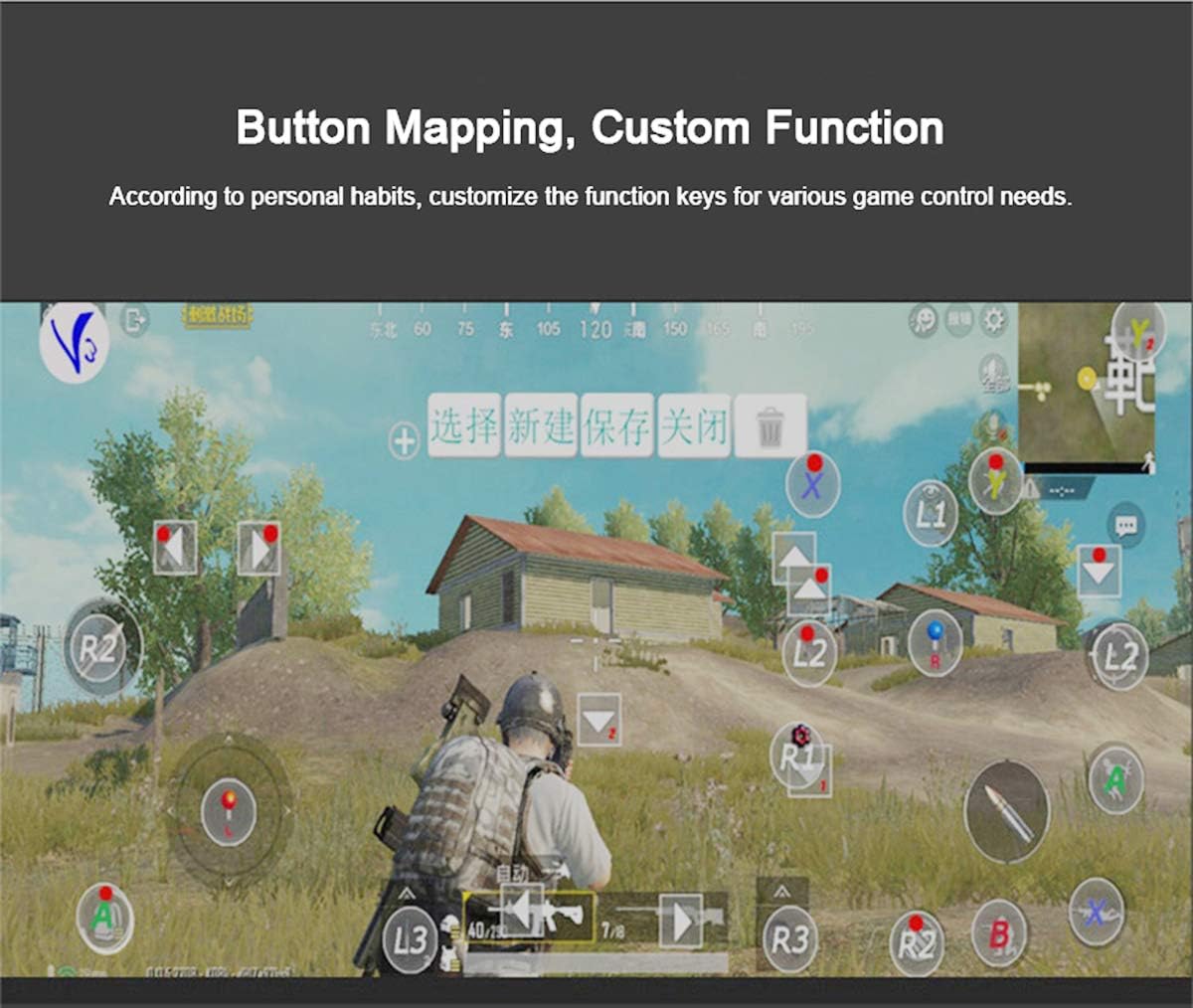
Figure 5: Button Mapping Interface. This image demonstrates the concept of button mapping within a game, allowing users to customize the function keys to suit their individual gaming preferences and needs.
The PG-9087S supports custom function key mapping. This feature allows you to assign specific in-game actions to the controller's buttons according to your personal habits. The method for customizing button functions typically depends on the game or emulator you are using. Refer to the specific game's settings or the emulator's configuration options for detailed instructions on how to remap controls.
3. Screen Orientation Support
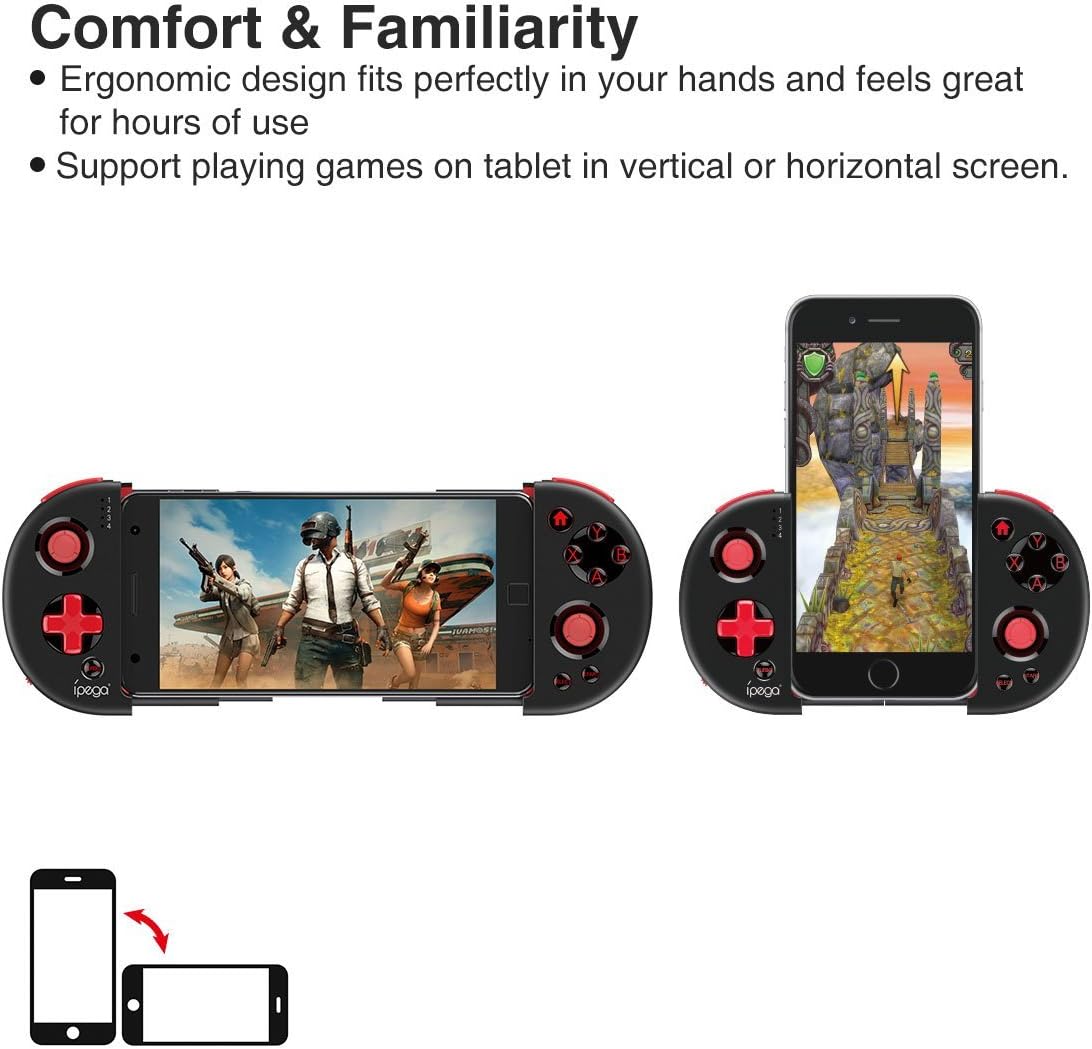
Figure 6: Orientation Support. This image illustrates the controller's ability to support gaming on tablets or smartphones in both vertical (portrait) and horizontal (landscape) screen orientations.
The controller supports playing games on your tablet or smartphone in both vertical (portrait) and horizontal (landscape) screen orientations, providing flexibility for various game types.
صيانة
- تنظيف: Use a soft, dry cloth to clean the controller. Do not use harsh chemicals or abrasive cleaners.
- تخزين: Store the controller in a cool, dry place away from direct sunlight when not in use.
- العناية بالبطارية: To prolong battery life, avoid fully discharging the battery frequently. Charge the controller regularly, even if not in constant use.
استكشاف الأخطاء وإصلاحها
- لا يعمل جهاز التحكم: Ensure the battery is charged. Connect the controller to a power source using the USB cable.
- Controller does not pair with device:
- Ensure the controller is in pairing mode (indicator light flashing rapidly).
- قم بإيقاف تشغيل البلوتوث على جهازك وتشغيله مرة أخرى.
- قم بحذف الجهاز من إعدادات البلوتوث وحاول الاقتران مرة أخرى.
- Ensure you are using the correct pairing combination (Y+HOME for iOS, A+HOME for Android).
- الأزرار لا تستجيب أو بطيئة الاستجابة:
- Ensure the controller is fully charged. Low battery can affect performance.
- اقترب من جهازك للتأكد من وجود اتصال قوي عبر تقنية البلوتوث.
- أعد تشغيل كل من وحدة التحكم وجهازك المحمول.
- Check the game's settings to ensure controller input is enabled and correctly configured.
- Device does not fit in the extendable arm: Check the dimensions of your device. The arm supports devices up to 6.2 inches (158mm) in length and 9mm in thickness. Remove any bulky cases from your device.
تحديد
| نموذج | PG-9087S |
| ماركة | أي بيغا |
| تكنولوجيا الاتصال | Bluetooth 4.0, USB (for charging) |
| نوع وحدة التحكم | لوحة الألعاب، عصا التحكم |
| الأجهزة المتوافقة | Android (6.0 and above), iOS |
| بطارية | بطارية ليثيوم أيون واحدة (مطلوبة) |
| Extendable Arm Max Size | 6.2 بوصة (158 مم) |
| Extendable Arm Max Thickness | 9 ملم |
| وزن العنصر | 6.9 أونصات |
| لون | أسود |
| أبعاد الحزمة | 6.8 × 5.15 × 1.6 بوصة |
الضمان والدعم
Warranty information for the ipega PG-9087S Wireless Game Controller is typically provided with your purchase or can be found on the manufacturer's official webيرجى الاحتفاظ بإثبات الشراء الخاص بك للمطالبة بالضمان.
For technical support or further assistance, please refer to the contact information provided by your retailer or visit the official ipega support channels.


