1. المقدمة
This manual provides detailed instructions for the iTOMA CKS3501BT FM/DAB Clock Radio. This device features a 1.4-inch cyan blue LED display, dual alarms, DAB and FM radio capabilities, Bluetooth audio streaming, a USB charging port, and a headphone jack. Please read this manual thoroughly to ensure proper operation and to utilize all available functions.

الشكل 1: iTOMA CKS3501BT Clock Radio. This image shows the front of the clock radio with its large digital display indicating the time and date. The top panel with control buttons is visible, along with a smartphone connected for charging, highlighting the USB charging feature.
2. الإعداد
2.1 توصيل الطاقة
Connect the clock radio to an AC power outlet using the provided power adapter. The unit requires AC power for full functionality. Ensure the power cable is securely connected to both the device and the wall outlet.
2.2 تركيب بطارية احتياطية
The iTOMA CKS3501BT uses a CR2032 lithium battery (not always included) for backup. This battery preserves time and alarm settings during a power outage. The clock radio will not function without AC power, even with the backup battery installed. Replace the battery when the battery indicator lights up on the display.
- حدد مكان حجرة البطارية في الجزء السفلي من الوحدة.
- افتح غطاء الحجرة.
- قم بإدخال بطارية CR2032 واحدة مع توجيه الجانب الموجب (+) لأعلى.
- أغلق غطاء المقصورة بشكل آمن.
2.3 ضبط الوقت الأولي
Upon first connection to AC power, the time and date may automatically set to a default time zone (e.g., London Time). You can adjust the time zone or manually set the time and date as follows:
2.3.1 Setting Time Format (12/24 Hour)
- Ensure the unit is in Standby mode (radio off).
- اضغط مع الاستمرار على تعليق button for approximately 5 seconds until "H12" or "H24" is displayed.
- اضغط على تعليق button again to toggle between 12-hour and 24-hour formats.
- Wait 5 seconds or press the وقت زر للخروج.
2.3.2 Manual Time and Date Adjustment
- في وضع الاستعداد، اضغط على وقت button. The hour display will blink.
- استخدم TUNE + / - أزرار لضبط الساعة.
- يضعط وقت ثم انتقل إلى الدقائق، ثم اضبط باستخدام TUNE + / -.
- تواصل الضغط وقت للتنقل بين إعدادات السنة والشهر واليوم، وضبط كل منها باستخدام TUNE + / -.
- يضعط وقت one last time or wait a few seconds for the settings to save.
3. تعليمات التشغيل
3.1 Dual Alarm Function
The iTOMA CKS3501BT features two independent alarms (AL1 and AL2) that can be set for different times and wake-up sources.
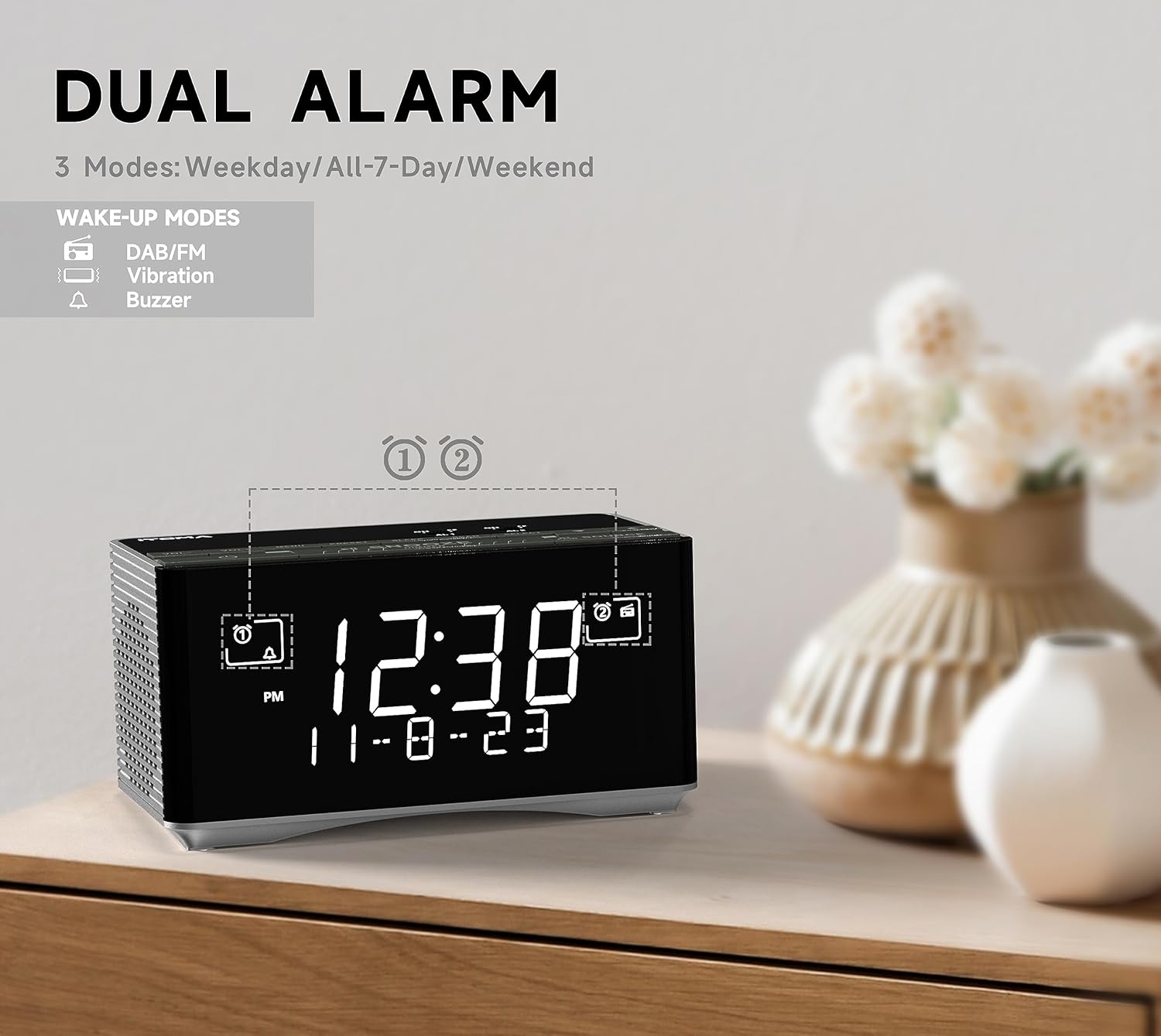
الشكل 2: Dual Alarm Functionality. This image illustrates the dual alarm feature of the clock radio, highlighting the different wake-up modes available, including DAB/FM radio, vibration, and buzzer. The display shows the current time and date.
3.1.1 Setting an Alarm (AL1 or AL2)
- In Standby mode, press and hold either ال1 or ال2 for 2 seconds until the hour display blinks.
- استخدم TUNE + / - أزرار لضبط ساعة التنبيه المطلوبة.
- يضعط ال1 or ال2 ثم انتقل إلى الدقائق، ثم اضبط باستخدام TUNE + / -.
- يضعط ال1 or ال2 again to select the alarm frequency mode:
- أسبوع:اضغط على أسبوع button to cycle through: Any Single Day, Everyday, Weekdays, or Weekends.
- يضعط ال1 or ال2 again to set the alarm volume (16 levels, displayed as U1 to U30) using TUNE + / -.
- يضعط ال1 or ال2 one last time or wait 3 seconds to save and exit.
3.1.2 تفعيل/إلغاء تفعيل أجهزة الإنذار
- يضعط ال1 or ال2 briefly to cycle through alarm types: Buzzer (bell icon), Radio (music note icon), or Off (no icon).
- عندما يصدر صوت التنبيه، اضغط على الزر الكبير غفوة / باهتة button to activate snooze for 9 minutes.
- لإيقاف التنبيه ، اضغط على ال1, ال2، أو تعليق.
3.2 DAB and FM Radio
The clock radio supports both Digital Audio Broadcasting (DAB) and FM radio frequencies. An external antenna is provided for improved reception.

الشكل 3: DAB & FM Radio. This image highlights the clock radio's ability to receive both DAB and FM radio signals, with the display showing a DAB station name.
3.2.1 Tuning and Presets
- اضغط على تعليق زر لتشغيل الوحدة.
- اضغط على مصدر button repeatedly to select either DAB or FM radio mode.
- استخدم TUNE + / - أزرار لضبط المحطة يدويًا أو الضغط مع الاستمرار للمسح التلقائي للمحطة التالية المتاحة.
- To save a preset (up to 20 DAB and 20 FM stations):
- ضبط على المحطة المطلوبة.
- اضغط مع الاستمرار على AL1/STORE button until "P01" (or the next available preset number) blinks.
- يستخدم TUNE + / - لاختيار رقم الإعداد المسبق المطلوب (P01-P40).
- يضعط AL1/STORE مرة أخرى للتأكيد.
- لاستدعاء إعداد مسبق:
- في وضع الراديو ، اضغط على AL2/MEMORY زر.
- يستخدم TUNE + / - to cycle through saved presets.
3.3 اتصال البلوتوث
قم بتوصيل هاتفك الذكي أو أي جهاز آخر يدعم تقنية البلوتوث لبث الصوت لاسلكيًا.

الشكل 4: Bluetooth Audio Streaming. This image shows the clock radio connected via Bluetooth to a smartphone, demonstrating its ability to play music from external devices wirelessly.
- اضغط على تعليق زر لتشغيل الوحدة.
- اضغط على مصدر button repeatedly until "BT" appears on the display and starts blinking. The unit is now in pairing mode.
- On your mobile device, enable Bluetooth and search for "iTOMA CKS3501BT".
- Select "iTOMA CKS3501BT" to pair. Once connected, the "BT" indicator will stop blinking, and a confirmation tone may sound.
- You can now play audio from your device through the clock radio.
- استخدم غفوة / باهتة زر لتشغيل/إيقاف الصوت مؤقتًا.
- يستخدم TUNE + / - لتخطي المسارات.
- اضبط مستوى الصوت باستخدام ملف الحجم + / - buttons on the clock radio or your connected device.
3.4 منفذ شحن USB
A USB port is located on the back of the unit, allowing you to charge compatible mobile devices (e.g., smartphones, tablets) with an output of 5V, 1.2A.
- قم بتوصيل كابل شحن USB الخاص بجهازك بمنفذ USB الموجود على راديو الساعة.
- Ensure the clock radio is connected to AC power for the charging function to operate.
3.5 سماعة رأس جاك
A 3.5mm headphone jack is provided for private listening to radio or Bluetooth audio.

الشكل 5: Headphone Jack. This image shows the clock radio with headphones connected to its side, illustrating the option for private audio listening.
- Plug your 3.5mm headphones into the headphone jack located on the unit.
- Audio will automatically switch from the internal speaker to the headphones.
3.6 وحدة التحكم في سطوع الشاشة
The display brightness can be adjusted manually or automatically to suit ambient light conditions.

الشكل 6: Auto & Manual Dimmer. This image visually explains the display dimming options, including high, medium, low, and off settings, as well as an automatic brightness adjustment mode.
- السطوع التلقائي: The display brightness adjusts automatically based on the surrounding light. It will be brighter in well-lit conditions and dimmer in low-light conditions.
- Manual 3-Step Dimmer: في وضع الاستعداد، اضغط على غفوة / باهتة button repeatedly to cycle through High, Medium, and Low brightness levels.
3.7 Radio Sleep Timer
The sleep timer allows you to listen to the radio for a set duration before the unit automatically turns off.
- Ensure the radio is playing.
- اضغط على ينام button. The display will show the default sleep time (e.g., 10 minutes).
- اضغط على ينام button repeatedly to cycle through available sleep times (e.g., 10, 20, 30... up to 90 minutes).
- لإلغاء مؤقت النوم ، اضغط على ينام button until "OFF" appears on the display.
4. الصيانة
4.1 التنظيف
Wipe the unit with a soft, dry cloth. Do not use abrasive cleaners or solvents, as they may damage the surface.
4.2 Backup Battery Replacement
When the battery indicator appears on the display, replace the CR2032 backup battery as described in Section 2.2.
5. استكشاف الأخطاء وإصلاحها
| مشكلة | السبب المحتمل | حل |
|---|---|---|
| الوحدة لا تعمل بالطاقة. | Power cable not connected or loose. | Ensure the AC power adapter is securely plugged into the unit and a working wall outlet. |
| لا يوجد صوت من الراديو/البلوتوث. | مستوى الصوت منخفض جدًا؛ تم اختيار مصدر غير صحيح؛ سماعات الرأس موصولة. | ارفع مستوى الصوت. اضغط مصدر to select the correct input. Disconnect headphones if using speakers. |
| استقبال راديو ضعيف. | Antenna not extended or positioned correctly; weak signal. | Fully extend and adjust the position of the FM/DAB antenna. Try moving the unit to a different location. |
| لا يمكن لجهاز البلوتوث الاقتران. | Unit not in pairing mode; device too far; Bluetooth already connected to another device. | Ensure the clock radio is in Bluetooth pairing mode (BT blinking). Move device closer. Disconnect from other Bluetooth devices. |
| لا يصدر صوت الإنذار. | Alarm not activated; volume too low; incorrect alarm mode. | Verify alarm is set and activated (bell/music note icon visible). Check alarm volume. Ensure correct alarm mode (buzzer/radio) is selected. |
| الوقت/الإعدادات المفقودة بعد انقطاع الطاقةtage. | بطارية النسخ الاحتياطي معطلة أو مفقودة. | Replace the CR2032 backup battery. |
6. المواصفات
| ماركة | اي توما |
| رقم الموديل | CKS3501BT (also referred to as 3501) |
| نوع العرض | 1.4" Cyan Blue LED Digital Display |
| موالف الراديو | DAB, FM Digital Tuning |
| بلوتوث | Yes, for audio streaming |
| منفذ شحن USB | مخرج 5 فولت، 1.2 أمبير |
| مقبس سماعة الرأس | 3.5 ملم |
| ميزات التنبيه | Dual Alarms, Snooze (9 minutes), Buzzer/Radio wake-up, Weekday/Weekend/Everyday modes, 16-level volume control |
| تحكم باهتة | Automatic brightness adjustment, 3-step manual dimmer (High-Medium-Low) |
| مؤقت النوم | Up to 90 minutes for radio |
| بطارية احتياطية | 1 x CR2032 Lithium Metal (for time/settings retention during power outage) |
| مصدر الطاقة | AC Cable (Electric) |
| أبعاد المنتج (الطول × العرض × الارتفاع) | 8 x 3.81 x 7.5 cm (3.15 x 1.5 x 2.95 inches) |
| وزن العنصر | 730 جرام (1.61 رطل) |
7. الضمان والدعم
Specific warranty information for the iTOMA CKS3501BT is not provided in the product details. Please refer to the documentation included with your purchase or contact iTOMA customer support for warranty details and technical assistance.
For further support, visit the official iTOMA webالموقع أو الاتصال بقسم خدمة العملاء.


