مقدمة
This manual provides detailed instructions for the setup, operation, and maintenance of your 1byone Foldable Wireless Backlit Keyboard. Please read this manual thoroughly before using the product to ensure proper function and longevity.
محتويات الحزمة
- 1 x 1byone Foldable Wireless Backlit Keyboard
- 1 × كابل شحن Micro-USB
- 1 × دليل المستخدم
المنتج انتهىview
Familiarize yourself with the keyboard's components and layout.

الصورة 1: The 1byone Foldable Wireless Backlit Keyboard shown fully unfolded, displaying the QWERTY layout with function keys and special keys for Android, Windows, and iOS.

الصورة 2: لقطة مقرّبة view highlighting the Micro-USB port for charging and wired connection, along with the retractable balance supports designed to stabilize the keyboard during use.
يثبت
1. شحن لوحة المفاتيح
Before first use, fully charge the keyboard. Connect the provided Micro-USB cable to the keyboard's charging port and the other end to a USB power source (e.g., computer USB port, USB wall adapter). The charging indicator light will show the charging status.
2. Unfolding and Folding
- تتكشف: Gently open the keyboard. The integrated magnetic switch will automatically power on the device. Ensure the retractable supports are extended for stability.
- طية: Close the keyboard. The magnetic switch will automatically power off the device, making it compact for storage and travel.
3. أوضاع الاتصال
The keyboard supports two connection modes: Bluetooth wireless and Micro-USB wired.
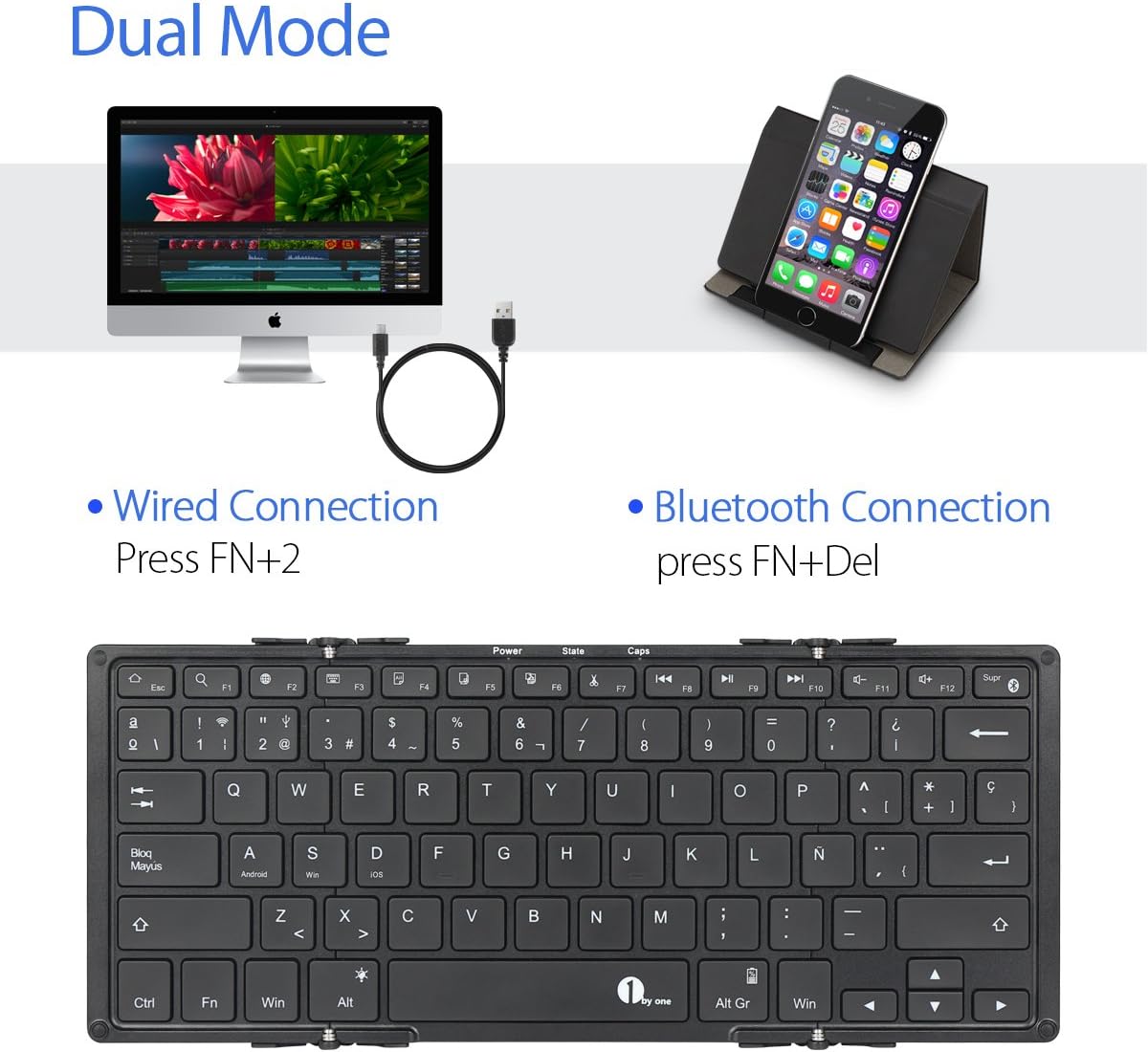
الصورة 3: Illustration of the dual connection modes: wired via USB cable and wireless via Bluetooth. Instructions for activating each mode are shown.
اتصال بلوتوث:
- افتح لوحة المفاتيح لتشغيلها.
- يضعط الجبهة الوطنية + حذف simultaneously to activate Bluetooth pairing mode. The Bluetooth indicator light will flash.
- على جهازك (الهاتف الذكي، الجهاز اللوحي، الكمبيوتر)، قم بتمكين البلوتوث وابحث عن الأجهزة المتاحة.
- Select "1byone Keyboard" (or similar) from the list of devices.
- اتبع التعليمات التي تظهر على الشاشة لإكمال عملية الاقتران. سيتوقف ضوء المؤشر عن الوميض بمجرد الاتصال.
الاتصال السلكي:
- Connect the Micro-USB cable to the keyboard's port and the other end to your device's USB port.
- يضعط Fn + 2 simultaneously to switch to wired mode. The keyboard will now function via the USB cable.
تعليمات التشغيل
1. التحكم في الإضاءة الخلفية
The keyboard features a 3-color backlight (red, blue, green) with two adjustable brightness levels for each color.
- تغيير اللون: يضعط Fn + Alt simultaneously to cycle through backlight colors.
- ضبط السطوع: يضعط Fn + سهم لأعلى or الجبهة الوطنية + سهم لأسفل لضبط سطوع الإضاءة الخلفية.
- إيقاف تشغيل الإضاءة الخلفية: Cycle through brightness levels until the backlight turns off.
2. التوافق مع نظام التشغيل
تتوافق لوحة المفاتيح مع مجموعة واسعة من أنظمة التشغيل:
- iOS (e.g., iPad Air/Air 2/Mini, iPhone 4s/5/5s/5c/6/6s/6 Plus/6s Plus)
- Android (e.g., Samsung Galaxy tablets, Android smartphones)
- Windows (e.g., Windows tablets/PCs)
- Mac OS (via Bluetooth connection)
Note: Not compatible with Kindle Fire HD 10 (OS 5.6).
3. مفاتيح الوظائف الخاصة
The keyboard includes function keys that may vary in behavior depending on the connected operating system. Look for icons on the keys for specific functions like volume control, media playback, and home screen access.
صيانة
تنظيف
لتنظيف لوحة المفاتيح، امسح السطح برفق بقطعة قماش ناعمة.amp cloth. Avoid using harsh chemicals or abrasive materials. Ensure the keyboard is powered off and disconnected from any power source before cleaning.
تخزين
When not in use, fold the keyboard to protect the keys and make it compact for storage. Store in a dry, cool place away from direct sunlight and extreme temperatures.
استكشاف الأخطاء وإصلاحها
- لوحة المفاتيح غير متصلة عبر البلوتوث:
- تأكد من شحن لوحة المفاتيح وتشغيلها.
- Make sure Bluetooth is enabled on your device and the keyboard is in pairing mode (Fn + Delete).
- Delete previous pairings on your device and try pairing again.
- تأكد من أن جهازك يقع ضمن نطاق التشغيل البالغ 10 أمتار.
- لوحة المفاتيح لا تستجيب في الوضع السلكي:
- Verify the Micro-USB cable is securely connected to both the keyboard and your device.
- Ensure you have pressed Fn + 2 to switch to wired mode.
- حاول استخدام منفذ USB أو كابل مختلف.
- الإضاءة الخلفية لا تعمل:
- Check if the keyboard battery is sufficiently charged.
- Try adjusting the brightness using Fn + Up/Down Arrow.
- المفاتيح لا تستجيب:
- إعادة شحن لوحة المفاتيح.
- Reconnect the keyboard (either Bluetooth or wired).
- أعد تشغيل جهازك المتصل.
تحديد
| نطاق التشغيل | حتى 10 مترا (33 قدما) |
| التوافق | أنظمة التشغيل: iOS، Android، Windows، Mac OS |
| سعة البطارية | بطارية ليثيوم أيون بوليمر 750 مللي أمبير |
| عمر المفتاح | 3 مليون نقرة |
| Operating Time (Backlight ON) | تصل إلى 5 ساعة |
| Operating Time (Backlight OFF) | تصل إلى 300 ساعة |
| وقت الاستعداد | حتى 90 يوما |
| وقت الشحن | حوالي 3.5 ساعات |
| مادة | ABS (front), Aluminum Alloy (rear) |
| الأبعاد (مطوية) | 16.5 x 12 x 1.5 cm (6.5 x 4.7 x 0.6 inches) |
| الأبعاد (تكشفت) | 29.2 x 11.6 x 0.7 cm (11.5 x 4.6 x 0.3 inches) |
| الاتصال | Bluetooth, Micro-USB |
الضمان والدعم
For warranty information and technical support, please refer to the official 1byone webالموقع أو تواصل مع خدمة العملاء. احتفظ بإيصال الشراء لطلبات الضمان.
الدعم عبر الإنترنت: www.1byone.com/support (مثالample link, actual link not provided in data)


