1. المقدمة
This manual provides essential information for the safe and efficient use of your Lenovo IdeaPad Miix 510-12ISK 2-in-1 Tablet. The Miix 510 is a versatile device designed to function as both a laptop and a tablet, adapting to various tasks with its detachable keyboard and integrated kickstand. Please read this manual thoroughly before operating your device.
2. محتويات العبوة
تأكد من وجود جميع العناصر في عبوة المنتج الخاص بك:
- Lenovo IdeaPad Miix 510-12ISK Tablet
- لوحة مفاتيح قابلة للفصل
- Webكاميرا (متكاملة)
- محول الطاقة
- دليل البدء السريع (إذا كان متضمنًا)
3. الإعداد
3.1 الشحن الأولي
Before first use, connect the tablet to a power outlet using the provided power adapter. Allow the device to charge fully. The charging indicator light will typically change color or turn off when charging is complete.
3.2 توصيل لوحة المفاتيح
Align the magnetic connectors on the bottom edge of the tablet with the corresponding connectors on the keyboard. The keyboard will snap into place securely. To detach, gently pull the tablet away from the keyboard.

Image: The Lenovo IdeaPad Miix 510-12ISK in laptop mode, showing the tablet connected to its detachable keyboard. The screen displays the Windows 10 operating system interface.
3.3 التشغيل الأول
Press and hold the power button (usually located on the side or top edge of the tablet) until the Lenovo logo appears. Follow the on-screen instructions to complete the initial Windows 10 Pro setup, including language selection, network connection, and user account creation.
4. تعليمات التشغيل
4.1 تشغيل/إيقاف التشغيل ووضع السكون
- تشغيل الطاقة: اضغط مع الاستمرار على زر الطاقة.
- إيقاف التشغيل: From the Windows Start menu, select Power > Shut down.
- وضع السكون: Briefly press the power button, or select Power > Sleep from the Start menu.
4.2 Using Tablet and Laptop Modes
The Miix 510 automatically switches between tablet and laptop modes when the keyboard is attached or detached. You can also manually switch modes via the Action Center in Windows 10.
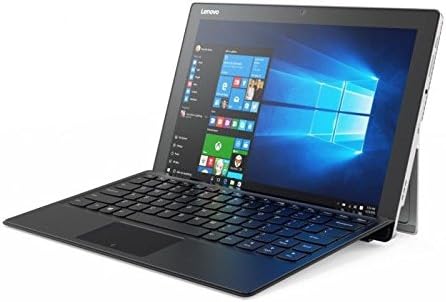
الصورة: زاوية view of the Lenovo IdeaPad Miix 510-12ISK, showcasing its kickstand functionality when used with the detachable keyboard in laptop configuration.
4.3 Touch Screen and Keyboard Usage
- شاشة اللمس: Use gestures such as tap, swipe, pinch-to-zoom, and long-press for navigation and interaction.
- لوحة المفاتيح: The detachable keyboard provides a full QWERTY layout and a touchpad for precise input.
4.4 الاتصال
Your device supports Wi-Fi and Bluetooth for wireless connectivity. Access network settings via the Windows Action Center or Settings app to connect to available networks and pair Bluetooth devices.
5. الصيانة
5.1 التنظيف
- استخدم قطعة قماش ناعمة وخالية من الوبر وامسحها برفق.ampاغسلها بالماء أو بمنظف الشاشة لتنظيف الشاشة.
- امسح الأسطح الخارجية بقطعة قماش ناعمة وجافة. تجنب استخدام المواد الكيميائية القاسية أو المواد الكاشطة.
5.2 تحديثات البرامج
Regularly check for and install Windows updates to ensure optimal performance, security, and compatibility. Access updates via Windows Settings > Update & Security.
5.3 العناية بالبطارية
لإطالة عمر البطارية، تجنب درجات الحرارة القصوى، واتركها تُفرغ جزئيًا قبل إعادة شحنها. وللتخزين طويل الأمد، اشحن البطارية إلى حوالي 50%.
6. استكشاف الأخطاء وإصلاحها
6.1 الجهاز لا يعمل
- تأكد من شحن الجهاز. وصّل محول الطاقة وانتظر بضع دقائق قبل محاولة تشغيله.
- حاول الضغط باستمرار على زر الطاقة لمدة 10-15 ثانية لإجراء إعادة تعيين شاملة.
6.2 مشاكل الشاشة
- If the screen is blank, ensure the device is powered on and not in sleep mode.
- ضبط إعدادات سطوع الشاشة.
6.3 Keyboard or Touchpad Not Responding
- Ensure the keyboard is securely attached to the tablet.
- أعد تشغيل الجهاز اللوحي.
- Check for updated drivers in Windows Device Manager.
6.4 مشاكل الاتصال بشبكة Wi-Fi أو Bluetooth
- قم بإيقاف تشغيل Wi-Fi أو Bluetooth ثم قم بتشغيلهما في إعدادات Windows.
- أعد تشغيل جهاز التوجيه/المودم الخاص بك لحل مشكلات Wi-Fi.
- Ensure devices are within range and properly paired for Bluetooth.
For persistent issues, refer to the Lenovo support webالموقع أو الاتصال بخدمة العملاء.
7. المواصفات
| ماركة | لينوفو |
| اسم الموديل | 80U1006EUS |
| حجم الشاشة | 12.2 بوصة |
| دقة الشاشة | 1920 × 1080 بكسل |
| المعالج | 2.3 GHz Intel Core i5-6200U |
| كبش | 8 جيجا بايت |
| القرص الصلب | محرك أقراص الحالة الصلبة (SSD) سعة 256 جيجابايت |
| معالج الرسوميات المساعد | بطاقة رسوميات Intel HD 520 |
| نظام التشغيل | ويندوز 10 برو |
| نوع لاسلكي | بلوتوث |
| وزن العنصر | 2.78 رطل |
| أبعاد المنتج | 4.48 × 5.8 × 0.6 بوصة |
| مؤخرة Webقرار الكاميرا | 5 ميجا بكسل |
8. الضمان والدعم
This product is covered by Lenovo's standard warranty. For detailed warranty terms, registration, and technical support, please visit the official Lenovo support webالموقع أو تواصل مع خدمة العملاء. احتفظ بإثبات الشراء لطلبات الضمان.
No official product videos were provided by the seller for this model.


