1. تعليمات السلامة الهامة
Please read all safety instructions carefully before using the Vivitek Qumi Q3 Plus-RD projector. Failure to follow these instructions may result in electric shock, fire, or damage to the device.
- مصدر الطاقة: Use only the supplied AC power adapter. Ensure the voltagيتوافق مع متطلبات جهاز العرض.
- تهوية: لا تسد فتحات التهوية. حافظ على مساحة كافية حول جهاز العرض لضمان تدفق الهواء بشكل صحيح ومنع ارتفاع درجة حرارته.
- رُطُوبَة: Do not expose the projector to rain, moisture, or operate it near water.
- حرارة: Avoid placing the projector near heat sources such as radiators, heat registers, stoves, or other apparatus that produce heat.
- تنظيف: Unplug the projector from the power outlet before cleaning. Use a dry cloth for cleaning. Do not use liquid cleaners or aerosol cleaners.
- الخدمة: لا تحاول خدمة هذا المنتج بنفسك. قم بإحالة جميع أعمال الصيانة إلى أفراد الخدمة المؤهلين.
- سلامة العين: لا تنظر مباشرة إلى عدسة جهاز العرض عندما يكون الضوءamp قيد التشغيل. الضوء الساطع قد يسبب ضررًا للعين.
2. محتويات العبوة
Verify that all items listed below are included in your Vivitek Qumi Q3 Plus-RD package:
- Vivitek Qumi Q3 Plus-RD Projector
- AC Power Adapter with Cable
- كابل HDMI
- Documentation Kit (Quick Start Guide, Warranty Card)

Image: The AC power adapter and cable for the Vivitek Qumi Q3 Plus-RD projector.
3. انتهى المنتجview
Familiarize yourself with the components and ports of your Vivitek Qumi Q3 Plus-RD projector.
3.1 الجبهة View

الصورة: الجبهة view of the Vivitek Qumi Q3 Plus-RD projector, showing the projection lens and speaker grille.
3.2 خلفي View (Ports and Connections)

الصورة: الخلفية view of the Vivitek Qumi Q3 Plus-RD projector, displaying various input/output ports including AV IN, USB 1, USB 2, HDMI, DC IN power input, microSD card slot, and the power button.
3.3 الجانب View

الصورة: الجانب view of the Vivitek Qumi Q3 Plus-RD projector, showing the ventilation grilles and the integrated kickstand for angle adjustment.
3.4 التحكم عن بعد
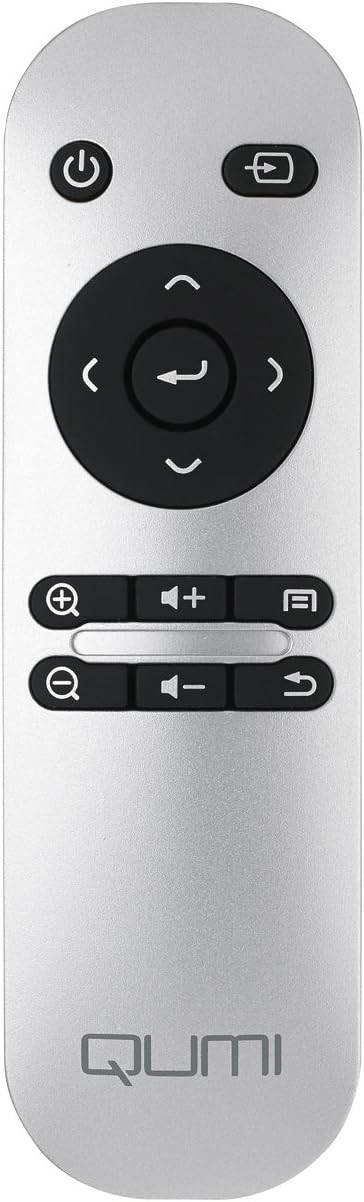
Image: The remote control for the Vivitek Qumi Q3 Plus-RD projector, featuring power, navigation, volume, and focus adjustment buttons.
4. الإعداد
Follow these steps to set up your Vivitek Qumi Q3 Plus-RD projector for first use.
- توصيل الطاقة: Connect the supplied AC power adapter to the 'DC IN' port on the projector and then plug it into a power outlet. The projector can also operate on its internal battery.
- الموقع: Place the projector on a stable, flat surface. Use the integrated kickstand to adjust the projection angle if needed. Ensure there are no obstructions to the lens or ventilation openings.
- تشغيل الطاقة: اضغط مع الاستمرار على زر الطاقة الموجود على جهاز العرض أو جهاز التحكم عن بعد لتشغيل الجهاز.
- ضبط التركيز: Once powered on, use the focus buttons on the remote control to adjust the image sharpness. The Qumi Q3 Plus-RD features motorized focus for precise adjustment.
- تصحيح الانحراف: The projector features digital auto keystone correction. If the image appears trapezoidal, the projector will automatically adjust it. Manual adjustment options may be available in the settings menu.
5. تعليمات التشغيل
This section details how to operate your Vivitek Qumi Q3 Plus-RD projector.
5.1 تشغيل/إيقاف التشغيل
- لتشغيل: Press and hold the power button on the projector or the remote control until the device starts.
- لإيقاف التشغيل: Press the power button on the projector or the remote control. A shutdown prompt will appear. Select 'Power Off' to shut down the system safely.
5.2 التنقل في نظام التشغيل أندرويد
The Qumi Q3 Plus-RD runs on an Android operating system. Use the remote control's navigation buttons (up, down, left, right, OK) to move through menus and select options. A Bluetooth keyboard/mouse can also be paired for easier navigation.
5.3 تشغيل الوسائط
- محرك أقراص USB: Insert a USB flash drive into one of the USB ports. The system will typically detect it and prompt you to open the file المتصفح أو مشغل الوسائط.
- بطاقة MicroSD: Insert a microSD card into the microSD slot. Similar to USB, the system will allow you to access its contents.
- التخزين الداخلي: The projector has 5.1 GB of available on-board memory for storing fileس والتطبيقات.
5.4 Connecting External Devices (HDMI)
To connect an external device such as a laptop, Blu-ray player, or gaming console:
- Connect one end of an HDMI cable to the HDMI port on the projector.
- Connect the other end of the HDMI cable to the HDMI output port on your external device.
- On the projector's home screen, navigate to the input selection and choose 'HDMI'.
6. الاتصال
The Vivitek Qumi Q3 Plus-RD offers various connectivity options for seamless integration with your devices.
6.1 إعداد Wi-Fi
- من الشاشة الرئيسية، انتقل إلى "الإعدادات".
- حدد "Wi-Fi" وقم بتشغيله.
- اختر شبكة الواي فاي التي تريدها من قائمة الشبكات المتاحة.
- أدخل كلمة مرور الشبكة إذا طُلب منك ذلك، ثم اتصل بالشبكة.
6.2 اقتران بلوتوث
You can pair Bluetooth devices such as external speakers, headphones, or a keyboard/mouse with your projector.
- من الشاشة الرئيسية، انتقل إلى "الإعدادات".
- حدد "البلوتوث" وقم بتشغيله.
- ضع جهاز Bluetooth في وضع الإقران.
- Select your device from the list of available devices on the projector and confirm pairing.
6.3 Wireless Content Sharing
The projector supports wireless content sharing from Android and iOS devices. Refer to the projector's specific application (e.g., HappyCast or similar pre-installed app) for detailed instructions on mirroring your device's screen.
7. الصيانة
تضمن الصيانة المناسبة طول عمر جهاز العرض الخاص بك والأداء الأمثل.
- تنظيف العدسات: امسح عدسة جهاز العرض برفق بقطعة قماش ناعمة وخالية من الوبر مصممة خصيصًا للأسطح البصرية. لا تستخدم مواد كاشطة أو مواد كيميائية قاسية.
- تهوية: Regularly check that the ventilation openings are clear of dust and debris. Use a soft brush or compressed air to clean them.
- العناية بالبطارية: For models with an internal battery, avoid fully discharging the battery frequently. If storing the projector for an extended period, charge the battery to approximately 50% to prolong its lifespan.
- تخزين: قم بتخزين جهاز العرض في مكان بارد وجاف بعيدًا عن أشعة الشمس المباشرة ودرجات الحرارة القصوى.
8. استكشاف الأخطاء وإصلاحها
If you encounter issues with your Vivitek Qumi Q3 Plus-RD, refer to the following common problems and solutions.
- No Image Projected:
- تأكد من تشغيل جهاز العرض وإزالة غطاء العدسة.
- Check the input source selection to ensure it matches the connected device (e.g., HDMI, USB).
- Verify that the external device is powered on and outputting a signal.
- لا يوجد صوت:
- اضبط مستوى الصوت على جهاز العرض وجهاز المصدر المتصل.
- Check if external speakers are connected via Bluetooth or AV IN, and ensure they are powered on and functioning.
- Ensure the audio output settings on the source device are correctly configured.
- جهاز التحكم عن بعد لا يستجيب:
- Ensure there are no obstructions between the remote and the projector's IR receiver (located at the rear).
- Replace the remote control battery (typically a coin cell battery).
- مشاكل الاتصال بشبكة Wi-Fi/Bluetooth:
- تأكد من تفعيل خاصية الواي فاي/البلوتوث في إعدادات جهاز العرض.
- أعد تشغيل جهاز العرض والجهاز الذي تحاول توصيله.
- تحقق من عدم وجود تداخل من الأجهزة اللاسلكية الأخرى.
- الصورة ضبابية:
- Use the remote control's focus buttons to adjust the image sharpness.
- تأكد من أن سطح العرض مستوٍ وأن جهاز العرض مستقر.
9. المواصفات
Key technical specifications for the Vivitek Qumi Q3 Plus-RD projector:
| ميزة | مواصفة |
|---|---|
| رقم الموديل | Q3 PLUS-RD |
| نوع العرض | دي إل بي |
| دقة العرض الأصلية | 1280 × 720 (HD 720 بكسل) |
| سطوع | تصل إلى شنومك لومينز |
| نسبة التباين | 5,000:1 |
| تكنولوجيا الاتصال | بلوتوث، HDMI، واي فاي |
| المميزات الخاصة | Bluetooth, Portable, Android OS |
| نظام التشغيل | Android V.4.42 |
| وحدة المعالجة المركزية | Quad-core CPU at 1.5GHz |
| التخزين الداخلي | 5.1 GB available |
| بطارية | 1 بطارية ليثيوم بوليمر (متضمنة) |
| أبعاد المنتج | 6.9 × 4 × 1.1 بوصة |
| وزن العنصر | 1 جنيه |
10. الضمان والدعم
The Vivitek Qumi Q3 Plus-RD projector comes with a standard manufacturer's warranty. For detailed warranty information, please refer to the documentation kit included with your product or visit the official Vivitek webموقع.
For technical support, troubleshooting assistance, or service inquiries, please contact Vivitek customer support through their official channels. Keep your product's model number (Q3 PLUS-RD) and serial number handy when contacting support.


