مقدمة
The ThermoPro TP22 Digital Wireless Meat Thermometer is an advanced tool designed to help you achieve perfect cooking results for various meats and dishes. With its dual probe system and wireless receiver, you can monitor temperatures from a distance, ensuring convenience and precision whether you're grilling, smoking, or baking. This manual provides comprehensive instructions for setting up, operating, and maintaining your device.
محتويات الحزمة
- شينومكس x استقبال لاسلكي
- شنومكس x اللاسلكية الارسال
- 2 × مجسات من الفولاذ المقاوم للصدأ
- 4 x AAA Batteries (2 sets)
- 1 × دليل التعليمات
يثبت
Follow these steps to set up your ThermoPro TP22 thermometer for the first time:
- تركيب البطارية: Open the battery compartments on both the wireless receiver and the wireless transmitter. Insert two AAA batteries into each unit, ensuring correct polarity (+/-). The devices will automatically power on once batteries are inserted.
- Automatic Syncing: The receiver and transmitter are pre-synchronized at the factory. Once both units are powered on, they should automatically sync. The receiver display will show temperature readings from the probes.
- اتصال التحقيق: Remove the protective covers from the probe ports on the transmitter. Firmly insert the stainless steel probes into the designated ports (Probe 1 and Probe 2) until you hear a click and feel a snap. The current temperature from the probes will immediately transmit to the receiver.
Official ThermoPro TP22 Meat Thermometer Setup Video. This video demonstrates the unboxing, battery installation, syncing process, and initial probe connection for the device.
تعليمات التشغيل
Familiarize yourself with the functions of your ThermoPro TP22:
- تشغيل/إيقاف التشغيل: Simply tap the power button on both the receiver and transmitter to turn them on or off.
- Temperature Unit Selection (°F/°C): On the remote transmitter, press and hold the power button to switch between Fahrenheit (°F) and Celsius (°C) temperature readings. The receiver will update accordingly.
- تفعيل الإضاءة الخلفية: On the wireless receiver, tap the backlight button (light bulb icon) to activate the display backlight for improved visibility in low-light conditions.
- Probe/Timer Mode Toggle: Use the 'MODE' button on the receiver to toggle between Probe 1, Probe 2, and the Timer mode.
- Meat Presets: While in Probe 1 or Probe 2 mode, use the 'MEAT' button to cycle through various USDA-recommended preset meat temperatures. Options include Ground Beef, Ground Poultry, Beef, Veal, Chicken, Pork, Lamb, Fish, Ham, and an ambient Oven temperature setting (without an alarm).
- Taste Settings: For certain meat presets (e.g., Beef), you can adjust the desired doneness (taste) using the 'TASTE' button. Options typically include Rare, Medium Rare, Medium, Medium Well, and Well Done.
- وظائف المؤقت:
- Count-Up Timer: In Timer mode, if the timer is set to 00:00, press the 'START/STOP' button once to begin a count-up timer.
- Count-Down Timer: Use the arrow buttons (up/down) to set your desired minutes and seconds (or hours and minutes, see below). Press 'START/STOP' to begin the countdown.
- Switching Timer Units: While in Timer mode, press the 'MEAT' button to switch the timer display between minutes:seconds and hours:minutes. Two dots between the numbers indicate hours:minutes.
- Stopping/Clearing Timer: Press 'START/STOP' to pause/stop the timer. Press and hold 'STOP/CLEAR' to reset the timer to 00:00.
سيناريوهات الاستخدام
The ThermoPro TP22 is versatile for various cooking environments:
- Meat Probe Placement: Insert the probe into the thickest part of the meat, avoiding bones or gristle, as these can affect temperature accuracy.
- Ambient Temperature Monitoring: Use the second probe to monitor the ambient temperature inside your oven, grill, or smoker. Place the probe on the grill rack, ensuring the probe tip does not touch the rack itself.
- المراقبة اللاسلكية: Place the transmitter unit near your cooking appliance and carry the receiver with you. The wireless range allows you to monitor your food from up to 300 feet away, providing freedom to attend to other tasks without constantly checking the cook.
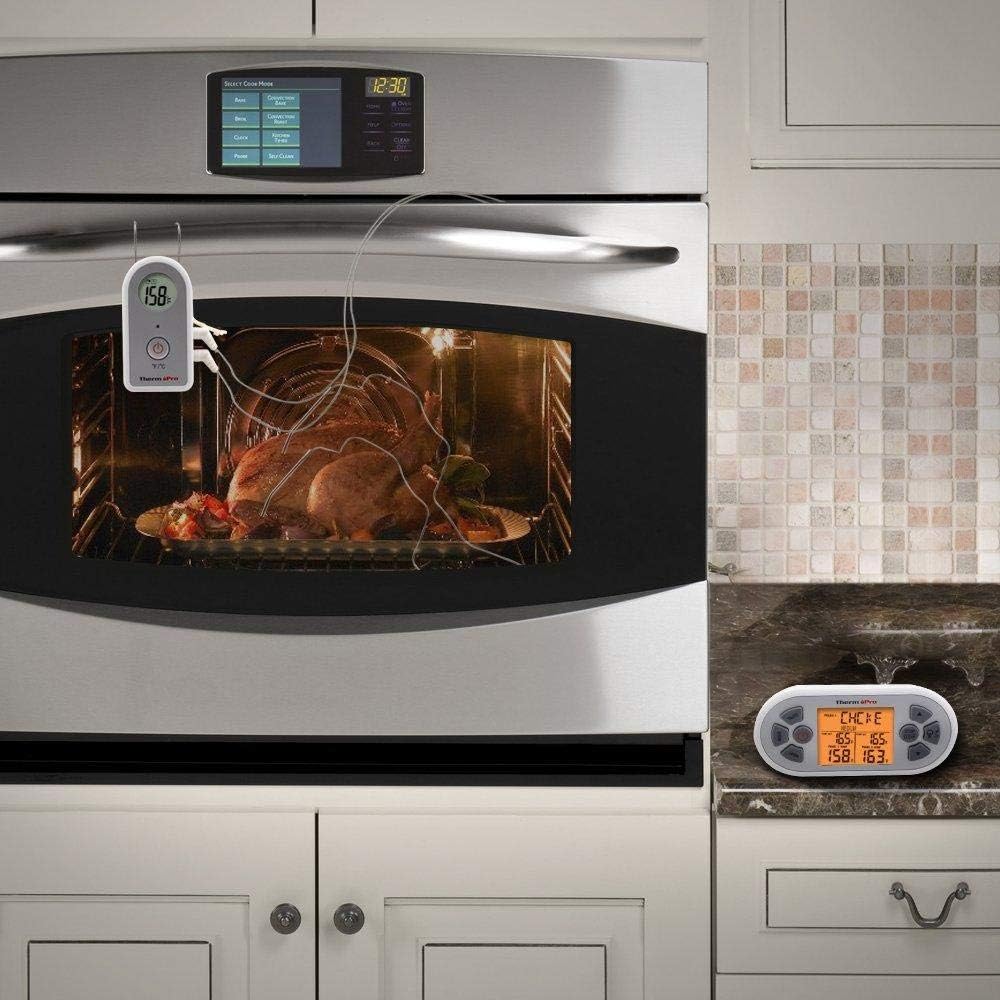
The ThermoPro TP22 thermometer in use, showing the probe inserted into a turkey inside an oven, with the wireless receiver placed on the countertop for remote monitoring.
صيانة
Proper care ensures the longevity and accuracy of your thermometer:
- مجسات التنظيف: Always clean the stainless steel probes thoroughly after each use with hot soapy water. Do not immerse the probe connectors or the main units in water.
- Unit Care: Wipe the receiver and transmitter units with a damp cloth. Do not submerge them in water or place them in a dishwasher.
- تخزين: Store the thermometer and probes in a dry place when not in use.
- استبدال البطارية: استبدل البطاريات عند ظهور مؤشر انخفاض مستوى البطارية على الشاشة لضمان التشغيل المستمر.
استكشاف الأخطاء وإصلاحها
If you encounter issues with your ThermoPro TP22, try these solutions:
- No Temperature Reading / Dashes on Display: Ensure probes are fully inserted into the transmitter ports. Check that both the transmitter and receiver are powered on and within range. Replace batteries if they are low.
- مشاكل المزامنة: If units do not sync automatically, try turning both units off and then back on. Ensure they are close to each other during the syncing process.
- قراءات غير دقيقة: Verify that the probe is inserted correctly into the thickest part of the meat and not touching bone or the cooking surface. Ensure the probe cable is not damaged.
- إنذار لا يصدر: Check the volume settings on the receiver. Ensure the target temperature has been set correctly and the current temperature has reached or exceeded it.
- Probe Malfunction: If a specific probe port consistently shows no reading or incorrect readings, try swapping probes between ports to determine if the issue is with the probe or the unit itself. Damaged probes may need replacement.
تحديد
- نموذج: TP-22
- نطاق درجة الحرارة: تصل إلى 572 درجة فهرنهايت (300 درجة مئوية)
- نوع المجس: Dual Stainless Steel Probes
- النطاق اللاسلكي: حتى 300 قدم
- مصدر الطاقة: بطاريات آا شينومكس x (وشملت)
- نوع العرض: شاشة LCD رقمية بإضاءة خلفية
- أبعاد: 5.7 × 2.4 × 5 بوصة
- وزن السلعة: 9.9 أونصات
الضمان والدعم
For warranty information or technical assistance, please refer to the product packaging or contact ThermoPro Customer Service directly.
خدمة العملاء: 1-877-515-7797
ساعات: Monday - Friday, 8:00 AM - 6:00 PM (EST)


