1. المقدمة
The Soundstream VM-22B is a versatile Single DIN Digital Media Receiver designed to enhance your in-car audio experience. It offers a range of features including Bluetooth connectivity, SD/USB media playback, and an AM/FM radio tuner. This manual provides detailed instructions for the setup, operation, and maintenance of your device.

Figure 1: Soundstream VM-22B Single DIN Digital Media Receiver
المميزات الرئيسية:
- الاتصال عبر البلوتوث: لإجراء مكالمات بدون استخدام اليدين وبث الصوت لاسلكيًا.
- تشغيل اس دي/يو اس بي: Supports MP3, WMA, M4A audio files, AVI, MP4, H264 video files, and JPEG, GIF, PNG, BMP image files.
- موالف AM / FM: Access your favorite radio stations.
- مدمج Ampمكبر: Features a Class A/B integrated circuit audio ampمكبر.
- التعادل: Customizable audio settings with several pre-set genre EQs.
- شحن USB سريع: Keep your devices powered.
- خاصية الربط المتطابق: Sync your smartphone to the display (when parked).
2. الإعداد
2.1. التثبيت
The VM-22B is designed for Single DIN installation. Ensure your vehicle's dashboard opening is compatible. Professional installation is recommended for optimal performance and safety.
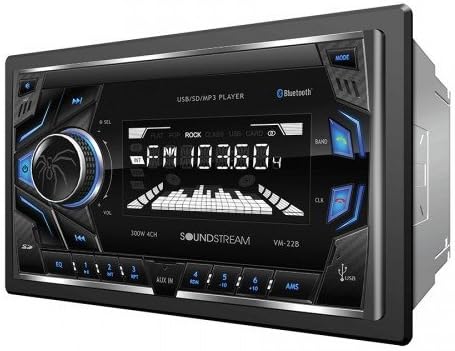
الشكل 2: الجبهة view of the Soundstream VM-22B unit.
2.2. توصيلات الأسلاك
Before connecting, ensure the vehicle's ignition is turned off and the negative battery terminal is disconnected. Use the provided wiring harness and refer to the diagram below for correct connections. It is highly recommended to use a wiring adapter specific to your vehicle to avoid cutting original car wires.

Figure 3: General Wiring Diagram for the VM-22B. Consult your vehicle's specific wiring diagram for accurate connections.
Ensure all speaker wires are connected with correct polarity (positive to positive, negative to negative) to prevent phase issues and poor sound quality. Secure all connections properly, preferably by soldering and heat-shrinking, rather than crimping.
The unit features RCA line outputs for connecting external amplifiers and an antenna input for the AM/FM tuner. A dedicated wire is available for connecting to a reverse camera, which will automatically display the camera feed when the vehicle is in reverse.
3. تعليمات التشغيل
3.1. ضوابط اللوحة الأمامية
- زر الطاقة / الوضع: Press to turn on/off, short press to cycle through audio sources (FM, AM, Bluetooth, AUX, USB, SD).
- مقبض الصوت: Rotate to adjust volume. Press to access audio settings (Bass, Treble, Balance, Fade, EQ).
- Track Skip/Search Buttons: Use to skip tracks or search radio stations.
- منفذ USB: لتشغيل الوسائط وشحن الجهاز.
- فتحة بطاقة SD: لتشغيل الوسائط.
- مدخلات AUX: مقبس مقاس 3.5 ملم للأجهزة الصوتية الخارجية.
- ميكروفون: لإجراء مكالمات بدون استخدام اليدين.
3.2. تشغيل بلوتوث
To pair your smartphone:
- تأكد من تمكين Bluetooth على هاتفك الذكي.
- Select 'Bluetooth' as the source on the VM-22B. The unit will enter pairing mode.
- بحث عن 'VM-22B' on your smartphone's Bluetooth device list and select it to connect.
- Once paired, you can make/receive calls hands-free and stream audio wirelessly.
The unit supports hands-free profile for dialing, receiving calls, and displaying call logs. Advanced Audio Distribution Profile (A2DP) allows for wireless audio streaming.
3.3. تشغيل الوسائط
Insert a USB drive or SD card into the respective slots. The unit will automatically switch to the USB or SD source and begin playback of compatible media files. Supported formats include MP3, WMA, M4A for audio, and AVI, MP4, H264 for video. Image files like JPEG, GIF, PNG, and BMP are also viewقادر.

Figure 4: VM-22B supports various audio, video, and image file التنسيقات.
3.4. إعدادات المعادل
Press the volume knob to cycle through audio settings. You can adjust Bass, Treble, Balance (left/right speakers), and Fade (front/rear speakers). The unit also includes several pre-set genre equalizers (EQs) such as Flat, Rock, Pop, Classic, and Jazz to tailor the sound to your preference.

Figure 5: Customize your audio with various equalizer settings.
3.5. رابط المرآة
The Mirror Link function allows you to display your smartphone's screen on the VM-22B's display. This feature is intended for passenger use only when the vehicle is safely parked. Consult your smartphone's manual for specific Mirror Link setup instructions.
4. الصيانة
To ensure the longevity and optimal performance of your Soundstream VM-22B, follow these maintenance guidelines:
- تنظيف: استخدم قطعة قماش ناعمة وجافة لتنظيف شاشة الجهاز وأزراره. تجنب استخدام المنظفات الكاشطة أو المذيبات.
- درجة حرارة: تجنب تعريض الوحدة لدرجات حرارة عالية، أو أشعة الشمس المباشرة لفترات طويلة، أو الرطوبة العالية.
- الاتصالات: قم بفحص جميع توصيلات الأسلاك بشكل دوري للتأكد من أنها آمنة وخالية من التآكل.
5. استكشاف الأخطاء وإصلاحها
If you encounter issues with your VM-22B, refer to the following common troubleshooting steps:
| مشكلة | السبب المحتمل | حل |
|---|---|---|
| لا يوجد طاقة | فيوز محترق، توصيلات كهربائية غير صحيحة، وصلة طاقة غير محكمة. | Check vehicle's fuse box and unit's fuse. Verify power and ground connections. |
| لا يوجد صوت | مستوى الصوت منخفض جدًا، تم اختيار مصدر غير صحيح، مشاكل في توصيلات السماعات. | Increase volume. Select correct audio source. Check speaker connections and polarity. |
| بلوتوث لا يتصل | Unit not in pairing mode, Bluetooth off on phone, interference. | Ensure unit is in Bluetooth mode. Restart phone and unit. Try re-pairing. |
| USB/SD Playback Error | غير متوافق file format, corrupted media, faulty USB/SD card. | يفحص file formats. Try a different USB/SD card. Ensure media is not corrupted. |
6. المواصفات
| ميزة | التفاصيل |
|---|---|
| رقم الموديل | في إم-22ب |
| أبعاد المنتج | 4 × 7 × 4 بوصة |
| وزن العنصر | 2.31 رطل |
| تكنولوجيا الاتصال | بلوتوث، يو اس بي |
| الاتصالات اللاسلكية | بلوتوث |
| المميزات الخاصة | Equalizer, Spotify (via connected device) |
| الأجهزة المتوافقة | الهاتف الذكي ، مكبر الصوت |
| وضع إخراج الصوت | ستيريو |
| تكوين قناة الصوت المحيطي | 4.0 |
| طاقة الإخراج | 75 واط |
| لون | أسود |
7. الضمان والدعم
For warranty information, technical support, or service inquiries, please refer to the documentation included with your Soundstream VM-22B Digital Media Receiver or visit the official Soundstream webالموقع. احتفظ بإثبات الشراء الخاص بك لتقديم مطالبات الضمان.


