1. انتهى المنتجview
The Xiaomi Mi Bluetooth Speaker Mini (Model: XMYX02YM) is a compact and portable wireless speaker designed for high-quality audio playback. It features Bluetooth connectivity for seamless pairing with various devices and a durable, waterproof design for versatile use.
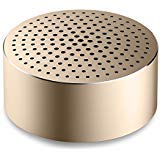
Image: The Xiaomi Mi Bluetooth Speaker Mini, a small, cylindrical black speaker with a mesh grille, showcasinتصميمها المدمج.
2. الإعداد
2.1 فتح علبته
Carefully remove all components from the packaging. The box should contain the Mi Bluetooth Speaker Mini.
2.2 شحن السماعة
The speaker is powered by an internal battery. Before first use, ensure the speaker is fully charged. Connect the appropriate charging cable (not included) to the speaker's charging port and to a compatible USB power source. The charging indicator light will provide status updates.
2.3 اقتران بلوتوث
- تشغيل الطاقة: Press and hold the power button on the speaker until you hear an audible prompt or see the indicator light flash, indicating it is in pairing mode.
- تفعيل البلوتوث: On your device (smartphone, tablet, laptop, MP3 player), enable Bluetooth.
- اختر المتحدث: In your device's Bluetooth settings, search for available devices. Select "Mi Bluetooth Speaker Mini" from the list.
- تأكيد الاتصال: Once paired, the speaker will provide an audible confirmation, and the indicator light will change to a steady state.
The speaker is now ready for audio playback.
3. تعليمات التشغيل
3.1 تشغيل/إيقاف التشغيل
- لتشغيل: اضغط مع الاستمرار على زر الطاقة لمدة 2-3 ثوانٍ تقريبًا.
- لإيقاف التشغيل: Press and hold the power button for approximately 3-4 seconds until the speaker powers down.
3.2 تشغيل الصوت
After successful Bluetooth pairing, play audio from your connected device. The sound will be transmitted wirelessly to the Mi Bluetooth Speaker Mini. The speaker supports stereo audio output.
3.3 الضوابط التي تعمل باللمس
The speaker features touch controls for basic functions. Refer to the specific touch areas on your speaker for volume adjustment, play/pause, and track navigation. (Specific touch control details may vary; consult product packaging or quick start guide for exact touch gestures).
3.4 المدخلات الإضافية
While primarily a Bluetooth speaker, the device may support an auxiliary audio input. If available, connect an audio cable (not included) from your device's audio output to the speaker's auxiliary input port for wired audio playback.
4. الصيانة
4.1 التنظيف
To clean the speaker, use a soft, dry, lint-free cloth. Do not use abrasive cleaners, solvents, or strong chemicals, as these can damage the speaker's surface or internal components.
4.2 مقاومة الماء
The Xiaomi Mi Bluetooth Speaker Mini is waterproof. While it can withstand splashes and light exposure to water, it is not designed for prolonged submersion. Ensure all ports are securely closed before exposure to water. After exposure, dry the speaker thoroughly before charging or using it again.
4.3 التخزين
When not in use for extended periods, store the speaker in a cool, dry place away from direct sunlight and extreme temperatures. It is recommended to charge the speaker periodically to maintain battery health.
5. استكشاف الأخطاء وإصلاحها
- لا يتم تشغيل مكبر الصوت: تأكد من شحن البطارية. وصّل السماعة بمصدر طاقة وحاول مرة أخرى.
- لا يمكن الاقتران بالجهاز:
- تأكد من أن السماعة في وضع الاقتران (يومض ضوء المؤشر).
- قم بإيقاف وتشغيل البلوتوث على جهازك.
- قم بتقريب مكبر الصوت من جهازك.
- قم بمسح اتصالات البلوتوث السابقة على جهازك وحاول الاقتران مرة أخرى.
- لا يوجد صوت أثناء التشغيل:
- تحقق من مستويات الصوت على كل من مكبر الصوت والجهاز المتصل به.
- تأكد من إقران السماعة وتوصيلها بجهازك بنجاح.
- حاول تشغيل الصوت من تطبيق أو جهاز مختلف.
- جودة الصوت سيئة:
- تأكد من عدم وجود أي عوائق بين مكبر الصوت وجهازك.
- ابتعد عن مصادر التداخل (على سبيل المثال، أجهزة توجيه Wi-Fi، وأجهزة Bluetooth الأخرى).
- التحقق من جودة مصدر الصوت.
6. المواصفات
| ميزة | التفاصيل |
|---|---|
| نموذج | XMYX02YM |
| ماركة | شاومي |
| نوع السماعة | رف كتب (محمول) |
| تكنولوجيا الاتصال | بلوتوث، لاسلكي |
| تكنولوجيا الاتصالات اللاسلكية | بلوتوث |
| الأجهزة المتوافقة | كمبيوتر محمول، مشغل MP3، هاتف ذكي، جهاز لوحي |
| مصدر الطاقة | تعمل بالبطارية |
| طريقة التحكم | يلمس |
| وضع إخراج الصوت | ستيريو |
| نوع برنامج تشغيل الصوت | سائق ديناميكي |
| تكوين قناة الصوت المحيطي | 2.1 |
| وزن العنصر | 59 جرام |
| أبعاد المنتج (الطول × العرض × الارتفاع) | 0.43 × 0.43 × 0.2 سم (4 × 4 × 2 مليمترًا) |
| لون | أسود |
| ضد للماء | نعم |
| البطاريات المطلوبة | Yes (Internal, rechargeable) |
| المكونات المضمنة | Mi Bluetooth Speaker Mini |
| الشركة المصنعة | Xiaomi Technology Inc. |
7. الضمان والدعم
For warranty information, please refer to the documentation included with your purchase or visit the official Xiaomi webللحصول على الدعم الفني أو الاستفسارات المتعلقة بالخدمة، يرجى الاتصال بخدمة عملاء شاومي عبر قنواتهم الرسمية.


