1. انتهى المنتجview
The Manhattan USB 2.0 Multi-Card Reader/Writer is designed for efficient data transfer and management across various flash memory card formats. This device allows you to easily access, download, and manage digital content such as pictures, music, and videos without directly connecting your media device to a computer. It supports simultaneous reading and writing on up to five different flash memory cards and functions as a USB mass storage device.
تتضمن الميزات الرئيسية ما يلي:
- التوافق مع البطاقات المتعددة: Supports 79 card formats, including CompactFlash, Memory Stick, Secure Digital, MultiMedia, and XD.
- عملية التوصيل والتشغيل: لا يتطلب تثبيت برامج التشغيل لمعظم أنظمة التشغيل.
- نقل البيانات بسرعة عالية: Achieves speeds up to 480 Mbps.
- إمكانية الوصول المتزامن بالبطاقات: Read and write to five different card slots concurrently.
- مدعوم من USB: No external power supply or adapters needed.

Figure 1: The Manhattan USB 2.0 Multi-Card Reader/Writer, showing its compact design and integrated USB cable.
2. محتويات العبوة
تأكد من أن الحزمة الخاصة بك تحتوي على العناصر التالية:
- Manhattan USB 2.0 Multi-Card Reader/Writer (Model 101998)
- دليل المستخدم (هذا المستند)
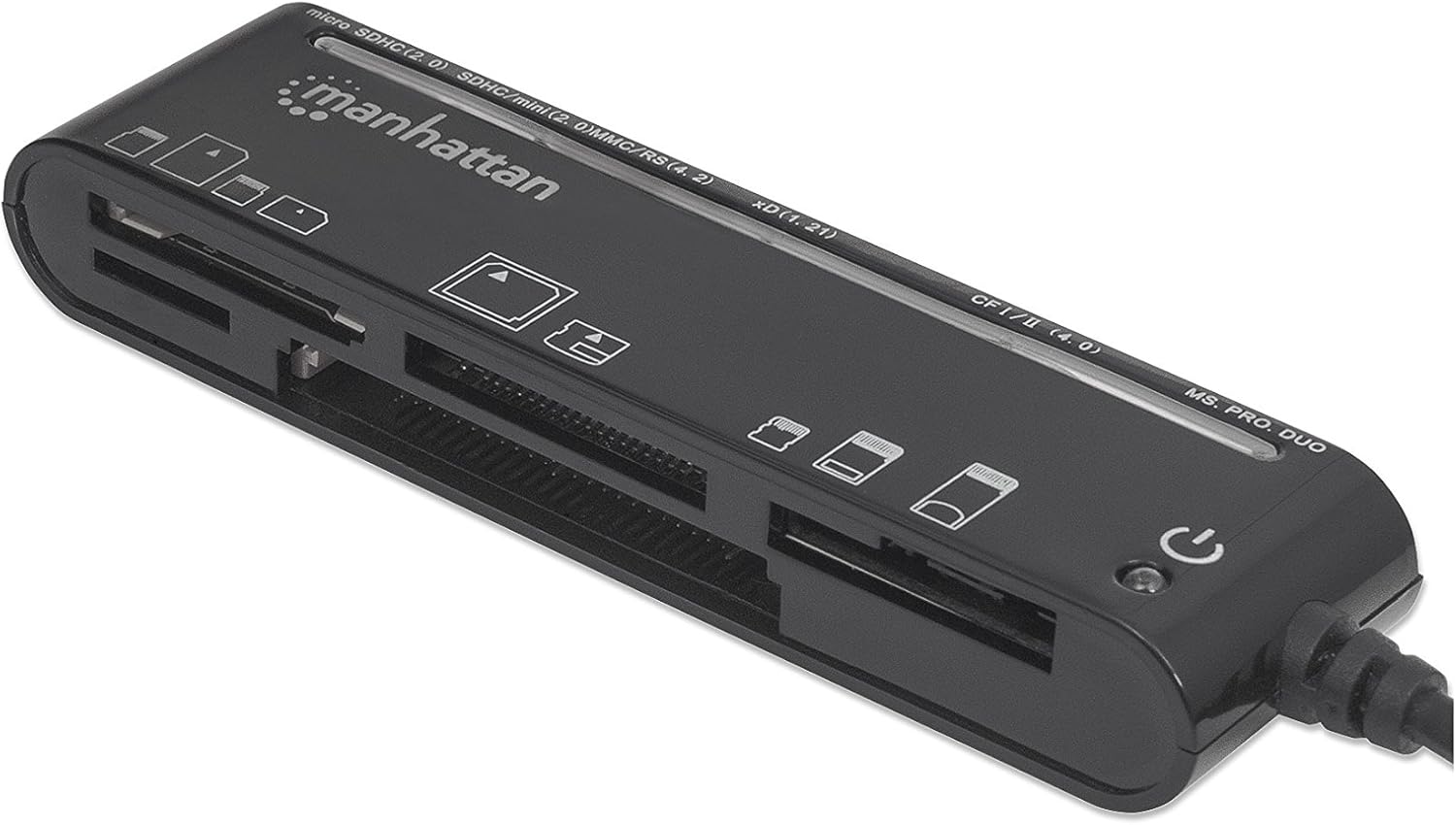
Figure 2: The Manhattan Multi-Card Reader/Writer shown in its retail packaging.
3. متطلبات النظام
- Available USB 2.0 or 1.1 port
- Windows operating system (Windows XP/Vista/7/8/10/11)
- Mac operating system (macOS 10.x or later)
4. تعليمات الإعداد
- Connect the Card Reader: Plug the USB connector of the Manhattan Multi-Card Reader/Writer into an available USB port on your computer.
- التثبيت التلقائي للسائق: Your operating system will automatically detect the device and install the necessary drivers. This process typically takes a few moments. No manual driver installation is required.
- تَحَقّق: Once installed, the device will appear as several removable disk drives in your computer's "My Computer" (Windows) or "Finder" (Mac) section.

Figure 3: The card reader connected via its USB cable.
5. تعليمات التشغيل
5.1 إدخال بطاقة الذاكرة
Identify the correct slot for your memory card type. The card reader features multiple slots, each designed for specific card formats. Refer to the labels on the device for guidance.

الشكل 4: الجزء العلوي view of the card reader, highlighting the various card slots and their labels.
- حدد الفتحة: Locate the appropriate slot for your memory card (e.g., SD, microSD, CF, MS PRO DUO, xD).
- أدخل البطاقة: Gently insert the memory card into the designated slot until it is fully seated. Do not force the card; if it does not insert easily, verify the card's orientation.
- بيانات الوصول: Once inserted, the card will appear as a removable drive on your computer. You can now access, copy, move, or delete fileق حسب الحاجة.
5.2 Removing a Memory Card
- إخراج آمن: Before physically removing the card, always safely eject the removable drive from your operating system to prevent data corruption.
- الويندوز: Right-click on the drive icon in "My Computer" and select "Eject."
- ماك: اسحب رمز محرك الأقراص إلى سلة المهملات أو انقر فوق زر الإخراج الموجود بجوار محرك الأقراص في Finder.
- إزالة البطاقة: Once safely ejected, gently pull the memory card out of its slot.
5.3 Simultaneous Card Access
The Manhattan Multi-Card Reader/Writer supports simultaneous access to multiple card types. You can insert different types of memory cards into their respective slots and access them as separate drives on your computer. This allows for easy data transfer between different card formats.
6. الصيانة
- تنظيف: Use a soft, dry cloth to clean the exterior of the card reader. Avoid using liquid cleaners or solvents.
- تخزين: قم بتخزين الجهاز في مكان بارد وجاف بعيدًا عن أشعة الشمس المباشرة ودرجات الحرارة القصوى عندما لا يكون قيد الاستخدام.
- التعامل: Avoid dropping the device or subjecting it to strong impacts. Do not attempt to disassemble the unit.
7. استكشاف الأخطاء وإصلاحها
| مشكلة | السبب المحتمل | حل |
|---|---|---|
| Card reader not detected by computer. | Loose USB connection, faulty USB port, operating system issue. |
|
| لم يتم التعرف على بطاقة الذاكرة. | Incorrect card slot, improper card insertion, damaged card, unsupported card format. |
|
| سرعة نقل البيانات بطيئة. | Using a USB 1.1 port, system resource contention, slow memory card. |
|
8. المواصفات
| ميزة | التفاصيل |
|---|---|
| رقم الموديل | 101998 |
| الواجهة | يو اس بي 2.0 |
| سرعة نقل البيانات | تصل إلى 480 ميجابايت في الثانية |
| تنسيقات البطاقات المدعومة | CompactFlash (Type I/II, 4.0, Alpha, Elite Pro, PRO I/II, Turbo, Ultima I/II, UltraX, CF-PSP II, Extreme I/III/IV CF, Platinum II CF, ProMax CF/CF II), IBM/Hitachi/Seagate Microdrive, MagicStor, Memory Stick (MagicGate, MagicGate PRO, MagicGate Duo, High Speed Memory Stick PRO Duo, High Speed MagicGate PRO Duo, High Speed MagicGate PRO, Memory Stick, Memory Stick Duo, Memory Stick Extreme III PRO, Memory Stick Extreme III PRO Duo, Memory Stick Extreme PRO, Memory Stick PRO Duo, Memory Stick PRO Duo PSP, Memory Stick Ultra II PRO, Memory Stick Ultra II PRO Duo, Gaming Edition Memory Stick PRO Duo), SecureDigital (SD, Elite Pro SD, Extreme III SD, Gaming Edition SD, microSD/TransFlash, microSDHC, miniSD, miniSD Ultra II, miniSDHC, miniSD-Pro, Platinum II SD, SD Pro, SDHC, SDXC, SD-Max, SD-Pleomax, SD-Pro C, Super SD, Turbo SD, Ultima I SD, Ultima II SD, Ultimate SD, Ultra High Speed SD, Ultra II SD, Ultra II SD Plus, Ultra SD, Ultra-X SD), MultiMediaCard (MMC/MMC 4.0, DV-RS MMC, High Speed MMC/RS-MMC, MCCmobile, MMC Pro, MMCplus, MMCplus Turbo, RS-MMC), xD Picture Card (1.21/Type M/Type H) |
| توافق نظام التشغيل | ويندوز، ماك أو إس |
| قوة | USB powered (5 Volts) |
| الأبعاد (الطول × العرض × الارتفاع) | 8.66 × 3.15 × 7.87 بوصة |
| وزن العنصر | 1.28 أونصات |
9. الضمان والدعم
This Manhattan product is backed by a ضمان الشركة المصنعة لمدة 3 سنوات when purchased from the manufacturer or an authorized reseller. For warranty claims or technical support, please contact Manhattan customer service or visit their official webموقع.
الشركة المصنعة: MANHATTAN LUXURY BRANDS LLC Parent Code
For further assistance, please refer to the official Manhattan webالموقع أو الاتصال بقنوات الدعم الخاصة بهم.
10. معلومات السلامة
تحذير: This product may contain chemicals known to the State of California to cause cancer and reproductive harm. For more information, please visit تحذيرات P65.ca.gov.


