مقدمة
This manual provides detailed instructions for the setup, operation, and maintenance of your BIOS Weather Indoor/Outdoor Wireless Thermometer & Hygrometer. Please read this manual thoroughly before using the device to ensure proper function and longevity.
The BIOS Weather Indoor/Outdoor Wireless Thermometer & Hygrometer is designed to provide accurate readings of indoor temperature and humidity, as well as outdoor temperature. It features wireless connectivity for the outdoor sensor, a moon phase display, and the capability to connect with up to three sensors (additional sensors sold separately).
- Wireless range up to 30 meters (100 feet) from the outdoor sensor.
- Indoor monitor includes a hygrometer sensor for RH percentage readings (20% to 95%).
- Displays temperature from up to 3 sensors (Model No. 312TX, sold separately).
- Tracks relative indoor humidity and moon phase.
محتويات الحزمة
عند فتح العبوة، يرجى التأكد من وجود جميع المكونات وأنها في حالة جيدة:
- 1 x Main Display Unit (Indoor Monitor)
- 1 × مستشعر خارجي لاسلكي
- 1 × دليل التعليمات (هذه الوثيقة)

Image: The main display unit (left) and the wireless outdoor sensor (right). The main unit shows indoor temperature, humidity, moon phase, time, and outdoor temperature. The outdoor sensor displays its current temperature.
دليل الإعداد
1. تركيب البطارية
Both the main display unit and the wireless outdoor sensor require batteries (not included).
- Open the battery compartment on the back of both the main display unit and the outdoor sensor.
- Insert the required batteries (e.g., AA or AAA, refer to the battery compartment markings for correct type and polarity).
- أغلق حجرات البطارية بشكل محكم.
ملحوظة:
- It is recommended to insert batteries into the outdoor sensor first, then the main display unit, to facilitate immediate pairing.
- Use high-quality alkaline batteries for optimal performance, especially in cold weather for the outdoor sensor.
2. وضع المستشعر
Proper placement of both units is crucial for accurate readings and reliable wireless communication.
- وحدة العرض الرئيسية: Place indoors, away from direct sunlight, heat sources, or drafts that could affect temperature and humidity readings. Ensure it is within 30 meters (100 feet) of the outdoor sensor.
- جهاز استشعار لاسلكي خارجي:
- Mount in a shaded area to avoid direct sunlight, which can cause artificially high temperature readings.
- Protect from direct rain and snow. An overhang or a weather-resistant enclosure is ideal.
- Avoid placing near large metal objects, electrical appliances, or thick walls that could interfere with the wireless signal.
- Ensure it is within the 30-meter (100-foot) wireless range of the main unit.
3. الاقتران الأولي
The main display unit and outdoor sensor should automatically pair upon battery installation. If pairing does not occur:
- تأكد من أن كلا الجهازين مزودان ببطاريات جديدة.
- Bring the outdoor sensor closer to the main display unit.
- Press the "CH" (Channel) button on the main display unit to cycle through channels or initiate a search for the sensor.
- If issues persist, remove batteries from both units, wait a few minutes, and reinsert them, starting with the outdoor sensor.
تعليمات التشغيل
1. عرض أكثرview
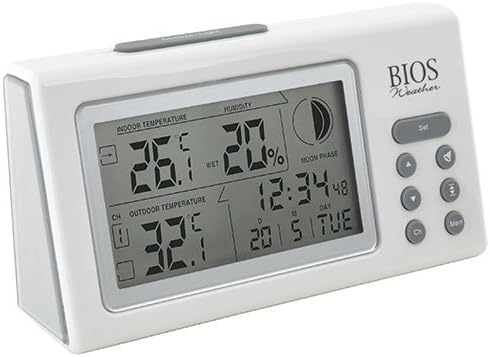
الصورة: بزاوية view of the main display unit, highlighting the various segments for indoor temperature, humidity, moon phase, time, and outdoor temperature.
The main display unit provides the following information:
- درجة الحرارة الداخلية: Displays the current temperature inside the room where the main unit is located.
- رطوبة: Shows the relative indoor humidity percentage.
- درجة الحرارة الخارجية: Displays the temperature from the connected wireless outdoor sensor.
- الوقت والتاريخ: الوقت والتاريخ الحالي.
- مرحلة القمر: An icon indicating the current moon phase.
- مؤشر القناة: Shows which outdoor sensor channel is currently displayed (if multiple sensors are used).
2. وظائف الأزرار
The main display unit features several buttons for configuration and viewجي البيانات:
| زر | وظيفة |
|---|---|
| تعيين | Enters setup mode for time, date, and other settings. Press to confirm settings. |
| ▲ / ▼ (Up/Down) | Adjusts values during setup. Cycles through channels for outdoor sensors. |
| CH (قناة) | Switches between outdoor sensor channels (1, 2, 3) or initiates a search for sensors. |
| MEM (الذاكرة) | Displays maximum and minimum temperature/humidity readings. Press again to clear. |
3. ضبط الوقت والتاريخ
- اضغط مع الاستمرار على تعيين button until the time display flashes.
- استخدم ▲ or ▼ أزرار لضبط الساعة.
- يضعط تعيين to confirm and move to the next setting (minutes, year, month, day).
- كرر الخطوتين 2 و 3 حتى يتم ضبط جميع الإعدادات.
- يضعط تعيين one last time to exit setup mode.
4. Viewing Max/Min Readings
اضغط على ميم زر ل view the maximum recorded indoor temperature, humidity, and outdoor temperature. Press ميم مرة أخرى إلى view the minimum readings. To clear the memory, press and hold the ميم button while the max/min readings are displayed.
صيانة
1. التنظيف
To clean the display unit and outdoor sensor, use a soft, damp cloth. Do not use abrasive cleaners, solvents, or harsh chemicals, as these may damage the plastic casinأو المكونات الإلكترونية.
2. استبدال البطارية
When the battery indicator appears on the display, it is time to replace the batteries in the respective unit (main unit or outdoor sensor). Always replace all batteries in a unit at the same time with new, high-quality batteries of the correct type.
مهم:
- تخلص من البطاريات القديمة بطريقة مسؤولة وفقًا للوائح المحلية.
- If the unit will not be used for an extended period, remove the batteries to prevent leakage and damage.
استكشاف الأخطاء وإصلاحها
If you experience issues with your BIOS Weather Thermometer & Hygrometer, please refer to the following common problems and solutions:
| مشكلة | السبب المحتمل / الحل |
|---|---|
| لا توجد قراءة لدرجة الحرارة الخارجية أو عرض "---". |
|
| قراءات غير دقيقة لدرجة الحرارة والرطوبة. |
|
| العرض باهت أو فارغ. |
|
| الوقت/التاريخ غير صحيح. |
|
مواصفات المنتج

Image: The main display unit with indicated dimensions: 21.59 cm (length), 7.62 cm (width), and 19.05 cm (height).
| ميزة | التفاصيل |
|---|---|
| رقم الموديل | BBYCA10300783 (312BC) |
| يكتب | Indoor/Outdoor Thermometer and Hygrometer |
| مادة | بلاستيك |
| لون | أبيض |
| الأبعاد (الوحدة الرئيسية) | الارتفاع: 19.05 سم، العرض: 7.62 سم، العمق: 21.59 سم |
| وزن | 0.30 كجم |
| لاسلكي المدى | حتى 30 مترا (100 قدما) |
| نطاق الرطوبة الداخلي | 20% إلى 95% رطوبة نسبية |
| Sensor Capability | Supports up to 3 outdoor sensors (additional sensors Model No. 312TX, sold separately) |
| المميزات الخاصة | Wireless connectivity, Multi-Sensor support, Humidity Tracking, Moon Phase Display |
| مصدر الطاقة | تعمل بالبطارية |
معلومات الضمان
This BIOS Weather product comes with a ضمان لمدة 1 سنوات على الأجزاء from the date of purchase. This warranty covers defects in materials and workmanship under normal use. It does not cover damage resulting from misuse, accident, unauthorized modification, or improper installation.
يرجى الاحتفاظ بإثبات الشراء الخاص بك لمطالبات الضمان.
دعم العملاء
If you have any questions, require technical assistance, or need to make a warranty claim, please contact Bios customer support. For more information and resources, you may also visit the official Bios store on Amazon:
Visit the Bios Store on Amazon
Please have your product model number (BBYCA10300783) and purchase date ready when contacting support.


