1. علىview
The iHome iBT35 is a rugged, portable, and waterproof Bluetooth stereo speaker designed for both indoor and outdoor use. It features a built-in speakerphone for hands-free calling and is engineered to withstand various environmental conditions, making it an ideal companion for travel and outdoor activities.

الصورة 1.1: الجبهة view of the iHome iBT35 speaker, showcasing its black body, blue trim, and attached carabiner clip.
2. الميزات الرئيسية
- تصميم قوي: Built to withstand military-grade drop tests, offering durability against accidental falls.
- مقاوم للماء (تصنيف IP67): Fully waterproof, allowing submersion up to 3 feet for 30 minutes. It also floats, making it suitable for poolside use.
- الاتصال عبر البلوتوث: بث الصوت لاسلكيًا من الأجهزة المتوافقة.
- مكبر صوت مدمج: Answer and end calls directly from the speaker.
- عمر بطارية طويل: Up to 8 hours of playback in normal mode, extendable to 14 hours in Eco mode.
- منفذ الإدخال الإضافي: For wired connection to non-Bluetooth audio sources.
- Carabiner Clip with Bottle Opener: Convenient for portability and utility.
3. الإعداد
3.1 شحن السماعة
Before initial use, fully charge the iBT35 speaker. Use the provided Micro USB cable to connect the speaker's 'POWER IN' port to a USB power source (e.g., computer USB port, USB wall adapter). The charging indicator light will show the charging status.

Image 3.1: Side panel of the iBT35 with the protective door open, showing the AUX-IN, POWER IN, and ON/ECO/OFF switch.
3.2 تشغيل/إيقاف التشغيل
Locate the 'ON/ECO/OFF' switch behind the waterproof door on the side of the speaker. Slide the switch to 'ON' to power on the speaker. To conserve battery, slide the switch to 'ECO' mode, which slightly reduces volume levels for extended playback. Slide to 'OFF' to power down.
3.3 اقتران بلوتوث
- تأكد من تشغيل مكبر الصوت.
- اضغط مع الاستمرار على زر اقتران البلوتوث (often combined with Play/Pause) on the top panel until the Bluetooth indicator light flashes, indicating it's in pairing mode.
- على جهازك المحمول، قم بتمكين Bluetooth وابحث عن الأجهزة المتاحة.
- Select "iHome iBT35" from the list.
- بمجرد الاقتران، سيصبح ضوء مؤشر البلوتوث ثابتًا، وستسمع تأكيدًا صوتيًا.
3.4 Using Aux-in
For devices without Bluetooth, connect an audio cable (not included) from your device's headphone jack to the 'AUX-IN' port on the speaker (located behind the waterproof door). The speaker will automatically switch to Aux-in mode.
4. تعليمات التشغيل
4.1 عناصر التحكم في اللوحة العلوية
- زر الطاقة (دائرة بخط عمودي): Press to power on/off (short press for power, long press for pairing if combined).
- رفع الصوت (+): زيادة حجم التشغيل.
- خفض الصوت (-): خفض مستوى صوت التشغيل.
- تشغيل / إيقاف مؤقت (play/pause icon): Play or pause audio playback. Also functions as Bluetooth pairing button (long press).
- المسار التالي (double arrow right): Skip to the next audio track. Also functions as 'Talk' button for calls.
- المسار السابق (double arrow left): Go to the previous audio track. Also functions as 'End' button for calls.
4.2 وظيفة مكبر الصوت
When paired with a mobile phone:
- الرد على المكالمة: Press the 'Talk' button (Next Track button) to answer an incoming call.
- إنهاء المكالمة: Press the 'End' button (Previous Track button) to end an active call.
5. الصيانة
5.1 Maintaining Waterproofing
To ensure the iBT35 remains waterproof, always make sure the side protective door covering the ports (AUX-IN, POWER IN, ON/ECO/OFF switch) is completely closed and securely sealed before exposing the speaker to water or moisture.
5.2 التنظيف
قم بتنظيف مكبر الصوت باستخدام قطعة قماش ناعمة.amp cloth. Do not use abrasive cleaners or solvents, as these may damage the finish or rubberized coating.
5.3 Resetting the Speaker
If the speaker becomes unresponsive or experiences connectivity issues, locate the small 'RESET' pinhole button behind the side waterproof door. Use a thin object (like a paperclip) to gently press and hold the reset button for a few seconds. This will restart the speaker without losing pairing information.
6. استكشاف الأخطاء وإصلاحها
- لا يوجد طاقة: Ensure the speaker is charged. Connect it to a power source using the Micro USB cable. Check the 'ON/ECO/OFF' switch is in the 'ON' or 'ECO' position.
- لا يمكن الاقتران عبر البلوتوث: Make sure the speaker is in pairing mode (flashing Bluetooth indicator). Ensure your device's Bluetooth is enabled and within range. Try turning both devices off and on again. If issues persist, perform a reset on the speaker.
- جودة صوت رديئة/تشويش: Reduce the volume on both the speaker and your connected device. Ensure there are no obstructions between the speaker and the Bluetooth device. If using Aux-in, check the cable connection.
- Speaker Not Waterproof: Verify that the side protective door is fully closed and sealed. Any gap will compromise its waterproof capabilities.
Helpful Video: iHome iBT35 Waterproof Bluetooth Speaker Overview
يوفر هذا الفيديو عرضًا مرئيًاview of the iHome iBT35 speaker, demonstrating its design, features, and rugged capabilities, including its waterproof nature and various ports.
7. المواصفات
| ميزة | التفاصيل |
|---|---|
| اسم الموديل | آي بي تي 35 |
| نوع السماعة | في الهواء الطلق |
| المميزات الخاصة | Built-in Microphone, Waterproof (IP67) |
| الاستخدامات الموصى بها | Smartphones, Tablets, Outdoor Activities |
| الأجهزة المتوافقة | سطح المكتب، الكمبيوتر المحمول، الهاتف الذكي، الجهاز اللوحي |
| أبعاد المنتج | 8 بوصة عمق × 4 بوصة عرض × 4 بوصة ارتفاع |
| وزن العنصر | 1.5 رطل |
| طريقة التحكم | يلمس |
| الاتصالات اللاسلكية | بلوتوث |
| مصدر الطاقة | تعمل بالبطارية |
| نوع برنامج تشغيل الصوت | سائق ديناميكي |
| أسلوب | وعرة في الهواء الطلق |
| الشركة المصنعة | اي هوم |
| الحد الأقصى لقوة خرج السماعة | 3 واط |
| وضع إخراج الصوت | ستيريو |
| نوع التركيب | قائما بذاته |
| رمز المنتج العالمي / رقم GTIN | 047532910162 |
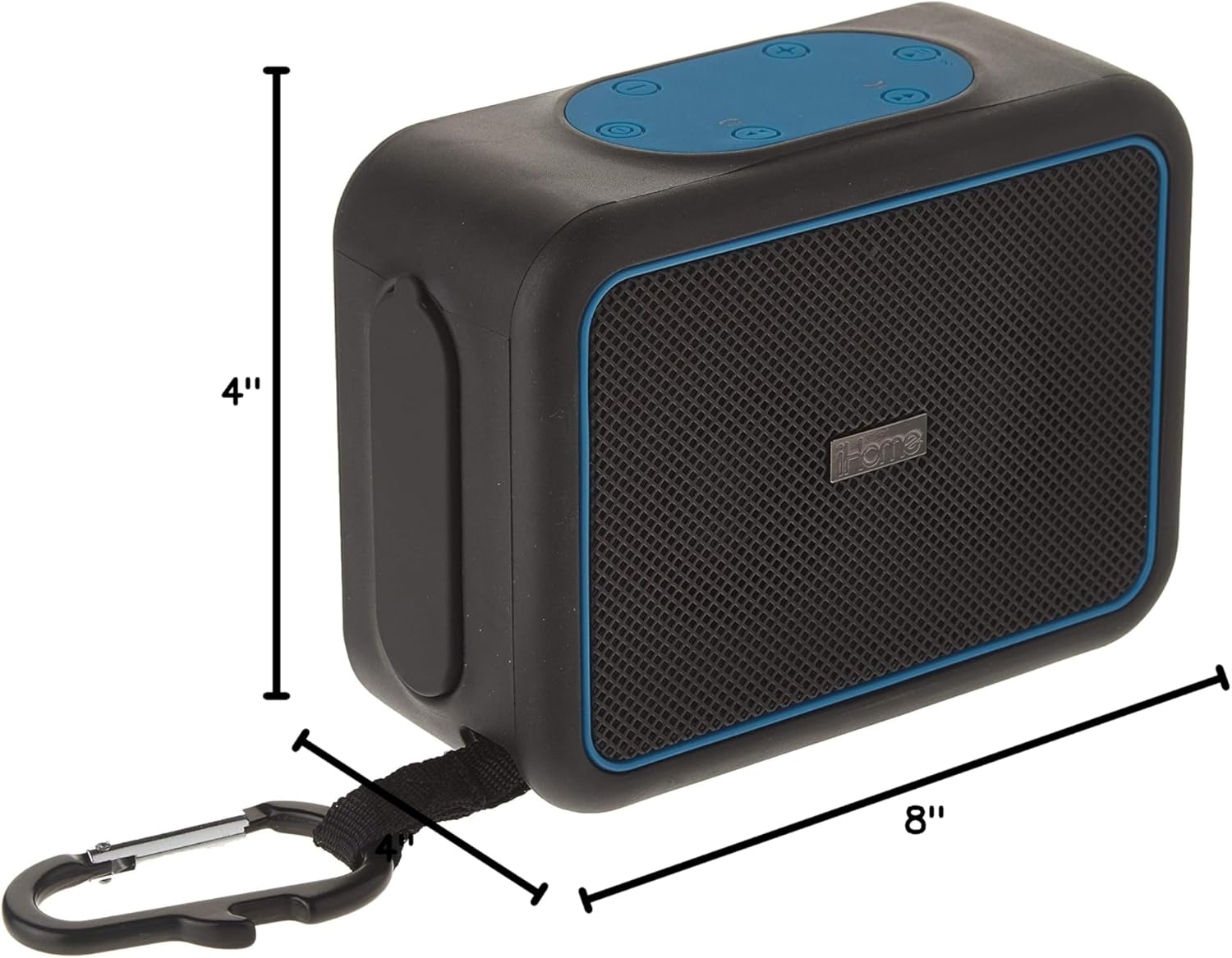
Image 7.1: Dimensions of the iHome iBT35 speaker.
8. الضمان والدعم
The iHome iBT35 speaker comes with an Extended Warranty. For specific warranty terms, conditions, and to register your product, please refer to the warranty card included in your product packaging or visit the official iHome support website. For technical assistance or further inquiries, please contact iHome customer support.


